Your PC runs fine, and then a pop-up from the maker’s app tells you a BIOS update is ready. It sounds like normal upkeep, the same as a Windows patch, but it isn’t. The BIOS is the firmware that starts your PC before Windows loads. If the update stops partway, the PC may not start at all, and new firmware can also make Windows ask for your BitLocker recovery key. When is that risk worth taking?
Three Questions to Ask Before a BIOS Update
We read Intel’s, HP’s and Microsoft’s guidance, and three questions settle it.
First, did you add new hardware? A newer CPU, memory kit or drive can need a newer BIOS.
Second, does your chip have a known bug? Intel’s 13th and 14th Gen desktop chips had a crash problem called Vmin Shift, which Intel addressed with small chip patches inside motherboard BIOS updates. One patch arrived in September 2024. A later one followed in May 2025, and Intel found no measurable hit to speed.
Third, is there a security fix for your exact model? In 2024, researchers found that some PCs shipped with a test security key that was never meant for real machines. The fix is the latest firmware from your PC maker.
If all three answers are no, leave it alone. HP puts it plainly: “If your computer is functioning normally, there’s usually no urgent need to update the BIOS.” Dell is the exception, since it recommends BIOS updates as regular upkeep.
If You Need a BIOS Update, Do It the Safe Way
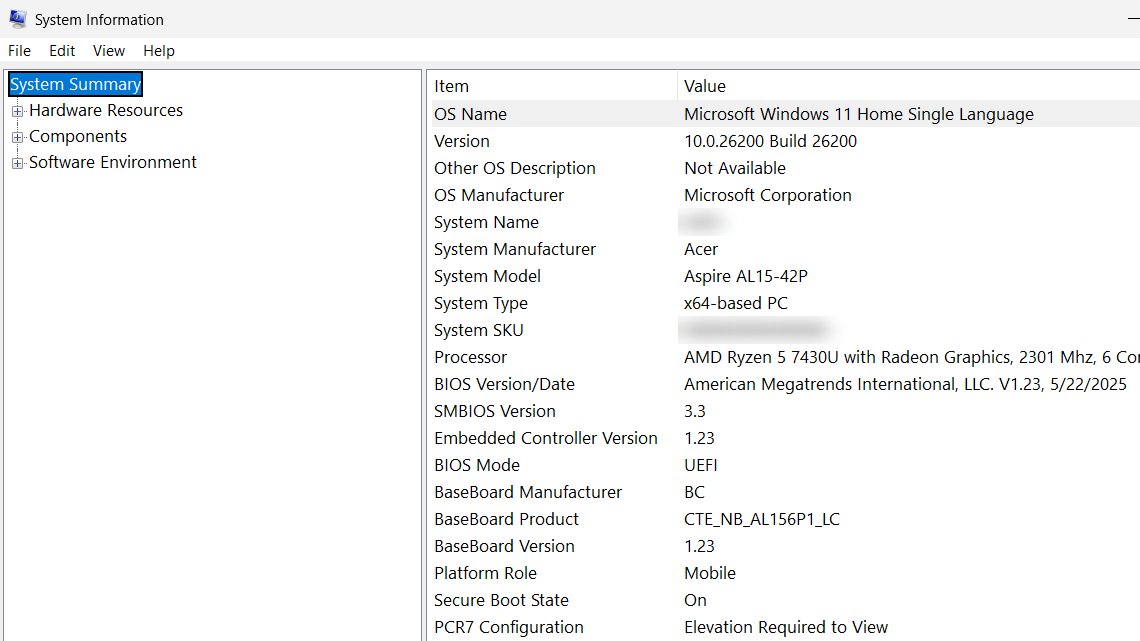
Start by pressing Windows key + R, typing msinfo32 and checking the BIOS Version/Date line. Then back up your files and plug in the charger, since ASUS also wants a battery of 20% or more.
Next, pause BitLocker, the drive lock built into Windows, because pausing it first keeps the recovery screen away. If you don’t, Dell warns, Windows will ask for the key at the next restart. Keep your recovery key close anyway, since it’s usually saved in your Microsoft account.
Use your PC maker’s own tool or file, and don’t turn the PC off until it finishes. Afterward, your BIOS settings may reset to their defaults.
We’d treat a BIOS update like a repair, not an oil change. If it fixes a problem you really have, do it with care, and if it doesn’t, your working PC is fine as it is.
Want us to review your product? Send it over.
Frequently Asked Questions
Can a BIOS update make my PC faster?
Don’t count on it, since BIOS updates generally don’t boost performance.
Does Windows Update install BIOS updates?
On some PCs, yes. The maker can send BIOS updates through Windows Update. Check the BIOS Version/Date line before you download anything.