
Walk into any big-box store the week before move-in and you’ll get pointed at whatever laptop has the biggest number on the sticker. Ignore that. After a decade of watching students burn financial-aid money on the wrong machine, I can tell you the best laptop for college students isn’t a single model at all — it’s the one that matches what you actually study and what you can actually spend. A nursing major hauling a laptop between clinical rotations needs almost the opposite of what a mechanical engineering student running CAD needs, and both of them are wildly overspending if they buy the same premium ultrabook the marketing wants them to.
Published July 30, 2026
So here’s how we’re going to do this, the way I’d walk a younger cousin through it in the store aisle. First, the five specs that genuinely decide whether a laptop survives four years of your life — and the ones you can safely ignore. Then how to shift those priorities based on your major, because “best” for engineering is not “best” for nursing. Then the three honest budget tiers, from a genuinely usable entry-level machine to a premium splurge. And finally, the specific 2026 models I’d actually hand someone, sorted by the job each one wins.
- There is no single best laptop for college students — the right pick falls out of two questions: what’s your major, and what’s your ceiling on price. Answer those and the field narrows fast.
- Spend on battery life, weight, and 16GB of RAM before anything else. Those three decide how a laptop feels to live with; a flashy processor you’ll never max out does not.
- The Apple MacBook Air (M-series) is the safest all-around pick for most majors — silent, ~15-hour battery, and it still feels fast years later. The catch is software: some engineering and nursing programs are Windows-only.
- Money’s tight? The Acer Aspire 3 is a real, usable laptop at the entry-level end, and the mid-range sweet spot (like the ASUS Vivobook S 14 OLED or HP Pavilion) covers roughly 90% of students.
- Engineering and CS students should prioritize a strong CPU, 16GB+ RAM, and real ports — the Lenovo ThinkPad E14 earns its keep here. Nursing and health-science students want light weight and all-day battery above all.
- Buy in the back-to-school window (now through early September) and always check for student and education pricing before you pay full sticker.
What matters most for your four years?
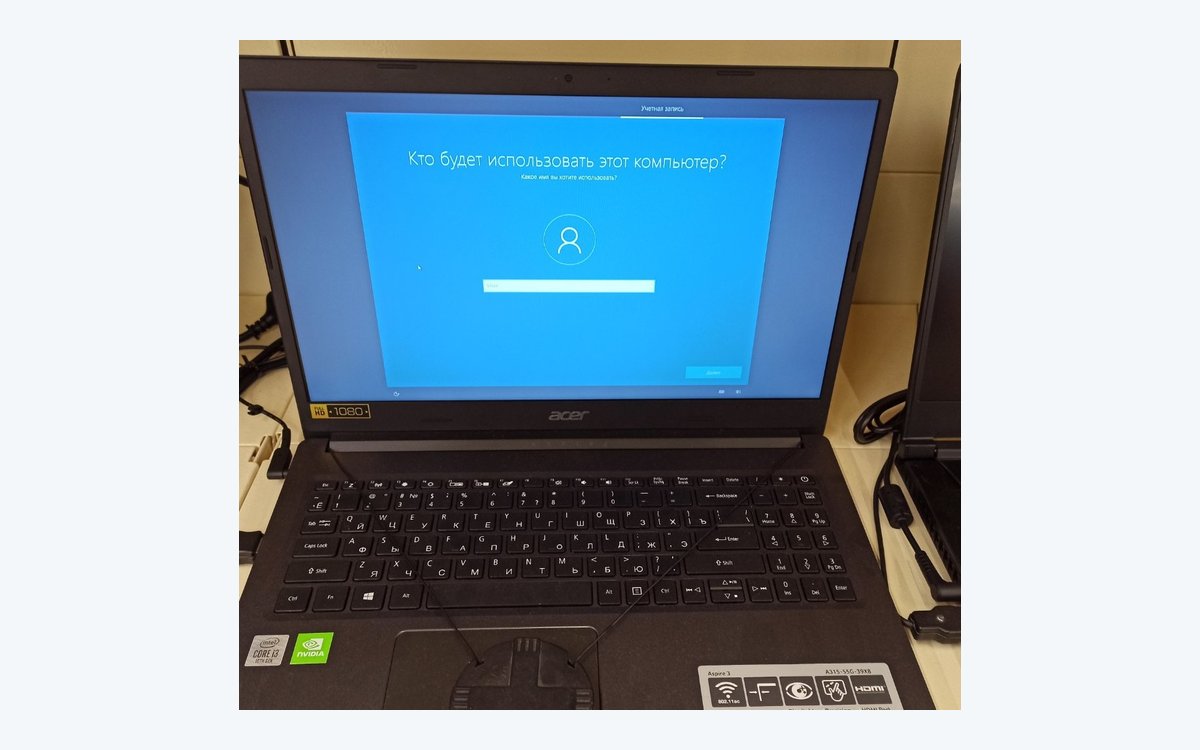
★ Your pick: Acer Aspire 3
Entry-level money for a real full-Windows laptop; get the 8GB-RAM-and-SSD config, not 4GB.
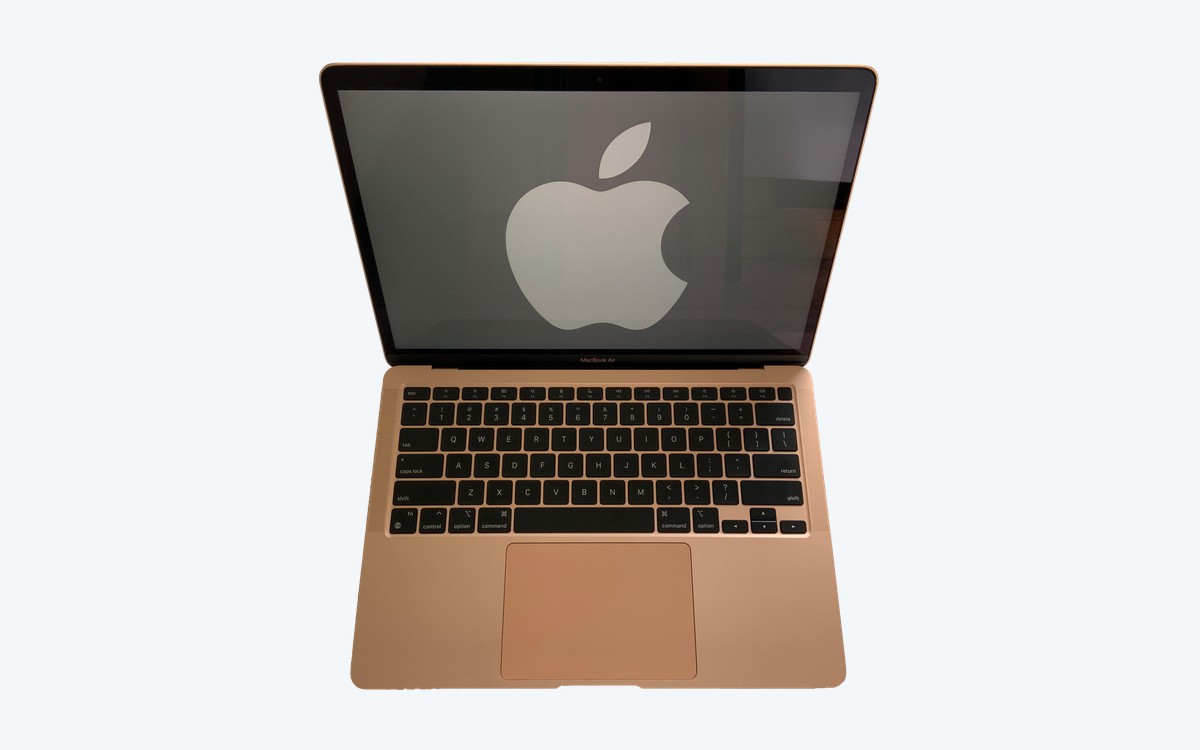
★ Your pick: MacBook Air M4
Around 18 hours on a charge, so it survives back-to-back classes without hunting for an outlet.
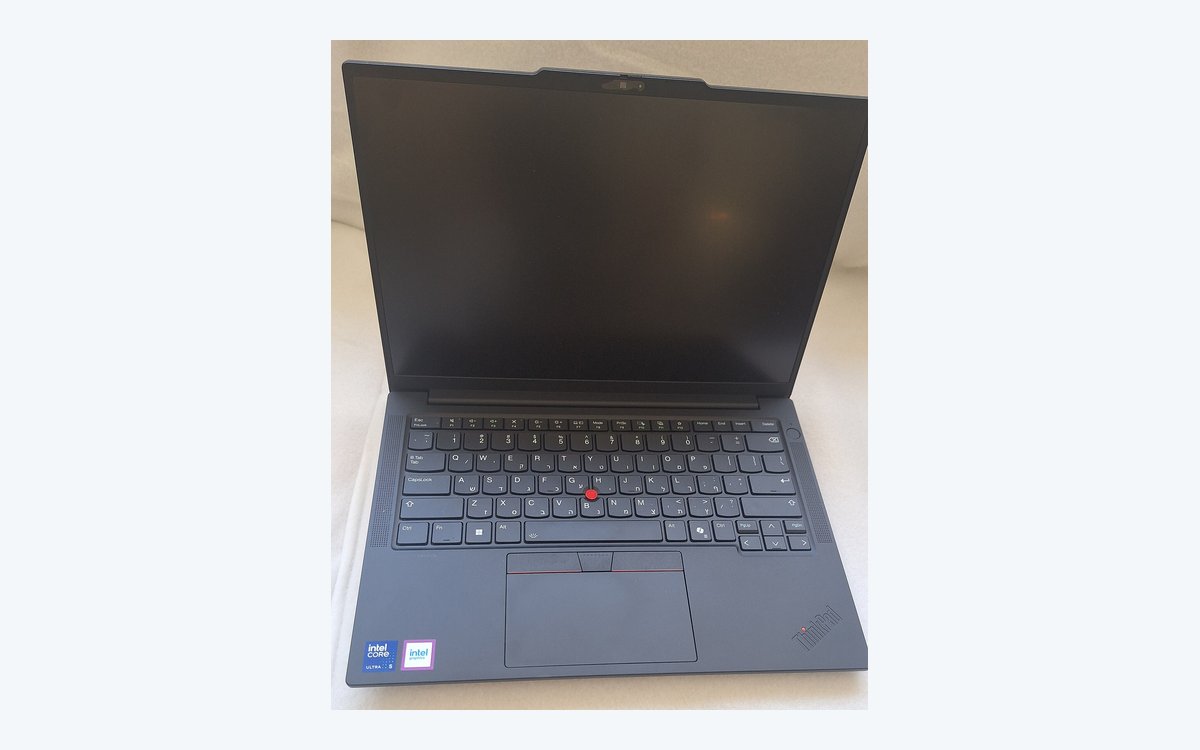
★ Your pick: Lenovo ThinkPad E14
A military-tested hinge and spill-resistant keyboard — built to survive four years in a backpack.
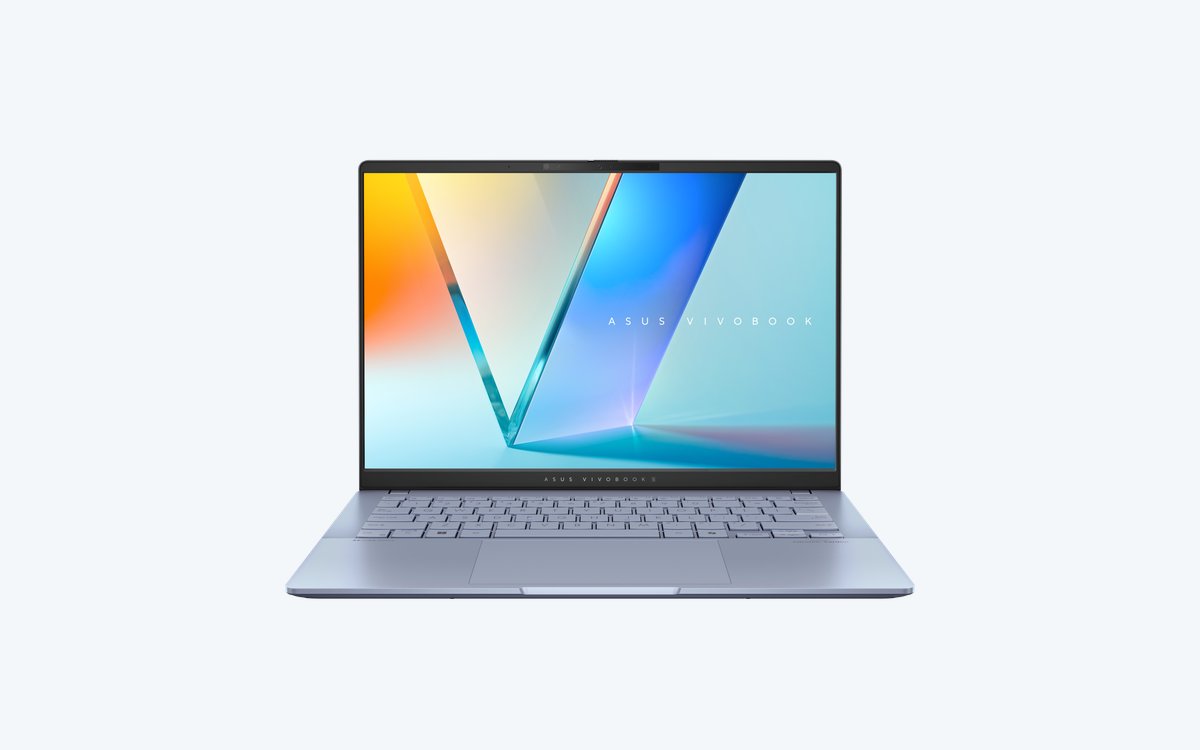
★ Your pick: ASUS Vivobook S 14 OLED
A true OLED screen at a student price — the upgrade you actually notice every single day.
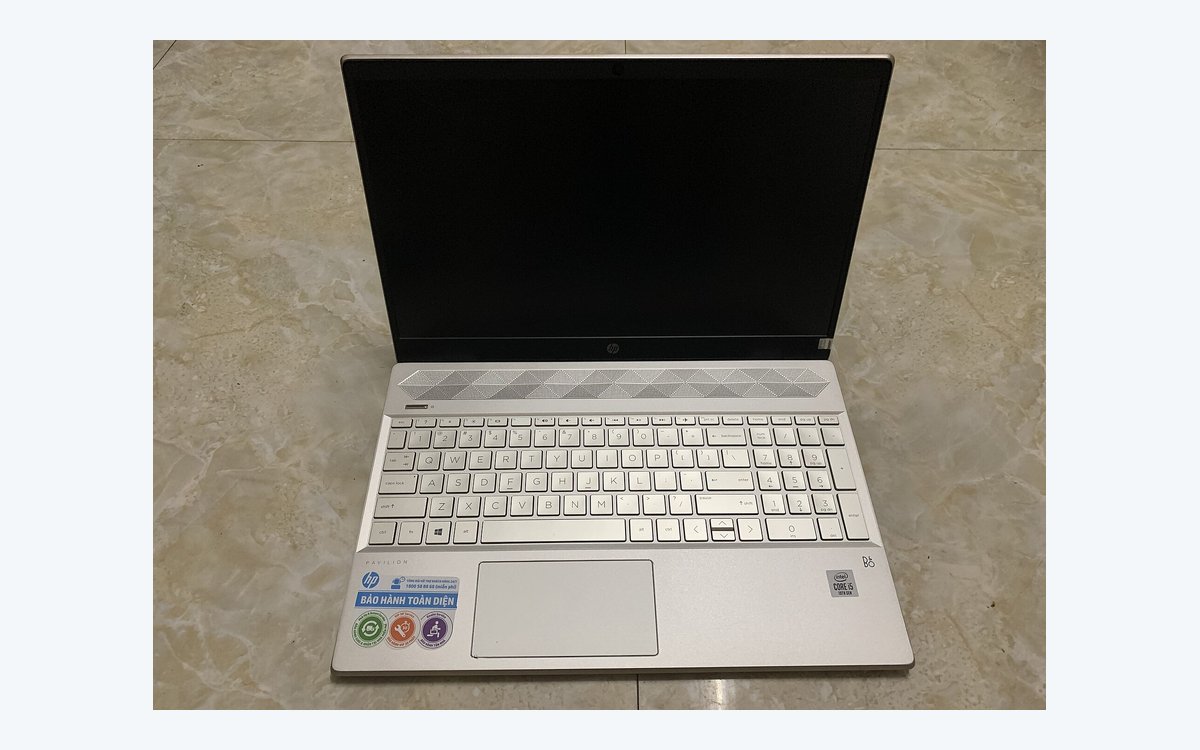
★ Your pick: HP Pavilion
Light enough that you stop noticing it’s in your bag between classes.
👑 Our Top Pick — Best Overall Value
Acer Aspire 3
Best value overall: the most laptop for the least money. At the entry-level end: a real full-Windows laptop that handles everyday student work, docs, web, and streaming; buy the 8GB-and-SSD config, not just freshman year.
Opens on our Top Pick. Tap an option to see the best match for you.
The Specs That Matter Most When You Buy a Student Laptop
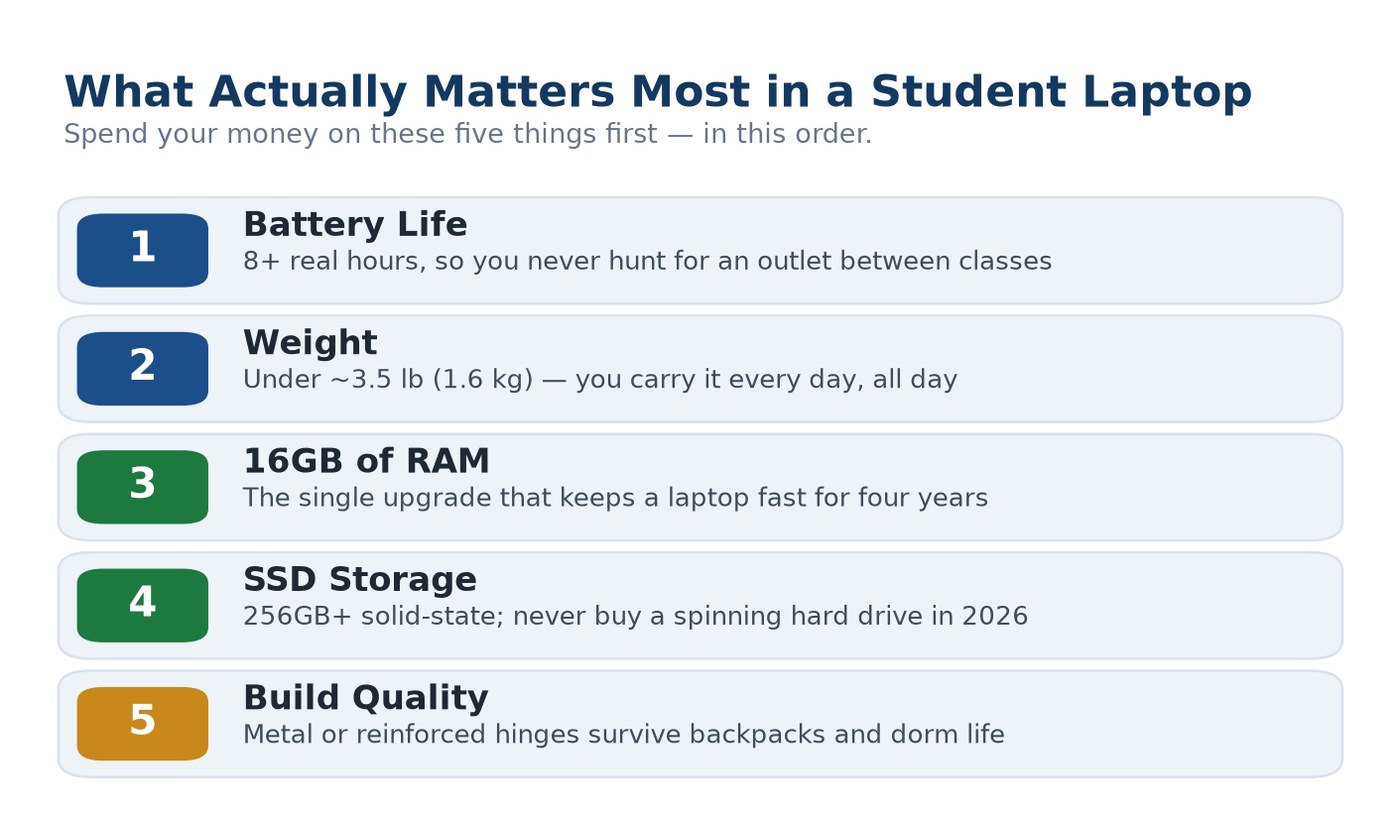
Before you compare a single model, get your priorities straight, because the spec that salespeople push hardest — the processor — is almost never the one that decides whether you’ll love or resent this thing by junior year. What decides that is boring stuff: how long it runs unplugged, how much it weighs on your shoulder, and whether it still feels quick after a couple of years of Chrome tabs. Nail the five things below, in this order, and you can’t really go wrong.
Battery Life That Survives a Full Day of Classes
This is the one that quietly ruins laptops. A campus day isn’t a home day — you’re in a lecture hall at 9, the library at noon, a study group at 4, and outlets are always taken. A laptop that only lasts four hours means you’re tethered to a wall and lugging a charger everywhere. Aim for a machine rated at 10-plus hours, which in real mixed use (browsing, notes, video) lands around 7 to 9 honest hours. Apple’s M-series MacBooks are the class leaders here — Apple rates the Air for up to 18 hours of video playback — but plenty of Windows laptops now clear a full school day too. Battery is the single most underrated spec on the box.
Weight and Size You Will Carry Every Single Day
You will pick this laptop up and move it more times than you’ll do anything else with it. A pound of difference sounds trivial in the store and feels enormous by week three, buried under textbooks in a backpack. For most students the sweet spot is a 13- or 14-inch laptop under about 3.5 pounds (1.6 kg). A 15- or 16-inch screen is genuinely nicer to work on, but it’s heavier and won’t fit on those tiny lecture-hall desks — buy the bigger screen only if you know you’ll mostly work from a dorm desk.
Enough RAM and Storage for Four Years, Not Four Months
Here’s the upgrade that matters more than any other: RAM. Eight gigabytes is the bare minimum in 2026 and it’ll feel cramped the moment you’ve got 30 browser tabs, a video call, and Word open at once. Sixteen gigabytes is the number that keeps a laptop feeling fast for all four years, and it’s worth stretching the budget for. If you’re unsure how much you actually need, we broke it down in detail in how much RAM you really need. For storage, get a solid-state drive (SSD) of at least 256GB — never a spinning hard drive in 2026 — and lean toward 512GB if you store photos, video, or big project files.
Keep in mind: On most thin laptops the RAM is soldered to the board, which means you can not upgrade it later — the amount you buy on day one is the amount you’re stuck with for four years. That’s exactly why paying up front for 16GB instead of 8GB is the smartest upgrade money in this whole guide. Check the listing for “soldered” or “onboard” memory before you assume you can add more.
Build Quality That Survives Dorm Life
Laptops that live in dorms get treated like dorm furniture: shoved in bags, slid off couches, splashed with coffee. A cheap all-plastic chassis with a flexy lid will loosen and crack over four years; an aluminum body or a reinforced plastic one with tested hinges holds up. This is where business-class machines shine — the ThinkPad line, for instance, is built to and stress-tested against military-grade durability standards and ships with spill-resistant keyboards. You don’t need a tank, but you do want something that won’t feel like a toy by sophomore year.
The Screen, Keyboard, and Ports You Touch All Day
These are the “feel” specs, and they’re worth more than a spec-sheet glance. A crisp 1080p (Full HD) screen is the floor; an OLED or higher-resolution panel is a genuine daily pleasure if your budget allows, especially for design or film students. The keyboard matters because you’ll write thousands of pages on it — try before you buy if you can. And check the ports: at least one USB-C, ideally a USB-A for older gear, and HDMI if you present a lot. A machine that forces a dongle for every single connection is a small, constant tax on your day. If you’re weighing connection types, our USB-C versus Thunderbolt explainer clears up which ports actually matter.
How to Choose a Laptop Based on Your Major
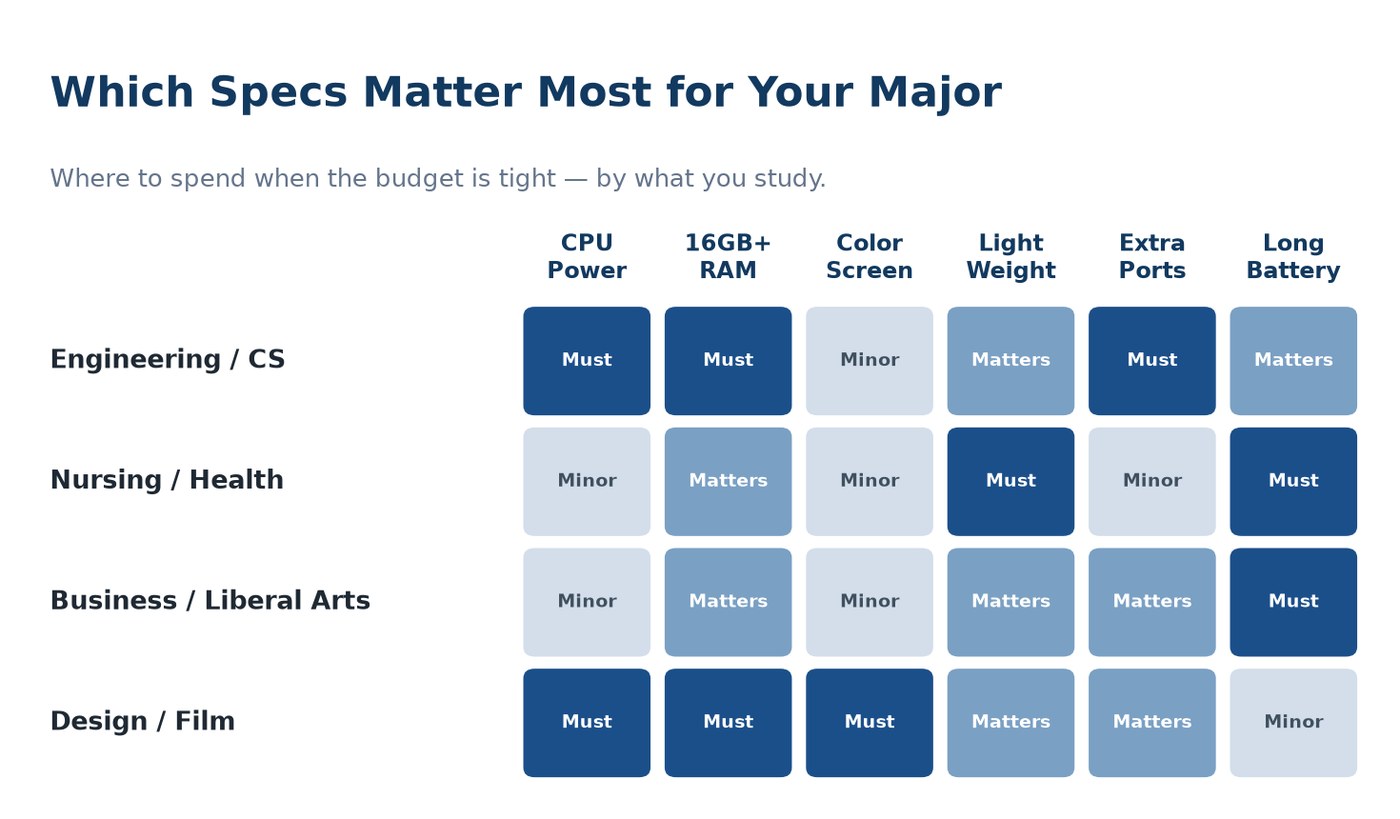
Now flip the lens. Once you know the five specs above, your major tells you which of them to spend on and which to let slide. This is the part generic buying guides skip, and it’s the part that actually saves you money — because the best laptop for college students on a budget is the one that spends every dollar on what your coursework demands and nothing on what it doesn’t.
Engineering and Computer Science Students
This is the one group that genuinely benefits from more power. CAD software, circuit simulators, virtual machines, compiling large codebases, running local models — these tasks lean on the processor and, above all, memory. Get 16GB of RAM minimum (32GB if you can swing it), a current-generation Intel Core Ultra or AMD Ryzen chip, and real ports for external monitors and dev boards. Critically, check your program’s required software before you buy: some engineering suites are Windows-only and won’t run natively on a Mac, which can make the best laptop for engineering students a well-specced Windows machine rather than a MacBook.
Nursing and Health Science Students
Nursing is the mirror image of engineering. You don’t need raw power — you need a laptop that’s light, tough, and lasts all day, because it’s coming with you to clinicals, labs, and long library sessions where you’re mostly in a browser, a testing portal, and Word. Prioritize weight under 3 pounds and 10-plus hours of battery over any processor spec. A durable build matters too, since it’s getting hauled everywhere. The best laptop for nursing students is a light, reliable all-rounder — a MacBook Air or a slim Windows 14-incher — not the powerhouse an engineer needs.
Business, Liberal Arts, and Undecided Majors
If you’re in business, the humanities, social sciences, or genuinely don’t know yet, good news: you have the most freedom and the lowest requirements. Your workload is documents, spreadsheets, research, presentations, and video calls — all of which run beautifully on a mid-range machine. Buy for battery, weight, and a comfortable keyboard, put the savings toward 16GB of RAM, and you’re set. This is the group that gets the most value from the mid-range sweet spot and has no reason to overspend on power they’ll never touch.
Design, Architecture, and Film Students
Creative majors are the other group with real demands, but different ones from engineers. You want color accuracy and screen quality first — an OLED or high-resolution display genuinely matters when you’re editing photos, video, or renders — backed by a strong GPU, 16GB or more of RAM, and fast, roomy storage for huge project files. A MacBook Pro or a Windows creator laptop is the target here; a bargain machine with a dull, low-resolution screen will actively hold your work back.
Budget Tiers, From Entry-Level to a Premium Splurge
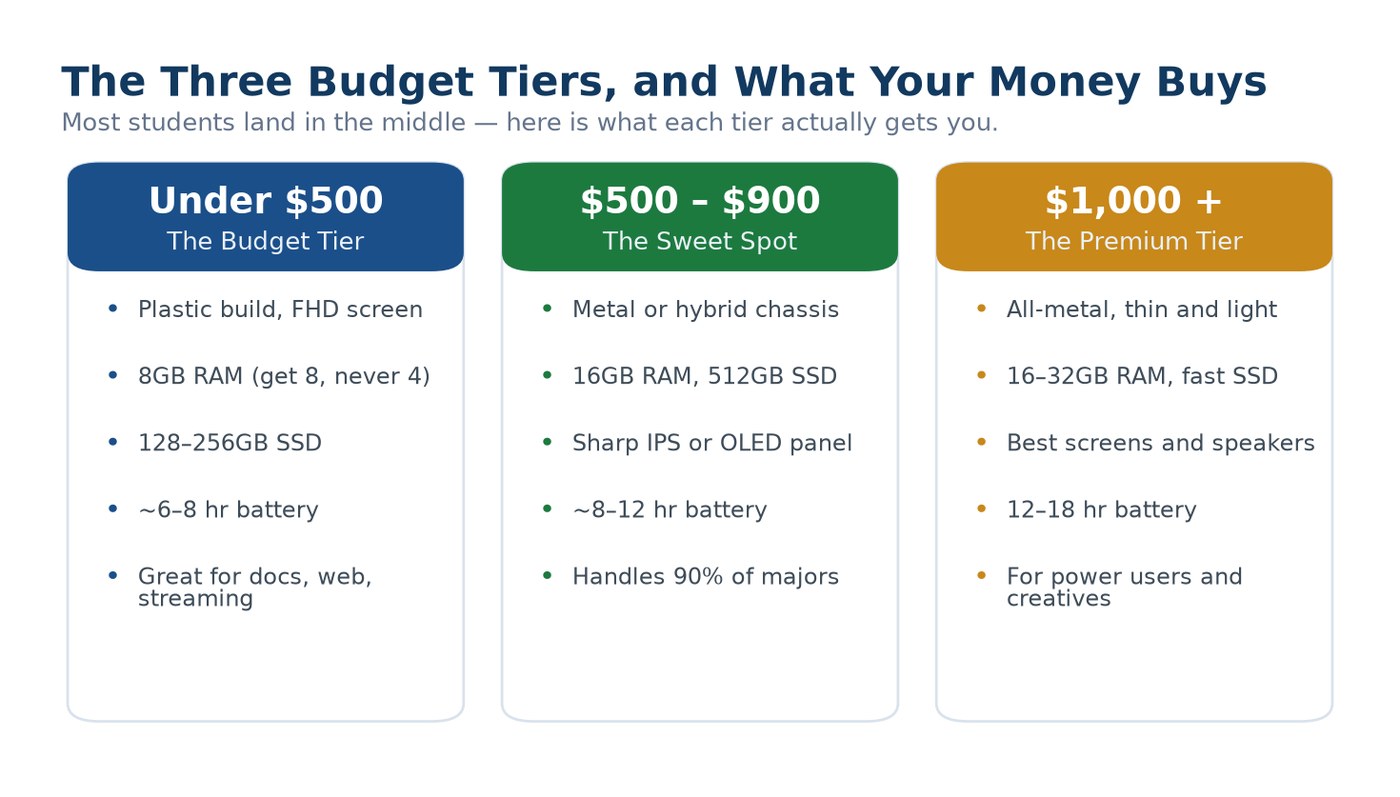
Money is usually the real deciding factor, so let’s be honest about what each price band actually buys in 2026. Almost every student lands in the middle tier, and that’s exactly where it should be — you rarely need to spend more, and you shouldn’t spend much less.
The Entry-Level Tier and What You Actually Get
Yes, a genuinely usable laptop under 500 dollars exists, and it’s a fine choice if your work is documents, web research, and streaming. At this price you’re getting a plastic build, a decent Full HD screen, 8GB of RAM (make sure it’s 8, never 4), and a smaller 128–256GB SSD. Battery and screen brightness are where budget laptops cut corners, so temper expectations there. One smart move to stretch this tier further: buying certified refurbished can get you last year’s mid-range machine for budget-tier money — here’s what “refurbished” really means before you pull the trigger.
The Mid-Range Sweet Spot for Most Students
This is where I steer the overwhelming majority of students, and where the value is genuinely excellent right now. For this money you get a metal or hybrid chassis, a proper 16GB of RAM, a 512GB SSD, a sharp IPS or even OLED screen, and 8–12 hours of real battery. A laptop from this tier handles roughly 90% of all majors without breaking a sweat, and it’ll still feel current when you graduate. If you only read one section of this guide, make it this one — the middle tier is almost always the right answer.
The Premium Tier and When It Earns Its Money
Above a grand you’re paying for polish and headroom: an all-metal thin-and-light body, the best screens and speakers, 16–32GB of RAM, and 12–18 hours of battery. This tier makes sense for two people — engineering, CS, and creative students who’ll actually use the extra power, and anyone who simply wants the nicest possible machine and can afford it. For everyone else, premium is a want, not a need, and the sweet-spot tier will serve you just as well day to day.
The Best Laptops for College Students in 2026
Enough theory — here are the specific machines I’d actually recommend, each the clear winner of one job. Prices below are mid-2026 US street estimates that move with sales, so treat them as ballparks, not receipts, and always check for education pricing first.
Disclosure: TechDaily is reader-supported. The links below are affiliate links, which means we may earn a small commission if you buy through them — at no extra cost to you. It never changes which laptops we recommend or what we say about them.
1. Apple MacBook Air (M-Series) — Best Overall for Most Students
Upper mid-range~2.7 lbUp to ~18 hr battery16GB base RAM
For the widest range of students, the MacBook Air is the one I hand over without a second thought. Apple’s M-series silicon is the reason: it’s fast, it’s completely silent because there’s no fan, and it sips power so gently that all-day battery is a given rather than a hope. Apple also finally made 16GB of RAM the base configuration, which erases the single biggest complaint about older Airs. It’s thin, it’s genuinely light, and — the part spec sheets miss — it still feels quick three and four years in, which is exactly what you want from a four-year purchase.
The honest catch is software and ports. macOS is wonderful for writing, research, and creative work, but some engineering, nursing, and accounting programs require Windows-only software that simply won’t run on a Mac — always confirm with your department first. And you get just two Thunderbolt ports plus a headphone jack, so a hub is in your future. Look for back-to-school and education deals that routinely knock a real chunk off the base Air.
The catch: Before you buy any Mac, email your academic advisor or check your program’s tech requirements page for the phrase “Windows only.” Nursing testing software (like some lockdown browsers), certain CAD and statistics packages, and a few accounting tools still don’t run on macOS without workarounds. If your major names any of them, buy Windows and save yourself a semester of headaches.
Pros
- Class-leading battery life and completely silent, fanless operation
- Still feels fast years later — an excellent four-year investment
- Light, premium metal build that survives daily hauling
- 16GB of RAM now standard on the base model
Cons
- Some Windows-only major software won’t run on macOS
- Only two ports, so you’ll likely need a USB-C hub
- Base storage is 256GB; upgrades are pricey
2. Acer Aspire 3 — The Best Budget Laptop for Tight Money
Budget tier15.6-inch FHD8GB RAMReal laptop, real cheap
When the budget is genuinely tight, the Acer Aspire 3 proves you can get a real, usable laptop for well under 500 dollars. It runs full Windows, has a roomy 15.6-inch Full HD screen, and handles the daily student diet — documents, web research, Canvas, streaming, video calls — without complaint. For a first-year student who mostly writes papers and doesn’t need power, this is honest value and the obvious answer to the best laptop for college students on a budget.
Be clear-eyed about the compromises, because they’re real: the build is plastic, the screen is fine but not bright, and battery life is average at best — plan on carrying a charger. Also insist on a configuration with 8GB of RAM and an SSD, not 4GB or a slow hard drive, or it’ll feel sluggish fast. Within those limits, though, nothing else this cheap is this genuinely usable.
Pros
- A real, full-Windows laptop for entry-level money
- Large 15.6-inch Full HD screen that’s comfortable for reading and writing
- Easily handles documents, browsing, streaming, and video calls
- Often user-upgradeable RAM and storage, unlike pricier ultrabooks
Cons
- Plastic build and a dim, average screen
- Mediocre battery life — keep the charger handy
- Underpowered for engineering, CAD, or heavy creative work
3. ASUS Vivobook S 14 OLED — Best Screen for the Money
Mid-range14-inch OLED16GB RAM~2.9 lb
The Vivobook S 14 is my pick for the student who wants a genuinely gorgeous screen without leaving the sweet-spot tier. That OLED panel — inky blacks, punchy color — is a real upgrade over the dull screens you get at this price, and it makes streaming, photo work, and even just reading a joy. Pair it with 16GB of RAM, a current Intel or AMD chip, a light ~2.9-pound body, and solid Harman Kardon speakers, and you’ve got a laptop that punches well above its price. If you want the same OLED experience with a more premium metal build, ASUS’s step-up Zenbook 14 OLED is the sibling to look at.
The trade-offs are modest. Battery is good but not MacBook-good, so expect a solid school day rather than two. OLED panels can theoretically retain a faint image over many years of static content, though it’s rarely an issue in normal use with a screensaver on. For design, film, and media-heavy majors who want screen quality on a real-world budget, this is the standout.
Pros
- Stunning OLED screen that’s rare at this price
- 16GB of RAM and a strong modern processor
- Light, well-built, with genuinely good speakers
- Excellent value for creative and media-focused majors
Cons
- Good battery, but not in the MacBook Air’s league
- OLED carries a small long-term burn-in risk with static images
- Preloaded with some bloatware you’ll want to clear out
4. HP Pavilion — Best Affordable Mainstream All-Rounder
Mid-range14 or 15-inch FHD8–16GB RAMBig-screen comfort
The HP Pavilion is the definition of a safe, sensible middle-tier choice — the laptop that does everything a typical student needs without drama or a premium price. You get a comfortable Full HD screen, a solid Intel Core i5 or i7, a good keyboard, and enough ports (including HDMI and USB-A) that you won’t live in dongle hell. For business, liberal arts, and undecided majors who just want a reliable machine that works, the Pavilion is a perennial value pick. If portability is your top priority, HP’s featherweight Pavilion Aero 13 is the sibling worth a look — it dips under 2.3 pounds.
Where it lands depends entirely on the configuration, so shop carefully: aim for 16GB of RAM and a 512GB SSD, and skip the barebones 8GB models unless you’re truly just writing papers. The build is pleasant but plasticky, and battery is average rather than exceptional. Configured right, though, it’s a dependable four-year workhorse at a fair price.
Pros
- Well-rounded and reliable for everyday coursework
- Full port selection, including HDMI and USB-A — minimal dongles
- Comfortable keyboard and a choice of 14 or 15-inch screens
- Frequently discounted into genuine bargain territory
Cons
- Plasticky build and only average battery life
- Base 8GB configurations feel tight — spring for 16GB
- Ships with HP bloatware to uninstall
5. Lenovo ThinkPad E14 — Best for Engineering and Durability
Mid-range14-inch16GB RAMLegendary keyboard + full ports
When durability and real work come first, the ThinkPad E14 is the pick — and it’s my top recommendation for the best laptop for engineering students who want Windows. ThinkPads are built like tools, not toys: the E14 pairs a rock-solid chassis and spill-resistant keyboard with the best typing experience in this entire list, which matters enormously when you’re writing lab reports and code all night. It also brings the ports engineers and CS students actually use — USB-C, USB-A, and HDMI — so you can drive an external monitor and plug in dev hardware without adapters. Configure it with a Core Ultra chip and 16GB of RAM and it chews through compiling, simulation, and virtual machines.
It’s not the thinnest or flashiest laptop here, and the display is good rather than dazzling. But those are the right trade-offs for a machine you’re buying to survive four years of hard use and heavy workloads. For engineering, computer science, and anyone who values a keyboard and reliability over looks, nothing else here competes.
Pros
- Tough, business-grade build tested to military durability standards
- The best keyboard in this roundup — a real advantage for heavy writers and coders
- Full port selection (USB-C, USB-A, HDMI) with no dongles required
- Handles engineering and CS workloads with the right configuration
Cons
- Utilitarian, boxy design that won’t win style points
- Good-not-great display compared to the OLED options
- Heavier and thicker than the ultrabooks here
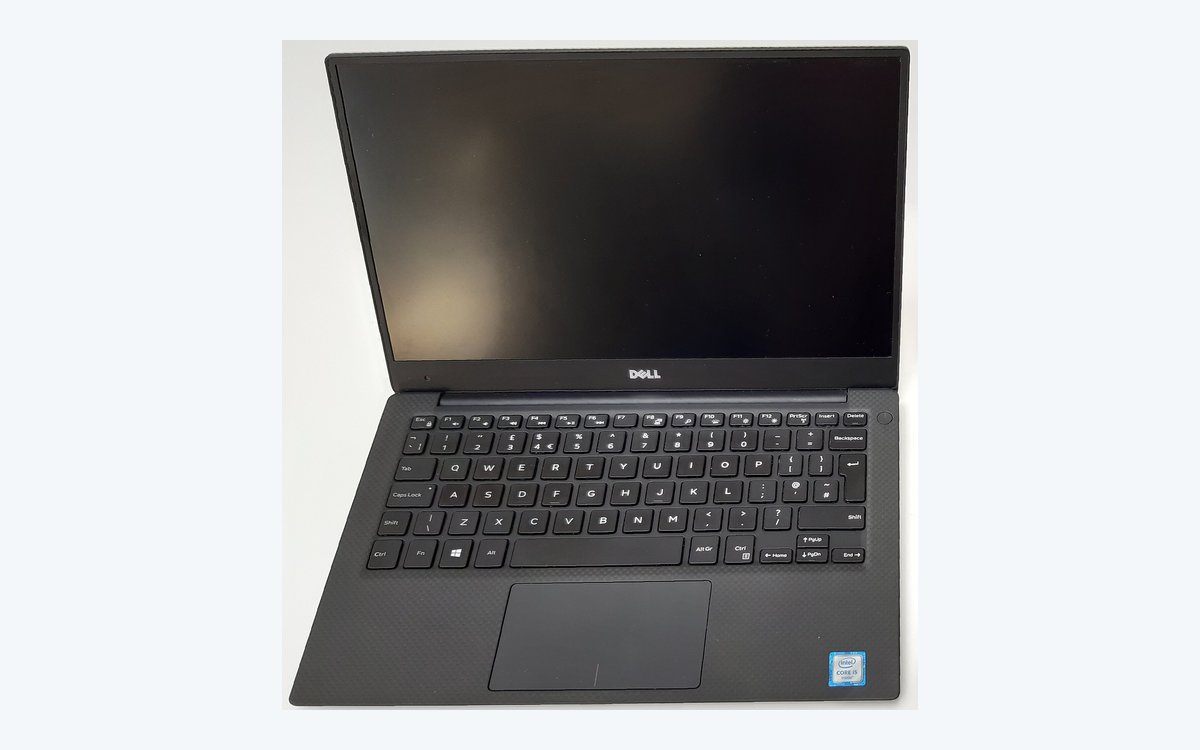
6. Dell XPS 13 — Best Premium Windows Ultrabook
Premium tier13-inch16GB+ RAM~2.7 lb premium build
If you want the nicest Windows laptop on this list and have the budget for the premium tier, the Dell XPS 13 is it. It’s the Windows answer to the MacBook Air: a genuinely premium aluminum-and-carbon body, near-borderless display (OLED optional), a great keyboard, and a thin ~2.7-pound frame that’s a pleasure to carry. For students who want top-tier build and screen quality but need Windows for their coursework, this is the machine to covet. (Worth knowing: Dell folded the XPS name into its “Dell Premium” line in its 2025 refresh, so you may see the newest models sold under that badge — same lineage, same premium positioning.)
The compromises are the usual premium-ultrabook ones: it’s expensive, the newer models lean hard on USB-C ports so you’ll want a hub, and it’s more machine than a documents-and-browsing student needs. But if you want a beautifully made Windows laptop that’ll still feel special at graduation, few things match it.
Pros
- Premium metal build and a stunning near-borderless display
- Thin, light, and genuinely desirable to carry and use
- Strong performance with 16GB+ RAM configurations
- The Windows alternative to a MacBook for design and pro work
Cons
- Premium price that’s overkill for light workloads
- Newer models are USB-C-only — plan for a hub
- Rebranded under “Dell Premium” in 2025, which can confuse shopping
How to Make a Student Laptop Last All Four Years

Buying the right laptop is half the job; the other half is not wrecking it before graduation. A few cheap habits add years to any machine on this list — and one of them saves your degree, not just your device.
Protect the Battery So It Still Lasts Senior Year
Lithium batteries wear out with use, but you can slow it dramatically. Avoid leaving the laptop plugged in at 100% around the clock, don’t run it flat to zero repeatedly, and keep it out of hot cars and direct sun. Most laptops now include a battery-health or charge-limit setting — turn it on. The same logic that applies to your phone applies here; we dug into the myths in whether overnight charging actually hurts your battery.
Back Up Your Work Before You Learn the Hard Way
Every semester, someone loses a term paper the night before it’s due to a dead drive or a stolen bag. Don’t be that person. Save coursework to cloud storage (your school almost certainly gives you free Google Drive or OneDrive) so it syncs automatically, and it survives even if the laptop doesn’t. This is the single most important habit on this page.
Warning: A laptop is stolen or dies far more often than students plan for, and a lost hard drive takes every unsaved assignment with it. Turn on automatic cloud backup the day you set the machine up — not the week finals start. Free university cloud accounts make this effortless, and it’s the difference between a bad afternoon and a failed course.
Keep It Clean, Cool, and Updated
Dust clogs the vents that keep a laptop cool, and heat is what quietly kills components over years. Blow out the vents a couple of times a year, don’t run it on a soft bed or couch that blocks airflow, and keep the operating system and drivers updated for security and performance. A five-dollar can of compressed air and ten minutes a semester genuinely extend a laptop’s life.
Frequently Asked Questions
What is the best laptop for college students overall in 2026?
For most students, the best laptop for college students overall is the Apple MacBook Air with M-series silicon — it’s light, silent, lasts all day, and still feels fast years later, now with 16GB of RAM as standard. The one thing to check first is whether your major requires Windows-only software; if it does, a well-specced Windows laptop like the Dell XPS 13 or Lenovo ThinkPad E14 is the better call. There’s no universal winner, only the best fit for your major and budget.
What is the best laptop for college students on a budget?
If money is tight, the Acer Aspire 3 is the standout — a genuinely usable, full-Windows laptop for well under 500 dollars that handles documents, web research, and streaming without complaint. Just make sure the configuration has 8GB of RAM and an SSD, not 4GB or a slow hard drive. To stretch a budget even further, look at certified refurbished models, which can get you last year’s mid-range laptop for budget-tier money.
What laptop is best for engineering students?
The best laptop for engineering students prioritizes a strong current-generation processor, 16GB or more of RAM, and real ports for external monitors and dev hardware. The Lenovo ThinkPad E14 is my top pick — tough, with an outstanding keyboard and full port selection — configured with a Core Ultra chip and plenty of memory. Crucially, confirm your program’s required software before buying, because some engineering suites are Windows-only and won’t run on a Mac.
What laptop is best for nursing students?
Nursing students want the opposite of raw power: light weight, all-day battery, and a durable build, because the laptop travels to clinicals, labs, and long study sessions. A MacBook Air or a slim 14-inch Windows laptop under 3 pounds is ideal. The one non-negotiable is compatibility — many nursing programs use specific testing or lockdown-browser software, so verify it runs on your chosen laptop (Mac or Windows) before you buy.
How much should a college student spend on a laptop?
Most students should land in the mid-range tier, the sweet spot where you get 16GB of RAM, an SSD, a sharp screen, and all-day battery — enough for roughly 90% of majors. Drop to the entry-level tier only if your work is light (documents and browsing), and go premium only if you’re in engineering, computer science, or a creative field that genuinely uses the extra power, or you simply want the nicest machine and can afford it.
Is a MacBook or a Windows laptop better for college?
Neither is universally better — it depends on your major’s software. A MacBook Air wins on battery, silence, build, and longevity, making it the safest pick for writing-heavy and general majors. But some engineering, nursing, and business programs require Windows-only applications that don’t run on macOS, and Windows laptops offer more choice at every price. Check your department’s technical requirements first, then pick the platform that runs the software you’re required to use.
The Bottom Line for Back-to-School 2026
Stop shopping for “the best laptop” as if it’s one product on a shelf. It isn’t. The best laptop for college students is whichever one lines up with your major and your budget — and once you frame it that way, the decision gets easy. Get your major’s software requirements straight, aim for the mid-range sweet spot unless engineering or creative work pushes you higher, and spend your money on battery, weight, and 16GB of RAM before anything the salesperson is excited about. Do that, buy in the back-to-school window while the deals are live, and turn on cloud backup the day it arrives. Get those basics right and any machine on this list will carry you all the way to graduation.
Photo credits: Dell XPS 13 by Green-Curtain, Acer Aspire 3 by Oleg Bor, and HP Pavilion by Dienthoaiquangcao62, all CC BY-SA 4.0; featured and desk study photos by Shixart1985, CC BY 2.0; via Wikimedia Commons. ThinkPad E14 and ASUS Vivobook images are CC0. MacBook Air photo is public domain via Wikimedia Commons.