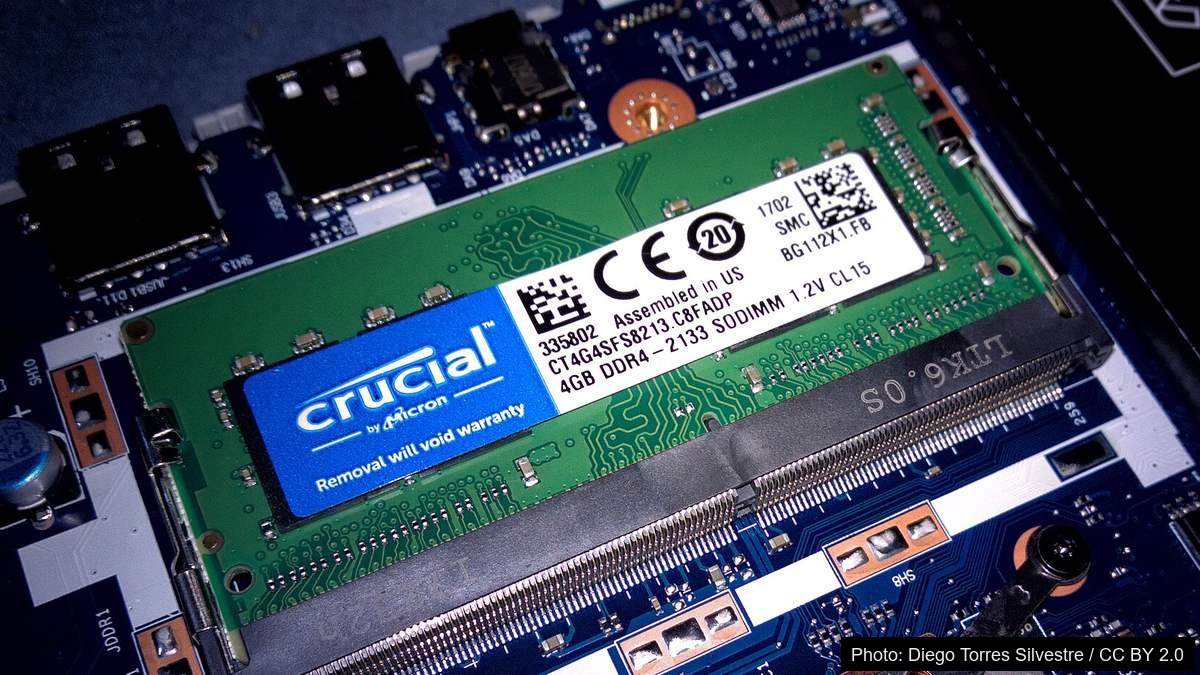
Search how much RAM do I need and look who wrote the top results: HP. Lexar. Kingston. Lenovo. Four of the seven strongest pages belong to companies that sell memory or the computers it goes into. We sell neither, so here’s the answer without the sales pitch.
Most people in 2026 need 16GB of RAM. Eight gigabytes covers browsing and office work; thirty-two only pays for itself editing 4K video, running VMs, or running AI models. Past the point your computer stops shuffling memory to the drive, extra RAM does nothing — and that’s never been worth more, with memory prices roughly doubled in twelve months. The 16GB-to-32GB gap is now real money: enough for a fast 1TB drive, something you feel every day.
- Sixteen gigabytes is right for most people, gamers included.
- Measure first: if nothing’s swapping, more RAM changes nothing.
- 90% memory usage isn’t a problem — both OSes fill spare RAM with cached files and hand it back instantly.
- Extra memory doesn’t raise average frame rate — it stops the stutter, which only matters if you’re running out.
- The real question: can you add more later? Soldered memory makes today’s choice permanent.
- Two sticks beat one: a second channel is worth roughly 12% average frame rate, 16% of 1% lows (that test also doubled capacity, so part of the gain is capacity, not just channel).
What RAM Actually Does and the One Thing It Cannot Fix
Almost everyone believes more RAM makes a computer faster. It doesn’t.
The Desk, the Filing Cabinet and the Worker
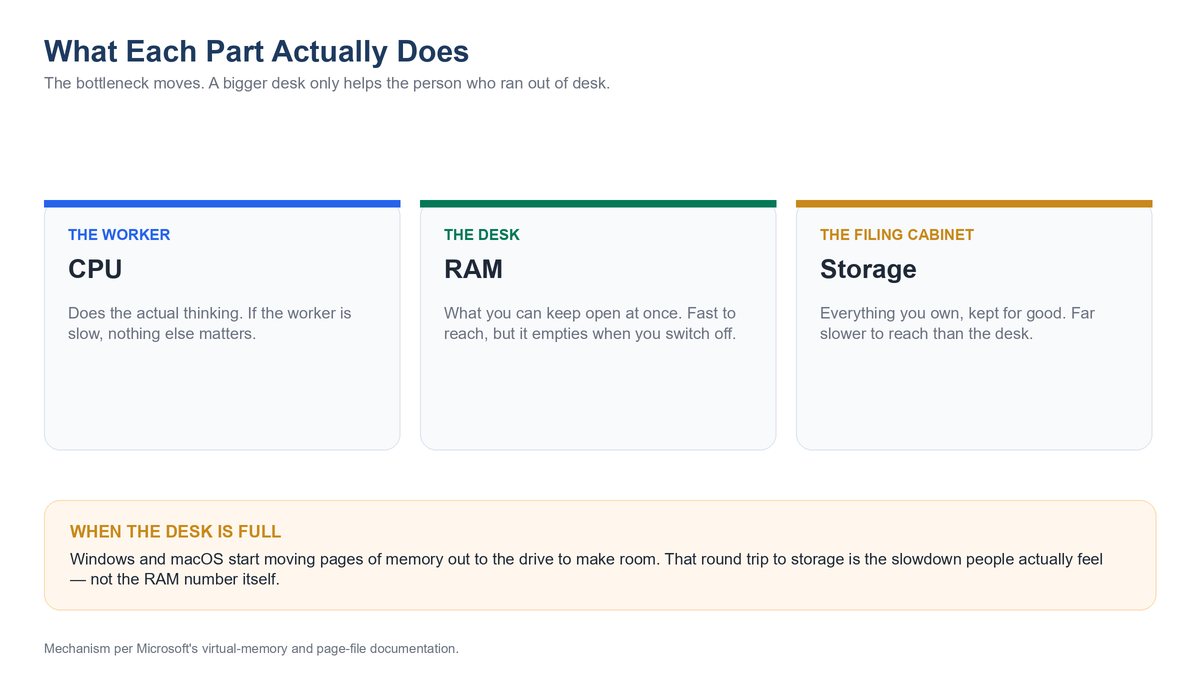
Your storage drive is the filing cabinet; your processor is the worker; RAM is the desk. A bigger desk only helps the one who’d run out of desk.
Per Microsoft’s own virtual memory documentation: when RAM runs out, the OS moves pages — four kilobytes at a time — to the drive, the slowdown blamed on “not enough RAM.” If it isn’t happening, you’re not short of RAM.
Why More RAM Does Nothing When Your Drive Is the Real Bottleneck
Storage is more often the culprit than memory: a slow drive hurts every boot and save, while insufficient RAM only hurts once exceeded — which most people never do. Same for the processor: a pinned core makes memory inert. The queue is at the worker’s desk, not on it.
Why Almost Everyone Answering This Question Sells Memory
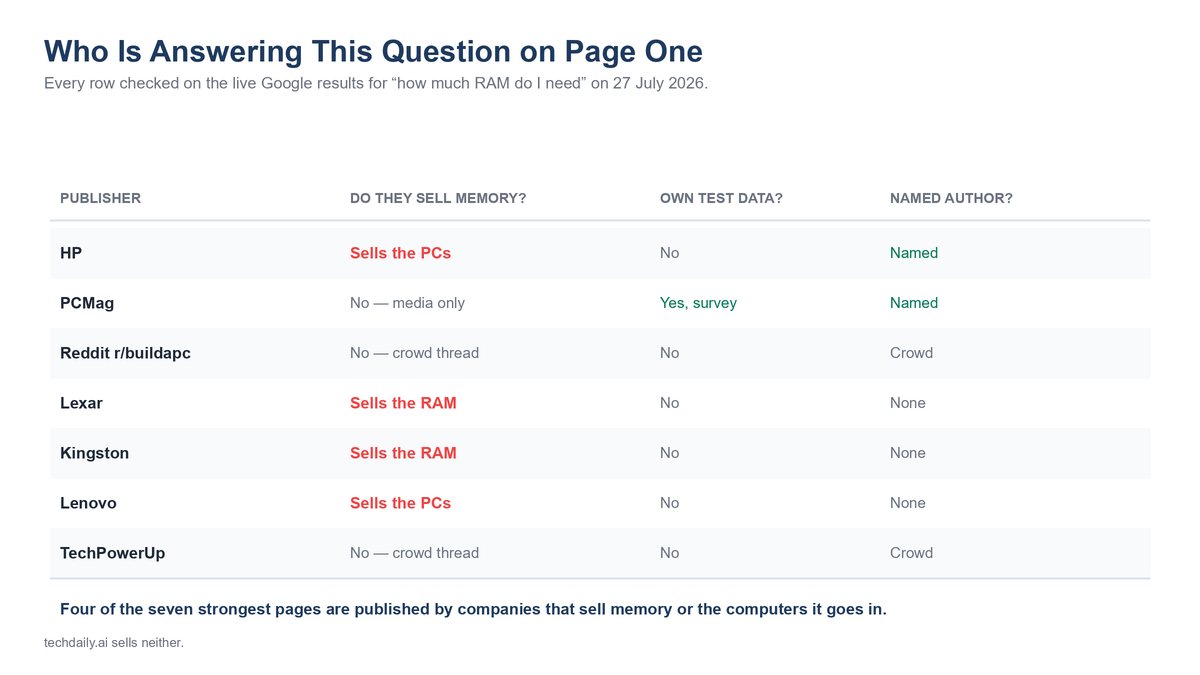
Number one, live 27 July 2026: HP carries a byline but cites no data. Its advice: “future-proof your investment by buying enough capacity to support the workload you expect to have three years from now, not just what gets you by today.”
PCMag cites Steam’s January 2026 survey: 40% of gamers on 16GB, 38% on 32GB. It sells nothing, and lands on 16GB, same as us.
The rest splits the same way: discussion threads with nobody selling anything, versus Lexar, Kingston and Lenovo nudging toward more memory than most people need. Four of seven are selling you memory or the machine it sits in.
Measure Your Own Usage Before You Spend a Dollar
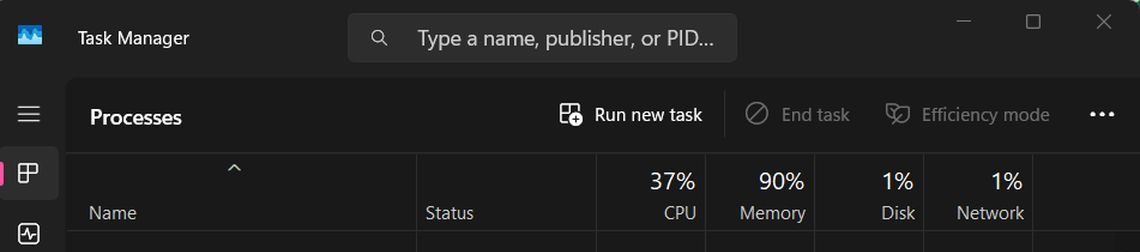
No vendor page ranking for this search shows you a real Task Manager screen, or teaches you to read one. That is remarkable, because measuring your own peak is the highest-value thing you can do before spending money on memory — and it is free.
How to Read the Memory Tab in Windows Task Manager
Ctrl+Shift+Esc, Performance, Memory: In use, Available, Committed and Slots used tell the story. Watch the peak, not the idle.
How to Read Memory Pressure in macOS Activity Monitor
On a Mac, watch the Memory Pressure graph, not raw numbers. Apple’s own guidance: green efficient, yellow/red need more. That is Apple’s own wording — and notice what is missing from it: any mention of how much memory is free.
Why 90 Percent Memory Usage Is Not a Problem by Itself
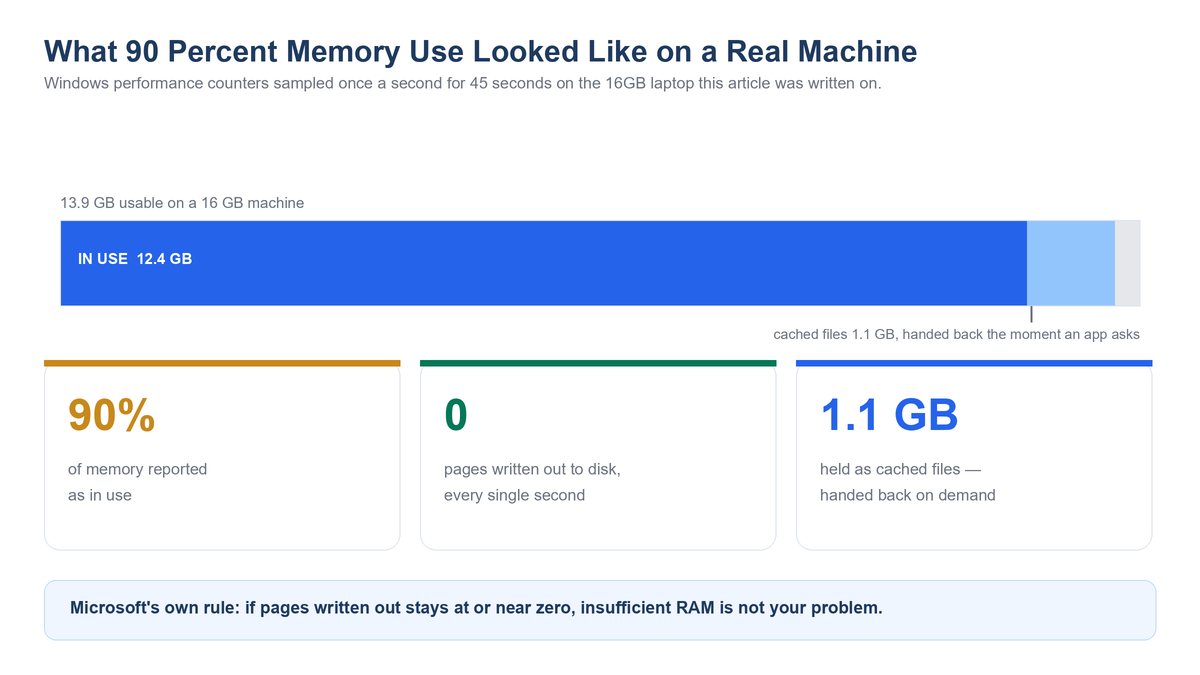
This was written on a 16GB Windows 11 laptop with two 8GB sticks, Task Manager showing memory at 90 percent — the number that sends people to a search engine in a panic. Sampling Windows performance counters once a second for forty-five seconds: available memory averaged 1,453 MB, cached files sat at 1.1 GB, and pages written out to disk — Microsoft’s own indicator of memory starvation — averaged zero. Not low. Zero, across all forty-five samples.
By Microsoft’s own yardstick, that machine isn’t short of memory: even when committed memory exceeds installed RAM, low or zero pages-written-per-second means no significant performance problem. The same page warns available memory “won’t reach zero and isn’t necessarily a good indication of whether your system is short of RAM.” Cached memory is a feature, not consumption — both OSes fill spare RAM with cached files and hand it back instantly. Empty RAM is wasted RAM.
Keep in mind: TechSpot found Marvel Rivals allocated just 7,194 MB on an 8GB machine but 18,290 MB on a 64GB one, same game and settings. Allocation isn’t requirement.
The Number That Actually Matters Is Swapping, Not Usage
Forget percentages — two signals matter. Windows: pages written to the drive (per Microsoft’s page file documentation). Mac: Swap Used and the graph’s colour. Rule of thumb: peak under 70% with no swapping means more memory does nothing; past 85% with active swapping is your upgrade signal.
How Much RAM You Need, Broken Down by Workload
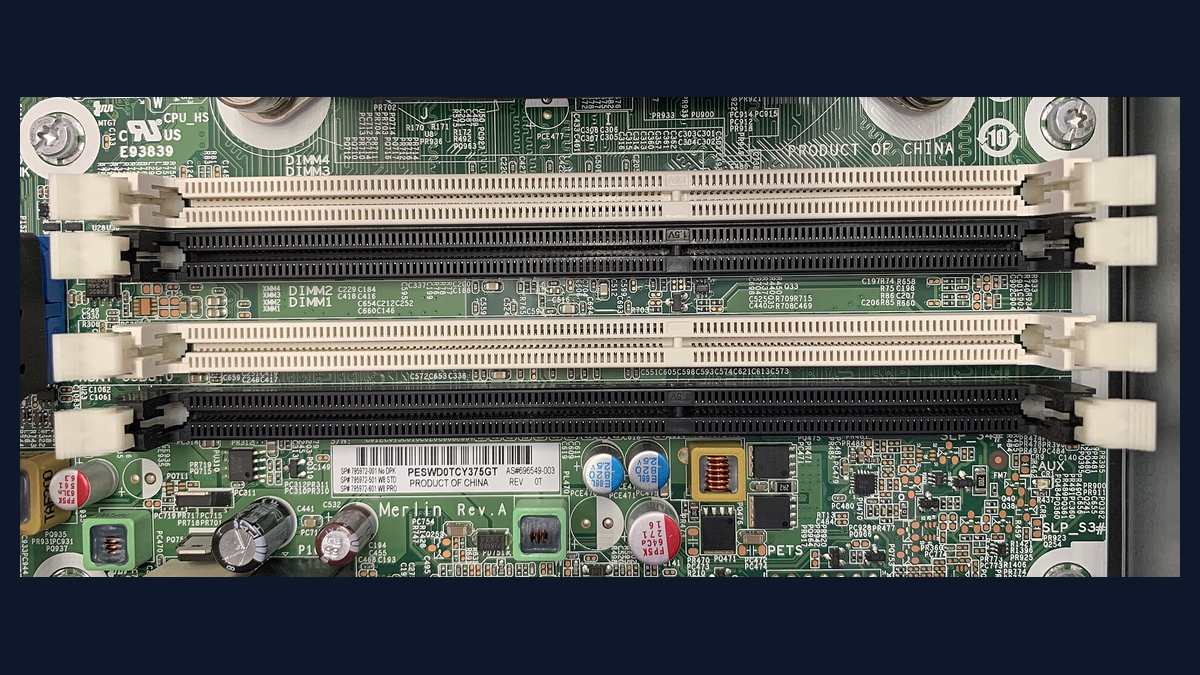
Every tier below carries its reasoning.
| Workload | Capacity |
|---|---|
| Light use (browsing, email, office) | 8–16GB |
| Mainstream and gaming | 16GB |
| 4K video and multi-layer timelines | 32GB |
| Virtual machines and containers | 32GB |
| Local AI models | 16–32GB |
Light Use Such as Browsing, Email and Office Work
Verdict: 8GB, 16GB in browser tabs (Windows 11’s official minimum is 4GB). A clean Windows 11 install idles around 3–4GB, so 8GB leaves real working headroom. But it is the floor now, not a comfortable target — Microsoft’s own AI-capable tier already demands double. So if the memory is soldered, override us and take 16GB. With slots, 8GB now and 16GB later is fine. Wrong for forty tabs plus Teams plus Spotify.
The 16GB Default That Fits Almost Everybody
Verdict: 16GB fits most: Copilot+ spec, M5 Air base, and the newest AAA games agree. That convergence is not marketing. Three very different companies with three very different incentives landed on the same number independently. It is the wrong call for 4K video, virtual machines and large local AI models — all covered below.
Gaming Needs Less Memory Than You Have Been Told
Verdict: 16GB is fine for most gamers; 32GB only earns its price maxed-out/streaming. Battlefield 6 lists 16GB as both minimum and recommended. When a studio’s minimum and recommended figures are identical, that number is a floor, not a target — and buying double a floor is not the same thing as buying headroom. Handhelds are a separate case: their memory is fixed at purchase and shared with graphics, which is part of why the Steam Deck OLED and ROG Ally X feel so different despite similar spec sheets. Wrong for streaming/modding.
Creative Work With Photos, Video and Big Timelines
Verdict: 32GB for 4K video/multi-layer timelines, 16GB for photo/1080p. This is the tier where the upsell is justified, and saying so is what makes the pushback everywhere else credible. A photo edit holds one image and its history; a 4K timeline holds decoded frames from several streams at once. Wrong for social clips.
Developers, Virtual Machines and Containers
Verdict: 32GB, arithmetic: two 8GB VMs plus a 16GB host is 32GB. This is the one tier where “more” is a calculation you can do on paper — add up your allocations and your normal desktop load, and buy that. Not you if you code against remote environments and run only an editor and a browser locally.
Running Local AI Models on Your Own Machine
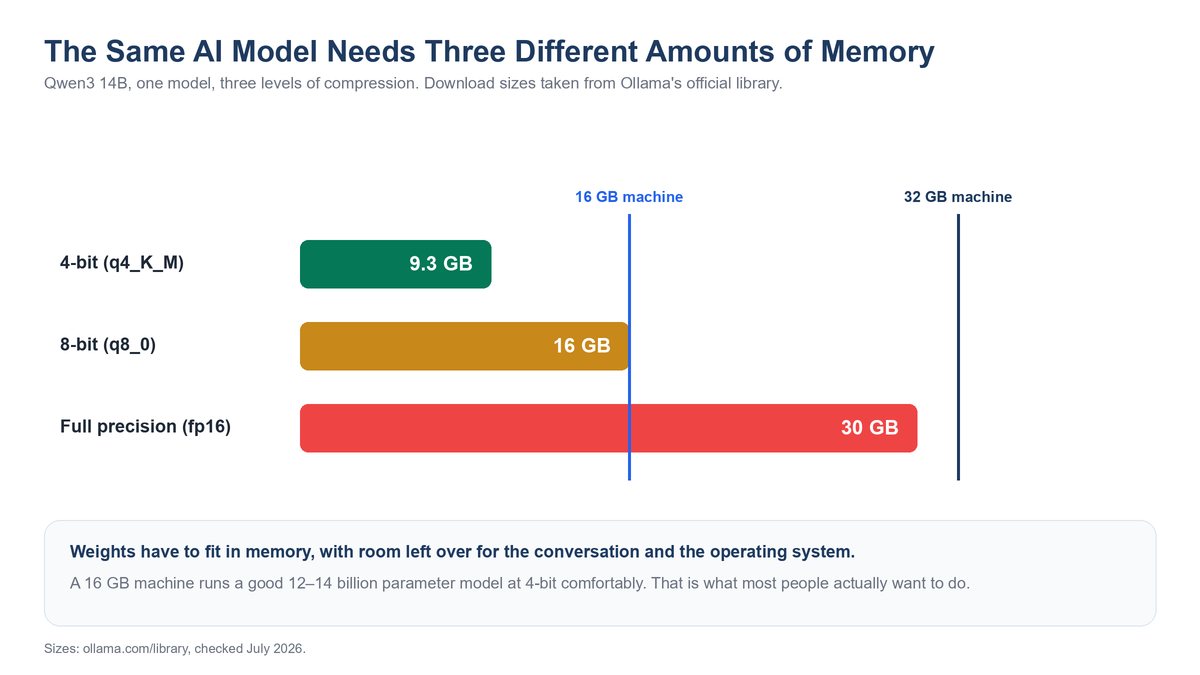
Compression is the whole story: the same model stored at lower precision takes less room and loses a little accuracy. HP asserts 32GB for AI PC workloads and shows no maths at all. Here is the maths: Qwen3 14B, from Ollama’s official library, is 9.3 GB four-bit, 16 GB eight-bit, 30 GB full precision. So 16GB runs a good 12-14B model at four-bit. None of this applies via a website or phone app — the model runs elsewhere.
Phones and Tablets Are a Different Question Entirely
Phone memory isn’t smaller PC memory: more RAM just buys warm background apps, not speed — why a phone under 500 can feel almost identical to a flagship.
What the Benchmarks Actually Show About Stutter
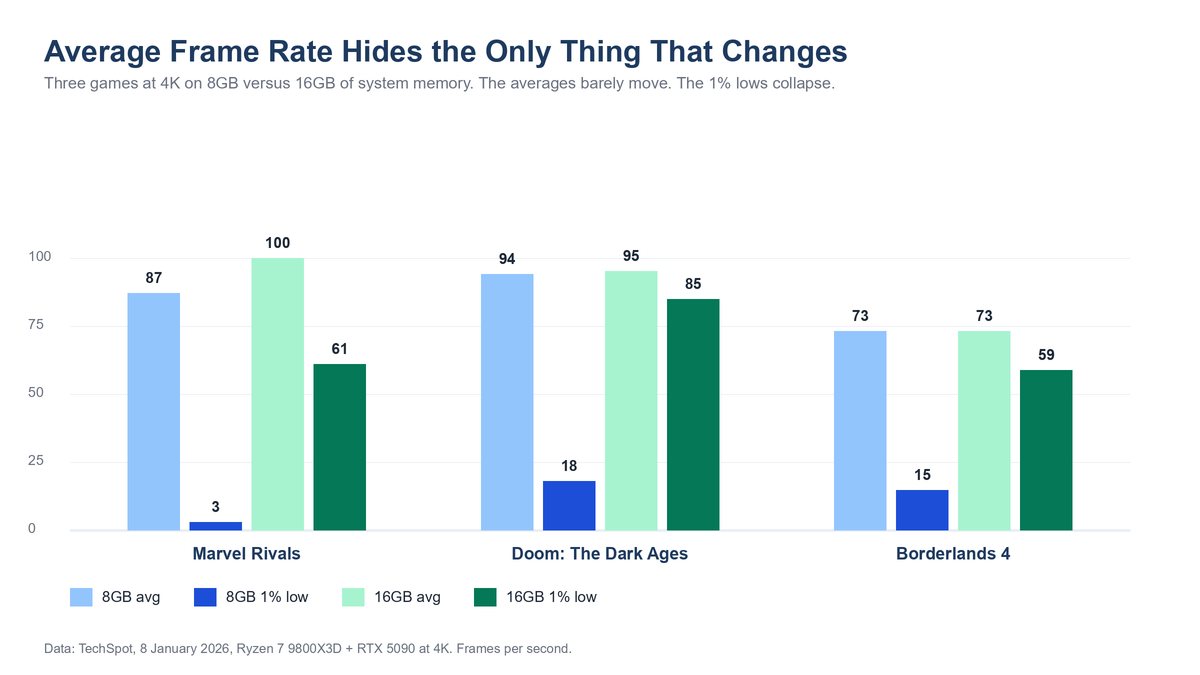
TechSpot’s January 2026 memory comparison ran on a real, cluttered Windows install — what your machine actually looks like.
The One Percent Lows Are the Stutter You Actually Feel
The 1% low is the worst frame in a hundred, the hitch you feel. In Borderlands 4 at Epic, 8GB to 16GB, average stays at 73 fps while the 1% low jumps from 15 to 59.
Read that again: the average doesn’t move, yet the game goes from unplayable to smooth. Too little memory doesn’t make a game slow — it makes it hitch.
Second finding: 16GB, 32GB and 64GB buy almost nothing for gaming, sitting inside test noise on nearly every title. TechSpot still calls 32GB the sweet spot, mainly for what DRAM costs; we follow the numbers.
Where 16GB Genuinely Breaks Down Today
The catch: Mafia: The Old Country posts a 1% low of 6 fps on 16GB against 62 fps on 32GB — TechSpot says around 20GB is needed for smooth play, making 24–32GB the sensible choice.
One title of thirteen — not that you need 32GB now, but games like this will stop being outliers eventually.
The Four Traps That Make 2026 Different
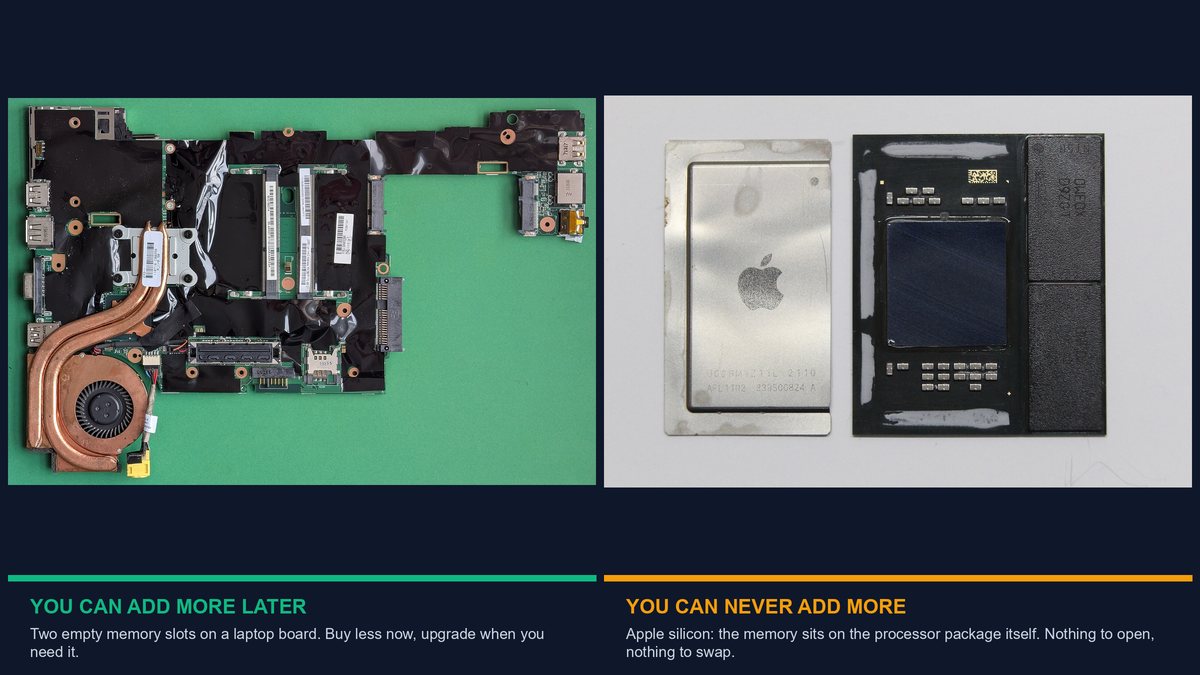
Four things decide whether you can act on the answer.
Soldered Memory Turns a Preference Into a Permanent Decision
Can you add more later? A wrong answer on a soldered machine is permanent. Apple states Mac mini memory is integrated into the chip package and cannot be upgraded; on Windows, LPDDR4X, LPDDR5 or LPDDR5X means soldered too. HP’s “buy for three years” advice is correct here: soldered — buy ahead; slots — buy less.
Apple Unified Memory Does Not Work Like PC Memory
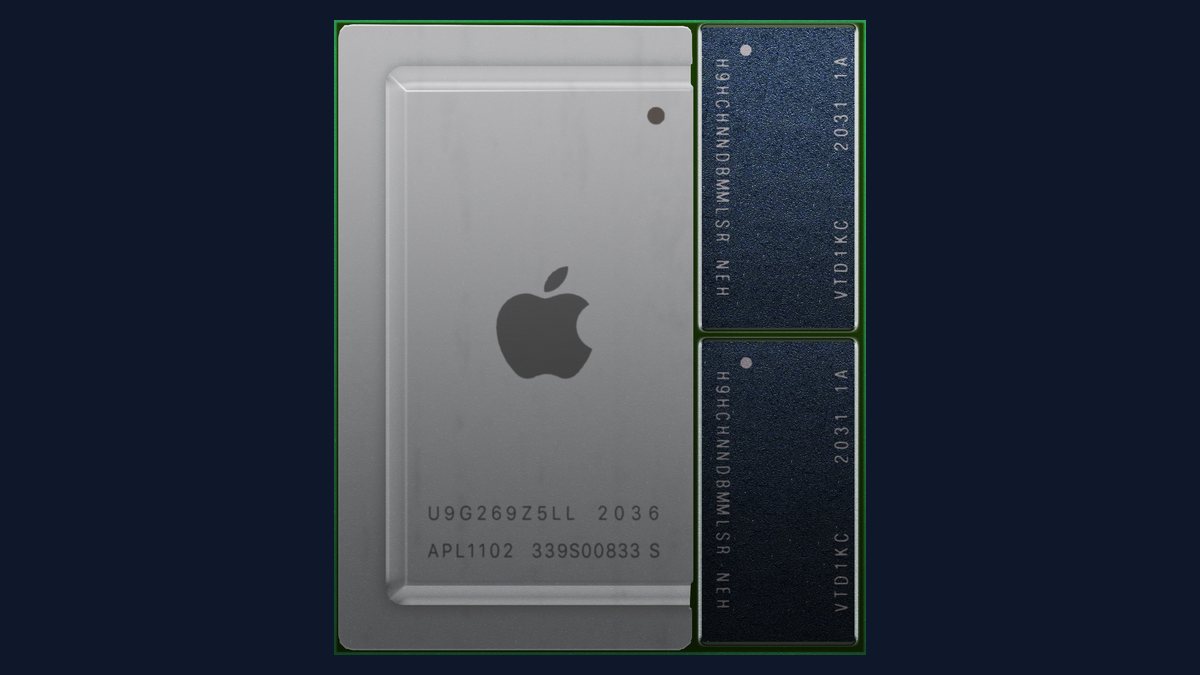
PC system RAM and video memory are separate pools; Apple’s unified memory draws the whole chip from one pool, why a Mac often runs a larger local AI model than a same-spec PC — though heavy graphics eats into what’s left, so 16GB unified isn’t simply 16GB plus a graphics card.
One Stick Instead of Two Costs Real Performance
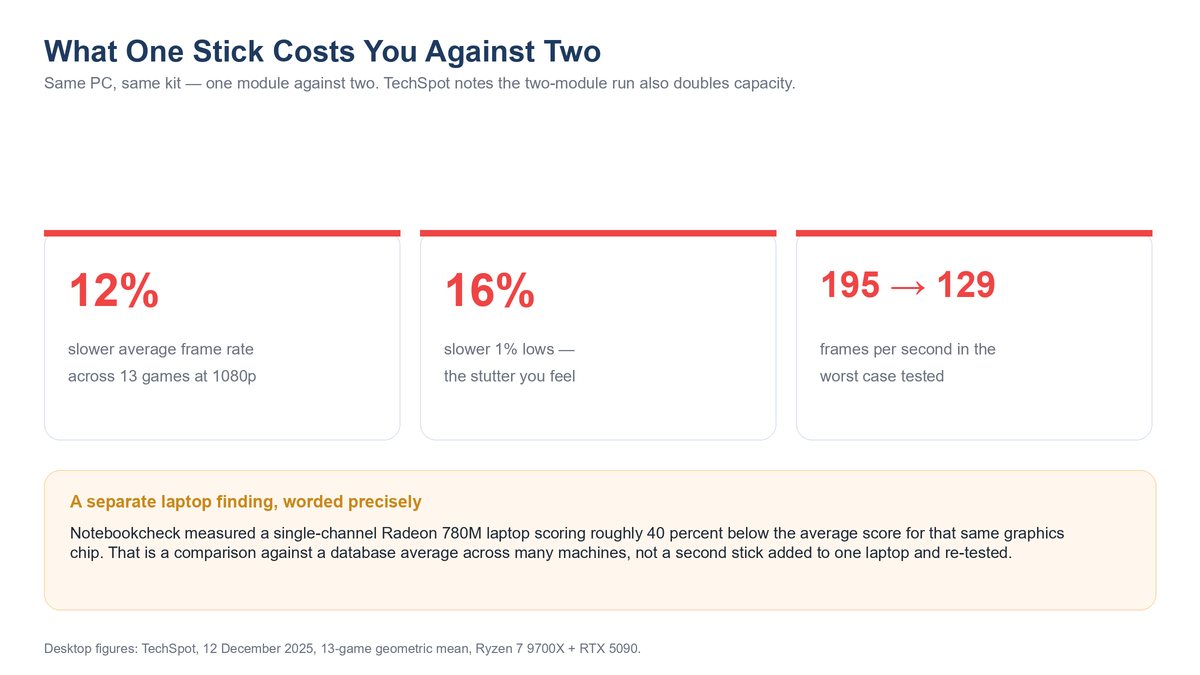
Two sticks beat one at the same capacity — a second module opens a second channel. TechSpot’s December 2025 test (doubling modules also doubles capacity, part channel, part capacity) found the single stick 12% slower on average frame rate and 16% slower on 1% lows.
Watch out: a spec sheet reading “1 x 16GB” rather than “2 x 8GB” quietly costs performance and fills your only upgrade slot.
LPCAMM2 Is Making Laptop Memory Upgradeable Again
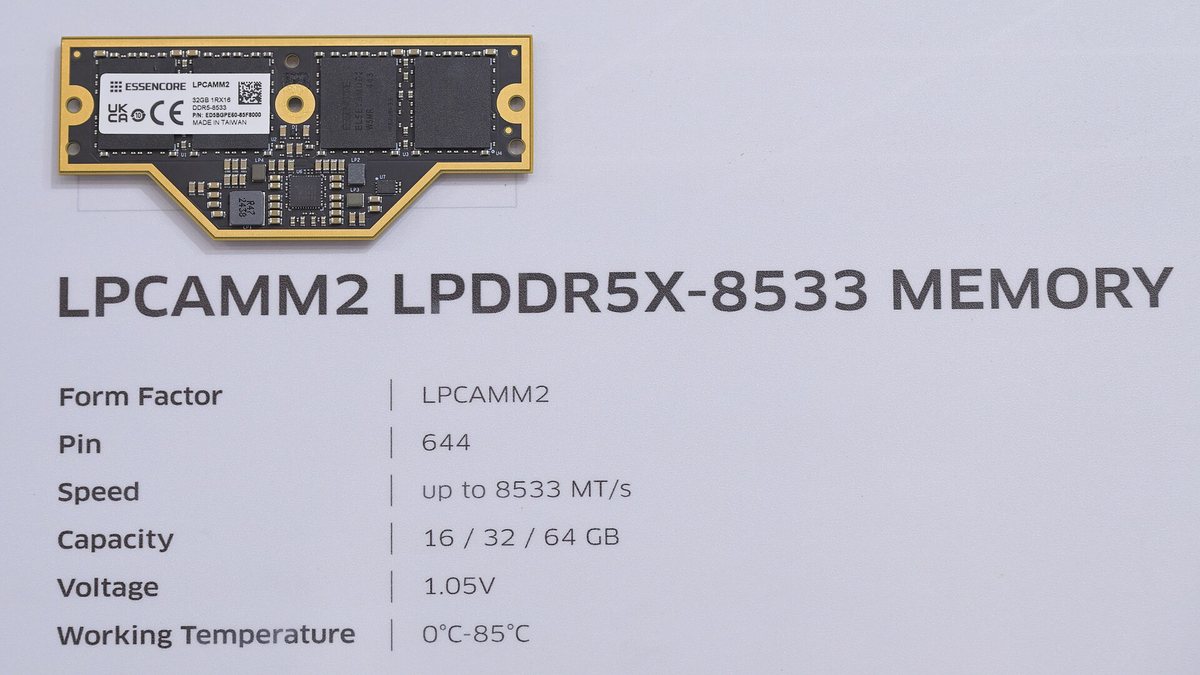
Good news: LPCAMM2 delivers low-power memory without soldering, already shipping in real laptops. With LPCAMM2/SO-DIMM, buy smaller now, upgrade on evidence.
What Overbuying RAM Actually Costs You in 2026
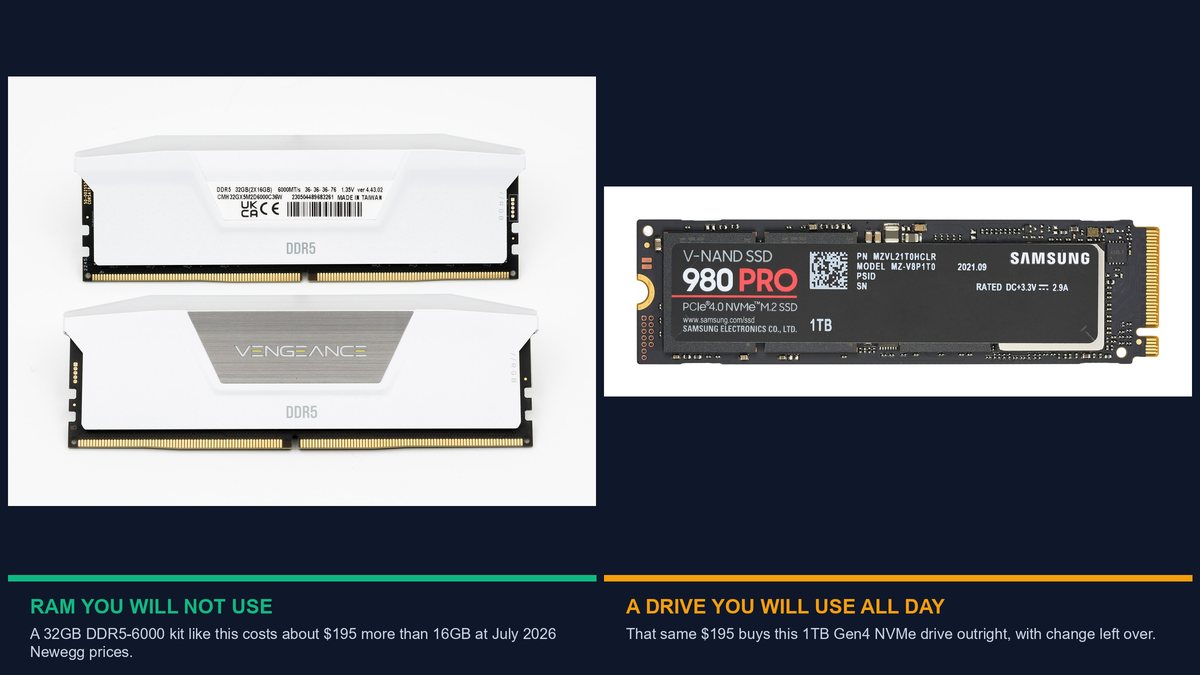
Overbuying memory usually wastes a few dollars unnoticed. Not this year.
Why Memory Got So Expensive This Year
DRAM makers diverted wafer capacity toward higher-margin AI-accelerator memory, and TrendForce tracked a 105-110% quarter-on-quarter price spike as a result — AI infrastructure demand making ordinary computers more expensive for everyone.
The Same Money Buys a Faster Drive or a Better Processor
Newegg, 27 July 2026: doubling from a 16GB kit to a 32GB kit costs roughly what a 1TB PCIe Gen4 NVMe drive costs outright — or what a real processor upgrade costs.
Tip: Check the delta: at 2026 prices, that gap is bigger than the drive it could buy.
Unlike unused RAM, both are differences you’d notice.
How to Decide in Five Minutes Flat
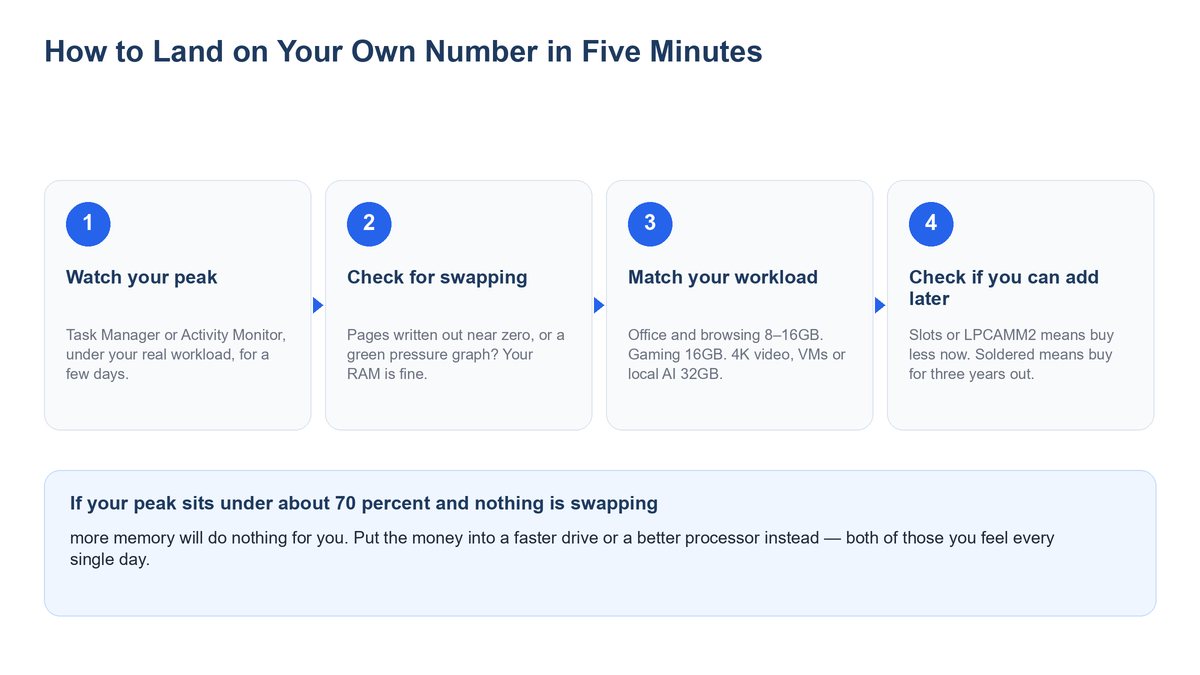
Four steps:
- Watch your peak, not idle. Note the highest figure over a few days.
- Check for swapping. Windows: pages written to disk. Mac: Swap Used and the graph’s colour. Under 70% with no swapping means nothing; past 85% means it does.
- Match your workload to a tier. Browsing/office 8–16GB. Mainstream/gaming 16GB. 4K video, VMs or local AI 32GB.
- Can you add it later? Slots/LPCAMM2: buy less now, upgrade on evidence. Soldered: buy for three years out.
If step two says the upgrade is pointless, spend on the drive or processor instead.
Frequently Asked Questions
Is 8GB of RAM still enough in 2026?
For browsing/email/office, yes — Windows 11’s minimum is 4GB. It’s the floor now; choose 16GB if soldered.
Is 16GB of RAM enough?
Yes, for most people: Copilot+ floor, M5 Air base, and newest AAA games agree.
Is 32GB of RAM overkill?
Mostly — January 2026 testing found 16GB/32GB within test noise on nearly every game; earns its price for 4K editing, VMs and larger local AI.
Does more RAM make your computer faster?
Only if you were running out; a slow, non-swapping computer’s bottleneck is almost always storage or processor.
How do I check how much RAM I am using in Windows 11?
Ctrl+Shift+Esc, Performance, Memory: watch In use, Available, Committed and Slots used over a few days.
Is 90 percent memory usage bad?
Not by itself; both OSes fill spare memory with cached files on demand. If pages written to disk stay near zero, insufficient RAM isn’t the problem.
How much RAM do I need for video editing?
32GB for 4K footage and multi-layer timelines; 16GB stays comfortable for photo editing and 1080p.
How much RAM do I need to run local AI models?
Depends on size and compression. Ollama lists Qwen3 14B at 9.3 GB four-bit, 16 GB eight-bit, 30 GB full precision. Sixteen gigabytes runs a good 12–14B model at four-bit; 32GB removes the constraint.
Can you upgrade soldered laptop RAM?
No — LPDDR4X, LPDDR5 or LPDDR5X is soldered for the machine’s life; Apple silicon memory is integrated into the chip package. Only SO-DIMM or LPCAMM2 can be changed later.
Is two 8GB sticks better than one 16GB stick?
Yes, at the same capacity. A second module opens a second memory channel. Controlled testing in December 2025 measured a single-module setup about 12 percent slower on average frame rate and 16 percent slower on 1% lows across 13 games at 1080p, though that test’s two-module run also carried double the capacity. A single stick also wastes a slot you might have upgraded into later.