Dolby Vision is a high dynamic range (HDR) format from Dolby Laboratories. Unlike standard HDR10, which sends your TV one set of brightness instructions for an entire film, Dolby Vision sends fresh instructions at every shot change, so the TV can adjust as the picture changes. It is licensed technology, so not every TV, app or streaming plan supports it.
Published 27 July 2026. Prices, lineups and firmware status verified on that date.
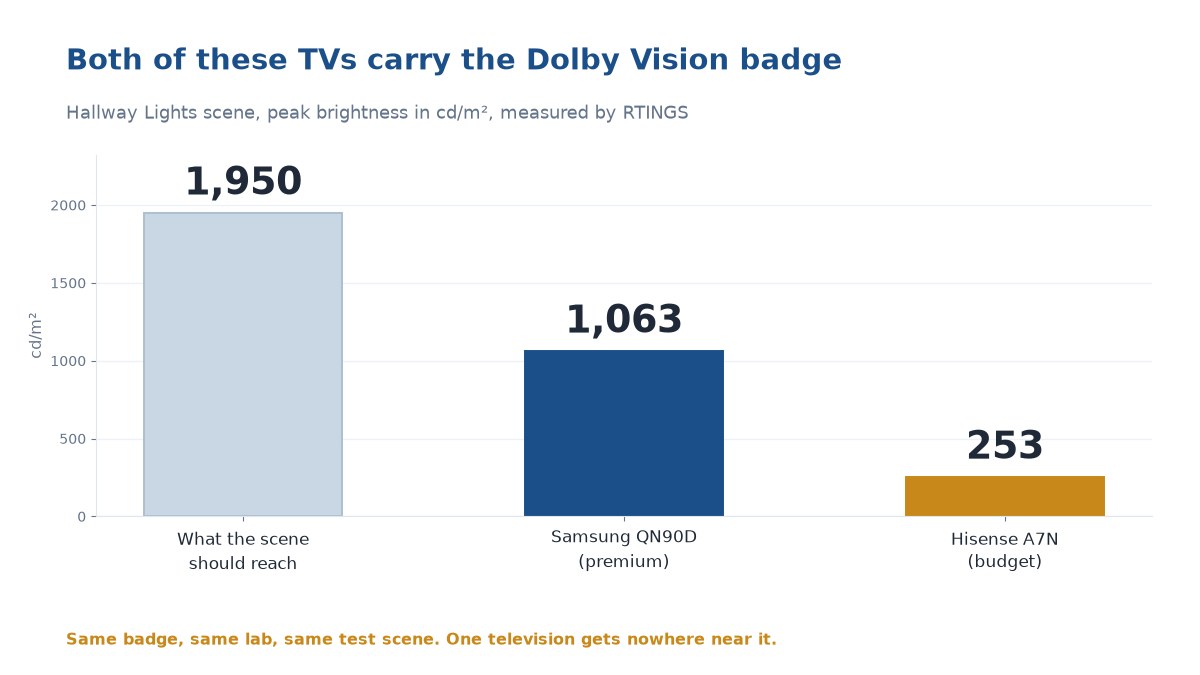
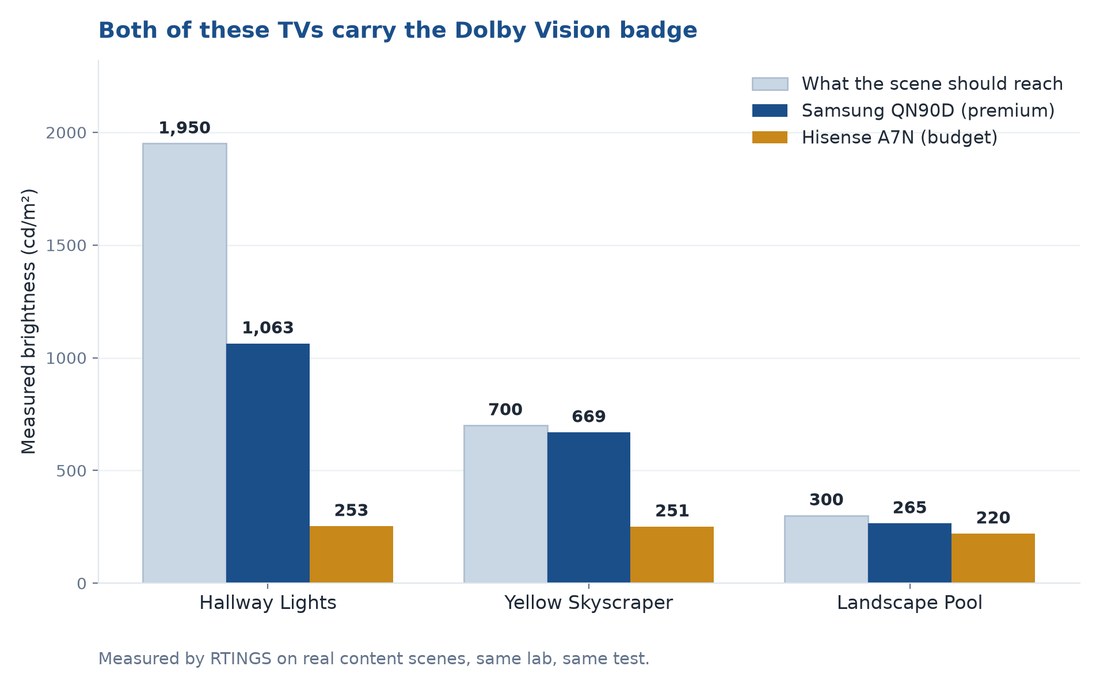
Two TVs, same lab, same scene, both carrying the Dolby Vision logo. Samsung QN90D: 1,063 cd/m². Hisense A7N: 253 cd/m². Scene target: ~1,950 cd/m². Same badge, four times the light out of one.
Nobody selling you a TV is going to lead with that. So this piece will.
- Dolby Vision sends fresh instructions per shot; HDR10 sends one and goes silent. The badge is a licensing fact, not a picture-quality promise — no brightness requirement attached, which is why two Dolby Vision TVs measured the same scene at 1,063 vs 253 cd/m².
- Smart instructions help a cheap TV more than an expensive one, but can’t make it brighter, and “12-bit, 10,000 nits” isn’t what reaches your TV — every shipping profile is 10-bit.
- Dolby Vision reaches your sofa via contracts and billing tiers as often as hardware, and Dolby Vision 2 (announced, not delivered) needs a chip your TV lacks.
What Dolby Vision Actually Is
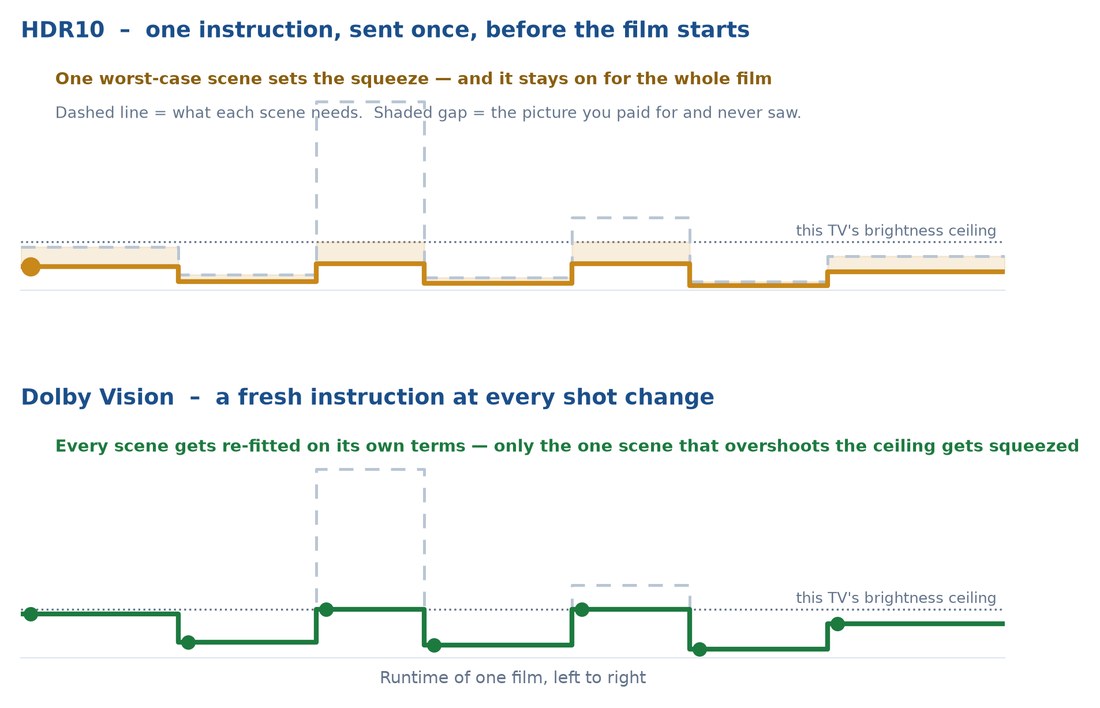
Every HDR format sends a brightness-and-colour note; formats differ in how often it arrives. HDR10 hands over one sheet; Dolby Vision talks the whole way — useful, but it can’t turn a hatchback into a sports car.
One Note vs. Running Commentary
HDR10’s metadata is fixed for the runtime; Dolby Vision’s is dynamic — Dolby’s RPU (Reference Processing Unit) updates “on as little as a frame-by-frame basis,” per RTINGS, one value per shot per Dolby’s grading guide. An optional L2 “trim” lets a colourist adjust for dimmer screens. Films are graded up to 4,000 nits; a TV given one static instruction dims everything for one bright scene. Dolby Vision re-fits every scene instead.
The Spec Sheet vs. What Your TV Actually Gets
Nearly every guide repeats a number that never reaches your TV. The 12-bit claim is Dolby’s: its Art of Better Pixels paper argues “12bit PQ is below the visible threshold for contouring artefacts whereas 10bit PQ is above.” But Dolby’s Profiles and Levels spec lists every consumer profile as 10-bit HEVC — “modern TVs are limited to 10-bit,” per RTINGS, and Dolby recommends the same for broadcast (FlatpanelsHD).
The 10,000-nit figure has the same origin: SMPTE ST 2084, the PQ transfer function Dolby developed, allows signals up to 10,000 candela/m² — the container, not your television. Dolby’s mastering monitors need only 1,000 nits, black level at/below 0.005 nits. Dolby’s consumer page prints no bit depth, no nits, just “ultravivid colors, sharper contrast, and richer details.” Even “masters up to 4,000 nits,” attributed to Dolby everywhere, appears in no Dolby document — just the ceiling of the reference monitors that happen to exist. The number on the box describes the container, not the picture.
Dolby Vision Versus HDR10 Versus HDR10+, Format by Format
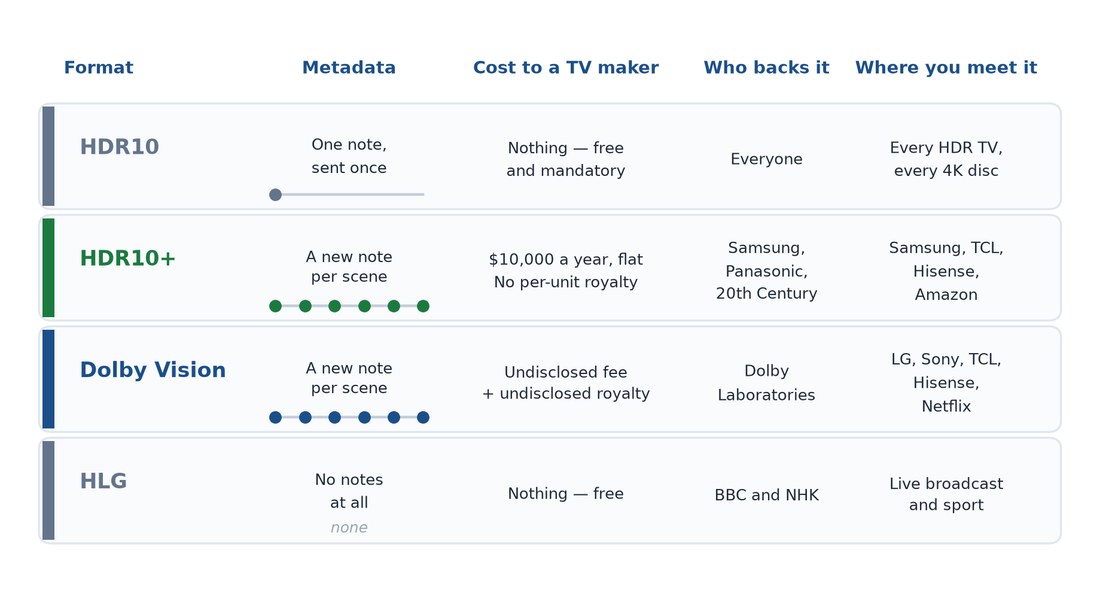
Four HDR formats exist, competing on business models more than picture quality.
The Four Formats, Compared
| Format | Metadata | Licensing | Key fact |
|---|---|---|---|
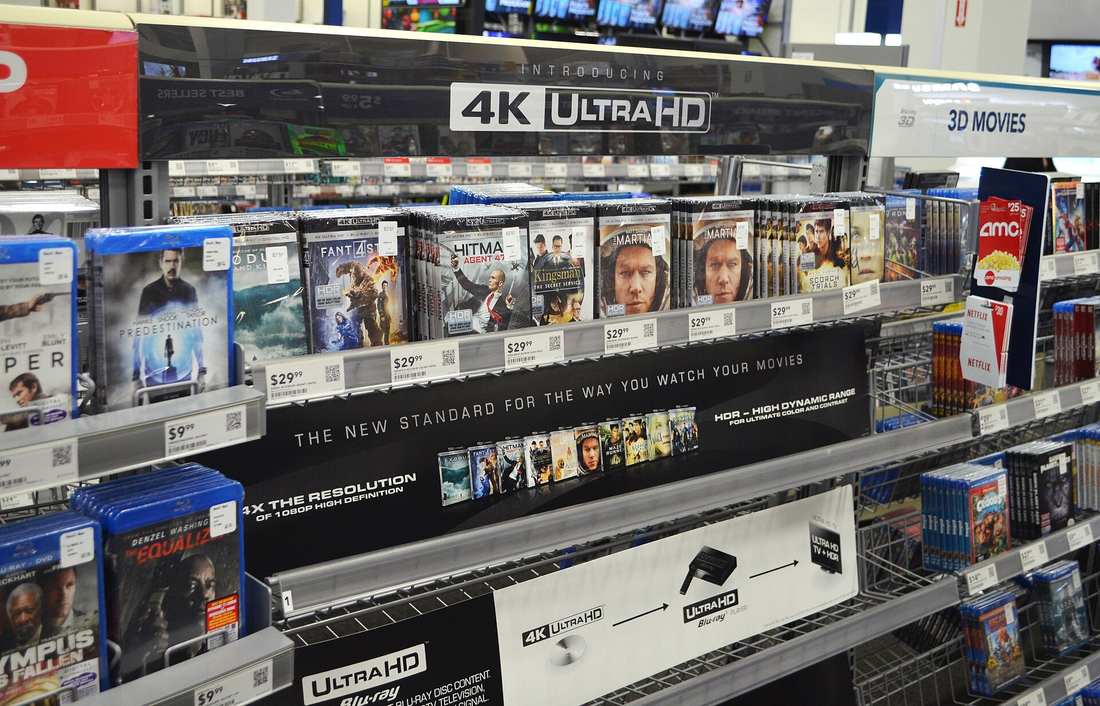
| HDR10 | Static — one note, once, for the whole film | Free, open | The floor: mandatory on every Ultra HD Blu-ray, every HDR TV must decode it |
| HDR10+ | Dynamic, Dolby Vision’s job without the bill | Royalty-free — “only a nominal administrative fee” (founded by Fox, Panasonic, Samsung; Berlin, 2018) | No manual trims like Dolby’s L2; RTINGS calls the two “very similar” |
| Dolby Vision | Dynamic, licensed tooling | Proprietary — a manufacturer signs, pays, certifies | Gets the branding, colourist tooling and profiles for streaming, disc, broadcast — good engineering, expensive |
| HLG | None — broadcast-safe by design | Free (BBC and NHK) | One signal reads right on HDR and SDR sets alike; sport, mostly |
Why Licensing, Not Picture Quality, Decides Which TVs Get Dolby Vision
The split follows contracts, not picture quality.
What Each Format Actually Charges
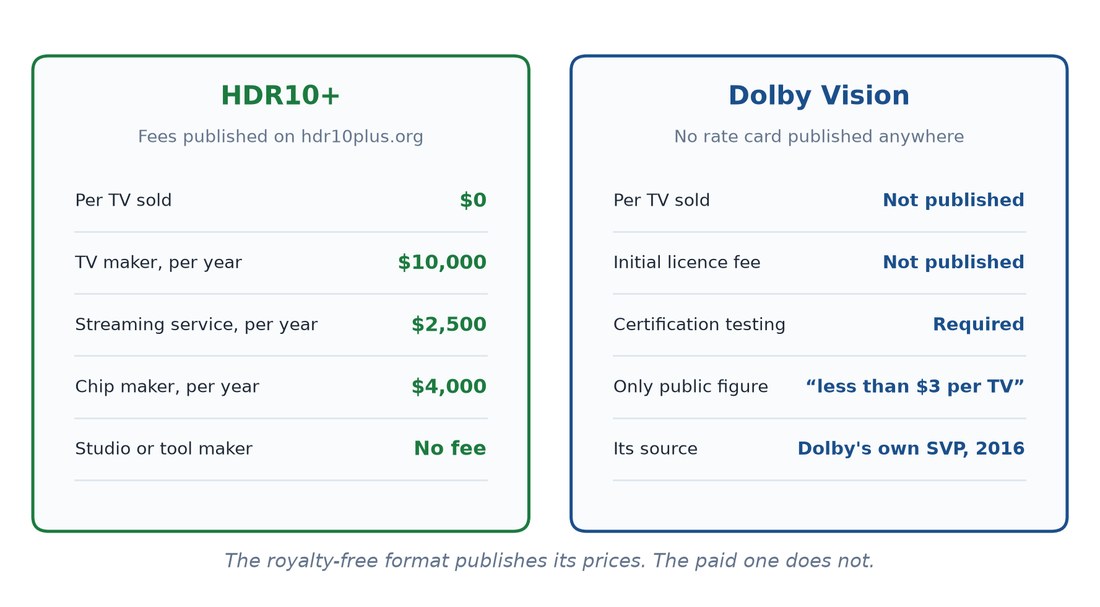
Nothing, on Dolby’s side: its licensing page has applicants pay an unpublished fee. (Dolby does publish one figure: a $2,500 annual licence to unlock manual trims, a content-side fee paid by colourists, not TV makers.) Giles Baker, then Senior Vice President of Dolby’s Broadcast Business Group, put the TV-side royalty at “less than $3 per TV” in 2016 — unaudited, never updated since. HDR10+ Technologies prints its fees instead: $10,000 a year for a display maker down to nothing for tools. One publishes its price; the other doesn’t.
Three Real-World Cases
When Prime Video’s ad-supported tier launched on 29 January 2024, it dropped to HDR10; Dolby Vision was reserved for the pricier ad-free plan — “only available on the ad-free option,” Amazon confirmed to The Verge, as reported at the time. A German patent injunction downgraded Disney+ to HDR10 across Europe, per ecoustics: support is “currently unavailable due to technical issues.” A patent injunction is many things. “Technical issues” is not the phrase I would have reached for. Samsung goes further, supporting no Dolby Vision at all (full 2026 lineup below).
Which Brands Support What in 2026
Where most buying guides let you down:
| Brand | Dolby Vision | HDR10+ | Dolby Vision 2 in 2026 |
|---|---|---|---|
| Samsung | No | Yes, plus HDR10+ Advanced on flagships | No |
| LG | Yes, including Dolby Vision IQ | No | No, skipped for 2026 |
| Sony | Yes | No | Announced, not planned — chip-limited |
| TCL | Yes, including Dolby Vision IQ | Yes | Announced, 2026 |
| Hisense | Yes, including Dolby Vision IQ | Yes | Announced, 2026 |
| Panasonic | Yes, including Dolby Vision IQ | Yes | Not announced |
| Philips | Yes | Yes | Announced, 2026 |
Nothing in that column has shipped, per FlatpanelsHD’s dated pages for LG and Sony. LG, Sony don’t support HDR10+ at all — $10,000/year, positioning not cost. “Does it have Dolby Vision” is a proxy for a contract, not picture quality — same-price sets can share panels, and the unbadged one is often brighter.
The Honest Part About Dolby Vision on a TV You Can Actually Afford
The section most guides skip.
The Badge Guarantees Nothing About Brightness — Here’s the Proof
“Current displays cannot reproduce the full Dolby Vision brightness and gamut capability. There are no brightness and color gamut capability requirements for consumer displays.”
Per Wikipedia, a 300-nit set and a 2,000-nit set can carry the identical logo. RTINGS buys its own sets; both of these carry the Dolby Vision badge:
| Test scene | What the scene should reach | Samsung QN90D | Hisense A7N |
|---|---|---|---|
| Hallway Lights | ~1,950 cd/m² | 1,063 cd/m² | 253 cd/m² |
| Landscape Pool | ~300 cd/m² | 265 cd/m² | 220 cd/m² |
Measured by RTINGS, HDR Brightness tests, 25 May 2026 — the gap widens as the scene gets brighter. The A7N carries every badge, yet RTINGS found “inadequate peak brightness… bright spots don’t pop at all.” Netflix’s guidelines require grading at 1,000 cd/m²+, versus the plain 100 cd/m² SDR reference — and the A7N’s 253 sits closer to the SDR number. Not a bug. A panel out of road.
Where Dolby Vision Helps — and Where It Can’t
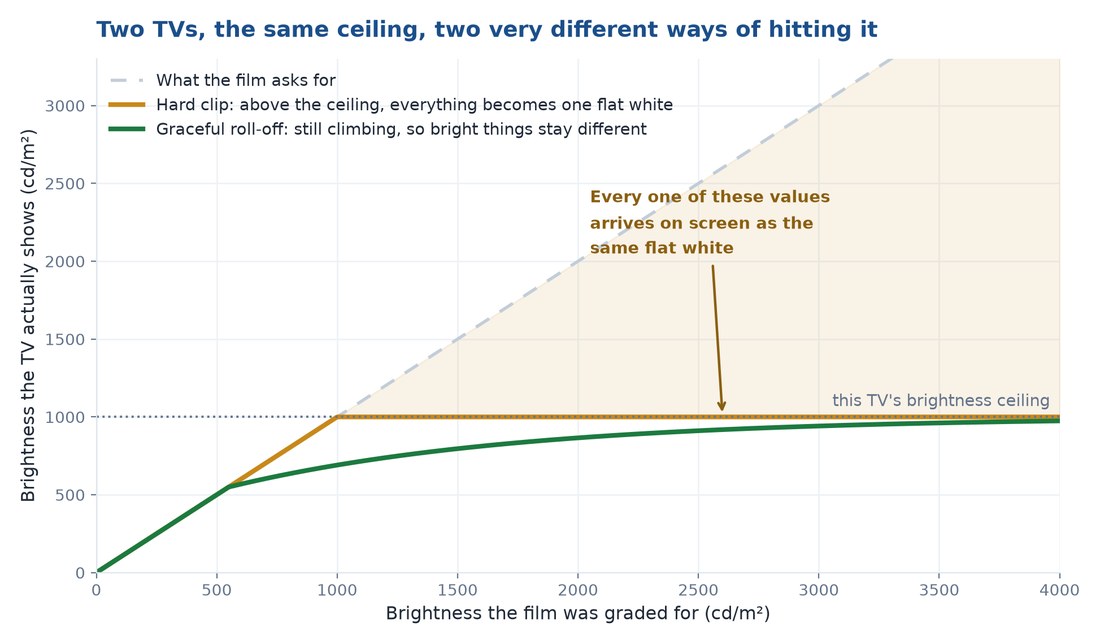
The usual claim — dynamic metadata helps good TVs most — is backwards: its “impact… is greater on low-end displays,” per RTINGS. Dolby Vision makes a dim TV’s compromise smarter. It does not make the TV brighter. Smart compromise is still compromise — no per-shot instruction adds a candela to the panel. Even the best TVs “tone map for rare content mastered at 4000 nits since no current models consistently get that bright,” per RTINGS — the panel is the hardware ceiling, whatever the metadata says; see our guide to what an RGB LED TV is.
Local Dimming, and the Invisible Difference
Darkening the screen independently matters as much as brightness, per RTINGS. The A7N has zero dimming zones, so blacks lift and “appear washed out when highlights appear on the screen,” per RTINGS — why its review pairs inadequate brightness with highlights that don’t pop. The two failures compound.
Caveat: local dimming can cause blooming, a halo around bright objects — glowing rings around subtitles are the trade-off.
What Dolby’s “Too Dark” Fix Admits
The best corroboration comes from Dolby itself, announcing Dolby Vision 2 with Precision Black, which “reduces consumer frustration that the image is ‘too dark.'” Read that as a business document. Dolby is describing content and viewing environments, not panels — but both land in the same living room, and the complaint is identical.
What You Actually Need for Dolby Vision to Work at All
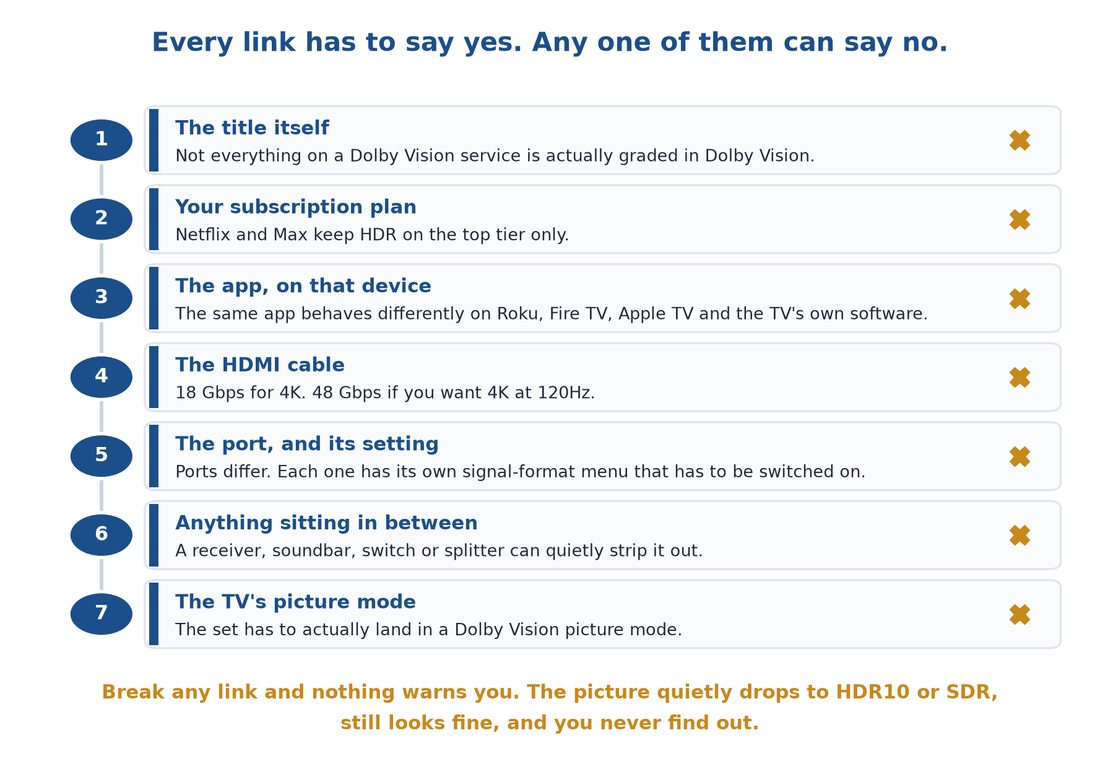
Everything above assumes Dolby Vision reaches your screen. Often it doesn’t.
The Chain, Link by Link
Every link needs a yes:
- Is the title actually graded in Dolby Vision?
- Is your subscription tier high enough?
- Does the app on that device support it?
- Is the HDMI cable rated for the bandwidth?
- Is it on a port that supports it, set correctly?
- Is anything in between passing it through intact?
- Is the TV’s picture mode actually a Dolby Vision mode?
Break any one and the picture quietly drops to HDR10 or SDR.
When the App Runs on the TV Itself, HDMI Never Enters the Picture
Netflix and Max gate it behind their top tier; YouTube never had it. The built-in Netflix app shows Dolby Vision; a plugged-in stick running the same app often doesn’t, since on-TV software never crosses HDMI. From Netflix, not from me: it plays “the highest quality available for that device, port, or cable” rather than warn you, per its help centre.
Tip: Play Our Planet or Lost in Space on Netflix — a 30-second check. Otherwise: a badge flash on start-up, the remote’s info button, or the picture-mode list.
HDMI Troubleshooting — Cables and Ports
Apple’s support page lists the usual breaks: wrong input, a mislabeled setting, outdated firmware. 4K needs 18 Gbps HDMI; 4K120/8K needs 48, the HDMI 2.1 ceiling (HDMI.org).
Tip: Apple TV’s built-in cable test (Settings > Video and Audio > Check HDMI Connection) flags a bad cable fast.
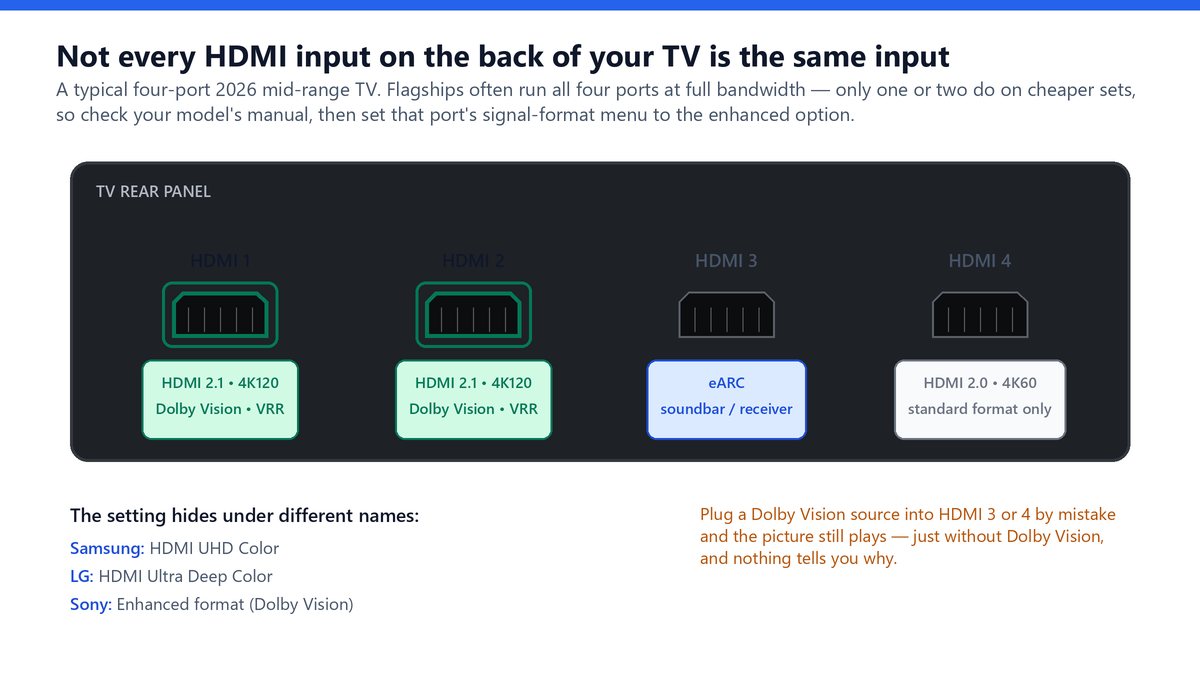
Ports on one TV aren’t interchangeable: Sony’s “Enhanced format (Dolby Vision)” option is separate from 4K120, and picking 4K120 loses Dolby Vision. Sony warns the reverse too — on Enhanced format “picture and sound may not be output correctly,” so move to Standard format if that happens.
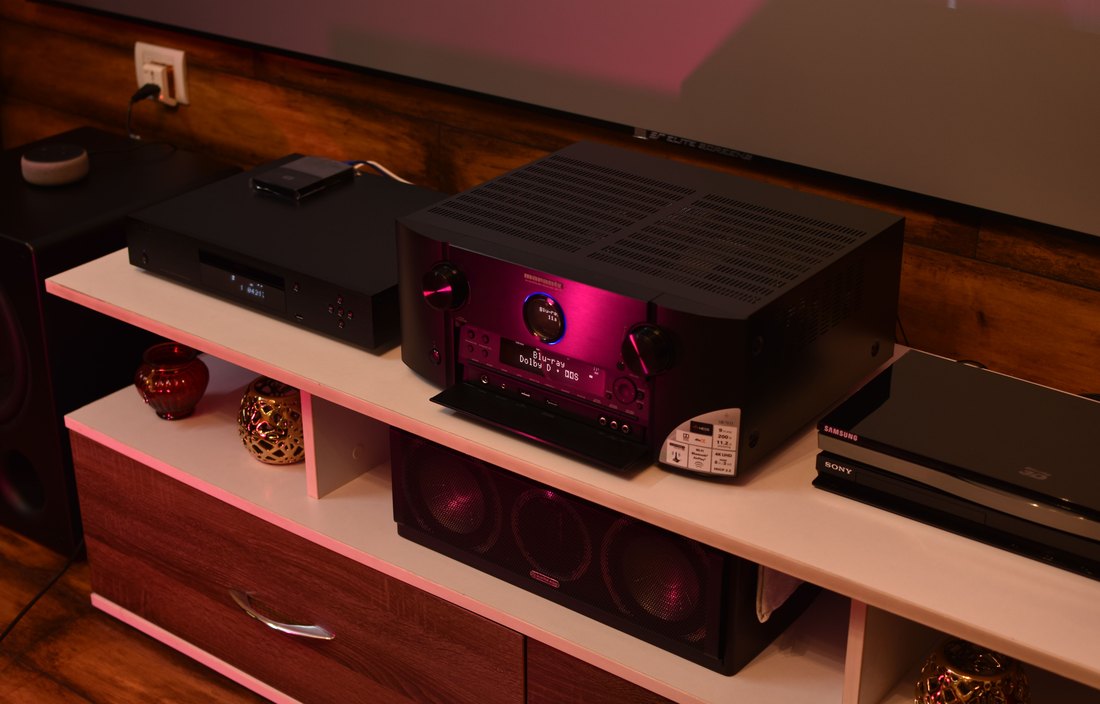
Receivers are the worst offender: sound and picture pass fine while Dolby Vision quietly doesn’t. Bypass to the TV; if it appears, update firmware. If the screen is fully dark rather than just missing the format, that’s a different fault — see our black-screen walkthrough.
Dolby Vision’s Variants, Decoded
Dolby Vision is not one thing.
Dolby Vision IQ Is Two Things
Most articles call Dolby Vision IQ “the ambient light sensor feature” — half of it. Dolby splits it into Light Sense (room light) and Automatic Playback Optimization, using L11 metadata to shift white point, noise reduction and sharpness across Movies, Game, Sport and User Generated Content — almost nobody mentions the second half.
Dolby Vision for Gaming and 4K120
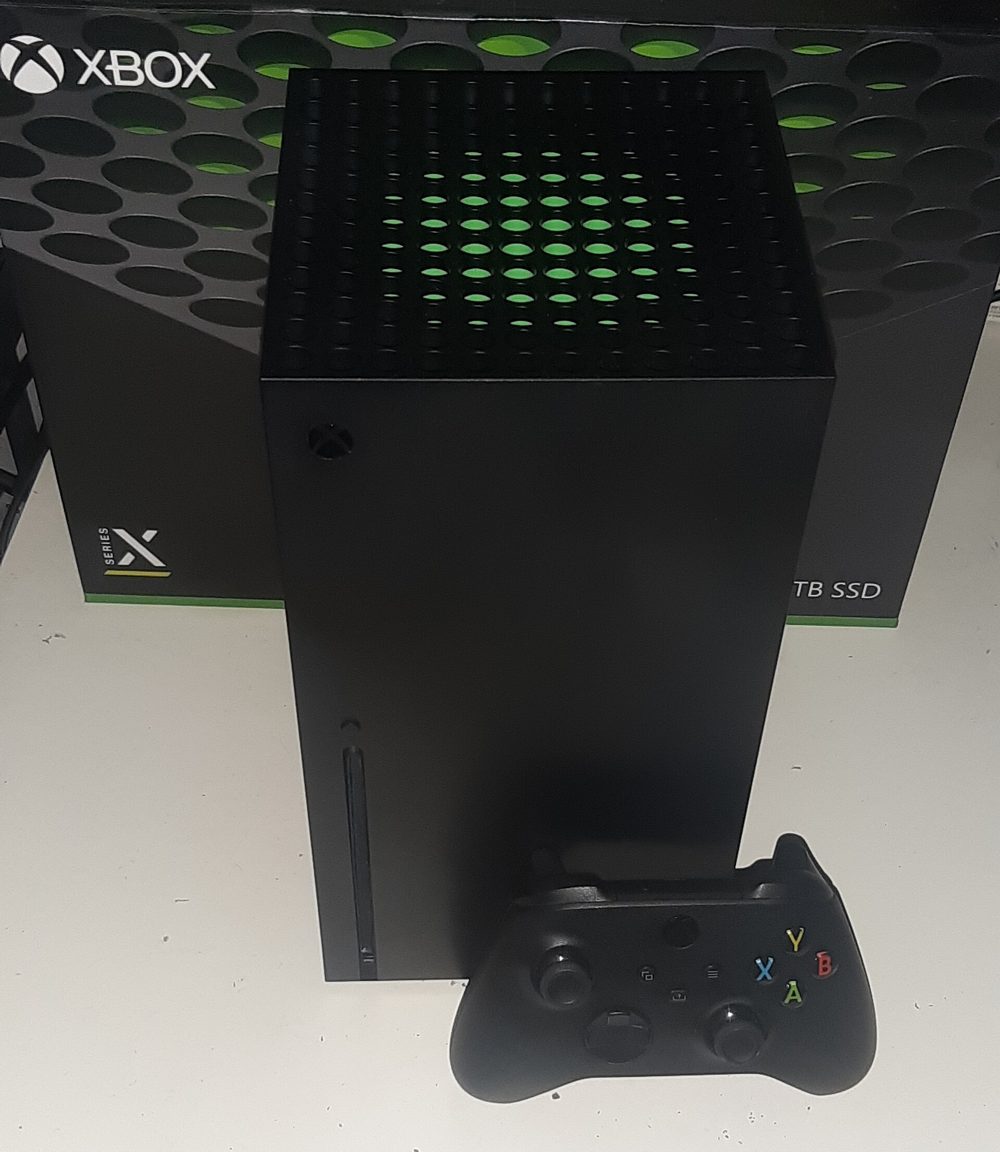
Dolby Vision gaming launched on Xbox Series X|S, 28 September 2021, still the console for it. Microsoft recommends automatic low-latency mode (ALLM) for it — turn it on. 4K120 in Dolby Vision, impossible at launch, is now standard on 2026 LG, Sony and Panasonic flagships.
Profile 5 vs Profile 7, and Why Streaming Goes Green
A washed-out, greenish stream is documented, not a fault: Profile 5 (streaming) has no fallback for incompatible gear, rendering it wrong. Profile 8 falls back to HDR10, SDR or HLG depending on the variant. Profile 7 (4K Blu-ray) is dual-layer with an HDR10 base, so discs play anywhere; its FEL variant alone reconstructs to 12-bit, downsampled to 10-bit regardless.
Dolby Vision 2 and HDR10+ Advanced
Dolby Vision 2, announced at IFA Berlin in September 2025, brings a redesigned Image Engine, Precision Black and more; per FlatpanelsHD, no TV has the firmware and there’s no content yet. Samsung answered with HDR10+ Advanced two months later — “a rushed response,” per FlatpanelsHD.
The catch: it needs a MediaTek Pentonic 800 chip or newer — no firmware update will add it to an existing TV.
So Should You Care About Dolby Vision? A Straight Answer
Every article says it depends. Here it doesn’t:
Quick Guidance by Situation
| Situation | What to do |
|---|---|
| Already own a Samsung TV | You’ll never get Dolby Vision — fine, HDR10+ does the same job on flagships already among the brightest made. |
| Buying a budget TV | A brighter unbadged set beats a dimmer badged one. |
| Buying premium | LG and Sony don’t support HDR10+; TCL, Hisense, Philips and Panasonic give you both. |
| Gamer or disc collector | Xbox Series X|S is the console; Ultra HD Blu-ray (Profile 7 FEL) is still the best-quality route. |
The Bottom Line on What That Badge Is Worth
Dolby Vision is real engineering, and its benefit is largest on the cheap televisions most people own. But the logo tells you a licence was paid, not that the television can produce the picture the format was designed to carry: Dolby sets no requirement that it should, and two badged sets can measure 1,063 and 253 cd/m² on the same scene.
Buy the panel, not the badge. Dolby Vision makes your television’s compromise smarter — only the panel decides how big that compromise is.
Frequently Asked Questions
Is Dolby Vision better than 4K?
Not the same thing: 4K is resolution, Dolby Vision is dynamic range.
Is Dolby Vision better than HDR10?
Technically yes — fresh instructions per shot beat one for the whole film. Whether you’ll see it varies, though: RTINGS notes often “barely any visible difference between the three formats.”
Is Dolby Vision just HDR?
One flavour of it — HDR10, HDR10+, Dolby Vision and HLG are all formats within the HDR category, and Dolby Vision is the licensed one.
Do I need Dolby Vision?
Not really; brightness and local dimming matter more.
Does my TV have Dolby Vision?
Check the picture-mode list, or play Our Planet on Netflix, one of the titles it names for the label.
Is Dolby Vision worth it?
Free on a TV that already has it — it helps lower-end sets most. As a reason to spend more, no; brightness or local dimming matters more.
What is Dolby Vision IQ?
Two features: Light Sense adapts to room light; Automatic Playback Optimization adjusts by genre, and most guides only cover the first.
Why is Dolby Vision so dark?
Usually your TV can’t reach the graded brightness, so it compresses the picture down — try the brighter Dolby Vision mode, not Dark. Dolby Vision 2’s Precision Black targets this, though no TV has the firmware yet.
Does Netflix have Dolby Vision?
Yes, with the broadest series selection of any service — but only on Premium.
Does Samsung support Dolby Vision?
No, and there’s no sign of change: the 2026 lineup lists HDR10, HDR10+ and HLG, with Dolby Vision absent throughout.