Walk past the back-to-school table this month and a $249 Chromebook sits next to a $549 Windows laptop under one sign saying both are perfect for school. One of them stops getting security updates in under three years, and nothing on the shelf tells you which.
That is the part of the Chromebook vs laptop argument nobody puts in front of you, and it decides whether you are buying a three-year machine or a nine-year one.
- The real test is not specs, it is whether your work happens inside a browser tab
- Every Chromebook has a Google-published Auto Update Expiration date, after which security patches stop
- Google gives ChromeOS platforms 10 years of updates counted from the platform’s release, not your purchase
- A clearance Chromebook with under three years left costs more per supported year than a $549 Windows laptop
- Adobe’s desktop apps, installed PC games and some exam-proctoring clients will never run on ChromeOS
- The Chromebook Plus badge is a real hardware floor: 8GB of RAM, 128GB of storage, a 1080p screen
The fine print: TechDaily earns an affiliate commission when you buy through the links on this page, at no extra cost to you. It never changes which machine we recommend.
Every pick below comes from the same three inputs: the model’s published AUE runway, whether it clears the Chromebook Plus hardware floor, and price. None of it is a hands-on test verdict.
What is this machine going to do all day?
★ Your pick: Acer Chromebook Plus 515
If the workload is Docs, Classroom and a browser, this is the honest answer.
★ Your pick: Microsoft Surface Laptop
Installed creative software is Windows and Mac only, and the Surface covers it. CAD or engineering apps usually need a discrete GPU this thin-and-light lacks — check requirements first.
★ Your pick: Microsoft Surface Laptop
Several testing clients refuse to launch on ChromeOS. Check your program first.
★ Your pick: Lenovo Chromebook Duet
A detachable that is a tablet when you want one and a keyboard when you need one.
★ Your pick: MacBook Air M1
Refurbished Apple silicon runs the browser things and the installed things — at roughly two years less runway than a five-year Chromebook Plus floor, so price that tradeoff before you buy.
👑 Our Top Pick — Best Overall Value
Acer Chromebook Plus 515
A long update runway and a real hardware floor, for half the price of a comparable Windows machine — picked for the best price-to-runway balance, not the single longest AUE date on the chart.
Opens on our Top Pick. Tap an option to see the best match for you.
What Actually Separates a Chromebook From a Laptop
A Chromebook is a laptop. Same screen, same keyboard, frequently the same Intel chip. The difference sits one layer up: it runs ChromeOS, built around the Chrome browser, and it cannot install Windows or Mac software. That is the whole answer to what the main difference between a laptop and a Chromebook is, and everything else flows out of it.
So run the browser test on yourself. List what you did on a computer last week. Gmail, Docs, Canvas, Zoom, Canva, ChatGPT are browser. Photoshop, Solidworks, a Steam library, a testing client are installed software. If the list is 90% browser, a Chromebook does your job for half the money. If two items are installed software you cannot skip, the decision is already made.
Offline is less scary than its reputation. Gmail, Drive, Docs, Sheets and Slides all have an offline mode, and downloaded Netflix and Spotify play fine. But it is opt-in, and a Chromebook nobody switched it on for is a brick in a dorm with dead Wi-Fi.
The catch: run the browser test on the next four years, not last week. A junior who lives in Docs today may be a design major by sophomore year, and design majors do not live in Docs.
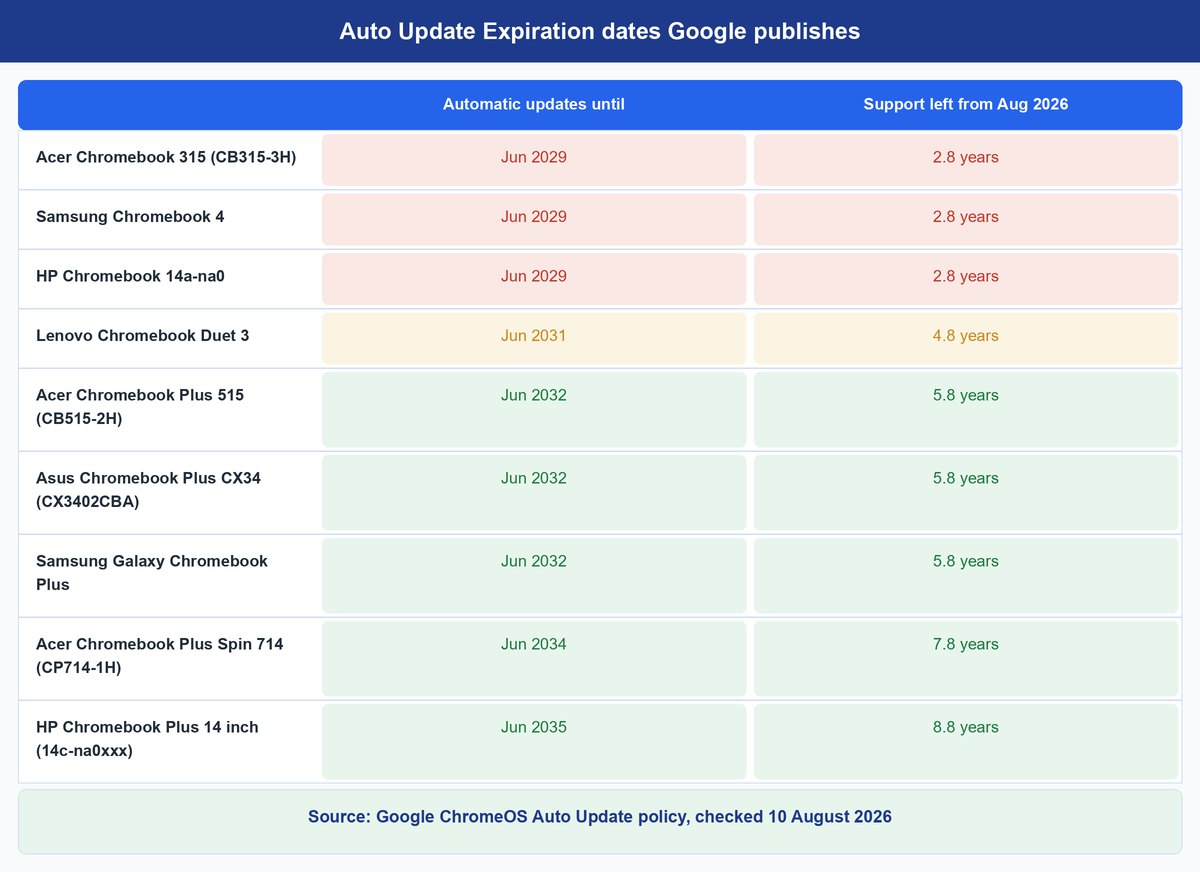
Every Chromebook Has an Expiration Date Google Publishes
| Model | Updates until | Support left from Aug 2026 |
|---|---|---|
| Acer Chromebook 315 (CB315-3H) | Jun 2029 | 2.8 yrs |
| Samsung Chromebook 4 | Jun 2029 | 2.8 yrs |
| HP Chromebook 14a-na0 | Jun 2029 | 2.8 yrs |
| Lenovo Chromebook Duet 3 | Jun 2031 | 4.8 yrs |
| Acer Chromebook Plus 515 (CB515-2H) | Jun 2032 | 5.8 yrs |
| Asus Chromebook Plus CX34 (CX3402CBA) | Jun 2032 | 5.8 yrs |
| Samsung Galaxy Chromebook Plus | Jun 2032 | 5.8 yrs |
| Acer Chromebook Plus Spin 714 (CP714-1H) | Jun 2034 | 7.8 yrs |
| HP Chromebook Plus 14 inch (14c-na0xxx) | Jun 2035 | 8.8 yrs |
Here is what page one of this search is almost silent about. Every ChromeOS device has an Auto Update Expiration date: the month Google stops shipping it updates. Google lists it model by model on its Auto Update policy page, where its own advice is blunt: “Remember to check the date when making a purchasing decision.”
Current policy gives ChromeOS platforms 10 years of updates, measured from the platform’s release date rather than the day the box left the warehouse. That is where the money hides. A model launched in 2019 and still discounted in 2026 is not a ten-year machine to you. It is a three-year machine wearing a ten-year policy. Google is equally clear about what follows the last update: policies may stop working as intended and technical support ends. The laptop keeps booting, it just stops being patched, which for a machine built entirely around the open internet is the part that matters.
Windows has no per-device equivalent, and that cuts both ways. Microsoft dates the operating system instead — Windows 10 support ended on October 14, 2025 — and the machines that could not meet Windows 11’s hardware requirements were the ones stranded. A Windows laptop’s horizon is fuzzier, not automatically longer. The Chromebook simply prints the number.
Where to find it: on a machine you already own, open Settings, then About ChromeOS, then Additional details.
The Cost per Supported Year Almost Nobody Runs
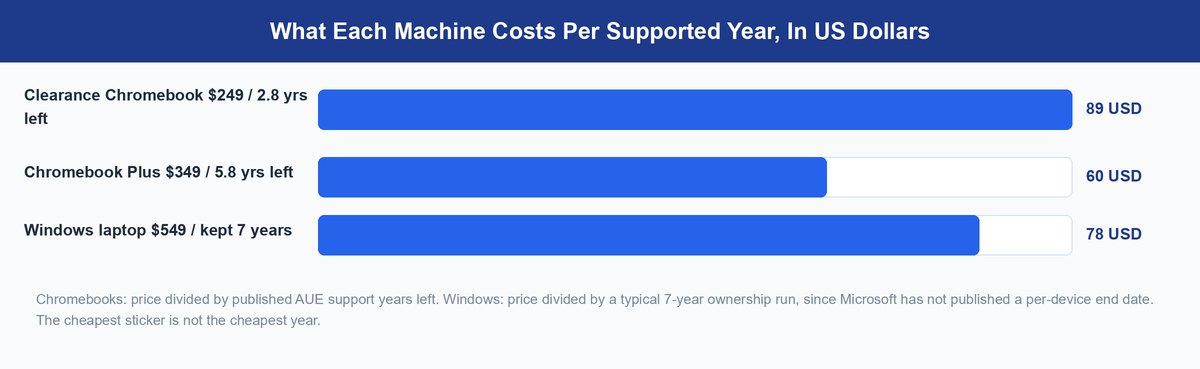
“Chromebooks are cheaper” is true on the sticker and often false on the calendar. Divide price by the support years left and the cheap machine can lose outright.
A $249 clearance Chromebook expiring in June 2029 has about 2.8 years left, roughly $89 per supported year. A $349 Chromebook Plus running to June 2032 has 5.8 years, about $60 a year. A $549 Windows laptop kept seven years — an ordinary run, as we cover in how long laptops actually last — lands near $78 a year.
The clearance Chromebook is the most expensive machine of the three, and it is the one wearing the deal sticker. The lesson is not that Chromebooks win on money. It is that current-platform Chromebooks do.
Keep in mind: an expired Chromebook has almost no resale value and no upgrade path, because ChromeOS cannot be swapped for a newer supported version the way you would reinstall Windows.
What the Chromebook Plus Badge Actually Guarantees
Chromebook Plus is not a trim level someone in marketing invented. When Google announced it in October 2023 it attached a hardware floor to the name: an Intel Core i3 12th generation or above, or AMD Ryzen 3 7000 series or above, 8GB or more of RAM, 128GB or more of storage, a Full HD IPS display or better, and a 1080p webcam.
Those minimums kill the three things that made cheap Chromebooks miserable: 4GB of RAM that died at fifteen tabs, 32GB of storage that filled in a semester, and a washed-out 1366×768 screen. A Plus machine also sits on a recent platform by definition, so its date is far out. The HP Chromebook Plus 14 runs to June 2035, against June 2029 for the HP Chromebook 14a-na0 still turning up on clearance racks.
The Software That Will Never Run on ChromeOS
ChromeOS runs Android apps and, on most models, a Linux container. Both are useful and both are oversold: Android apps are phone apps stretched across a 14-inch screen, and the Linux layer is a command line, not a Windows compatibility shim.
Adobe’s Installed Desktop Applications
Photoshop, Premiere Pro and Illustrator are Windows and Mac software with no ChromeOS version. Adobe Express and Photoshop on the web cover light work. A design or film program that hands you a desktop Creative Cloud workflow has already written “buy Windows or Mac” into your syllabus.
Nearly Everything in a Steam Library
A Chromebook cannot install a Windows game executable, full stop. It can run Android games and cloud streaming through GeForce NOW or Xbox Cloud Gaming, where the game runs on someone else’s hardware and you get a video feed. That works well on strong Wi-Fi and falls apart on congested dorm networks.
Installed Tax and Accounting Software
Desktop TurboTax, QuickBooks Desktop and the long tail of small-business software are installed Windows programs. Most now have web versions that are enough for a household. If your work depends on one specific installed package, confirm it has a real browser edition before you buy.
School Testing and Proctoring Clients
This is the one that ruins actual weeks. ExamSoft’s Examplify, used across law, medical, nursing and dental programs, states in its own minimum system requirements that it “will not run on Chromebooks, Android, or Linux operating systems.” Other proctoring tools ship a Chromebook build only when your school enables it. Email the program before week one.
Where Tablets and Used MacBooks Fit In
An iPad with a keyboard case lands within about $80 of a Chromebook Plus and is better for reading, annotating and drawing. It is worse for a fifteen-page paper with citations and for the eight-tabs-and-a-video-call pattern school actually looks like. Buy it as a second device.
The used MacBook is the underrated third answer. A refurbished MacBook Air M1 often sits near mid-range Windows money and runs what a Chromebook refuses. Apple publishes no per-device expiry, but its recent pattern has been roughly seven or more years of macOS updates, and M1 Macs are still supported.
How to Pick in Three Questions
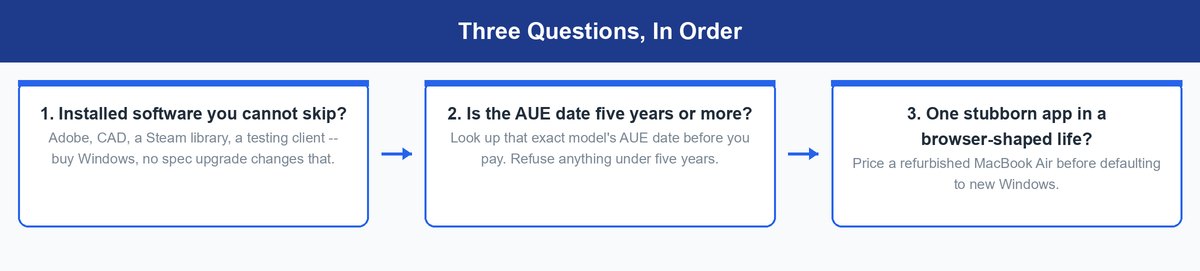
Ask them in order and stop at the first one that answers. Is there installed software you cannot skip? Buy Windows. If not, look up that exact model’s AUE date before you pay and refuse anything under five years. And if one stubborn app sits in an otherwise browser-shaped life, price a refurbished MacBook Air before defaulting to new Windows.
One thing worth naming plainly: most of page one here is written by companies that manufacture or sell both kinds of machine, and the Windows machine carries the higher price and the wider accessory attach. That is not dishonesty, but it explains why these comparisons end at specs and never reach the expiration date on Google’s own support site. For model-by-model picks see our guide to laptops for college students, and if a salesperson pitches AI features, whether you need an AI PC and what an NPU actually does will save you a few hundred dollars.
The Honest Answer for Back-to-School Season
For a student whose whole workload is Docs, Classroom and a video call, a current Chromebook Plus is not a compromise. It is the right machine at half the money. For a student with one immovable piece of installed software, a Chromebook is not a bargain at any price, because the thing it cannot do is the thing that gets graded. Between the two, the tiebreaker is the date.
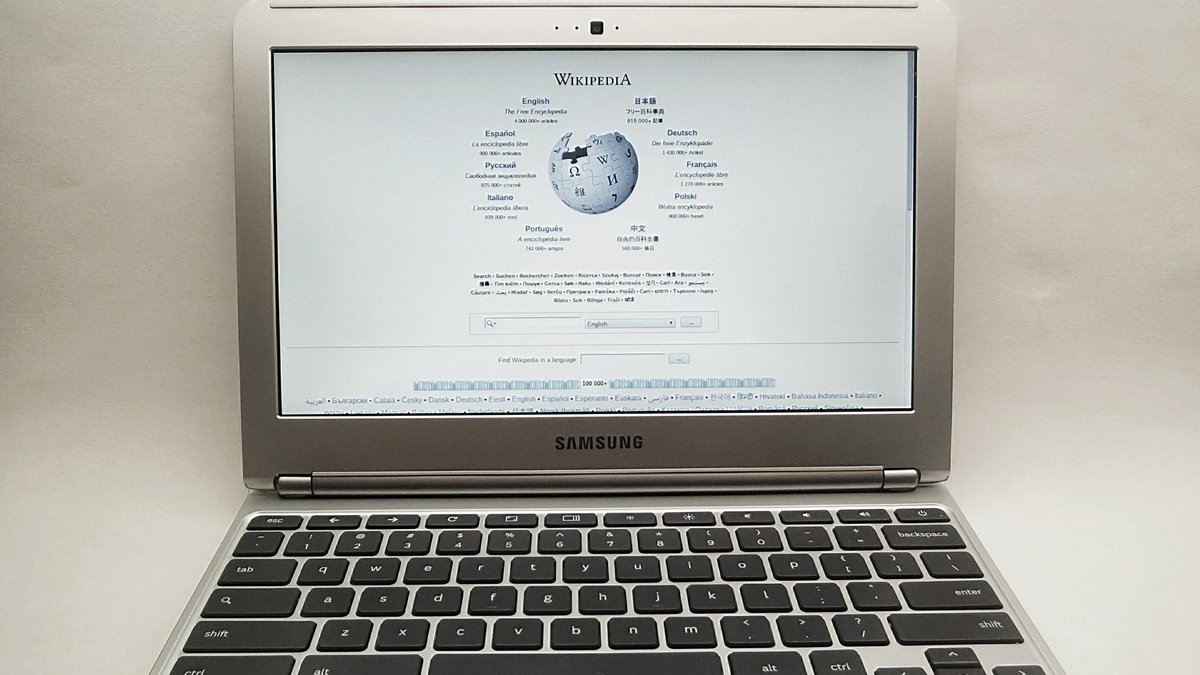
Featured photo: Marcus Qwertyus, CC BY-SA 3.0, via Wikimedia Commons.
Frequently Asked Questions
Is a Chromebook or a laptop better for students?
It comes down to whether the school’s work happens in a browser. Most K-12 districts run on Google Workspace and Classroom, so a Chromebook is the better buy: cheaper, faster, harder to break. Once Adobe, CAD or proctored exams enter the picture, Windows or a Mac becomes a requirement rather than an upgrade.
What is the main difference between a laptop and a Chromebook?
A Chromebook runs ChromeOS and installs only web apps, Android apps and Linux tools. A Windows laptop or Mac installs traditional desktop software. Price, battery life, boot speed and storage size are all downstream effects of that one difference.
Do Chromebooks work without internet?
Yes, if you set it up in advance. Gmail, Drive, Docs, Sheets and Slides each have an offline mode you switch on while still online, and downloaded video and music play fine. What you lose is anything that exists only as a website.
How much should I spend on a Chromebook versus a laptop?
Roughly $300 to $400 buys a Chromebook Plus, which is where Chromebooks stop being frustrating. Under $250 usually means an older platform with a short update runway. On the Windows side, $500 to $700 gets 16GB of RAM and storage that will not age out in two years.
Is a Chromebook enough for college?
For a lot of majors, yes: business, education, communications, most humanities. It is not enough for engineering, architecture, film, most design programs, or any program using a desktop testing client. Ask your department for its software requirements list before you buy.
What is the better budget buy, a cheap Chromebook or a cheap laptop?
A current-platform Chromebook, nearly every time. A $250 Windows laptop usually means slow storage and a machine struggling by year two, while a $300 Chromebook Plus meets a published hardware floor. The exception is the clearance Chromebook with an expiring update date.