
The renewal quote is how most people find out. VMware’s new owner, Broadcom, now sells the product in two big bundles, priced per core, and small servers get the worst of that math. So the hunt for VMware alternatives usually starts with a number that looks like a typo.
Here is the short version. If you run small or edge servers, you have a strong case to switch, and Proxmox VE or a turnkey appliance deserves a real pilot. If you run a big, dense estate that leans on NSX and vSAN, your leverage is a negotiation, not a migration. TechDaily sells no hypervisor and no migration service, so we have no side in that fight.
- Broadcom folded vSphere into two per-core bundles, VCF and VVF. Small hosts get the worst math, and there is no small SKU to hide in.
- No public price list exists. Analysts peg VCF near $350 per core per year — a floor near $5,600 for one socket.
- Europe opened a formal antitrust case in March 2026. That is renewal leverage today, not a rescue on a schedule.
- Renting VMware from a cloud stops being an escape. Azure’s license-included path is reported to end October 31, 2026.
- The license delta rarely decides the move. Backup re-testing, DR rewrites, and staff time do.
- Staying is a real answer for dense estates built on NSX and vSAN. A bad first quote is a starting position, not a verdict.
What Actually Changed, in Plain Terms
Five shifts matter, and they stack.
1. The Product Lineup Collapsed Into Two Bundles
The standalone editions many shops budgeted around are gone. Broadcom’s licensing docs state that from version 9.0 onward, you license through VMware Cloud Foundation (VCF) or VMware vSphere Foundation (VVF). Capacity is counted in cores, and license keys gave way to subscription files. Ran a modest vSphere Standard setup? There is no matching SKU to renew into — you land in a bundle full of things you never asked for.
2. The 72-Core Minimum, and Where It Stands
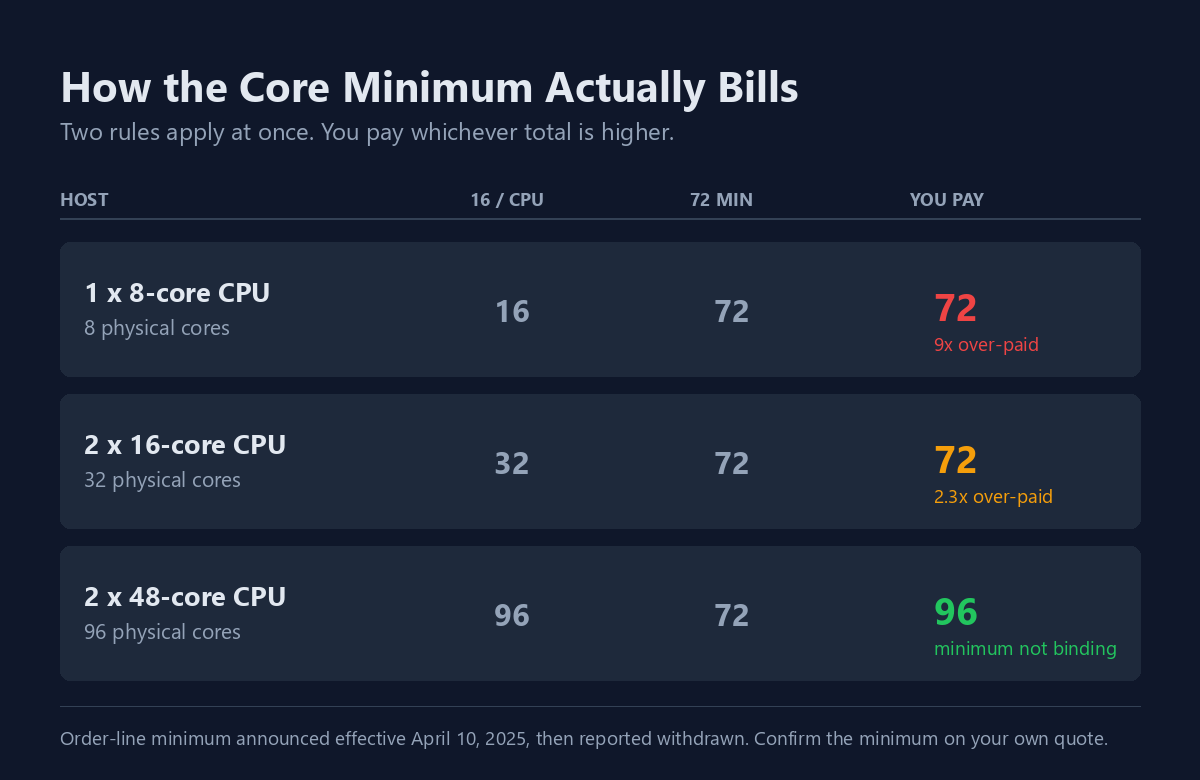
This one hit small and edge sites hardest. As The Register reported from an Arrow distributor email, the floor was set to jump “from 16 to 72 cores per command line” as of April 10, 2025 — an order-line minimum on top of the 16-cores-per-CPU rule, billing whichever total was higher. A single-socket 8-core edge box that used to bill at 16 cores would bill as 72. That is 64 cores of software the machine cannot even run.
Then it moved again. Within weeks, reporting based on distributor confirmations said Broadcom had withdrawn the 72-core rule and brought back the 16-core option. Broadcom never published its own statement, and accounts still disagree on how fully it was withdrawn.
Treat that fog as the finding. Do not assume you are safe, and do not assume you are exposed. Make your reseller put the minimum for your exact order in writing. “Renewal,” “subscription transition,” and “tier change” can be the same conversation with three different price tags.
3. Free ESXi Came Back, With Real Limits
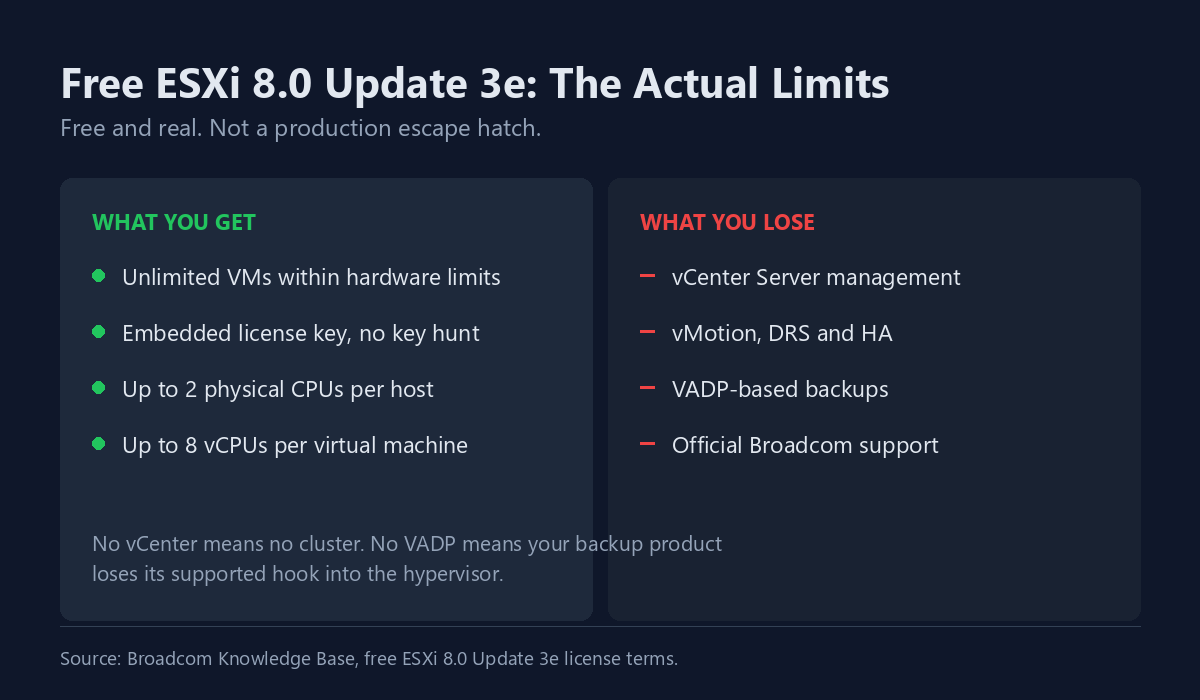
Broadcom brought back a free hypervisor with ESXi 8.0 Update 3e, embedded license key included. The limits, set out in Broadcom’s own knowledge base, decide whether it helps you:
- Up to 2 physical CPUs per host, and 8 vCPUs per virtual machine.
- Unlimited VMs within those hardware limits.
- No vCenter Server management, and no vMotion, DRS, or HA.
- No VADP-based backups, which cuts off the standard backup hook.
- No official Broadcom support.
No vCenter means no cluster. No VADP means your backup product loses its supported hook. It is a fine lab tool, not a license-cost escape hatch. And if you really just run one capable home box, the better question is usually Proxmox vs Unraid, not free ESXi.
4. Europe Opened a Formal Antitrust Front
CISPE, the trade body for European cloud providers, filed a formal competition complaint against Broadcom on March 19, 2026. It cites price rises of more than 1,000 percent and asks the European Commission for emergency measures. By mid-July 2026, reports said EU regulators were questioning Broadcom directly and gathering evidence of harm from European cloud firms.
Why care, even outside Europe? A vendor under a live antitrust review has a fresh reason to avoid loud customer disputes. That is negotiating leverage, strongest right now, while the case is open. What a probe is not: a rescue. No ruling will arrive by your renewal date, so use it as pressure, never as a plan.
5. The Cloud Escape Route Got a Deadline
Some teams answered the price shock by moving into a hosted VMware cloud, such as Azure VMware Solution (AVS) — Microsoft’s service that runs the VMware stack inside Azure. Broadcom is reported to be moving these cloud offerings to a bring-your-own model: you buy the VCF subscription yourself and carry it to the cloud.
Per Microsoft’s notices to AVS customers, the license-included pay-as-you-go option runs only through October 31, 2026, while reserved instances bought by October 15, 2025 reportedly keep their pricing until August 30, 2027. Confirm your own terms with Microsoft. The plain reading: renting VMware from a cloud no longer dodges Broadcom. You are back to buying the same subscription, just with hosting on top.
Do the Arithmetic Before You Shop
Most migration calls get made on a feeling and defended afterwards. Do it the other way round. You need three numbers first:
- Your real core count, per host, per socket. Not vCPUs. Physical cores.
- Your billed core count under the current minimums. On small hosts these split sharply, and the gap is your actual problem.
- Your renewal quote, in writing, for the exact bundle you would land in.
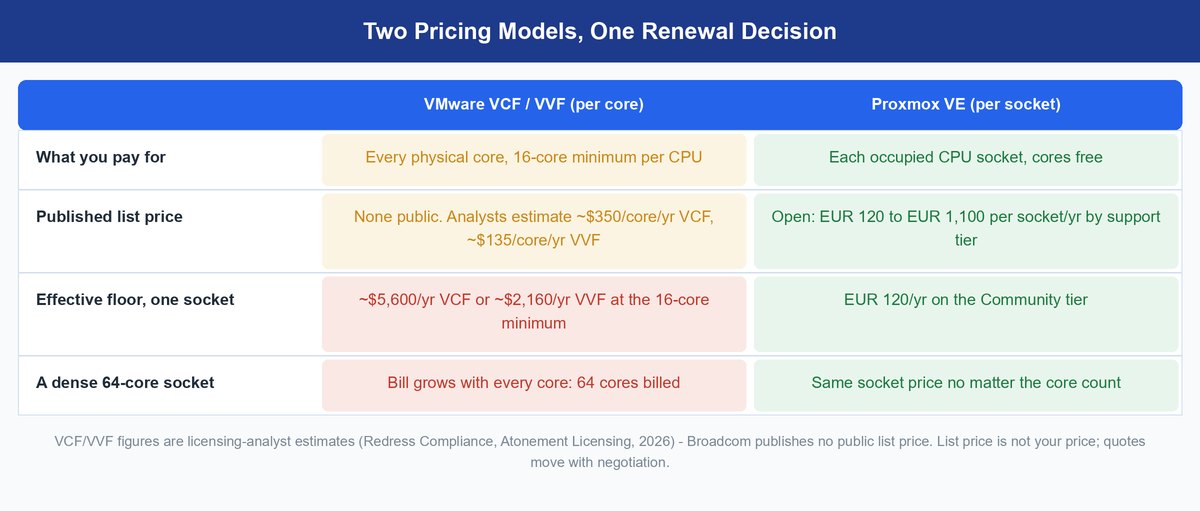
Broadcom publishes no price list, so anchor numbers come from analysts. Firms that track real quotes, such as Redress Compliance and Atonement Licensing, put VCF list pricing near $350 per core per year, and VVF near $135. Every CPU bills at least 16 cores. Run that once: a single socket floors near $5,600 a year on VCF, or about $2,160 on VVF. Treat those as directional analyst figures, not a price sheet.
The catch: Licensing write-ups in 2026 report that Broadcom now adds a 20 percent penalty to late renewals, applied retroactively. If your renewal lands inside the next two quarters, start the paperwork now. A lapsed date can cost more than the negotiation saves.
By contrast, Proxmox publishes its pricing openly, per occupied CPU socket per year:
| Tier | EUR per socket per year | Support level |
|---|---|---|
| Community | €120 | Forum only |
| Basic | €370 | Basic tickets |
| Standard | €550 | Faster response |
| Premium | €1,100 | Unlimited, two-hour response |
All four tiers include the full feature set — HA, live migration, clustering — plus the stable enterprise repository.
Per-socket pricing does not grow with cores. For a dense 64-core dual-socket host, that difference is the whole argument. For a fleet of 40 single-socket edge boxes, it works against you, and the gap narrows. Your topology decides, not the vendor’s example.
One caution on every figure above: list price is not your price. Deals, existing spend, and timing move real numbers a long way. Treat every table, this one included, as input to a quote request — never a substitute for one.
The Alternatives, and Who Each One Is Actually For

Proxmox VE
Debian-based, KVM and LXC, with clustering, HA, and backup built into the core product. The current 9.x line runs on Debian 13 and is moving fast. Version 9.2 shipped in May 2026. Official arm64 support followed on August 5, 2026, so Proxmox now runs on Arm servers too. The feature set is complete, and the software runs with no subscription at all if you accept the no-subscription repository and community support. Run our Proxmox vs VMware head-to-head before shortlisting, and see how Proxmox VE actually works if the platform is new to you.
Keep in mind: even the free exit has lifecycle deadlines. Proxmox VE 8 reaches end of life in August 2026. Land on the 9.x line, not the version your tutorial’s screenshots show.
Fits: teams with real Linux skill, dense multi-core hosts, and shops that want out of per-core licensing entirely. If containers are the real question, read Proxmox vs Docker first. Struggles: shops with heavy commercial software ties, where “is this certified on Proxmox?” gets an awkward answer.
XCP-ng
Xen-based and open source, with Xen Orchestra as the management layer. Paid support comes from Vates, the company that maintains it. It is the closest thing to a classic ESXi-plus-vCenter split, so the mental model transfers cleanly for a vSphere admin.
Fits: teams that want open source but also want a company to call. Struggles: a smaller ecosystem than Proxmox, so tooling and community answers are thinner.
Nutanix AHV
The hyperconverged route. The hypervisor comes with the platform, and the management layer is genuinely polished. It tends to survive formal enterprise evaluations because it answers the certification questions that eliminate open-source options early.
Fits: teams replacing hardware and hypervisor in one refresh cycle, with budget, who want a single support number. Struggles: it is a platform decision, not a hypervisor swap. You may be moving cost rather than removing it.
Microsoft Hyper-V and Azure Local
The underrated option, largely because it is dull. If you hold Windows Server Datacenter licensing, much of what you need sits in an entitlement you pay for today. System Center and Windows Admin Center cover management; Azure Local extends the stack toward hybrid. The deciding variable is your guest mix — our Hyper-V vs Proxmox breakdown shows why counting Windows guests settles it faster than any feature list.
Fits: Windows-heavy shops with Microsoft agreements and staff who know the tooling. Struggles: Linux-heavy estates, and anyone wary of trading one big vendor’s licensing model for another’s.
Oracle Linux KVM and OLVM
Oracle’s KVM stack, managed through Oracle Linux Virtualization Manager. It makes shortlists because Oracle certifies its own database and apps on it, which settles the certification question for Oracle-heavy shops. The caveat is cultural: you would be trading one aggressive licensing regime for a vendor whose audits are famous in their own right. Read the audit clauses before calling it the cheap exit.
Fits: shops already deep in Oracle databases and support contracts. Struggles: everyone allergic to Oracle’s licensing playbook.
OpenShift Virtualization and KubeVirt
Runs VMs as workloads on Kubernetes, collapsing two operating models into one.
Fits: teams already running Kubernetes in production, with a platform team to match. Struggles: everyone else. If Kubernetes is not your daily reality, this is a platform migration dressed as a hypervisor swap.
Turnkey Appliance Platforms
Scale Computing, VergeIO, Platform9, StorMagic, and Arcfra all target the same buyer: a team that wants virtualization to be an appliance, not a project.
Fits: edge sites, branch offices, and small IT teams with no local admin. Struggles: large central data centers, where you will eventually want the control these platforms hide on purpose.
The Cost That Never Appears on the License Quote
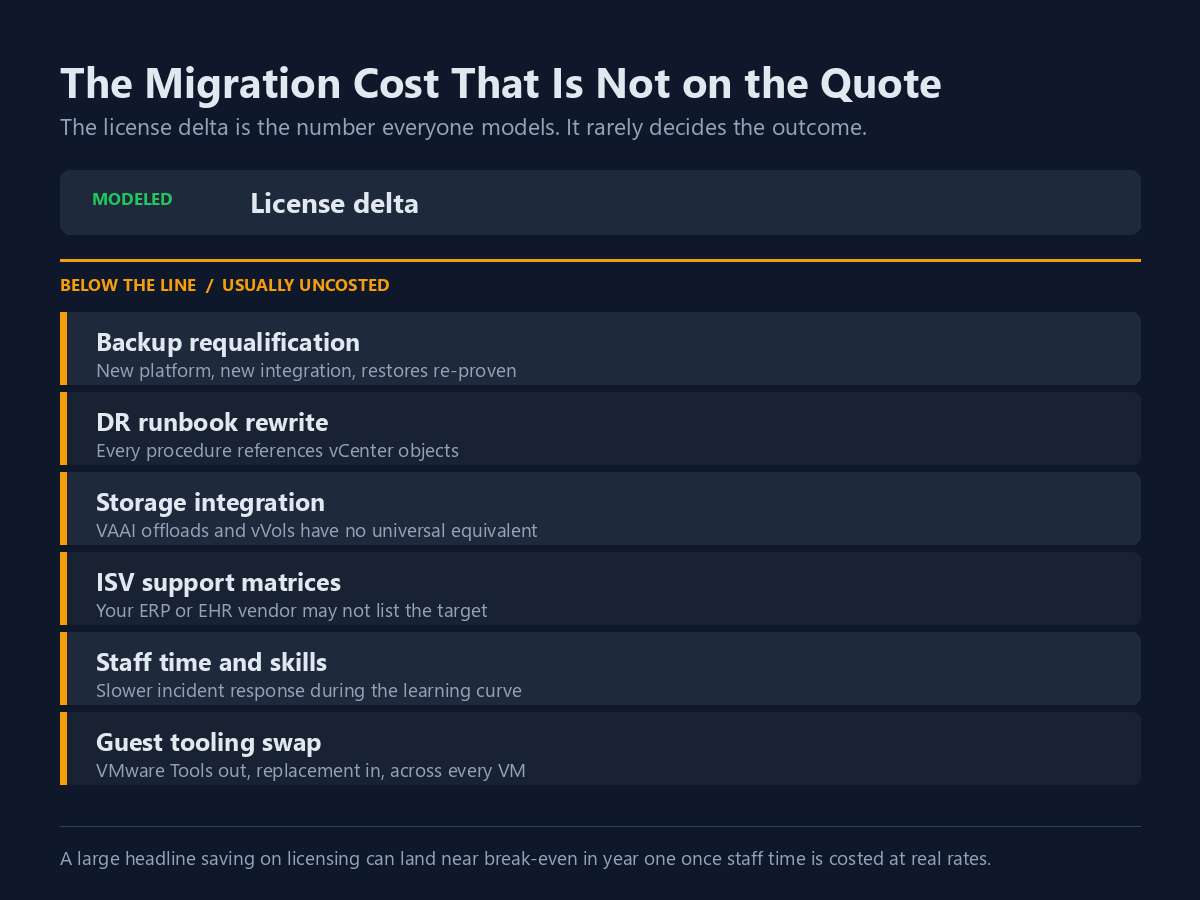
This is where migration business cases quietly fail: the license delta is the number everyone models, but rarely the one that decides the outcome.
- Backup re-testing. Your backup product’s VMware hook does not carry over. You re-select, re-test, and re-prove recovery. Until a real restore passes, you have hope, not backups. Rebuilding this layer anyway? Check it against the 3-2-1-1-0 backup rule, especially the zero-errors clause.
- DR runbooks. Every failover procedure you wrote names vCenter objects. All of it gets rewritten and re-tested. An untested runbook is a document, not a plan.
- Storage integration. VAAI offloads and vVols have no universal twin. Array features you lean on may need a new path, or may not exist on the target.
- Vendor support lists. Your ERP vendor publishes a supported-hypervisor list. Off that list, you run unsupported at the worst moment. Check before the pilot, not after.
- Staff time and skills. A vSphere-certified team is not a Proxmox or Kubernetes team on day one. Budget the training, and the slower incident response while they learn.
- Guest tooling. VMware Tools comes out, something else goes in, on every VM. Simple, and tedious at scale.
None of these are reasons to stay put — they are reasons to model the move honestly. A big licensing saving can land near break-even in year one once staff time counts at real cost.
Who Should Stay on VMware

Staying is a legitimate answer that deserves the same honest look as leaving.
Stay if you run a large, dense vSphere estate where NSX and vSAN carry real weight. Stay if compliance depends on certifications your target lacks. Stay if your software vendors support VMware and nothing else. And stay if your quote, after negotiation, lands in a range you can absorb. A bad first quote is a starting position, not a verdict — and with regulators examining Broadcom in Europe, the negotiating table is livelier than it has been since the deal closed.
Also stay if you lack staff to run a migration properly. A half-finished migration is worse than either endpoint: two platforms, two backup stacks, two DR plans, same headcount.
A Decision Path That Works
- Get the real quote first, in writing. Not list price — the written renewal number for your exact bundle, minimums applied to your hosts. While the EU case is live, ask for multi-year price protection in the same letter. Leverage fades when the headlines do.
- Separate the cost problem from the strategy problem. “This is too expensive” and “we want off this vendor” lead to different shortlists. Be honest about which one you have.
- Audit your dependencies before your shortlist. Vendor support lists, storage hooks, and backup tooling knock out more candidates than any feature chart.
- Pilot with a real workload. Not a test VM. Something with a backup schedule, a DR requirement, and a user who will complain.
- Test the restore, then the failover. A migration is not proven by a VM that boots. It is proven by a recovery that works.
- Then commit, in waves. Non-critical tiers first, rollback path open until the last wave lands.
Bottom Line
Weighing VMware alternatives comes down to your own core counts, not to anyone’s ranking. For small and edge sites, the core minimums produce genuinely irrational bills. If that is you, Proxmox VE or a turnkey appliance deserves a serious pilot. If you run a dense, mature estate with deep VMware feature ties, your leverage sits at the negotiating table — and an open EU antitrust case just made that table friendlier.
In between, which is most people? The sequence is quote, then dependency audit, then pilot, then decision. Not the reverse. For how the pricing shift landed on customers in the first place, our piece on surviving Broadcom’s price shock covers the negotiation angle in detail.
Frequently Asked Questions
What is the best alternative to VMware?
Anyone naming one without seeing your estate is guessing. Proxmox VE fits Linux-comfortable teams on dense hosts. Nutanix AHV fits enterprises that need certifications and one support number. Hyper-V fits Windows shops already paying for Datacenter licensing. Your vendor support list and core counts pick the answer.
Is there a free alternative to VMware ESXi?
Yes. Proxmox VE and XCP-ng both run without a paid subscription, with full features. Free ESXi is back with 8.0 Update 3e, but it cannot join vCenter, has no vMotion or HA, and blocks VADP backups. Fine for a lab, wrong for production.
How much does VMware cost per core now?
Broadcom publishes no public price list. Licensing analysts peg VCF near $350 per core per year and VVF near $135, with every CPU billed at a 16-core minimum. That floors one socket near $5,600 a year on VCF. Your real number comes from a written quote.
Should I wait for the EU antitrust case before deciding?
No. Regulatory reviews run on their own clock, and no ruling will arrive by your renewal date. Use the live case as leverage — ask for written multi-year price protection now — but make the switch-or-stay call on your own quote and dependencies.
How long does a VMware migration actually take?
The VM moves are the fast part. The slow parts are re-proving backups, rewriting DR runbooks, and training staff. Plan waves over months, pilot a real workload first, and declare victory only after a restore and a failover have both passed.
Can I just move my VMware estate to the cloud instead?
You can, but it no longer dodges Broadcom. Hosted services such as Azure VMware Solution are reported to be shifting to bring-your-own VCF subscriptions, with Azure’s license-included option running only through October 31, 2026. Price that path with your own subscription cost included.