Every page that ranks for this hands you the same answer. Proxmox is the free one. Hyper-V is the one Microsoft charges for. Pick on budget.
Both halves are wrong. Proxmox’s own wiki tells production users to stay off the free repository, and Hyper-V was never something you buy — it is a switch inside Windows Server that ships turned off. Take both seriously and the choice stops being a hypervisor question. It becomes a question about your guests. Count the Windows ones. That number settles it.
- Count your Windows guests first. Every cost conclusion here is downstream of that one number.
- Proxmox VE installs for nothing under AGPLv3, but Proxmox’s own docs say don’t run the free repo in production.
- Hyper-V isn’t a line item. It’s a role inside Windows Server 2025. The free standalone SKU died at Hyper-V Server 2019; the role never left.
- Microsoft bills by core with hard minimums. Proxmox bills by socket. That gap decides what your next server should look like.
- Proxmox VE 9.2 put automatic load balancing in the base product — the feature Microsoft shops have historically bought System Center to get.
Why the Free Versus Paid Framing Fails on Both Sides
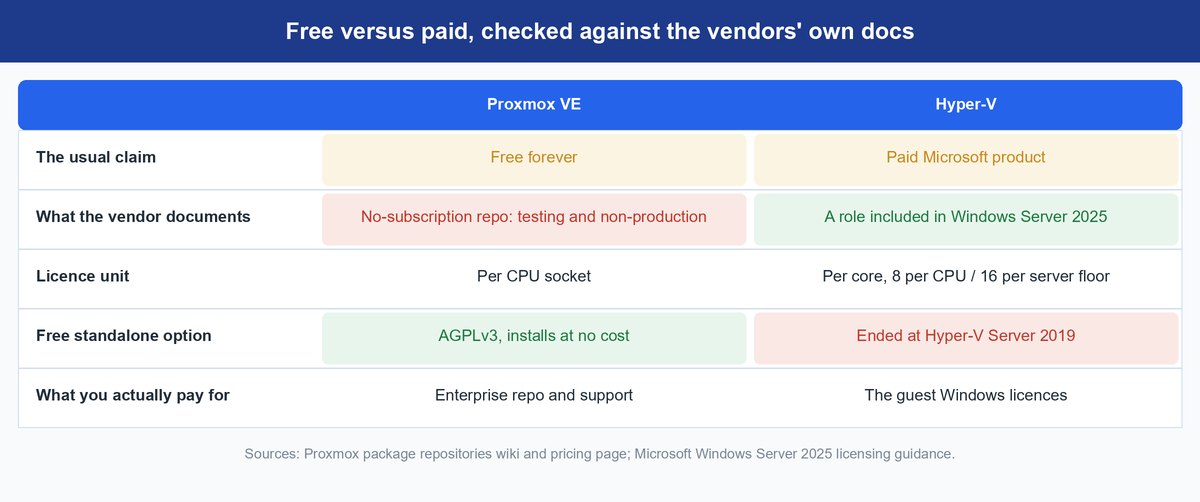
You have read this on Reddit a hundred times: one is the budget pick, the other is the enterprise tax. Open either vendor’s own docs and both halves fall apart. (New to hypervisors? Start with our hypervisor explainer.)
What Proxmox Actually Costs You in Production
You can put Proxmox VE on bare metal this afternoon and pay nobody. Here is what the free-forever crowd leaves out. Proxmox’s own package repositories page says the no-subscription repository “can be used for testing and non-production use,” and “it’s not recommended to use this on production servers, as these packages are not always as heavily tested and validated.” That is the vendor talking.
So the honest claim is narrower: free to install, free to learn on, free for the lab. Once a workload has an owner, Proxmox points you at the enterprise repository, and all four tiers — Community, Basic, Standard, Premium — include it plus Datacenter Manager. Billing is per CPU socket, and the tiers differ on support: ticket allowance from none to unlimited, response commitments from one business day down to two hours.
What the Hyper-V Role Actually Costs You
Nothing, in the sense you mean by “paid.” There is no hypervisor SKU on Microsoft’s price list. Go look.
What ended was the free standalone product: Microsoft’s server team confirmed Hyper-V Server 2019 is the last version, and it sits in Extended Support until 10 January 2029. The role ships inside Windows Server 2025.
Your real bill is the Windows Server licensing you were buying for the guests anyway. Standard grants two operating system environments per licensed server — two Windows VMs, in plain terms. Datacenter grants unlimited. Microsoft also added per-VM licensing in October 2022, but only with subscription licences or active Software Assurance, minimum eight core licences per VM.
The catch: Client Access Licences, the line nearly every comparison skips. Microsoft wants a CAL on Standard and Datacenter alike whenever a user or device touches the server, and on a user-heavy estate that can beat the core licences outright.
Count Your Windows Guests Before You Compare Anything Else
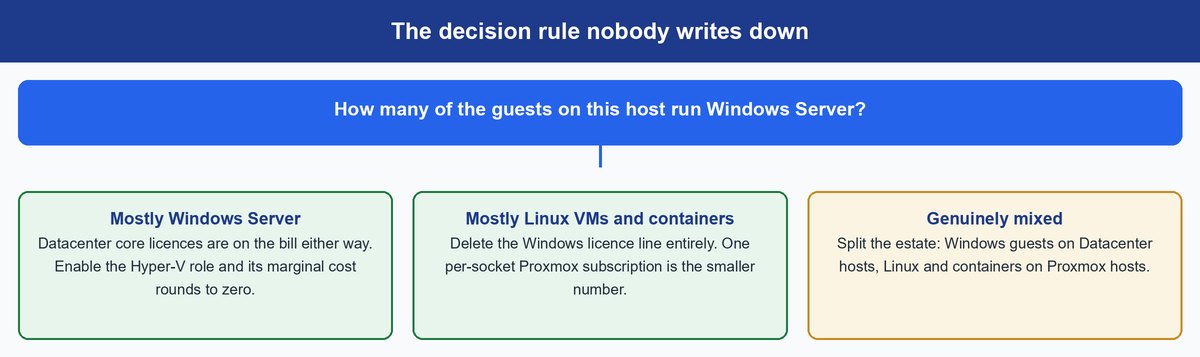
Here is the sentence nobody ranking for this comparison writes: the hypervisor choice is downstream of the guest OS mix. The guest licence follows the guest. It does not care what runs underneath.
A Windows-Heavy Host Makes Hyper-V Nearly Free
Picture a two-socket box stuffed with Windows Server guests. Past a couple of them you are into Datacenter territory — unlimited operating system environments on that hardware. You buy those core licences whether the hypervisor underneath is Microsoft’s, Broadcom’s or Proxmox’s, so flipping the Hyper-V role on costs effectively nothing.
Put that host on Proxmox and the guests still need their Datacenter licences, plus a per-socket subscription on top. You paid twice. That is the most common way this decision goes wrong.
A Linux-Heavy Host Deletes the Windows Bill Entirely
Flip the mix and the arithmetic inverts. If the workloads are Linux VMs and containers, a Windows Server licence buys a hypervisor and nothing else — that whole core-licence line is overhead you can delete. What is left is one per-socket subscription, and it is not close.
Proxmox is technically ahead here too, running KVM virtual machines and LXC system containers natively on one host, so a small service does not cost a whole VM. Hyper-V has no LXC equivalent, and Windows containers are a different model.
Sockets Versus Cores Quietly Decides Your Next Server Order
Microsoft licenses by core with floors: eight core licences minimum per physical processor, sixteen per server. Proxmox licenses by socket. Those shapes drag your hardware in opposite directions. A dense single-socket server with a monster core count is cheap per socket and brutal per core. Two modest low-core sockets flip the answer. So do not sign the hardware quote before you settle the hypervisor question — they are one decision.
Need a GPU inside a guest? Both pass one through, Proxmox via VFIO and Hyper-V via Discrete Device Assignment. Neither lets you live-migrate that VM while the card is attached, so plan the downtime.
Keep in mind: The cost that never appears on a quote is staffing. A Windows shop moving to Proxmox is adopting Debian, ZFS, corosync and Ceph as day-two responsibilities. We made that case in full for teams leaving VMware, and it lands just as hard here.
What Each Platform Actually Ships in 2026
Version numbers are what this comparison usually lacks. Microsoft’s half is deliberately boring: the role ships in Windows Server 2025 and inherits the OS servicing lifecycle. Proxmox has had the louder year.
Proxmox VE 9.2 and Its New Dynamic Load Balancer
Proxmox VE 9.2 landed on 21 May 2026 on Debian 13.5 “Trixie” with kernel 7.0, QEMU 11.0, LXC 7.0, ZFS 2.4 and Ceph Tentacle 20.2 alongside Squid 19.2. The headline is the Dynamic Load Balancer: a cluster scheduler that reads real-time node and guest usage and moves guests on its own, respecting your high-availability rules.
That is bigger than a changelog bullet. Rebalancing like this is much of why Microsoft shops bought System Center Virtual Machine Manager, a separate purchase from the hypervisor. Proxmox now ships the equivalent in the base product, plus native WireGuard and BGP in the SDN stack.
Proxmox Datacenter Manager Answers the vCenter Objection
“Proxmox has no vCenter” was a fair hit for years. It has expired. Proxmox Datacenter Manager reached 1.0 on 4 December 2025 with live migration of VMs between different clusters, and 1.1 followed on 28 May 2026 adding central subscription management, unified Ceph monitoring and central snapshots. Every tier includes it.
Proxmox VE Now Runs on Arm64 Servers, With Real Limits
On 5 August 2026 Proxmox shipped an official arm64 build, its first outside x86-64, validated day one on NVIDIA Grace and Vera and jointly with NVIDIA and Supermicro on Grace Hopper Superchip systems, claiming full feature parity across KVM, LXC, ZFS and Ceph. The Register read it as an answer to demand for virtualizing AI infrastructure on Arm. Hyper-V has no Arm server story to match, so if Arm silicon is on your roadmap, that is a real fork in the road.
Now the limits. Anything outside the validated platforms is best-effort on UEFI-based Arm hardware, so device-tree-only boards — every standard Raspberry Pi included — are out. Live migration only works between matching architectures, and Proxmox staff confirm in the announcement thread that mixed-architecture clusters are not officially supported. One early tester got the host onto a 128-core Ampere Altra Max fine, then watched an Ubuntu 24.04.1 arm64 guest halt at its installer — Armv8 silicon, he reckoned, not a validated Armv9 platform. Roadmap signal, not this quarter’s move.
Backup Is a Separate Buying Decision on Both Sides
Proxmox Backup Server 4.2 arrived on 29 April 2026, and S3-compatible object stores are now officially supported as a target. Watch the unit change: PBS is priced per server, not per socket. Hyper-V means a third-party product regardless, and our 3-2-1-1-0 backup guide applies either way.
Hyper-V and Proxmox Side by Side on the Points That Decide It
| Proxmox VE | Hyper-V | |
|---|---|---|
| Current release | VE 9.2, 21 May 2026 | Role in Windows Server 2025 |
| Licence unit | Per CPU socket, four tiers | Per core, 8 per processor and 16 per server minimum |
| What “free” means | AGPLv3 install; production pointed at the enterprise repo | No hypervisor SKU; free standalone SKU ended at 2019 |
| Guest access licences | None | CALs on Standard and Datacenter |
| Guest types | KVM VMs and LXC containers natively | VMs only; no LXC equivalent |
| GPU passthrough | PCIe passthrough and vGPU via VFIO | Discrete Device Assignment on Windows Server |
| Documented cluster ceiling | None published; under 5 ms latency required | 64 nodes and 8,000 VMs, unchanged across supported releases |
| Strongest fit | Linux-heavy guests and containers | Windows-heavy guests already on Datacenter |
How Far Each Platform Clusters Before It Stops Scaling
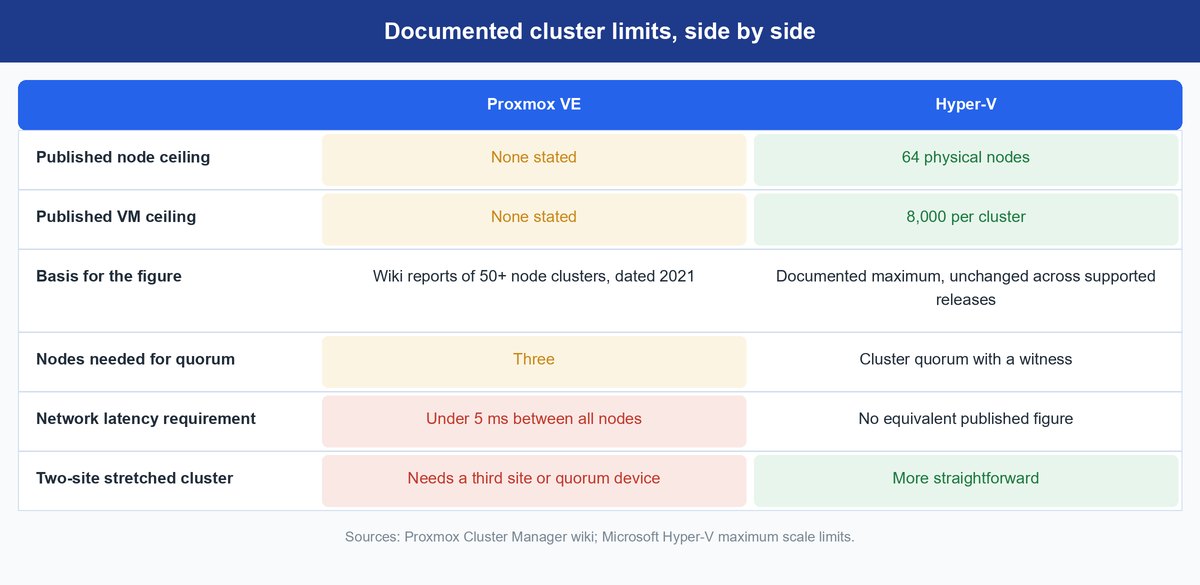
The two projects document their limits very differently, and that difference tells you something about each.
What Proxmox Clustering Actually Requires
Proxmox refuses to publish a hard ceiling. Its cluster manager wiki says there is “no explicit limit for the number of nodes in a cluster,” then adds that “in practice, the actual possible node count may be limited by the host and network performance.” Its one datapoint is old: as of 2021, the wiki notes reports of 50-plus-node clusters in production on high-end enterprise hardware.
The constraints that bite are network shaped. You need under 5 ms of LAN latency between every node — the delay a packet takes crossing your switch fabric — and above roughly 10 ms a cluster is unlikely to work past three nodes. Three nodes is also your minimum for reliable quorum, which answers “what happens when a node dies”: the surviving majority keeps the cluster writable and restarts HA guests elsewhere. Two nodes can never form a majority, so a two-node cluster is not HA.
What Hyper-V Failover Clustering Documents
Microsoft publishes a number and has for years. Failover clustering scales to 64 nodes and 8,000 running virtual machines per cluster, plus 1,024 running VMs on one server — figures documented identically for every supported Windows Server release, not a 2025 announcement. For most fleets neither ceiling binds; latency and storage get there first.
Caveat: A two-site stretched cluster is materially harder on Proxmox. The 5 ms latency requirement and three-node quorum minimum mean a two-datacentre split needs a third site or an external quorum device to break ties. Design that in before the second site is racked.
What Actually Drives Performance Between These Two
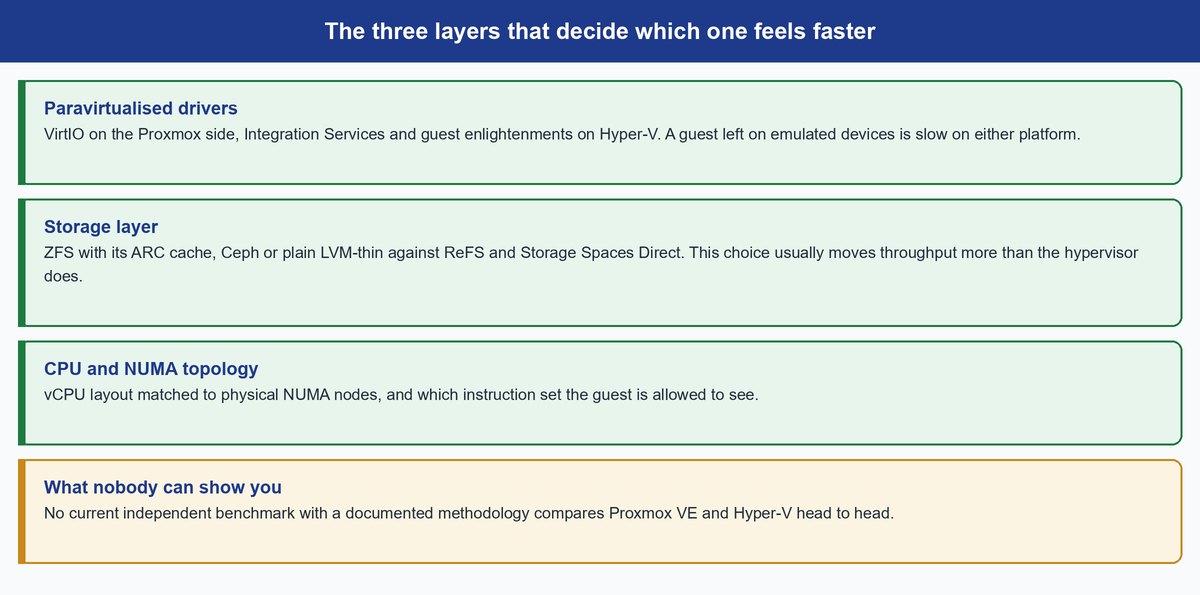
Straight answer: nobody can tell you. No current, independent, methodology-documented benchmark compares these two platforms, which is why every page on the subject waves at “performance” and moves on. Anyone quoting a clean percentage cannot show the method. Ask for it.
Three layers move the needle, and you control all three. Paravirtualised drivers come first — VirtIO on Proxmox, Integration Services and guest enlightenments on Hyper-V. Those let a guest know it is a guest instead of faking real hardware for it. Leave a guest on emulated devices and it is slow on either platform, and that one misconfiguration sits behind a large share of “Proxmox felt slower” posts. Storage is second and usually the bigger lever: ZFS with its ARC cache behaves nothing like Ceph or plain LVM-thin, and Storage Spaces Direct with ReFS is different again. Third is CPU topology — matching vCPU layout to physical NUMA nodes, and picking which instruction set the guest sees.
Note: The most common cause of a sluggish Windows guest on Proxmox is a missing VirtIO driver set, which drops it back to emulated storage and network devices. Mount the VirtIO ISO before you benchmark anything.
What the VMware Exodus Numbers Actually Show
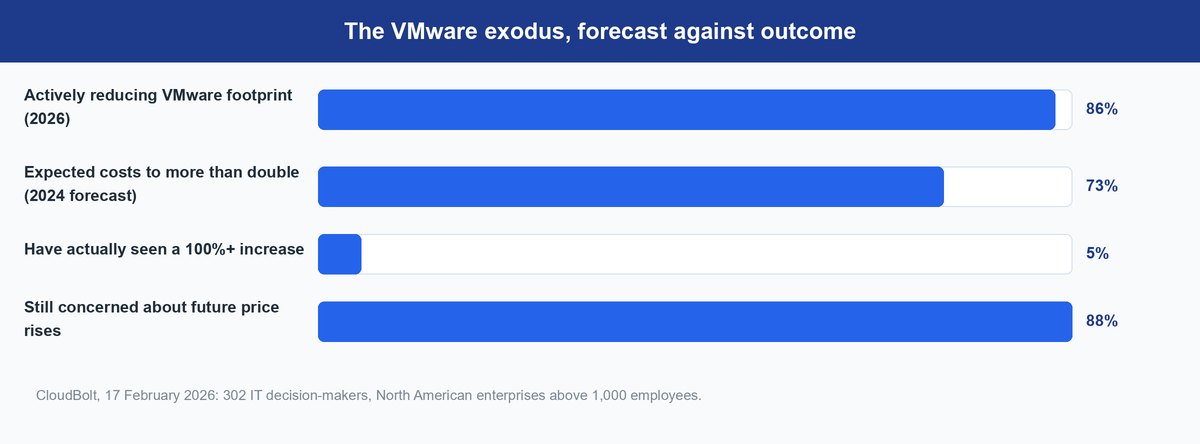
Let us be honest about why you are here: VMware’s pricing happened. But the data on that migration wave is more interesting than the panic was. CloudBolt research published on 17 February 2026, titled “The Mass Exodus That Never Was,” surveyed 302 IT decision-makers in January 2026 at North American enterprises over 1,000 employees.
Yes, 86 percent are actively reducing their VMware footprint. Now hold that against the forecast. In 2024, 73 percent expected VMware costs to more than double. Only 5 percent have actually seen increases of 100 percent or more, and 88 percent remain concerned about future rises. The forecast overshot reality badly while the anxiety behind it never went anywhere, which is why our own price-shock coverage reads differently now.
What that buys you is runway, more than the vendor blogs imply. A rushed migration is usually the more expensive mistake. Move on a real trigger: a renewal quote you have actually received, a hardware refresh already scheduled, a capability you genuinely need.
The Homelab Answer and the Enterprise Answer Are Different
Same question, opposite verdicts. That is why generic advice here ages badly.
What Makes Sense in a Homelab
Proxmox, and it is not close. LXC containers, ZFS, snapshots and a web interface that needs no management server, with zero Windows licences in the picture — and the no-subscription repo is doing exactly the job Proxmox says it is for. Run Hyper-V at home for one reason: to rehearse the stack you run at work.
What Holds Up Across an Enterprise Fleet
At fleet scale it goes back to the guest mix, plus two things a homelab never tests: who answers the phone at two in the morning, and who on your team already knows the platform. Proxmox’s higher tiers buy ticket volume and response commitments. Hyper-V rides the Microsoft agreement and the Windows admins already on payroll. A Windows-heavy enterprise picking Proxmox pays three times: guest licences, subscription, retraining.
Frequently Asked Questions
Is Proxmox faster than Hyper-V?
Nobody can honestly tell you: no current independent benchmark with a documented methodology compares the two. What you feel comes from paravirtualised drivers, your storage layer and CPU topology, not the hypervisor kernel. Configure the guest properly on either platform and storage decides it.
Can I install Hyper-V on Proxmox?
Yes, through nested virtualization. Enable nesting on the Proxmox host, set the VM’s CPU type to host so the virtualization extensions pass through, then add the Hyper-V role inside the Windows Server guest as normal. Keep it a lab technique — stacking two hypervisors costs performance and support standing.
Is Proxmox production-ready if I never buy a subscription?
It runs, and plenty of people do it. But Proxmox’s own repositories wiki says the no-subscription repo is meant for testing and non-production, and is not recommended for production servers because those packages are not always as heavily tested and validated. If the workload has an owner, buy a tier.
Do I need a separate management server for either one?
Not for Proxmox VE — every node serves the full web interface, and Datacenter Manager is optional and bundled with every tier if you want one pane across clusters. Hyper-V leans on Windows Admin Center for small estates, but fleet-scale automation has historically pulled shops to System Center.
How do Proxmox and Hyper-V compare against VMware ESXi?
They are the two realistic destinations for teams leaving ESXi, and they lose to it in different places. Proxmox now matches the two features people cite most — automatic load balancing and a central management plane — while Hyper-V wins on Windows guest integration. Our VMware alternatives guide walks the wider field.
Can I run Proxmox and Hyper-V side by side?
You can, and in a mixed estate it is often the cheapest answer rather than a compromise. Put the Windows Server guests on hosts you license with Datacenter anyway, and the Linux and container workloads on Proxmox hosts carrying no Windows licence. You do take on two platforms, so only split when the guest mix is genuinely lopsided both ways.
The Bottom Line for Your Next Hypervisor Decision
Stop asking which hypervisor is better. Start counting.
Windows-heavy guest mix? You are buying Datacenter core licences either way, so the Hyper-V role costs close to nothing extra, while Proxmox adds a subscription on top of a bill you cannot escape.
Linux-heavy? The Windows licensing is pure overhead you can delete, and a per-socket subscription is the smaller number by a wide margin.
Clustering ceilings, the 2026 feature race, the Arm question, even performance — none of it matters until that count is on paper. Do it before the hardware quote.