
Count the drives you already own. That’s the whole trick. If your drives are different sizes, and you plan to add more one at a time, pick Unraid. It isn’t close. If your drives match, and the box’s main job is running virtual machines — full computers that run inside one physical machine, often shortened to “VMs” — pick Proxmox. Buying all your drives fresh today? Then your workload decides instead. That’s the entire Proxmox vs Unraid decision, and it takes 30 seconds.
People used to compare these as a hypervisor (software that splits one physical computer into several virtual ones) versus a NAS (network-attached storage — a dedicated box built just for storing files). That framing is outdated. Both platforms now run VMs and containers (lightweight, fast-starting app boxes, the kind Docker made popular). The real difference is how each one treats your hard drives. Follow that difference to the price sheet, and the “free” option turns out to be the expensive one.
- The old “hypervisor vs. NAS” split doesn’t matter anymore. Both platforms run virtual machines. Both run containers. What splits them now is how they store your files.
- Unraid never splits a file across disks. Each disk keeps its own filesystem. That one choice is why you can mix drive sizes, why idle disks can power down, and why losing a disk only loses the files on that disk.
- “Free” Proxmox has a catch. The maker itself says its no-cost update channel isn’t meant for a server you depend on. Budget €120 a year instead. Over five years, that’s €600 — against Unraid’s one-time $249.
- Unraid’s cheaper $49 and $109 licenses quietly need a $36-a-year renewal if you want updates after year one. Almost no review mentions this.
- Nobody has published a fair speed test between the two. If someone gives you exact numbers, they’re guessing.
Count Your Drives Before You Compare Anything Else
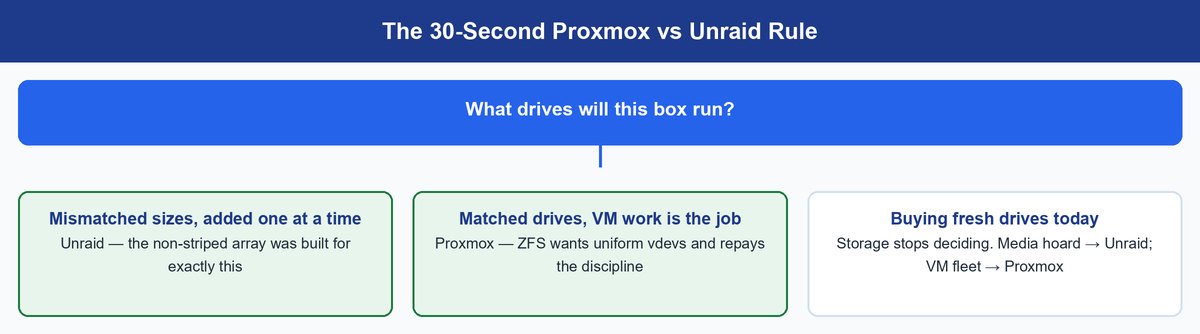
You already own your drives. That’s money already spent, and the two platforms treat it very differently. Unraid assumes your storage is a grab bag. Maybe a shucked 14TB drive here, an old 4TB drive from a dead desktop there. It has one rule: no regular drive can be bigger than your parity drive. (A parity drive is the one that stores recovery math, so the array can rebuild a disk if it dies — like a spare key that can recreate a lost one.) Unraid’s own docs say it plainly: “Always choose the largest available storage device as your parity device(s).”
Proxmox has no opinion about your storage at all. You bring your own system, usually ZFS or Ceph. ZFS is a storage system built to catch and fix quiet data errors before they spread. It wants matched drives grouped into uniform vdevs — the disk groups it manages as one unit — and checks every bit of data for errors, rebuilding fast after a failure.
So the tree is short. Mismatched pile: Unraid. Matched set with VM work as the main event: Proxmox. Clean slate: your drives have no vote — skip to the workload section.
Plan ahead: Unraid’s parity rule sets a ceiling years in advance. Once you pick your first parity drive, every drive you add later must be that size or smaller. Want to go bigger someday? Buy the new, larger drive as your parity drive first. Then move your old parity drive into the array as a regular data drive.
One Storage Decision Explains Almost Everything Else
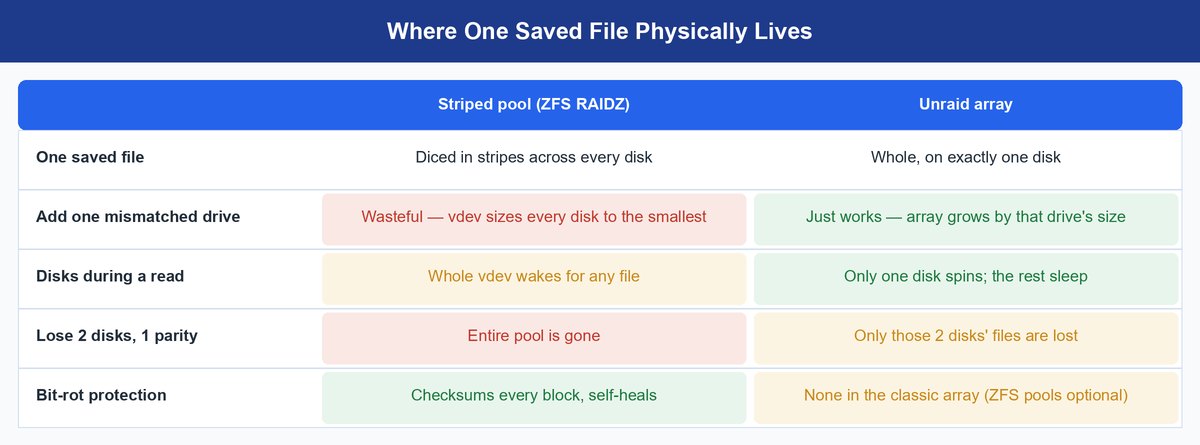
Here’s the one mechanism most comparisons skip. A striped pool — classic RAID, or a ZFS RAIDZ vdev — chops every file into pieces and spreads those pieces across every disk. Picture shuffling a deck of cards into six piles. It’s fast. But every read wakes every disk. Every disk has to match. And if you lose more disks than your parity can cover, you lose the whole pool — every file, gone at once.
Unraid’s array works the opposite way. Each disk keeps its own ordinary filesystem (XFS, by default). A file lives whole on exactly one disk. Up to two parity drives hold the math needed to rebuild a disk if it fails. One design choice. Three consequences. These are the three things homelabbers actually argue about.
Mismatched Drives Are a Feature, Not an Apology
Because no file spans more than one disk, Unraid doesn’t care that your drives are different sizes. Slot in a random 8TB drive, hit format, and the array just grows by 8TB. No rebalancing. No pool rebuild. ZFS can’t do that. A RAIDZ vdev treats every drive as if it were the size of its smallest member. Drop a 4TB drive into a shelf of 12TB drives, and you waste two-thirds of that drive’s space. If you buy drives whenever you spot a deal, this alone settles the debate.
Spin-Down Is the Power Bill Trick Nobody Explains
People comparing power bills expect a table of watt numbers. The real answer is about design, not specs. A file that lives whole on one disk only needs that one disk spinning. An Unraid box streaming a movie at 9pm can leave most of its drives asleep. A striped pool can’t do that. Because every file is scattered across every disk, any single read wakes the whole group. Neither company publishes exact watt numbers, so ignore anyone who claims precise savings. But the design guarantees one thing: a media server that sits idle most of the day draws less power on a non-striped array like Unraid’s.
When Drives Die, the Damage Stays Local
Lose two disks at once with single parity, and the platforms fail very differently. A striped RAIDZ1 pool is simply gone. Every file was chopped up and scattered across every disk, so losing two disks destroys everything. Unraid loses only the files that lived on those two disks. Every other disk is a normal, separate filesystem you can plug into any computer and read. That smaller “blast radius” is why Unraid users sleep well on cheap, mismatched drives.
To be fair to ZFS: it checks every block of data for silent corruption, repairs it automatically, and rebuilds faster after a failure. That’s real protection the classic Unraid array doesn’t build in. (Unraid has offered true ZFS storage pools alongside its classic array since version 7.0, if you want that protection too.)
Where TrueNAS Fits Into This Fight
Once you see the storage split, this question answers itself. TrueNAS is an operating system built entirely around ZFS. It shares Proxmox’s demand for matched drives and its check-everything approach, but wraps it in a storage-focused screen instead of a VM-focused one. Liked ZFS’s discipline, but want a storage app instead of a virtual-machine console? TrueNAS is your third option. Prefer Unraid’s mix-and-match drives? Nothing about TrueNAS will change your mind.
The Free Hypervisor Quietly Costs More Than the Paid NAS
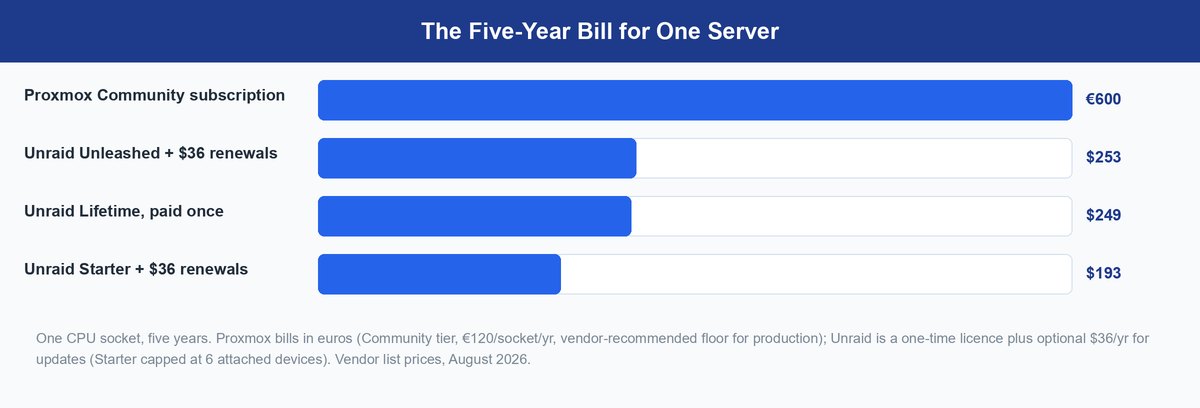
“Proxmox is free, Unraid costs money” is the common summary. Run the actual numbers, and that summary flips around. Proxmox’s software is free to download. But its no-cost update channel — the “repo,” short for repository, where updates come from — comes with the maker’s own warning attached. For a server you actually depend on, the honest answer is a paid subscription, priced per CPU (per “socket”) per year. The official pricing page lists four tiers:
- Community: €120/year — access to the more heavily tested update channel, forum support only
- Basic: €370/year
- Standard: €550/year
- Premium: €1,100/year
Straight from Proxmox: Proxmox’s own Package Repositories wiki says the free No-Subscription repo “can be used for testing and non-production use. It’s not recommended to use this on production servers, as these packages are not always as heavily tested and validated.” If your box matters enough that losing it would upset you, Proxmox’s own advice is: pay for the subscription.
Unraid works the opposite way: pay once, own it forever. The official buy page lists three permanent licenses:
- Starter: $49 one-time, up to 6 connected drives
- Unleashed: $109 one-time, unlimited drives
- Lifetime: $249 one-time, updates forever
Watch that drive limit. Unraid’s own docs warn “your array will not start if you exceed the number of storage devices permitted by your license key.” If you’re the type to keep buying drives, Starter’s 6-drive cap will catch up with you.
Read the fine print: Starter and Unleashed include only one year of free operating-system updates. After that, staying updated costs an optional $36 a year. Skip it, and you keep your license and a fully working server — but you’re stuck on small patch releases within your current version. (Example: stop paying after version 7.1.0, and you can still get updates like 7.1.1 and 7.1.2, but never the bigger jump to 7.2.) Only Lifetime licenses, and older grandfathered Basic/Plus/Pro licenses, get free updates forever.
Now add it all up over five years, one CPU, one server:
| Five-Year Path | Up Front | Ongoing | Five-Year Total |
|---|---|---|---|
| Proxmox Community subscription | €120 | €120/year | €600 |
| Proxmox No-Subscription repo | €0 | €0 | €0 — against the vendor’s own production advice |
| Unraid Starter + all renewals | $49 | $36/year | $193 (6-device cap) |
| Unraid Unleashed + all renewals | $109 | $36/year | $253 |
| Unraid Lifetime | $249 | nothing | $249 |
Follow Proxmox’s own advice for a server that matters, and the real math is €600 versus $249. The “free” hypervisor ends up costing more than double the paid NAS over five years.
What Each Side Actually Ships in 2026
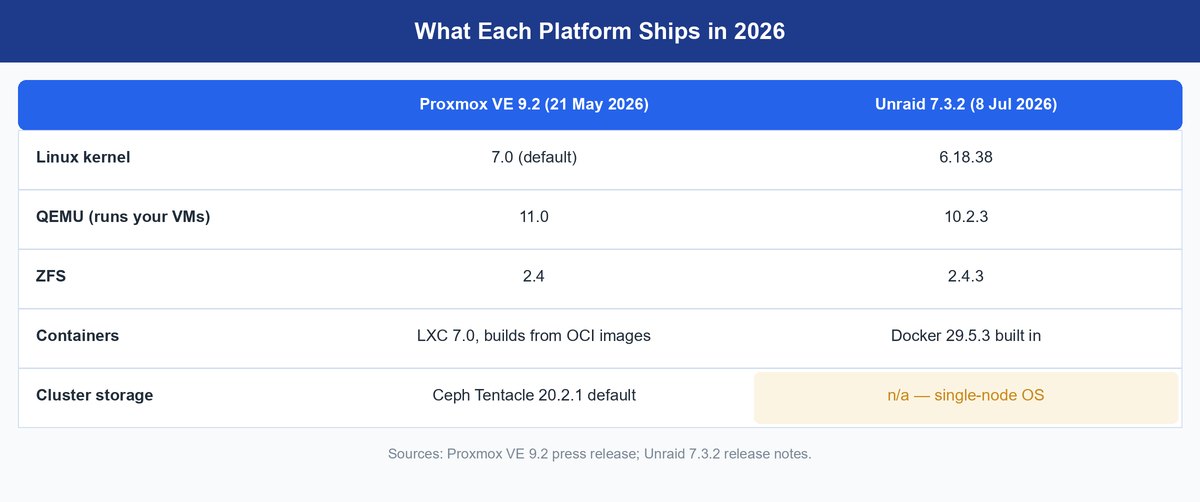
Both platforms got real updates in 2026. Proxmox VE 9.2 arrived 21 May 2026. The part that matters here: it added Dynamic Load Balancing, a feature that automatically moves VMs between cluster machines to even out the workload, with no manual work from you. Unraid OS 7.3.2 arrived 8 July 2026 with routine updates across the board. (Full version numbers for both releases are in the table above.)
One correction worth making: Proxmox can now run Docker-style containers directly. Since PVE 9.1 shipped in November 2025, Proxmox builds LXC containers — a lightweight kind of virtual machine — straight from OCI images, the packaging format Docker images use. Full application-container support is still an early “technology preview.” Many admins still run Docker inside a small VM for extra isolation, but Proxmox handling containers natively is a fact now. Unraid has always run Docker as a core, built-in part of its operating system.
One thing hasn’t changed: clustering. Proxmox can link multiple servers together, move a running VM between them, and automatically recover from a machine failure. Unraid runs on a single machine only, full stop. If you ever picture two boxes passing virtual machines back and forth, this settles the debate.
Grain of salt: No one has published a real head-to-head speed test between Proxmox and Unraid VMs. Treat any specific numbers you see online with suspicion. Both platforms run VMs on the same underlying engine, so real-world speed differences come from how your storage is set up, not from which platform’s name is on the box.
Plex, Home Assistant, and VM Farms Pick Different Winners
The generic “which should I run on my home server” answer hides three specific ones.
Plex Rewards the Platform That Hoards Cheaply
A Plex media library is the textbook Unraid job. It grows by whatever drive you happen to buy next. It sits idle most of the time, and mostly just reads files rather than writing them. A single spinning disk streams a 4K movie file just fine, so a striped pool’s extra speed buys you nothing here. Unraid’s spin-down feature keeps nine drives asleep while one serves your movie, and Plex itself runs in a container on the same box. Proxmox can host Plex fine too — you’ll just be building, by hand, the power savings Unraid gives you automatically.
Home Assistant Runs Happily on Either, With One Tiebreaker
Home Assistant OS — smart-home automation software — wants to run inside a VM, and both platforms give you one easily. The tiebreaker is what else your box does. Is it one VM among many that you snapshot, back up, and sometimes break while testing? Proxmox’s VM-focused tools are the comfortable choice. Is it the one lone VM sitting next to a big media collection? Running a whole hypervisor just for that is overkill. Let Unraid host it, next to the storage it’s already managing.
VM-Heavy Labs Have Only One Real Answer
If your box honestly runs “a dozen VMs and counting,” this isn’t even a contest. Proxmox brings clustering — linking multiple servers together — plus high availability (automatically restarting a VM on another machine if one server dies), automatic load balancing, and ZFS or Ceph underneath. It’s a data-center-grade hypervisor shrunk down to homelab size, the same reason it keeps winning our Ubuntu-vs-Proxmox home server comparison. Unraid runs VMs well as a side feature. It was never built to be a fleet manager.
Nobody Switches Platforms as Fast as Reddit Says
Spend an evening on r/homelab, and you’d think everyone swaps platforms in a weekend. Real-world data says otherwise. CloudBolt’s January 2026 survey of 302 enterprise IT decision-makers — a survey we keep coming back to — found that 86% were actively moving away from VMware, but only 4% had actually finished the move. Companies with real budgets and deadlines still move slowly. Your plan to “just move everything to Proxmox next month” will move slowly too. The more data you have stored, the harder and slower it is to move, and a full NAS setup holds a lot of data.
Here’s the open secret in this whole debate: plenty of homelabbers end up quietly running both. One Proxmox box for computing power, one Unraid box for the drive pile. That’s not a hard statistic — it’s a pattern from years of forum threads — but it’s consistent enough to plan around. The two platforms disagree so completely about storage that they’re barely even competing. They specialize instead. One-box budget? Count your drives and commit. Two-box budget? This whole argument may already be settled for you.
Frequently Asked Questions
Is Proxmox actually free to run at home?
Yes. The software itself is free, and its no-cost update channel costs nothing to use. Proxmox’s own wiki just warns that this channel isn’t meant for a server you depend on, because its updates get less testing. For a homelab you don’t mind occasionally rebuilding, free is genuinely fine. For a box your family’s data depends on, Proxmox’s own answer is the €120-a-year Community subscription.
What happens if I stop paying Unraid’s $36 yearly extension?
Nothing dramatic happens. Your license doesn’t expire. Your server keeps running. You keep full access to the operating system. You just stop getting new features and version upgrades — small patch updates within your current version still work. Lifetime licenses ($249) and older, grandfathered Basic/Plus/Pro licenses never hit this wall. Their updates stay free forever.
Can Unraid cluster multiple servers the way Proxmox does?
No. Unraid only runs on one machine at a time — one license, one box, no way to move a running VM to another machine. Proxmox connects multiple servers together natively, and its latest version added automatic load balancing between them. If managing multiple servers is anywhere in your future plans, that alone settles this comparison.
Which has better VM performance, Proxmox or Unraid?
Nobody has published a fair, rigorous head-to-head test, so any specific numbers you see are just guesses. Both platforms run on the same underlying engine. Real-world differences come from how your storage is set up — striped ZFS versus Unraid’s non-striped array — not from which platform’s name is on the box.
Does Proxmox support Docker containers now?
Yes. As of PVE 9.1 (November 2025), Proxmox can build LXC containers — a lightweight kind of virtual machine — directly from OCI images, the packaging format Docker images use. Full application-container support is still an early “technology preview.” Many admins still choose to run Docker inside a small VM for extra isolation, but the old “Proxmox can’t do Docker” claim is no longer true.
Can I mix different drive sizes in Proxmox?
You can, but ZFS won’t reward it. A RAIDZ vdev treats every drive as if it were the size of its smallest member, so you waste the extra space on your bigger drives. Unraid’s array genuinely doesn’t care about size differences — any mix works, as long as no regular drive is bigger than your parity drive. If mismatched drives are your real-world situation, that difference alone answers this question.
The Verdict Your Drive Pile Already Reached
Strip away all the forum noise, and this was never really hypervisor versus NAS. It’s striped versus non-striped storage, and everything else in this comparison falls out of that one choice. Mismatched drives, added one at a time? Unraid. $249 once, done. Matched drives and a habit of running VMs? Proxmox — budget €120 a year if the box matters enough to protect. Starting from a blank slate? Pick by workload: hoarding media points toward Unraid, a growing VM fleet points toward Proxmox. The 30-second rule holds up because your drives were always the real decision. You made that choice before you ever opened this tab. Now you just know which logo it comes with.