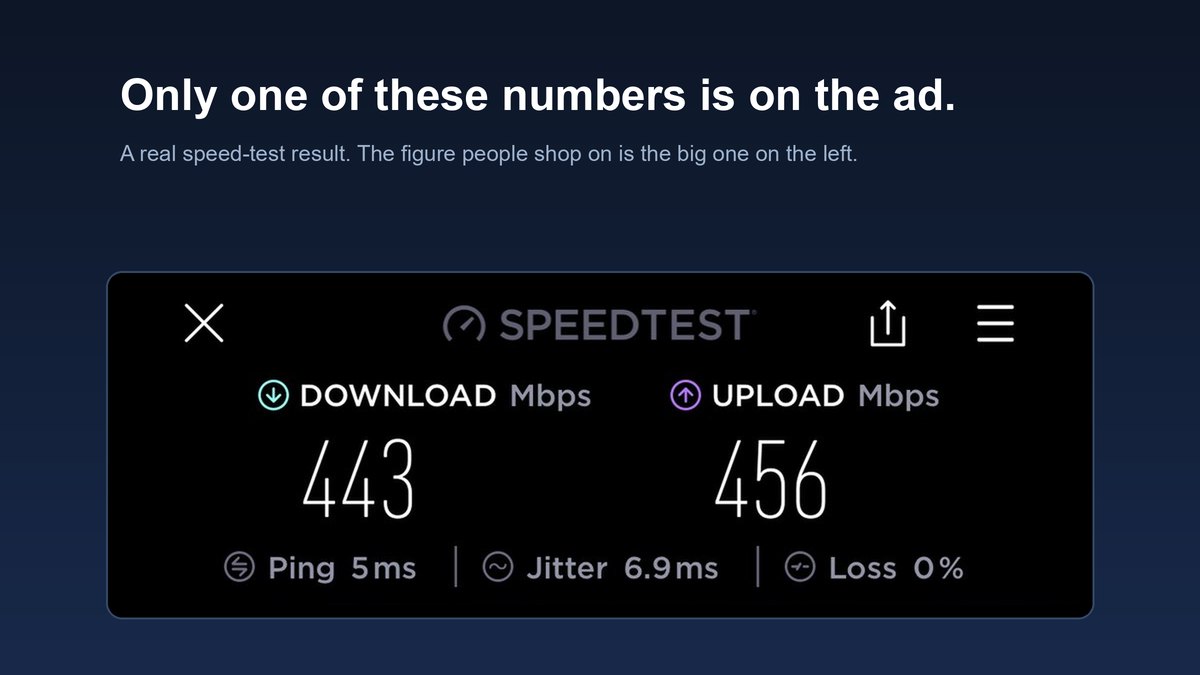
For most homes the answer is 200 to 300 Mbps, and the honest version is that your download number stopped being the problem years ago. Ask how much internet speed do I need and look at who answers. T-Mobile. Astound. Nuvera. Two comparison sites paid per sign-up. Every one of them earns when the number goes up, and none earns a cent when you work out that you already have enough.
Here is the arithmetic they leave out, and a two-minute method that gives you your number instead of theirs.
- A 4K stream needs 15 to 25 Mbps and has barely moved in years, while plans on sale went 100, then 300, then a gigabit
- Four 4K streams at once is roughly 100 Mbps, which is why most gigabit plans are capacity nobody ever touches
- Add up what genuinely runs at once, add 50%, buy the tier above that — your number, not the ad’s
- If video calls freeze you have an upload problem, and a bigger download tier fixes none of it
- Gaming feels bad because of ping and jitter, which are indifferent to Mbps
- 100 Mbps is fine for two or three people, 500 buys headroom, gigabit suits maybe one household in twenty
The fine print: TechDaily earns an affiliate commission on purchases made through links on this page, at no cost to you. Nothing below is a substitute for buying the right plan.
What is actually going wrong at your house?
★ Your pick: TP-Link Deco mesh system
A coverage fix, not a speed fix. Your plan is fine, the signal is not reaching that room.
★ Your pick: Cat 6 ethernet cable
Spikes are jitter, not bandwidth. A cable gives that machine a private lane to the router.
★ Your pick: TP-Link Archer AX55 router
An ISP box from six years ago becomes the ceiling long before your plan does.
★ Your pick: Nothing here fixes it
This one is upload, and no hardware creates upload you did not buy. Read the upload section first.
👑 Our Top Pick — Best Overall Value
Cat 6 ethernet cable
The cheapest genuine fix in home networking. It will not raise your speed, but it removes the wobble that gaming and calls actually feel.
Opens on our Top Pick. Tap an option to see the best match for you.
Why a Bigger Mbps Number Rarely Fixes Anything
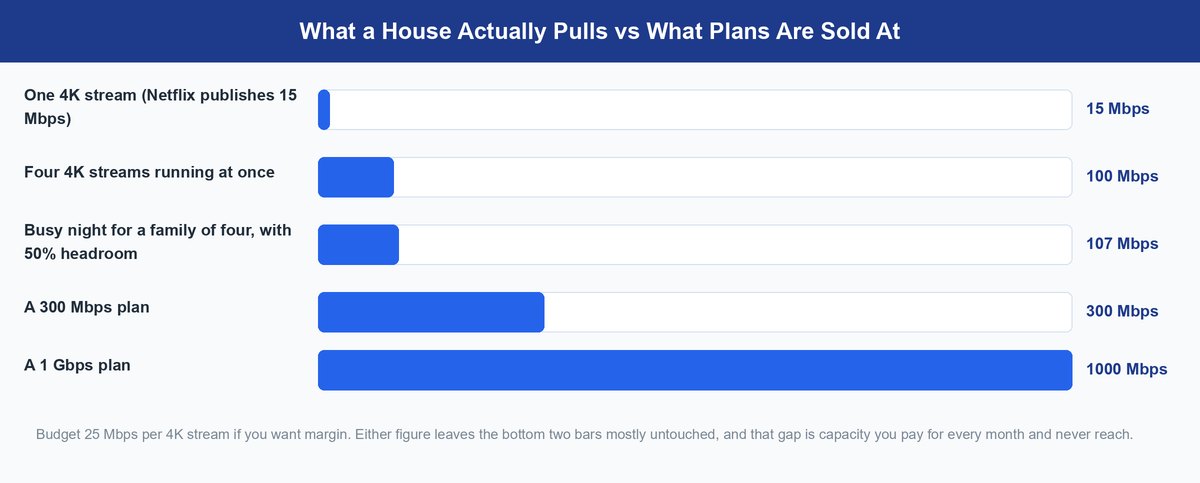
Here is the figure nobody selling internet leads with. Netflix publishes 15 Mbps for Ultra HD and 3 Mbps for HD. Budget 25 per 4K stream if you want margin. Either way that number has sat still for years while the tiers on sale climbed from 100 to 300 to a gigabit.
Do the multiplication and the pitch falls apart. Four 4K streams at once — genuinely rare in a four-person house — is about 100 Mbps. A gigabit is ten times that. Bandwidth is a ceiling, not a throttle: below the ceiling nothing speeds up when you raise it. Netflix does not play sharper 4K on a gigabit line. It plays the same 4K using the same 15 to 25 Mbps, and the other 700 sits there doing nothing.
Keep in mind: the FCC raised its fixed broadband benchmark to 100 Mbps down and 20 Mbps up in 2024. Note the second half of that pair. The regulator setting the floor thinks upload deserves its own number, which is more than most ISP ads manage.
What Each Activity Actually Costs in Mbps
Every plan recommendation online is built on this table and nobody shows it to you. Treat these published and widely reported figures as planning numbers, not laboratory truth.
| What you are doing | Download | Upload |
|---|---|---|
| Browsing, email, social | ~5 Mbps | ~1 Mbps |
| One HD (1080p) stream | ~5 Mbps | negligible |
| One 4K stream | 15–25 Mbps | negligible |
| One 1080p video call | ~3 Mbps | ~3.8 Mbps |
| Cloud gaming at 1080p60 | 25 Mbps | negligible |
| Console or PC online gaming | 3–5 Mbps | 1–2 Mbps |
| One 4K security camera | negligible | 4–8 Mbps |
| Cloud backup or big file upload | negligible | all of it |
Read down the upload column and the problem shows itself. Almost everything a house does for fun is download-heavy and cheap. Almost everything it does for work is upload-heavy — and upload is the column no ISP puts on a billboard.
How to Add Up Your Own Number in Two Minutes

Forget “10 to 25 Mbps per person”. It counts people, and people are not what consume bandwidth — simultaneous activities are. Four people asleep use nothing. One teenager downloading a game uses everything.
Step one. Picture your worst hour, not a quiet Tuesday, and write down what genuinely runs at once.
Step two. Add up the download column above.
Step three. Add 50%, which absorbs what you cannot schedule — a console update, a guest, a backup firing at the wrong moment.
Step four. Buy the tier just above that total, then check its upload before you sign.
Run it for a family of four on a bad night: two 4K streams (50), one gamer (5), two video calls (6), a phone updating (10). That is 71 Mbps, and 107 with headroom. So 300 Mbps is not the minimum for a family of four — it is already close to triple what that house peaks at.
Tip: test at 8pm on a weekday, never on a Sunday morning. Cable is a shared medium, so the neighborhood’s evening is the only hour that tells you what you really bought.
Upload Is the Ceiling Nobody Puts in the Ad
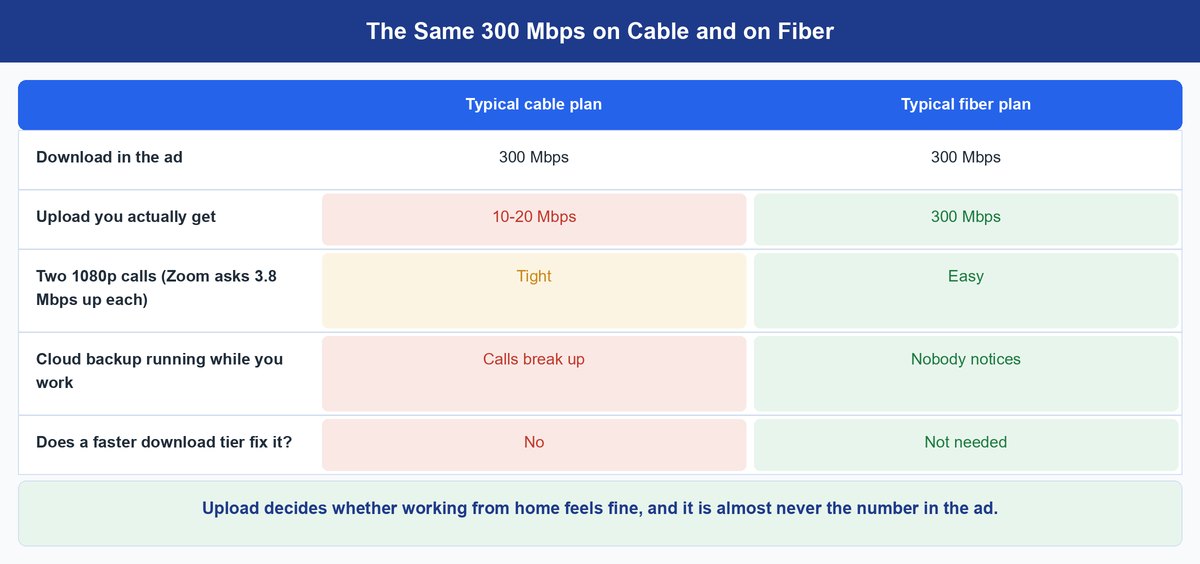
This is the section the ISPs and comparison sites on page one do not write, and it solves most real complaints.
Zoom asks for 3.8 Mbps upload against 3.0 Mbps download for 1080p video. Read that pair again — the call wants more going up than coming down. Calls, cloud backup, cameras and anything syncing to a cloud drive live in the upload column, and cable plans are lopsided: a 300 Mbps cable plan commonly ships with 10 to 20 Mbps of upload.
Picture the house that “needs faster internet for work”. Two people on calls want roughly 8 Mbps up, a doorbell camera takes 5, and a laptop backing up takes whatever is left. On 10 Mbps that house is over its ceiling before lunch and calls start freezing. Going from 300 down to 600 down changes nothing, because nothing was ever wrong with the download. No hardware helps here either — a mesh system like the TP-Link Deco fixes coverage, not upload you never bought.
The catch: moving up a download tier on cable often adds only a few Mbps of upload, sometimes none. Find the upload figure for your current tier and the one being sold to you before you pay. If the second number barely moves, that upgrade cannot fix a stuttering call — a different technology can, a bigger download tier cannot.
Ping and Jitter Are What Gaming Really Feels
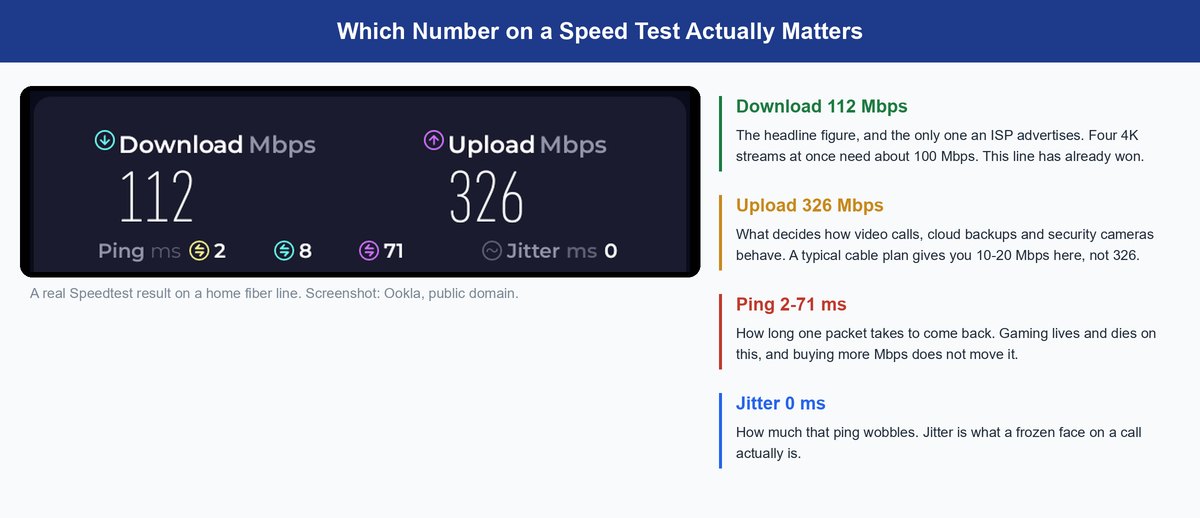
Ask what speed you need for gaming and you get a Mbps answer, which is the wrong unit. Competitive games send tiny packets and sit in the low single-digit Mbps. What decides whether a shot registers is how long each packet takes and how much that delay wobbles.
Even cloud gaming is modest. NVIDIA asks 25 Mbps at 1080p60 and under 80 ms of latency for GeForce NOW. A decade-old plan meets the bandwidth figure. The latency figure is not something you can buy, because ping and jitter come from distance to the server, the route your traffic takes, and how much your own network makes packets queue. That is why a cable changes how a game feels and a bigger plan does not. If your speeds already look right and everything still crawls, that is a diagnosis — we take the causes apart in why is my internet so slow.
Is 100 Mbps Fast and Is Gigabit Worth It
Three tiers cover almost every household in the country. Find yourself here.
What 100 Mbps Genuinely Covers
The FCC’s floor, and for one to three people it is no compromise. It carries three simultaneous 4K streams with room left, handles calls, and pulls a 60 GB game down in roughly ninety minutes. It gets tight only when big downloads collide with a busy evening. Living alone or as a couple on a 500 Mbps plan? You are funding capacity you never reach.
Where 500 Mbps Starts to Earn Its Price
The comfortable middle for a busy four or five-person house with heavy gamers or several people working from home. The gain is not smoother streaming, which was already smooth — it is that a huge download finishes in the background without anyone noticing. Buy it for headroom and the better upload that often rides along with the tier.
Who Actually Needs Gigabit Internet
Households moving very large files daily, several people uploading video, or anyone running a home server. That is a small minority. The other honest reason is fiber pricing: gigabit sometimes costs near the mid tier with symmetrical upload, in which case you are buying the upload and the download is what came in the box.
Caveat: a gigabit plan almost never reaches one device over Wi-Fi. Real-world wireless throughput to a single client is typically a fraction of the plan, and older devices cap far lower. Retest with a Cat 6 ethernet cable before you blame the plan, and if the router is the bottleneck our best WiFi router guide and the WiFi 6 vs WiFi 7 breakdown cover what actually changes.
How to Downgrade Without Losing a Thing
If your number came out well under what you pay for, the move is boring and it works. Check which tier you are actually on first — plenty of people were auto-migrated years ago and never noticed. Then ask your provider what the next tier down costs and, critically, what its upload figure is.
If the upload holds and the download still clears your number with headroom, take the drop, live with it two weeks, and watch one thing: does anyone complain during the busy hour? If nobody does, you found free money. If the upload falls with the download, stop — upload is the constraint people actually feel, and a few dollars a month is not worth turning every call into a slideshow.
Frequently Asked Questions
How much internet speed do I need for streaming?
Far less than you think. Netflix recommends 15 Mbps for Ultra HD, so three 4K screens at once sit comfortably inside a 100 Mbps plan. Streaming stopped being a reason to upgrade around the time 4K arrived.
How many Mbps do I need for a family of four?
Roughly 100 to 150 Mbps covers a bad evening and 200 to 300 gives comfortable headroom. Add up what genuinely runs at the same time rather than counting heads — four people asleep use nothing.
Is 100 Mbps fast in 2026?
Yes, for one to three people. It carries multiple 4K streams, calls and gaming without strain. It feels slow only when large downloads pile into a busy hour, or when the real problem is your Wi-Fi rather than your plan.
Is 500 Mbps fast enough for working from home?
The download side is more than enough. Whether it works depends on the upload figure attached to it, because calls, cloud backups and file syncing all run upward. Check that number before assuming the plan is the answer.
Do I need gigabit internet?
Almost certainly not for streaming or gaming. It earns its price if you move very large files daily, several people upload video, or you run a home server. Otherwise take it only when fiber prices it near the mid tier with symmetrical upload.
How much internet speed do I need for gaming?
Very little bandwidth and a lot of consistency. Online play runs on single-digit Mbps and even cloud gaming asks 25 Mbps at 1080p60. Ping and jitter decide how a game feels, so a cable does more than any upgrade.
The Bottom Line on Buying Internet Speed
Speed is the wrong axis, and it is the wrong axis on purpose. Mbps is the only part of a broadband product that is easy to advertise, easy to compare and easy to inflate, so it is the part everyone selling you internet talks about.
Your number is small and takes two minutes: what runs at once, add half, buy the tier above it. Then spend your real attention on the two things that decide how the internet feels — whether your upload can carry your work, and whether your Wi-Fi can carry the plan you already pay for. Fix those and 300 Mbps feels superb. Ignore them and a gigabit still feels broken.