Here’s the answer up front: the Minisforum MS-01 is the best mini PC for home server duty for most people, because it’s the rare small box with two 10-gigabit ports, two 2.5-gigabit ports, and three NVMe drive slots. If you mostly want file storage, the six-slot Beelink ME mini is the better buy. And if you’re just starting out, a cheap Beelink EQ14 will run Pi-hole and Home Assistant for years.
Why lead with the answer? Because the most common home server mistake isn’t picking a slow CPU. It’s buying a box you outgrow. A home server starts as one Docker container. A year later it’s your family’s photo backup, your media library, and your ad blocker. The box that survives that growth is the one with spare drive slots, spare RAM headroom, and more than one network port. Speed is the last thing to check, not the first.
Disclosure: TechDaily may earn an affiliate commission if you buy through links in this guide. It never changes which hardware we recommend.
- Buy for year two, not day one. Drive slots, RAM headroom, and network ports decide whether a mini PC survives as your home server. CPU speed almost never does.
- The Minisforum MS-01 is the pick to beat. Dual 10G SFP+ ports, dual 2.5G Ethernet, three NVMe slots, and a real PCIe slot in a box the size of a hardback book.
- Storing files more than running apps? The Beelink ME mini stacks six NVMe drives, up to 24 TB, into a silent little cube with dual Intel 2.5G Ethernet.
- A home server runs 8,760 hours a year, so idle watts are a real bill. The gap between a 6 W box and an old 60 W tower is real money every single year.
- Skip ECC-RAM anxiety. None of these picks officially supports it, and ZFS still checksums your data on disk. If ECC is a hard requirement, you want used workstation gear, not a mini PC.
What’s the first real job for your home server?
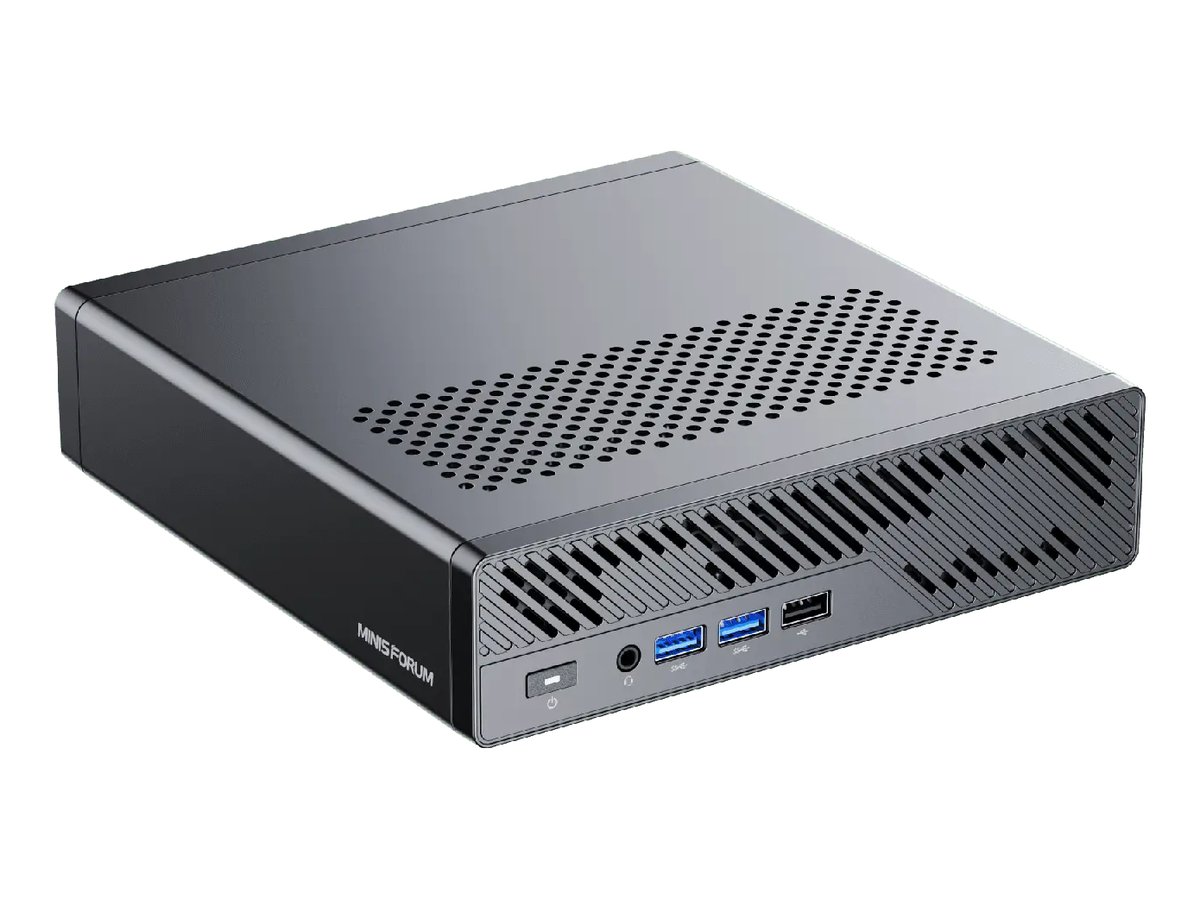
★ Your pick: Minisforum MS-A2
Sixteen Zen 5 cores that treat a whole rack’s worth of VMs as a light workload.
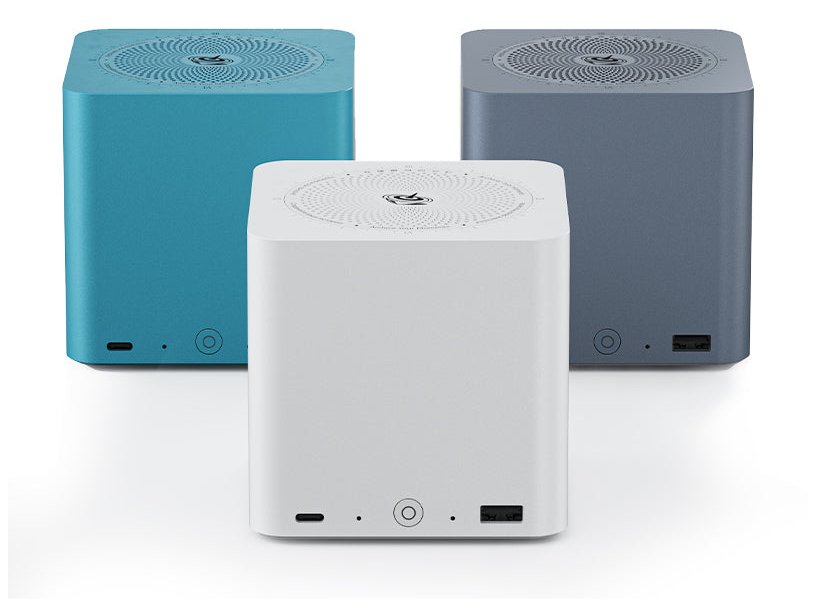
★ Your pick: Beelink ME mini
Six M.2 slots and up to 24 TB of silent flash in a cube smaller than a tissue box.
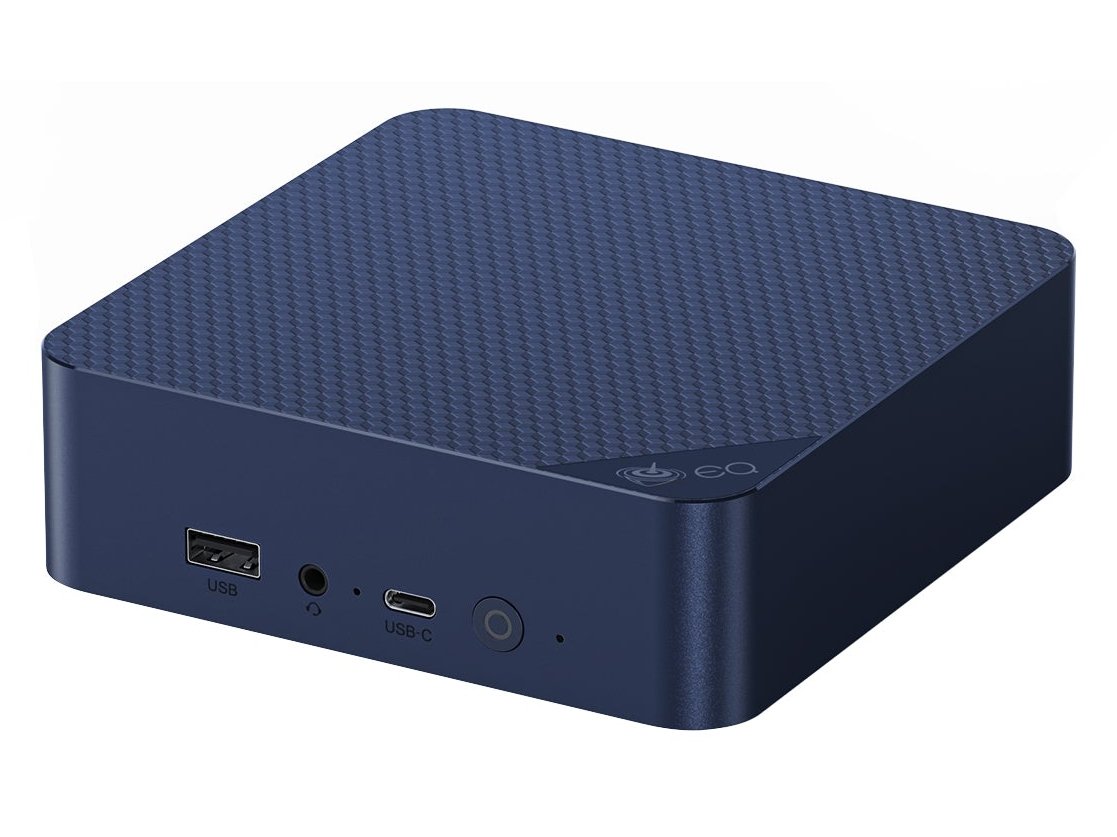
★ Your pick: Beelink EQ14
Cheap to run, dead simple, and plenty for Pi-hole, Home Assistant, and backups.
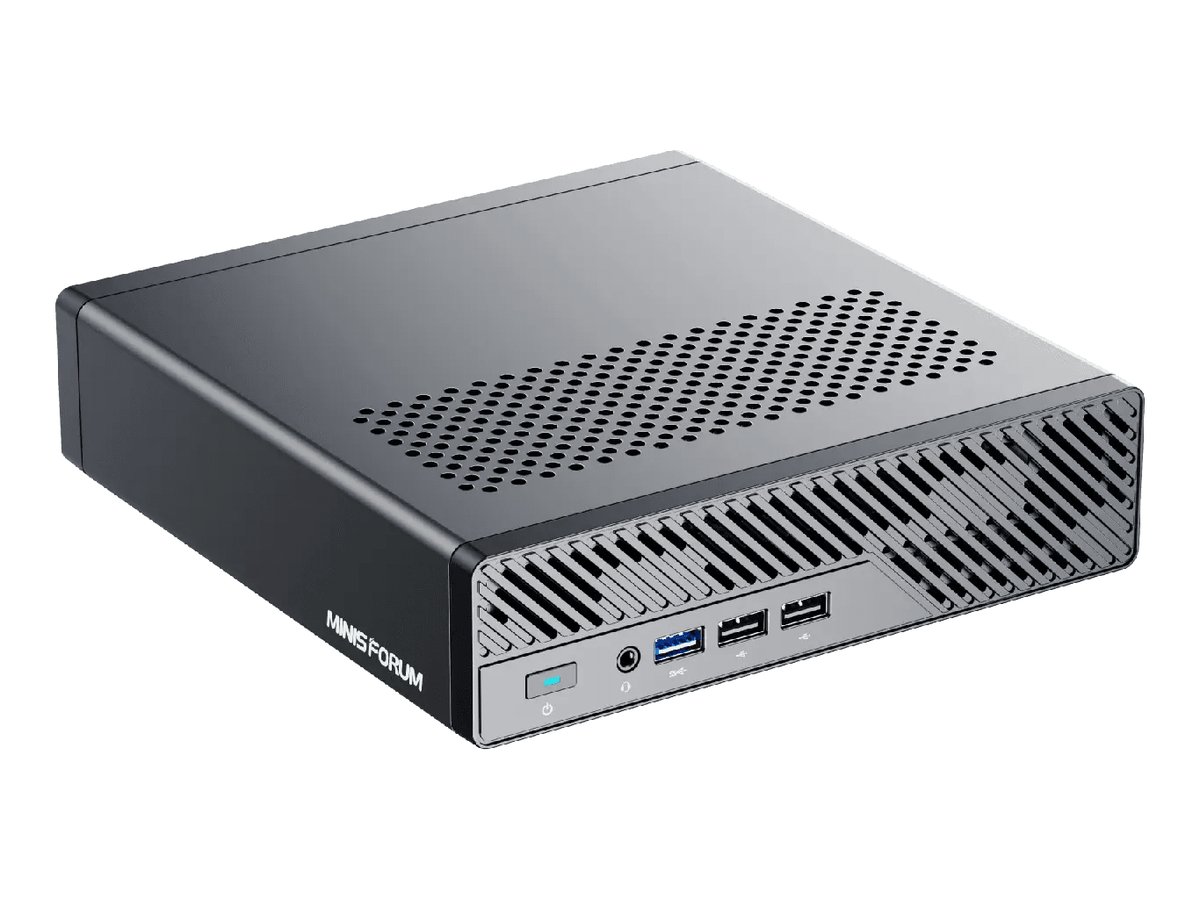
★ Your pick: Minisforum MS-01
Intel Quick Sync hardware turns Jellyfin and Plex transcodes into an easy job.
👑 Our Top Pick — Best Overall Value
Minisforum MS-01
The do-everything homelab box, with dual 10G SFP+, dual 2.5G Ethernet, three NVMe slots, and a PCIe slot to grow into.
Opens on our Top Pick. Tap an option to see the best match for you.
What a Home Server Actually Needs From a Mini PC
Mini PCs are designed and marketed as small desktops. A home server is the opposite kind of computer. It sits idle most of the day and never turns off. When it does work, the work is moving files and juggling containers, not rendering video. That mismatch is why so many spec sheets point you at the wrong things. Three features matter more than everything else combined.
Low Idle Power Because the Meter Never Stops
A desktop works eight hours a day. A server works 8,760 hours a year, and it spends most of them doing almost nothing. So the number that matters is idle draw, the power the box burns while waiting. Small boxes built on Intel’s N150 chip idle in the single digits of watts. Bigger boxes like the MS-01 sit noticeably higher. An old desktop tower pressed into server duty can burn ten times what a small box does. That difference lands on your electricity bill every month, forever. We run the actual numbers a few sections down.
Drive Slots and RAM Headroom for Year Two
Count the empty slots, because year-two-you will fill them. One M.2 slot means your first storage upgrade is a painful clone-and-swap. Three slots, like the MS-01 and MS-A2 carry, mean you just add a drive and grow the pool. Same logic for memory: soldered RAM caps your future, while SODIMM slots let you double up later. Virtualization eats RAM faster than anything else you’ll self-host. ZFS, the storage system TrueNAS uses, happily turns spare RAM into a read cache that makes everything feel faster.
Two Network Ports Beat One Fast CPU
One Ethernet port makes a PC. Two make a server. With a second port you can separate management traffic from storage traffic, bond both for throughput, or turn the box into a router running OPNsense. All four picks carry two wired ports. The two Minisforum boxes add two 10-gigabit SFP+ cages on top — networking you otherwise only get from rack gear.
Watch out: the network chip’s brand matters as much as its speed. Intel network chips like the i226-V work with Proxmox out of the box. Some Realtek 2.5G chips need a driver module added before the port even shows up. Every recommendation below leads with Intel networking where it counts.
The Four Mini PCs Worth Building Around
Four boxes, four different jobs. Each one is a current, shipping product we verified against the maker’s own spec sheet. Each one runs Proxmox or TrueNAS without drama.
1. Minisforum MS-01 — Best Overall Home Server Mini PC
$600–$850 barebonesDual 10G SFP+Dual 2.5G Ethernet3 NVMe slotsPCIe x8 slot96 GB RAM max
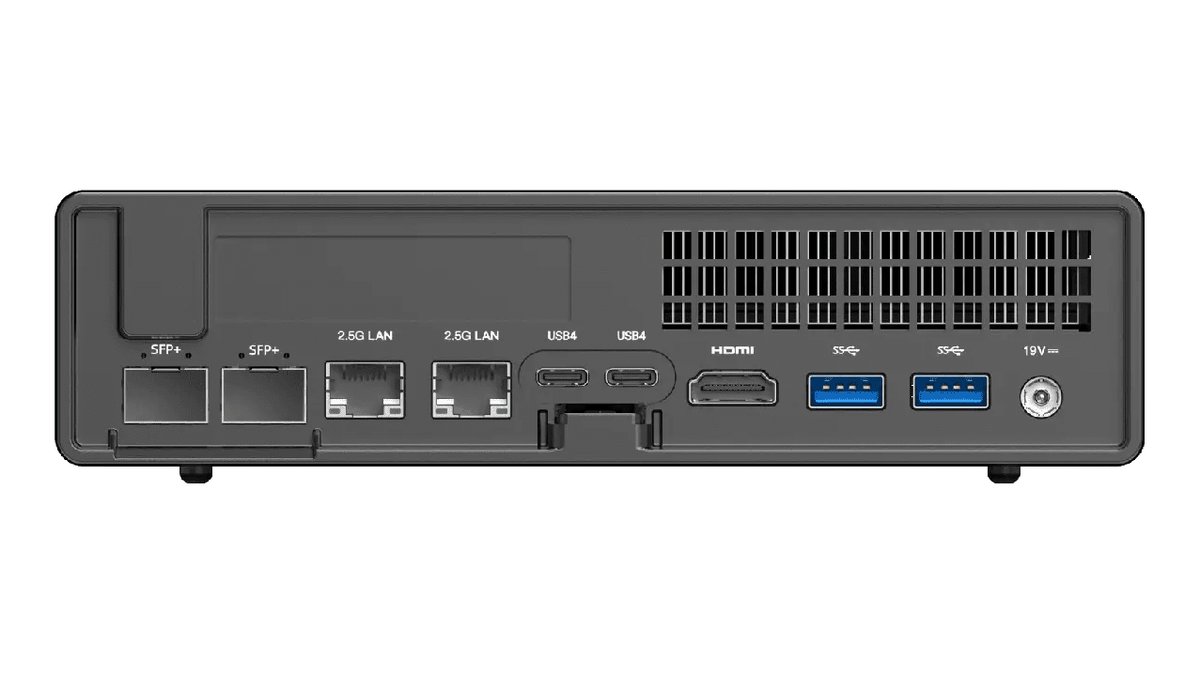
The MS-01 is what happens when someone designs a mini PC for homelabbers instead of office desks. The official spec sheet reads like a small rack server. You get two 10-gigabit SFP+ ports, two 2.5-gigabit Ethernet ports on Intel chips, three M.2 slots, U.2 enterprise-drive support, two USB4 ports, and a real PCIe 4.0 slot running at x8. No other box this size gives you that networking and that many drive slots at once.
The CPU choices are 12th and 13th-gen Intel Core i5 and i9 mobile chips, most with vPro remote management. The top i9-13900H option brings 14 cores. Every option includes Intel Quick Sync, the hardware video engine that lets Jellyfin or Plex transcode streams without pinning the CPU. Two SODIMM slots take up to 96 GB of DDR5, which is genuine virtualization headroom, not spec-sheet decoration.
Against the other picks, the MS-01 is the balanced one. The MS-A2 beats it on raw cores. The MS-01 counters with Quick Sync and Intel networking end to end, which makes it the smoother Proxmox and media box. The Beelink pair can’t touch its expansion. The honest trade-offs: it idles well above the N150 boxes, and the fans are audible under load. By the time you add RAM and drives, the total cost lands well north of the sticker. You’re paying for room to grow, and it’s the one box here you genuinely won’t outgrow.
Pros
- Dual 10G SFP+ plus dual 2.5G Ethernet, all usable at once.
- Three M.2 slots with U.2 support, so storage grows without surgery.
- Low-profile PCIe 4.0 x8 slot takes an HBA or a network card.
- Intel Quick Sync makes it the best media-server pick here.
- vPro on most CPU options for remote management.
Cons
- Idles well above the N150 boxes, which costs real money over years.
- Fans are clearly audible under sustained load.
- Fully loaded with RAM and drives, it costs laptop money.
2. Minisforum MS-A2 — Most CPU Power for Heavy Virtualization
$550–$1,000 by config16 cores, 32 threadsDual 10G SFP+Dual 2.5G Ethernet3 NVMe slotsU.2 support
The MS-A2 is the MS-01’s chassis with a desktop-class heart. Its spec sheet lists AMD’s Ryzen 9 9955HX at the top: sixteen Zen 5 cores and thirty-two threads in a box you can hide behind a monitor. That’s not a mobile chip pretending to be fast. It’s the kind of silicon that runs twenty VMs, a Kubernetes cluster, and a game server at the same time without asking you to schedule around it.
It keeps everything that makes this chassis great for servers. That means two 10G SFP+ cages, two 2.5G Ethernet ports, three M.2 slots with U.2 support on the primary slot, a PCIe x8 slot, and up to 96 GB of DDR5. Older Ryzen 7000-series options cost less and share the same platform. The cheaper configs are the same server with a smaller engine.
Choose it over the MS-01 when your bottleneck is compute: heavy CI builds, many concurrent VMs, code compilation, or a private AI stack. Choose the MS-01 instead when your workload is media and mixed services. AMD’s video engine is no match for Quick Sync in transcode support, and the MS-01’s all-Intel networking is the safer hypervisor default. The MS-A2’s other cost is heat. Sixteen cores in two liters means fans you will hear when the box works hard, plus the highest idle draw of our four picks.
Pros
- Sixteen Zen 5 cores, easily the most compute of any pick here.
- Same server-grade networking as the MS-01, dual SFP+ included.
- Three M.2 slots plus U.2 support for enterprise drives.
- Takes up to 96 GB of RAM, enough for serious VM sprawl.
Cons
- Highest idle draw and the loudest under sustained load.
- No Quick Sync, so it’s the weaker media-transcode box.
- Top configs cost more than some full tower builds.
3. Beelink ME mini — Best Tiny All-Flash NAS
$250–$500 by config6 M.2 slotsUp to 24 TB flashDual Intel 2.5G EthernetBuilt-in PSU
The ME mini answers a question the big two ignore: what if you mostly want storage? It’s a roughly four-inch cube whose spec sheet packs six M.2 slots, up to 24 TB of total flash, behind an Intel N150 chip and two Intel i226-V 2.5G Ethernet ports. Load it with NVMe drives, install TrueNAS or plain Proxmox with ZFS, and you have an all-flash network drive that’s silent, cool, and small enough to sit on a bookshelf.
Two design choices make it feel grown-up. The power supply is built in, so there’s no brick dangling behind the shelf, just a normal power cord. And the network chips are Intel, so Proxmox and TrueNAS see both ports on first boot. The catch list is honest but real. The RAM is soldered at up to 16 GB, and the N150 is a light-duty chip. The M.2 slots run at modest speeds — fine for a home network, nowhere near a workstation array.
Against the EQ14, the split is storage versus simplicity. The ME mini is the one you fill with drives; the EQ14 is the one you learn on. Against the MS-01 it’s a question of ceiling. The MS-01 can do everything the ME mini does and more, but not this quietly, not at this power draw, and not at this price. As a dedicated file box that also runs a handful of containers, the little cube is the most focused pick in this guide.
Pros
- Six M.2 slots, up to 24 TB of flash, in a silent cube.
- Dual Intel i226-V 2.5G ports work with everything out of the box.
- Built-in power supply, so no power brick to hide.
- Single-digit idle watts, about as cheap as always-on gets.
Cons
- RAM is soldered and tops out at 16 GB, so ZFS caching is limited.
- N150 is a light-duty chip, wrong for heavy VM stacks.
- M.2 slots run at reduced speeds, so pool bandwidth is capped.
4. Beelink EQ14 — Best First Home Server
$350–$470 rangeIntel N150Dual Ethernet2 M.2 slots25 W max CPU draw
The EQ14 is the box for the version of you that hasn’t self-hosted anything yet. It’s a small Intel N150 machine. Per the official specs, it carries two M.2 2280 slots taking up to 8 TB, one SODIMM slot up to 16 GB, and two wired network ports. A dual Intel i226-V 2.5G configuration is available, and it’s the one to order. The N150’s maximum chip power is 25 W, and boxes like this idle in the single digits. Leaving it on around the clock costs less per year than a couple of pizzas.
Don’t let “starter” read as “toy”. Four efficiency cores are genuinely enough for the classic first stack: Pi-hole or AdGuard, Home Assistant, a Tailscale node, network backups, and a lightweight dashboard. The N150’s graphics block includes Quick Sync, so a small Jellyfin library with a stream or two of transcoding is on the table. And unlike the ME mini, the RAM and both drives are yours to replace. That makes this a box you can repair and repurpose for a decade.
The comparison to the ME mini is simple. Two slots versus six says everything, so buy the cube if storage is the mission. The comparison upward is simpler. The EQ14 can’t bond 10-gigabit links or host twenty VMs, and it never pretends to. It’s the least commitment of the four. When you outgrow it, it retires gracefully into a dedicated Pi-hole box or an off-site backup target at a relative’s house.
Pros
- Dual wired LAN, with an all-Intel 2.5G option, at a starter price.
- RAM and both M.2 drives are user-replaceable, unlike most rivals here.
- 25 W max CPU draw and tiny idle draw keep the yearly bill trivial.
- Quick Sync on board handles light Jellyfin transcoding.
Cons
- 16 GB single-channel RAM cap rules out serious ZFS or VM work.
- Only two M.2 slots, so storage growth ends early.
- Base configuration ships gigabit Ethernet, so you must pick the 2.5G option deliberately.
How the Four Picks Compare at a Glance
| Model | CPU | Wired Networking | M.2 Slots | Max RAM | Best Job |
|---|---|---|---|---|---|
| Minisforum MS-01 | Intel Core i5/i9 (12th/13th gen) | 2× 10G SFP+ and 2× 2.5G | 3 (U.2 support) | 96 GB DDR5 | Do-everything homelab |
| Minisforum MS-A2 | AMD Ryzen 9 up to 9955HX | 2× 10G SFP+ and 2× 2.5G | 3 (U.2 support) | 96 GB DDR5 | Heavy virtualization |
| Beelink ME mini | Intel N150 | 2× 2.5G (Intel i226-V) | 6 | 16 GB (soldered) | All-flash NAS |
| Beelink EQ14 | Intel N150 | 2× LAN (2.5G Intel option) | 2 | 16 GB DDR4 | First server |
Read the table the way you’d read your own roadmap. If the “best job” column already names your plan, that’s your box. If you’re torn between two rows, take the one with more empty slots. Empty slots are the only spec that gets more valuable after you buy.
What a Year of Always-On Power Really Costs
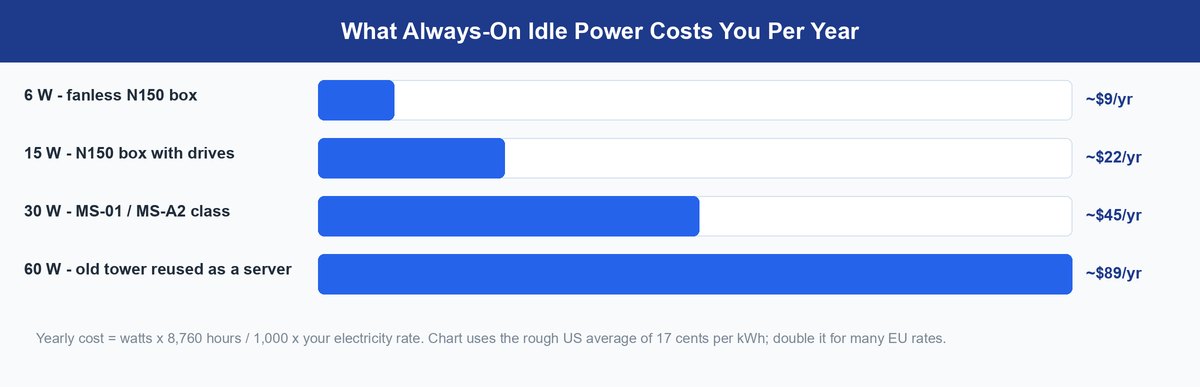
The formula is short: watts times 8,760 hours, divided by 1,000, times your electricity rate. At a rough US average of 17 cents per kilowatt-hour, every always-on watt costs about a dollar and a half a year. That sounds like nothing until you multiply it by a box that never sleeps.
The chart is the whole argument for mini PCs as servers. A fanless N150 box costs less per year than a single takeout order. An old tower “repurposed as a free server” burns the price of a new drive every year. The free server isn’t free — it’s on an installment plan. The Minisforum boxes sit in the middle. They cost more per year than the little Beelinks, and they buy you networking and expansion no N150 box can offer.
The math that matters: every 10 W of idle you avoid saves roughly $15 a year at average US rates. Over a five-year life, choosing a small efficient box over a repurposed tower covers the cost of a good 2 TB NVMe drive, out of savings alone.
Two habits keep the number honest. First, measure at the wall with a cheap power meter instead of trusting spec sheets. BIOS defaults and attached drives change idle draw. Second, cap the ZFS read cache on small-RAM boxes so the system isn’t forced to swap, which burns power and performance at once.
The Used Office Mini PC Wildcard
There’s a fifth option this guide would be dishonest to skip: the used corporate mini PC. Boxes like the HP EliteDesk 800 G9, Dell OptiPlex Micro, and Lenovo ThinkCentre M90q flood the refurb market when companies refresh their fleets. They make legitimately good Proxmox hosts, with desktop-grade CPUs, Intel networking, and business-grade build quality for less than any new pick here.
The trade-offs are the reason they’re the wildcard and not the headline. Idle draw typically lands well above an N150 box, and warranties from refurbishers are short. Drive room is usually one M.2 plus one SATA bay, and there’s no 10-gigabit path at all. A used EliteDesk is the right call when the budget is tight and your workload is CPU-flavored. The moment your plan involves lots of storage or fast networking, the new picks above pull away.
Before you buy used: stick to 12th-gen or newer Intel chips. That generation’s mix of performance and efficiency cores dropped idle power meaningfully versus older refurbs. It also keeps Quick Sync current enough for modern media formats.
Getting Proxmox or TrueNAS Onto Your New Box
The software side is a solved problem, and it’s free. Proxmox VE turns any of these boxes into a hypervisor that runs VMs and containers side by side. Our Proxmox hardware requirements guide walks through exactly what to check before install day. TrueNAS SCALE is the storage-first alternative, and the right default for the ME mini. Still deciding between hypervisors? Our Hyper-V vs Proxmox comparison settles that fork. Our VMware alternatives guide covers the escape routes if you’re fleeing licensing changes.
Two setup rules save the most pain. Install the hypervisor on its own small drive and keep the storage pool on separate drives, so a reinstall never touches your data. And give the box a wired management IP you write down. The day something breaks, you don’t want to be hunting DHCP leases while the family asks why the photos are gone.
Frequently Asked Questions
How much RAM does a mini PC home server really need?
Sixteen gigabytes runs a surprising amount: Pi-hole, Home Assistant, a media server, and a handful of containers fit comfortably. The number changes when ZFS enters, because ZFS uses spare RAM as a read cache and VMs each claim their own slice. For Proxmox with ZFS and a few VMs, treat 32 GB as the practical minimum. That is exactly why the upgradeable Minisforum boxes age better than the soldered N150 cubes.
Can an Intel N150 box handle Plex or Jellyfin?
Yes, within limits. The N150 carries Intel’s Quick Sync video hardware, which offloads transcoding from the CPU cores. A couple of 1080p transcodes are realistic. Direct play, where the TV accepts the file as-is, barely touches the chip at all. What an N150 can’t do is heavy simultaneous transcoding for many users, or tone-mapped 4K HDR conversions at scale. That’s MS-01 territory.
Do I need 10-gigabit networking at home?
Not on day one. For most homes, 2.5G is the honest middle answer, since it runs on the Cat5e cable already in your walls. You want the 10G SFP+ ports when multiple machines pull from all-flash storage at once, or when you edit video straight off the server. The reason to buy the MS-01 or MS-A2 anyway is that their 10G ports cost nothing extra to leave dark until the day you need them.
Is a used office mini PC better than a new N150 box?
It’s better at compute and worse at everything that makes a server cheap to own. A refurb 12th-gen i5 beats an N150 badly in raw performance and usually costs less. But it idles at multiples of the N150’s draw, carries a short refurb warranty, and offers no 10-gigabit path. Buy used when the workload is CPU-heavy and the budget is fixed. Buy new when the box will run for years and power, warranty, and expansion matter.
Does a home server need ECC RAM for ZFS?
It’s a nice-to-have that internet folklore promoted into a requirement. ZFS checksums every block on disk and heals corruption on read, with or without error-correcting memory. None of the four picks here officially supports ECC anyway. If your data genuinely justifies ECC, a mini PC is the wrong category, and used workstation or server gear is the right one. For family photos and media, ZFS plus a real backup beats ECC plus wishful thinking.
What’s the safest way to reach my home server from outside?
Don’t forward ports to your hypervisor’s web interface, ever. Install a mesh VPN like Tailscale or plain WireGuard on the server, put your phone and laptop on the same private network, and manage the box as if you were home. It takes about ten minutes on any pick in this guide, costs nothing for personal use, and removes the single most common way home servers get compromised.
Which Mini PC Should Actually Run Your Home Server
Buy the Minisforum MS-01 if you want one decision that stays correct for five years. Its combination of dual 10G SFP+, dual 2.5G Ethernet, three drive slots, and Quick Sync means the services you haven’t imagined yet already have a place to live. Choose the MS-A2 over it only when you know your future is VM-heavy. You’re trading quiet and transcoding strength for cores you must actually need.
If that’s more server than your life requires, the Beelink pair covers the sane endpoints. The ME mini is the silent all-flash file cube. The EQ14 is the starter box that costs almost nothing to run and teaches you what you’ll want next. That’s the real trick to this category. The best mini PC for a home server isn’t the fastest one you can afford. It’s the one whose empty slots match the person you’ll be in a year.