Proxmox will install on almost anything. The official minimum is a 64-bit CPU, 1 GB of RAM, and one network port. That one line has burned more first-time homelabbers than anything else in the docs. A box that small boots the web interface and runs nothing you actually want. The real Proxmox hardware requirements are set by your guest list — the VMs and containers you plan to run on it.
This guide does two jobs: the honest sizing math the official page skips, then three machines worth buying in 2026 — from a silent mini PC to used rack iron.
- The official 1 GB minimum is for test installs only. Real use starts at 2 GB for the system, plus guest RAM, plus about 1 GB per TB of ZFS storage.
- RAM is what kills a Proxmox host, not the CPU. Your core count almost never runs out first — your memory always does.
- Most first hosts should be a quiet Ryzen mini PC like the GEEKOM A6. It runs six-plus containers without breaking a sweat, and you can leave it on a shelf.
- Buying for year two is the whole game. The Minisforum MS-A2’s dual 10G ports save you a full rebuild the day you decide you want a cluster.
- Used Dell PowerEdge servers still win on cores, ECC memory, and drive bays per dollar — if you can live with the noise and the power bill.
Affiliate disclosure: TechDaily earns a commission on qualifying purchases through some links in this guide. It does not change our picks.
Which box should run your first Proxmox host?
★ Your pick: GEEKOM A6
Eight cores, near silence, and tiny power draw — the easiest first host there is
★ Your pick: Minisforum MS-A2
Dual 10G SFP+ ports are exactly what cluster and Ceph traffic want
★ Your pick: Used Dell PowerEdge
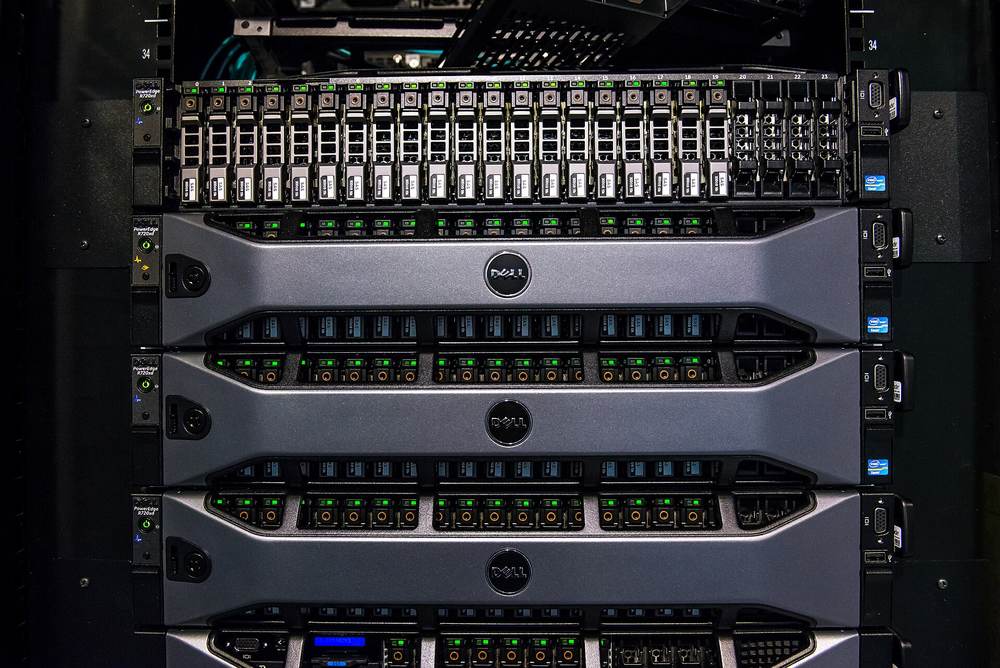
Eight to twelve hot-swap drive bays give ZFS room no mini PC can match
★ Your pick: Used Dell PowerEdge
Off-lease dual-Xeon boxes often cost less than one new mini PC
★ Your pick: GEEKOM A6
Its Radeon 680M iGPU passes through to a Jellyfin VM for smooth transcodes
👑 Our Top Pick — Best Overall Value
Minisforum MS-A2
16 cores and dual 10G networking mean the box you buy today is still the right box when your lab doubles
Opens on our Top Pick. Tap an option to see the best match for you.
What Proxmox Officially Requires
The official list is short, but the fine print matters. Here it is, per the Proxmox VE requirements page.
| Spec | Bare minimum (testing only) | Recommended for real use |
|---|---|---|
| CPU | Any 64-bit Intel or AMD chip | Intel VT-x or AMD-V support, plus VT-d or AMD-Vi if you want passthrough |
| RAM | 1 GB | 2 GB for the system, plus guest RAM, plus ~1 GB per TB of ZFS or Ceph storage |
| Storage | Any hard drive | Fast SSD storage |
| Network | One NIC | Redundant gigabit NICs, faster for clusters |
Plain words for those terms: VT-x and AMD-V are the CPU switch that lets one machine safely pretend to be many — every desktop chip from the last decade has it. VT-d and AMD-Vi go further, letting you hand a real device like a GPU straight to one VM. That is passthrough, and cheap old office PCs sometimes lack it.
Notice the label on that 1 GB figure: a minimum for evaluation. That is the project politely telling you not to build on it. Proxmox is a hypervisor — the software layer that lets one computer act like many. Every guest you add eats real memory. Still fuzzy on VMs versus containers? Our plain-English Proxmox explainer covers it in ten minutes.
Before you buy: Proxmox states flatly that neither ZFS nor Ceph works with a hardware RAID controller. If you buy a used server for ZFS, plan to flash its storage card to plain HBA (“IT”) mode or swap it out. Skipping this step is the classic way to lose a pool.
The RAM Math That Actually Sizes Your Box
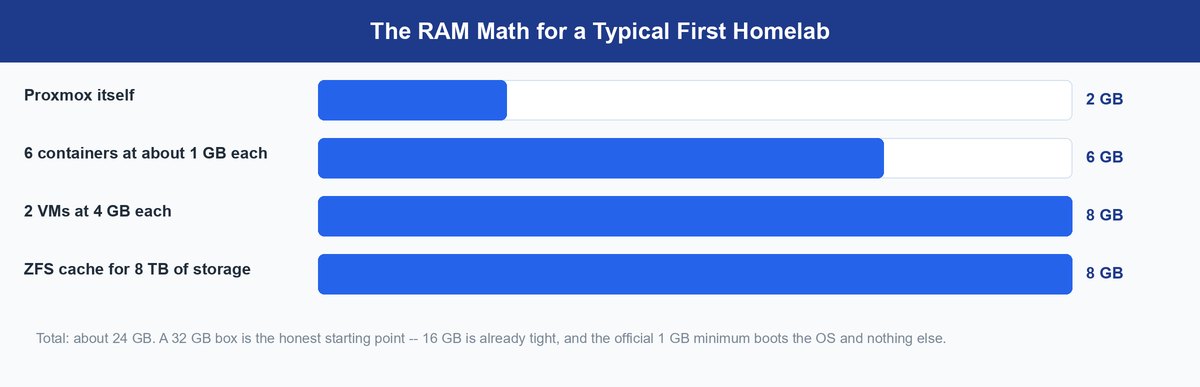
The docs give you the formula; almost nobody walks through it. So here is one honest example: six containers, two VMs, and 8 TB of ZFS storage.
The host takes its 2 GB off the top. Six light containers at about 1 GB each is 6 GB more. Two VMs at 4 GB each adds 8 GB. Then ZFS claims its share: roughly 1 GB per TB of storage, so 8 GB for our 8 TB pool. Total: about 24 GB. A 16 GB box is already underwater, and that is a modest lab.
Why does ZFS want so much? It keeps a cache called the ARC — a fast in-memory copy of the data you touch most, so reads come from RAM instead of disk. That cache is why ZFS feels quick — and it is paid for in gigabytes.
There is a second reason RAM is the wall. A hypervisor shares CPU time between guests easily — an idle VM costs almost no processor. Memory is different. RAM promised to a VM is spoken for. Promise more than you have, and the host starts killing guests under pressure. CPUs flex; memory doesn’t. That is why the used-server crowd obsesses over memory slots. It is also why many people end up running Docker inside one fat VM instead of many thin ones.
The rule that falls out of the math: whatever RAM you think you need, buy double — or buy a box with empty slots.
Three Builds That Cover Every First Proxmox Host
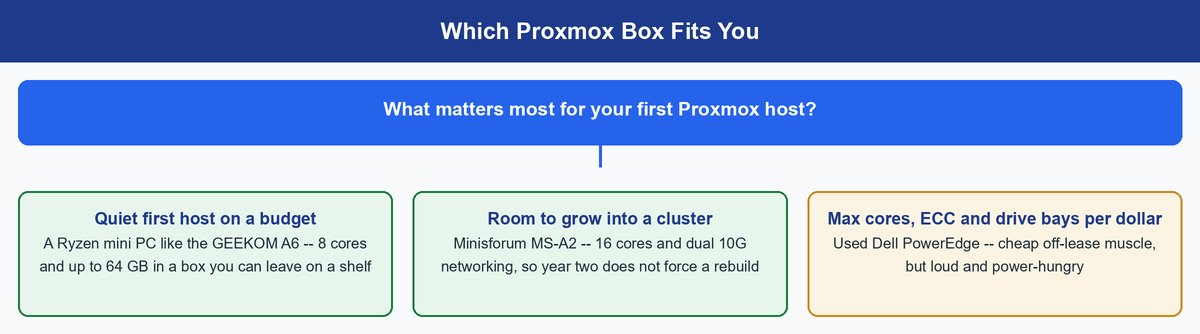
Most first Proxmox hosts are not servers — they are mini PCs and repurposed desktops. That is the right instinct: a homelab you can hear from the couch is one you eventually unplug.
1. GEEKOM A6 — The Quiet Starter Box
≈ $520–620 streetRyzen 7 6800HUp to 64 GB DDR52.5G Ethernet
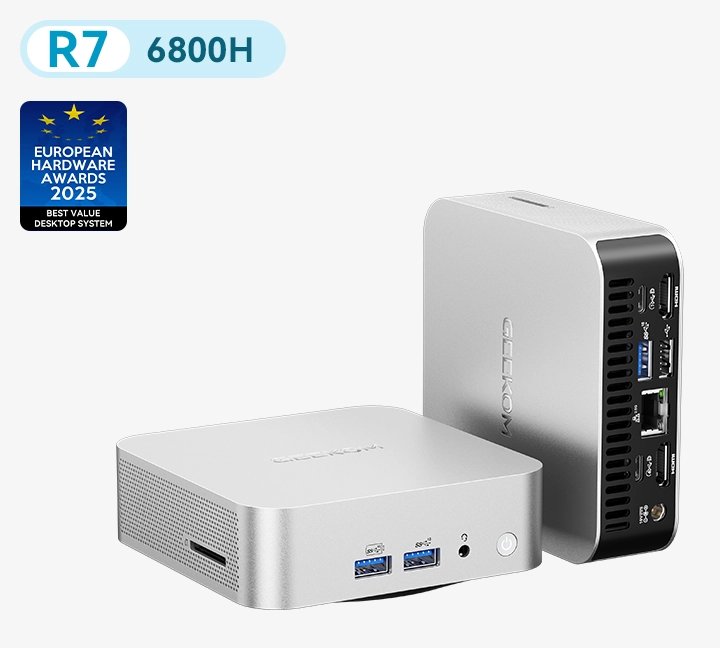
This is the box for whoever wants Proxmox running tonight, silently. The A6’s Ryzen 7 6800H brings eight full cores — enough to host a dozen light containers plus a VM or two without drama. GEEKOM sells it with 16 or 32 GB of DDR5. The board takes up to 64 GB, and that ceiling matters far more than the CPU ever will. You get one 2.5G Ethernet jack. Ignore the Wi-Fi — a hypervisor on Wi-Fi is a prank you play on yourself.
The sleeper feature is the Radeon 680M graphics built into the chip. Hand it to a Jellyfin or Plex VM with passthrough and hardware transcoding just works.
Pros
- Near-silent and sips power, so it can live anywhere
- Eight cores and a 64 GB RAM ceiling cover years of homelab growth
- Capable iGPU for media-server passthrough
Cons
- Single Ethernet port makes clustering awkward later
- No ECC memory support
- One NVMe slot limits your ZFS layout
2. Minisforum MS-A2 — The Box That Grows Into a Cluster
≈ $576–840 bareboneRyzen 9 9955HXDual 10G SFP+PCIe x16 slot
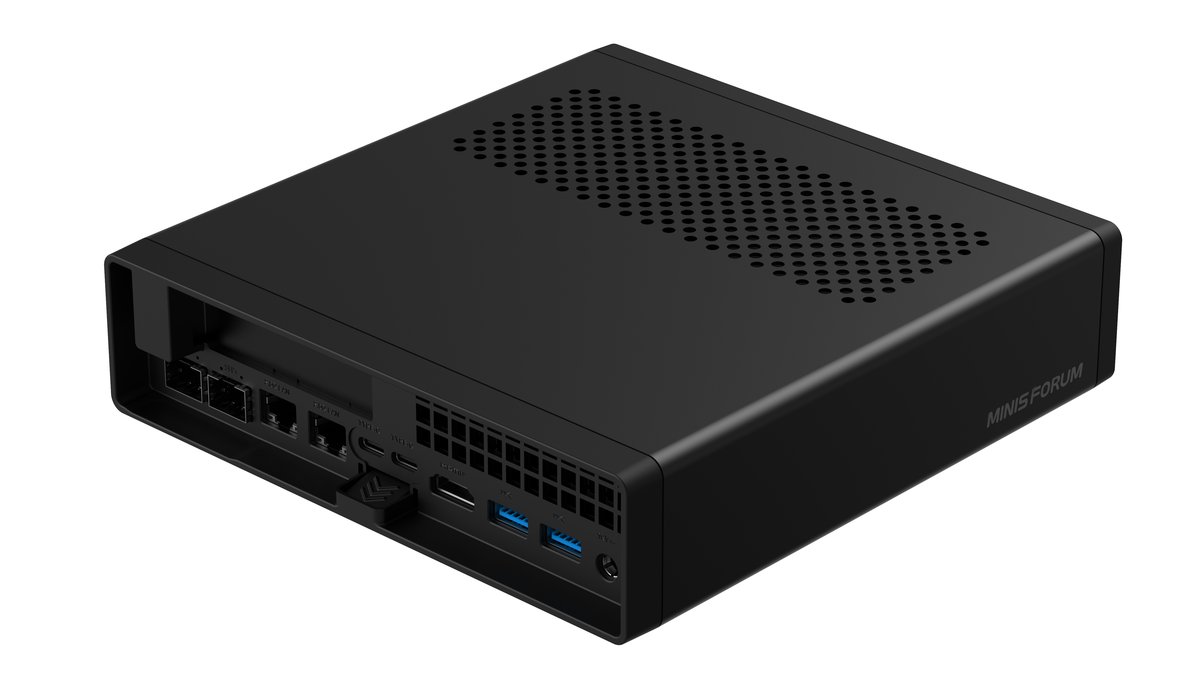
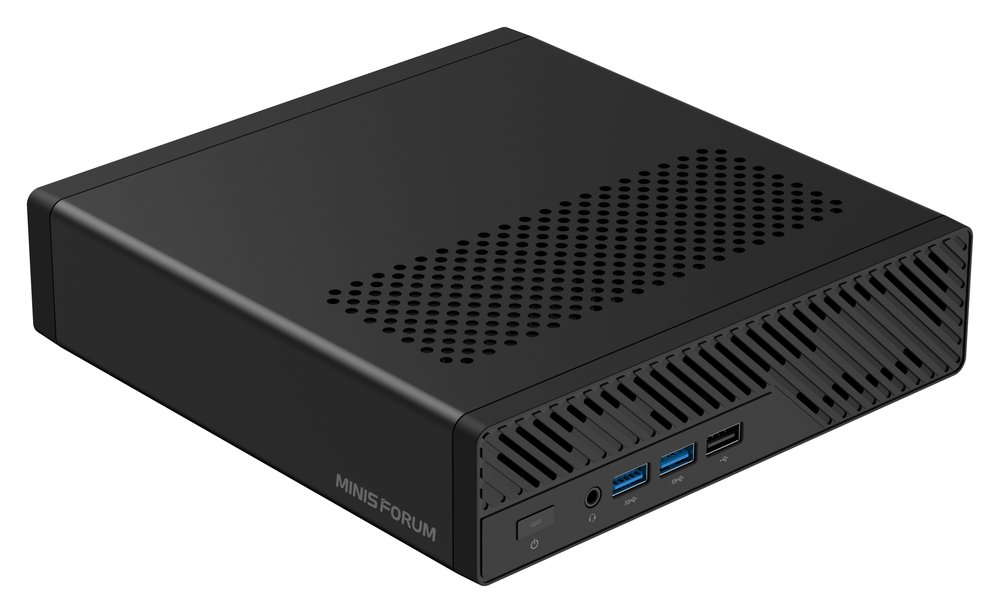
The MS-A2 is what you buy when you already know year two is coming. Minisforum packs four LAN ports into this tiny 1.78-liter case. Two of them are 10G SFP+ — the exact ports cluster and storage traffic beg for. AMD rates the top Ryzen 9 9955HX option at 16 cores and 32 threads. That is workstation muscle in a box smaller than a toaster. A PCIe x16 slot takes an HBA or another NIC.
Know what “barebone” means before you click. You add your own DDR5 and SSD, so the real total lands a couple hundred dollars above the sticker. Minisforum listed the 9955HX barebone at $839.90 at the time of writing. Not sure this beats a NAS OS for you? Our Proxmox vs Unraid comparison draws the line.
Pros
- Dual 10G SFP+ plus two more LAN ports — no rebuild when you cluster
- 16 cores rival a rack server at a fraction of the power draw
- PCIe slot adds real expansion no other mini PC class offers
Cons
- Barebone pricing hides the true cost of RAM and SSD
- ECC is not on the spec sheet
- Overkill if all you want is three containers
3. Used Dell PowerEdge — Most Cores and Bays per Dollar
≈ $200–600 usedDual Xeon socketsECC memory8–12 drive bays
Off-lease server iron is the third shape of Proxmox host. For two kinds of reader, it wins outright. Need serious ZFS storage? An R720xd-class chassis holds a dozen hot-swap drives — no mini PC plays in that league. Need the most cores and ECC memory for the least money? Used dual-Xeon boxes often cost less than one new mini PC. Newer models like the R730 and R740 take DDR4 and waste less power. Used prices swing wildly, so treat any number as a starting point.
The costs are physical, not financial. These machines are loud, heavy, deep, and hungry. A basement, garage, or closet is part of the purchase. The enterprise perks come along too: ECC RAM that catches its own bit flips, remote management, and twin power supplies.
Pros
- Unbeatable cores, ECC memory, and drive bays per dollar
- Hot-swap bays make big ZFS pools easy
- Remote management built in
Cons
- Fan noise rules out living spaces
- Power draw quietly adds to your bill every month
- Aged hardware means no warranty and heavier idle consumption
Four Spec Traps That Bite in Year Two
Spec sheets are written to sell boxes, not to run hypervisors. These four traps are where first builds go wrong. Each is cheap to avoid now and expensive to fix later.
RAM Runs Out Long Before the CPU Does
Homelabbers compare CPU benchmarks for fun, then hit a memory wall at eight guests. A modern eight-core chip idles through a typical home workload. The RAM you promised those guests is gone until they are. Choosing between a faster CPU and more memory? Take the memory, every time. A box with empty RAM slots beats its own benchmark score.
One Network Port Works Until You Want a Cluster
A single jack is fine for a standalone host. The moment you cluster, Proxmox wants its coordination traffic on a quiet, dedicated link, and shared storage wants another. A soldered-in single NIC caps your ceiling on day one. Dual 2.5G ports are the sensible 2026 baseline for a solo box; anything cluster-bound should have 10G in it. Buy the ports you will want in year two — you cannot solder them on later.
An iGPU Is a Free Media Server
Integrated graphics look like a throwaway spec-sheet line — they are not. With VT-d or AMD-Vi, that iGPU passes straight to a Jellyfin or Plex VM as a dedicated transcode engine. That is the gap between smooth 4K streams and a CPU pinned at 100%. Check the passthrough box when buying, and skip old office desktops that lack it.
ECC Memory Helps ZFS but Is Not Required
The forum legend says ZFS without ECC eats your data. The truth: ZFS runs fine on normal RAM, and nothing requires ECC. ECC is insurance — it catches memory bit flips before they reach your disks, which is why real servers use it. For irreplaceable data, it is one more argument for used enterprise gear. For a lab, skip it without guilt.
What Clusters, Ceph, and Backups Add to the List
Single-host specs are the easy half. Add a cluster, shared storage, or real backups, and the hardware list changes shape.
A Real Cluster Starts at Three Votes
Proxmox clusters decide who is in charge by majority vote, called quorum. Two nodes can tie, and a tied cluster freezes to protect your data — so three nodes is the real starting line. Keep the nodes similar-sized, or the weakest box becomes the one your VMs cannot fail over to.
Workaround: You can run a two-node cluster honestly by adding a QDevice — a tiny third voter that only breaks ties. A Raspberry Pi or any spare Linux box does the job — no third full node needed.
Ceph Wants Identical Nodes and Its Own Network
Ceph turns three or more nodes into one big pool of shared storage. It is glorious, and it is demanding. It expects matching drives across nodes. It burns about 1 GB of RAM per TB, just like ZFS. And it hits the network hard enough to deserve its own — exactly where the MS-A2’s 10G ports earn their price.
The Backup Box Can Be Modest
Proxmox Backup Server needs far less than the hypervisor. A retired desktop or older mini PC works; give it plenty of disk and, ideally, an SSD so its housekeeping runs fast. The one hard rule: the backup box is a separate physical machine. Backups living on the host they protect are not backups.
What Changed With Proxmox 9
For normal Intel and AMD builds, nothing moved: Proxmox VE 9 kept the same CPU, RAM, and storage requirements as 8. The current release is 9.2, published May 21, 2026. Every box in this guide runs it comfortably.
The genuinely new thing is Arm. Proxmox shipped an official arm64 installer on August 5, 2026 — a first for the project. But before you plan a shoebox lab of tiny boards, read the requirement: an Armv9-A processor or newer.
Hardware limit: The Raspberry Pi 5 does not qualify. Its Cortex-A76 cores are Armv8.2 designs, a generation below the Armv9-A floor. Official Arm support is aimed at server-class chips, not the Pi on your desk — for now, your Proxmox host stays x86.
Time-sensitive: Proxmox VE 8 reaches end of life on August 31, 2026. If a tutorial you are following starts from an 8.x installer, it is walking you into a dead branch — start from 9.2 instead.
Frequently Asked Questions
Can I run Proxmox on 8 GB of RAM?
Yes, for a small setup — the system takes about 2 GB, leaving room for a handful of light containers. You will feel the ceiling the first time you add a real VM or a ZFS pool. Fine for learning on hardware you already own — a poor spec to buy on purpose.
Do I need ECC RAM for ZFS on Proxmox?
No. ZFS runs correctly on ordinary RAM, and nothing in the requirements demands ECC. ECC catches memory errors before they touch your data, so it is cheap insurance for files you cannot replace. For a lab, skip it.
Does Proxmox run on a Raspberry Pi now that there is an Arm version?
No. The official arm64 build requires an Armv9-A processor or newer, and the Pi 5’s cores are Armv8.2. The Arm release targets server-grade chips. For a Pi-sized budget, a used x86 mini PC is the supported path.
Is a used server better than a mini PC for my first Proxmox host?
Only if you need what it uniquely offers: many drive bays, ECC memory, and the most cores per dollar. For everyone else the mini PC wins — silent, cheap to run, and happy on a shelf.
What CPU features does Proxmox actually need?
Any 64-bit Intel or AMD chip with VT-x or AMD-V. That flag makes real virtual machines possible, and nearly everything modern has it. Want to hand a GPU to one VM? You also need VT-d or AMD-Vi. Check both when buying used office PCs — that is where gaps hide.
How much disk does the Proxmox install itself need?
The system itself is small — a modest SSD holds it with ease. The advice that matters: use SSD storage, not spinning disks, because every guest’s speed rides on it. Spend your real disk money on the storage your VMs and data will live on.
Buy for Your Guest List, Not the Minimums
The official Proxmox minimums answer a question nobody should ask. The question that matters: what do you want running a year from now? That answer sizes the box. Do the RAM math on your real guest list, double it, and pick your shape. The GEEKOM A6 if you want silent and simple. The Minisforum MS-A2 if a cluster is in your future. Used PowerEdge iron if drive bays and ECC are the point. Get the memory and network ports right, and the rest of the spec sheet takes care of itself.