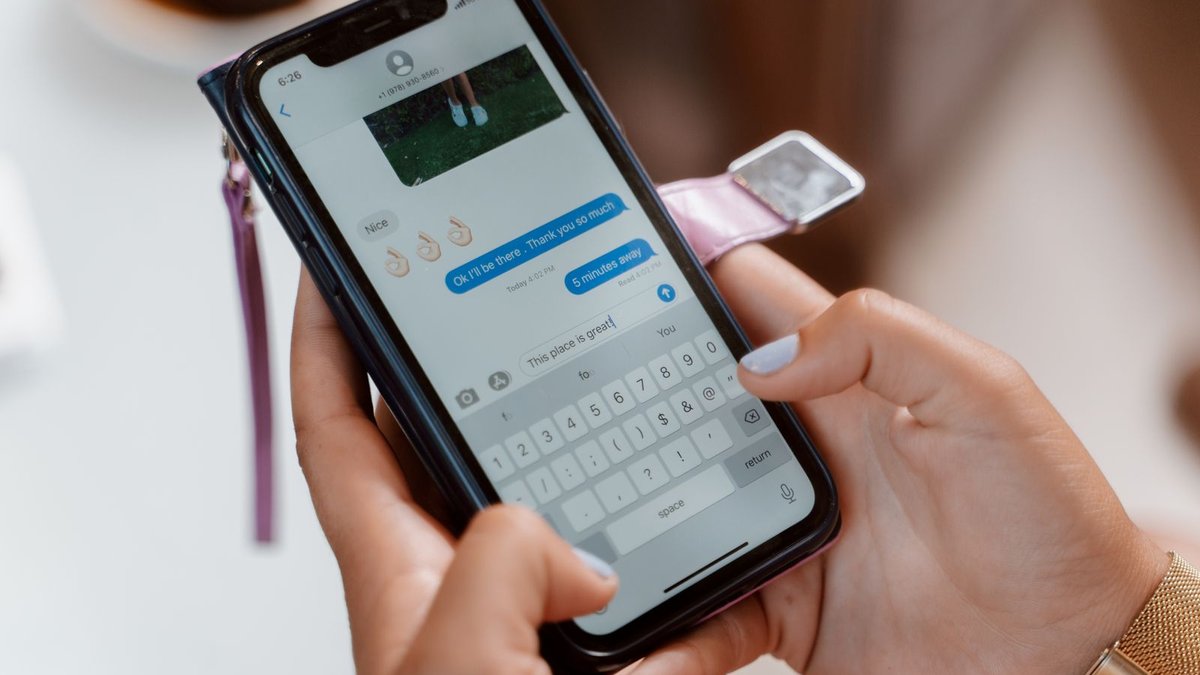
You sent a text, the bubble came out green, and your brain jumped straight to the worst case. Take a breath. If you’re asking why are my messages green, here’s the short answer: your iPhone sent that text as a regular text message, over SMS or RCS, instead of iMessage. That’s it. Green is a delivery route, not a verdict on your friendship. Most of the time it means the other person doesn’t have an iPhone, their phone lost its data connection, or Apple’s iMessage service hiccuped. And since iOS 18, there’s a third player called RCS that changed what green even means. Let’s decode it.
- A green bubble means your text traveled as SMS or RCS instead of iMessage. It says nothing about being blocked.
- Blocking doesn’t turn bubbles green. A blocked iMessage stays blue and just never says Delivered.
- Green with a small RCS tag is the new normal for texting Android friends. It’s an upgrade over old-school texting, not a bug.
- If one contact suddenly went green, their phone is probably off, out of data, or they switched to Android.
- Between two iPhones, blue almost always comes back with a data check and a quick iMessage toggle.
A Green Bubble Almost Never Means You Were Blocked
Let’s kill the scary theory first, because it’s the real reason most people search this. Blocking doesn’t work the way the green bubble makes you feel it does. When someone blocks you on an iPhone, your iMessages still look normal on your end. The bubble stays blue. The message says Sent. It just never shows Delivered, and calls roll straight to voicemail. Apple built blocking to be quiet, not colorful.
A bubble that turns green tells you something much more boring: iMessage wasn’t available for that message, so your iPhone used the regular texting network instead. Dead battery on their end. No signal in a basement. A switch to Android. An Apple server having a rough afternoon. All of those turn bubbles green. Rejection doesn’t.
So before you spiral over a green text, remember which clue actually matters. Blue with no Delivered for days, plus calls that never ring, is the pattern worth wondering about. Green alone means the message took a different road, and it very likely still arrived.
What Each Bubble Color Is Actually Telling You
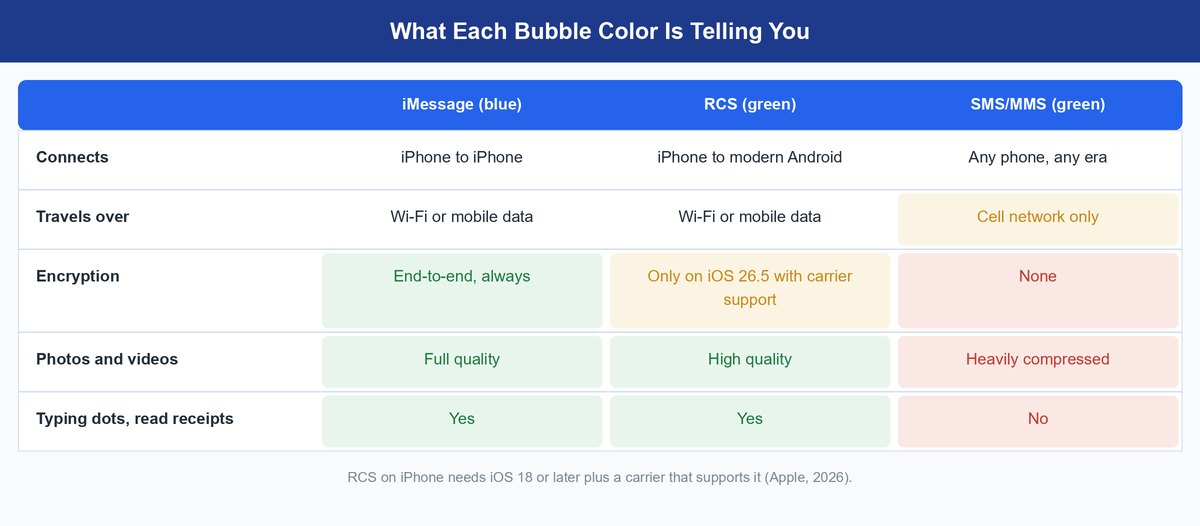
Your Messages app is really three messaging services wearing one trench coat. Apple explains the split on its own iMessage, RCS, and SMS/MMS support page, but here’s the plain-English version of what each color means.
Blue Bubbles Travel Apple’s Private iMessage Lane
Blue means both phones are Apple devices talking over iMessage, Apple’s own service. It runs on Wi-Fi or mobile data, so it works even with zero phone signal if you’re on Wi-Fi. Everything is end-to-end encrypted, which means nobody in the middle can read it, not even Apple. Photos and videos send at full quality, and you get typing dots, read receipts, editing, and reactions. This is the lane your iPhone always tries first.
Green With an RCS Tag Is the Modern Green
Since iOS 18, iPhones can use RCS, short for Rich Communication Services, when texting Android phones. The bubble is still green, but look under it: it says Text Message – RCS. Per Apple’s own breakdown, RCS runs over Wi-Fi or data, sends high-quality photos and video, and supports typing dots and read receipts. It needs iOS 18 or later and a carrier that supports it. In short, it’s most of the iMessage experience in a green wrapper.
Plain Green Is a Fallback From the 1990s
Old-fashioned green with no RCS tag is SMS, technology that dates back to 1992. It rides the cell network, caps each message around 160 characters, and squeezes photos and videos down until they look like they were filmed on a potato. No typing dots, no read receipts, no encryption. Your iPhone only drops to SMS when nothing better is available, which is exactly why a sudden plain-green bubble is a clue that something on the other end is off.
Watch out: neither SMS nor most RCS traffic is end-to-end encrypted today. Apple only added encrypted RCS in iOS 26.5, and both carriers involved have to support it. Treat every green bubble as a postcard, not a sealed letter, and keep truly private stuff in blue chats or an encrypted app.
Why Your Green Texts Suddenly Say RCS
If your green bubbles recently grew a little RCS label, nothing broke. Your carrier switched on RCS support, and your iPhone took the upgrade automatically. This is the part of the green-bubble story that changed completely: for years, texting an Android phone meant blurry videos and missing typing dots. Now the same green conversation gets crisp media, delivery receipts, and Wi-Fi delivery, because RCS is a modern data protocol rather than 1990s cell-tower tech.
Here’s the way to think about it: green used to mean downgrade. Now green splits into two tiers, and the RCS tier is genuinely good. The bubble color stayed the same only because Apple chose to keep blue as an iMessage-only badge. Under the hood, an RCS chat with your Android friend behaves far more like iMessage than like the old texts. If you were switching platforms yourself, this is also why the move hurts less than it used to; our Android to iPhone transfer guide covers that jump.
Worth knowing: one non-iPhone in a group chat flips the entire thread green for everyone. That’s not a glitch either. A group conversation can only run on a service every member supports, so a single Android friend moves the whole group onto RCS or SMS.
Why Only One Contact Shows Green While Everyone Else Stays Blue
When every chat is blue except one, the answer lives on that one person’s phone, not yours. Here are the usual suspects, in rough order of likelihood.
They Moved to Android and Kept Their Number
The classic. When someone trades an iPhone for a Pixel or Galaxy, their number stops speaking iMessage, so your texts go green permanently. If they forgot to unlink their number from iMessage before switching, your messages can even vanish into Apple’s servers for a while instead of reaching them.
Their Phone Is Off, Dead, or Out of Data
iMessage needs an internet connection on both ends. If your friend’s battery died, they’re on a flight, or they burned through their data plan, your iPhone waits, gives up, and may fall back to a green text so the message still lands. When their phone comes back online, the conversation usually turns blue again on its own.
iMessage Got Switched Off on One Side
iMessage is a setting, and settings get toggled. A software update, a new phone setup, or a sign-out of someone’s Apple Account can quietly disable it. When that happens, every message between you rides the texting network, green, until iMessage gets flipped back on in Settings.
Your iPhone Quietly Fell Back to Text Mode
iPhones have a setting called Send as Text Message. When it’s on and iMessage can’t get through, your phone resends the message as a green text automatically, sometimes with a small Sent as Text Message note. Helpful on a spotty network, but it means one weak-signal moment can make a normally blue chat go green for a message or two.
One warning: if your Android-convert friend stopped getting your texts entirely, have them visit Apple’s deregister iMessage tool and remove their number. It’s a two-minute fix, though it can take a little while to fully kick in across Apple’s servers.
How to Get Blue Bubbles Back Between Two iPhones
Two iPhones texting green is fixable in almost every case. Work through these in order; most people are done by step two.
Check Apple’s System Status Before Touching Anything
Sometimes it’s Apple, not you. Open Apple’s System Status page and look for a green dot next to iMessage. If it’s anything but green, stop fiddling with settings. Wait an hour and your blue bubbles will come home on their own.
Flip iMessage Off and Back On
Go to Settings, then Messages, and toggle iMessage off. Wait about thirty seconds, then turn it back on and give it a minute to reactivate. This forces your iPhone to re-register with Apple’s servers and clears the most common activation hiccups. If it sticks on Waiting for activation, restart the phone and try once more.
Make Sure Both Phones Have a Real Data Connection
iMessage cannot ride the bare cell network the way SMS can. Confirm Wi-Fi or cellular data is actually working on both phones by loading a webpage. Airplane mode, an expired data plan, or hotel Wi-Fi with a login wall you never finished are all classic silent killers of blue bubbles.
Ask Your Android Convert to Deregister iMessage
If you’re texting someone who used to have an iPhone, the fix is on their side: Apple’s deregister tool unlinks their number so messages stop routing to iMessage. Once that clears, your texts reach them as green RCS or SMS messages reliably, which beats blue messages that disappear.
Frequently Asked Questions
What does a green text message mean?
It means the message was sent as a regular text, over SMS or RCS, instead of Apple’s iMessage. Usually the other person is on Android, or an iPhone on their end lost its connection. It does not mean you were blocked.
Why are my messages green when they should be blue?
Between two iPhones, green means iMessage couldn’t connect. One phone is offline, iMessage got toggled off, Apple’s service is down, or your phone fell back to text mode. A data check and an iMessage toggle in Settings fix most cases.
Why are my messages sending green all of a sudden?
Something changed on the other end. The most common triggers: your contact switched to Android, their phone died or ran out of data, or they signed out of their Apple Account. If it’s every contact at once, check your own connection and Apple’s System Status page.
Does a green text message mean I’m blocked?
No. Blocking keeps iMessages blue; they simply never show Delivered, and calls go straight to voicemail. A green bubble means the message used the texting network, which is a connection issue or an Android recipient, not a rejection.
Is RCS as good as iMessage?
Close, but not equal. RCS gets you high-quality media, typing dots, and read receipts over Wi-Fi or data. What it mostly lacks is encryption: Apple only supports end-to-end encrypted RCS starting with iOS 26.5, and both carriers have to play along. iMessage encrypts everything by default.
Can I turn RCS off if I don’t want it?
Yes. On iOS 18 and later, go to Settings, then Apps, then Messages, and switch off RCS Messaging. Your Android conversations will fall back to plain SMS and MMS, which honestly makes them worse. Most people should leave RCS on.
Green Is a Different Road, Not a Rejection
Here’s the mental shift that ends the green-bubble panic: bubble color is a routing report, not a relationship report. Blue means Apple’s lane. Green with an RCS tag means the modern carrier lane, which is now genuinely good. Plain green means the old fallback lane that still works when everything else fails. Blocked is the one thing green has never meant. So next time a chat goes green, run the boring checklist: their phone, their data, your data, one toggle. And if you’re weighing a platform switch yourself now that green bubbles sting less, our iPhone vs Android breakdown is the honest version of that decision.