Walk into any electronics store and the 4K vs 1080p question looks closed before you open your mouth. Four times the pixels. Obviously better. Next customer. Except the pixels are not really the product, and nobody on the shop floor is going to do the one piece of arithmetic that decides whether you will ever see them. Your eyes have a fixed resolving power. Your couch sits a fixed distance from the screen. Between those two numbers there is a hard line where 4K detail simply stops arriving, and a lot of living rooms sit on the wrong side of it. So let’s do that math room by room, and then get to the honest reason to buy 4K anyway, which has almost nothing to do with resolution.
Affiliate disclosure: TechDaily earns a commission on qualifying purchases made through some links in this article. It never changes what we tell you.
- Eyes with 20/20 vision top out near 60 pixels for every degree of your field of view, and that one number quietly settles the entire 4K vs 1080p argument
- On a 65-inch screen, 4K only starts adding detail you can see once you sit closer than about 8 feet, and it only pays in full inside 4 feet
- The rule of thumb worth remembering: sit farther back than roughly 1.5 screen diagonals and the extra pixels stop reaching you
- Sharper-than-average eyes push those distances out by about double, so “nobody can tell the difference” is a marketing line, not a finding
- Buy the 4K set anyway — in 2026 the resolution is a side effect of getting HDR, a better panel, and the top streaming tier
- At a desk, with your face two feet from a 27-inch monitor, the math flips completely and 4K is obvious
The Short Answer Before You Spend a Dollar
Short answer: if you sit farther from the screen than about 1.5 times its diagonal, you will not see any difference between 4K and 1080p, no matter how good the TV is or how hard you squint. Move closer than that and the gap opens up quickly, until at roughly 0.7 diagonals you are getting every last pixel 4K has to give.
Those two numbers are not opinions. They fall straight out of how much detail a human retina can separate, and you can check them against your own room with a tape measure in under a minute. A 65-inch TV has about 8 feet of usable 4K range in front of it. Most people park the couch outside that range and then argue about panel brands.
That sounds like an argument for saving your money. It is not, and this is where most of the internet gets the answer half right. The resolution stops mattering long before the TV does. What you are actually buying with a 4K set in 2026 is contrast, brightness, color and panel technology that manufacturers stopped putting in 1080p sets years ago. The pixels just come along for the ride.
How Far Your Eye Can Actually Resolve Detail

Vision gets graded in arc-minutes, which is a fancy way of measuring how small a thing can get before your retina gives up and blurs it into its neighbor. Normal 20/20 vision resolves detail down to about one arc-minute, which works out to roughly 60 pixels per degree of your field of view. Pack more pixels than that into the same slice of your vision and the extra ones land inside the blur, doing nothing.
Now put a real room into that formula. Sit 10 feet from a 65-inch TV and the screen fills about 27 degrees of your view. Each 1080p pixel covers roughly 0.8 arc-minutes at that distance, already finer than your eye can separate. Each 4K pixel covers about 0.4. You are not looking at a sharper image; you are looking at the same image drawn with a pen your eye cannot follow. That is the whole trick, and it is why a 1080p Blu-ray and a 4K stream of the same movie look identical from the far end of a sofa.
Keep in mind: not everyone comes with standard-issue eyes. Researchers who study the limits of human vision do not all settle on one arc-minute — a 1998 Sun Microsystems analysis of display and vision limits worked to roughly half that. If your vision is sharper than 20/20, double every distance in this article. “Nobody can see it” is false, and anyone who tells you otherwise is selling something too.
The Screen Size and Seating Distance That Decide It
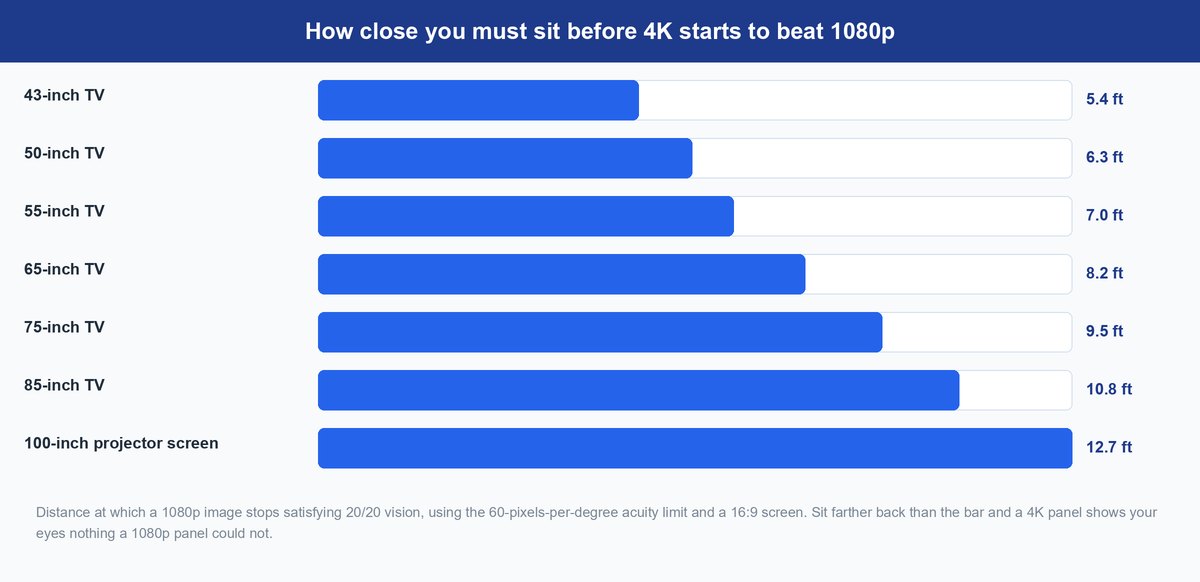
Here is the whole argument as a table. Measure from the screen to where your head actually sits, not to the front of the coffee table, and find your row.
| Screen size | 4K starts to show closer than | Full 4K benefit at | Verdict at a 9-foot couch |
|---|---|---|---|
| 43-inch | 5.4 ft | 2.5 ft | Nothing to see |
| 50-inch | 6.3 ft | 2.9 ft | Nothing to see |
| 55-inch | 7.0 ft | 3.2 ft | Nothing to see |
| 65-inch | 8.2 ft | 3.8 ft | Nothing to see |
| 75-inch | 9.5 ft | 4.4 ft | Right at the edge |
| 85-inch | 10.8 ft | 4.9 ft | Clearly visible |
| 100-inch projector | 12.7 ft | 5.8 ft | Clearly visible |
Read down that last column and the pattern is hard to miss. At a normal seating distance, everything up to 65 inches is delivering a picture your eye already saw in full at 1080p. The screens where 4K earns its name are the ones that dominate a wall, or the projector setups where a 100-inch image is throwing pixels across the room.
This is also why the upgrade advice you hear most often is backwards. If you are sitting 9 feet from a 55-inch TV, going from 1080p to 4K on the same size screen changes nothing you can perceive, while going from 55 to 75 inches changes everything — more of your vision is filled, the picture stops being a window and starts being a scene, and you cross into the range where the resolution starts working for you too. Size buys you the pixels. Pixels alone do not buy you size.
The catch: this table measures resolution and nothing else. It says a 4K panel cannot show you finer detail from your couch. It does not say the two TVs look the same, because in 2026 they almost never do, for reasons that have nothing to do with pixel count.
Why a 4K Set Still Wins Even When the Pixels Do Not
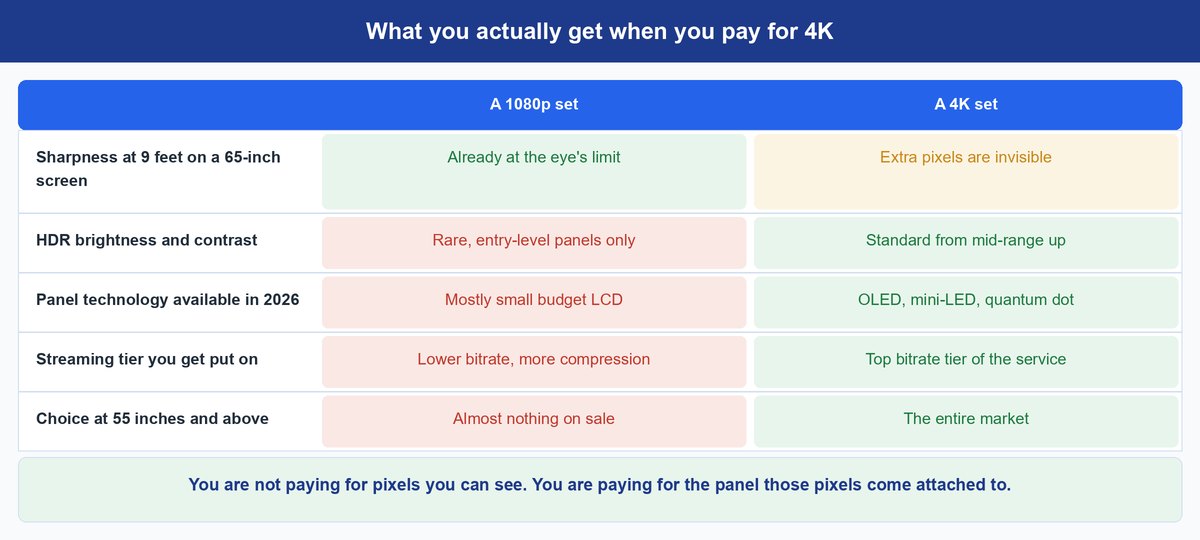
This is the part page-one search results tend to skip, because it complicates a clean answer. Resolution stopped being the interesting difference between televisions years ago. Everything that replaced it happens to ship on 4K panels only.
Contrast and Brightness Travel Any Distance
HDR is the real picture upgrade of the last decade, and unlike resolution it does not care where you sit — a bright highlight in a dark scene reads from across the room. Standard content was mastered against a 100-nit reference white; HDR content is commonly mastered at 1,000 nits or more, a tenfold jump in the range the picture can use. If you want the format details, we broke those down in our guide to what Dolby Vision actually buys you. What matters here is that HDR shipped alongside 4K, never behind it.
The Good Panels Are Only Made in 4K
OLED, mini-LED and quantum-dot sets exist in 4K and 8K, full stop. Nobody is manufacturing a 65-inch 1080p OLED for you to compare against. Choosing 1080p at a large size today means choosing an old, dim, low-contrast LCD, which is a genuine downgrade you will see from any seat in the house.
Streaming Services Keep Their Best Bitrate for 4K
The 4K stream is generally the least-compressed version a service will hand you, which means fewer smeared shadows and less blocky motion in a dark scene. Some of what people describe as “4K looking sharper” is really just a fatter data pipe doing a better job on the same picture.
The Market Stopped Selling Big 1080p Sets
Above 43 inches, 1080p televisions have all but disappeared from shelves, and where they survive they are rarely the cheaper option. You do not really get to choose 1080p at living-room size any more, which turns “is 4K worth it” into a question about which 4K set to buy.
Where 4K vs 1080p Lands for PC and Console Gaming
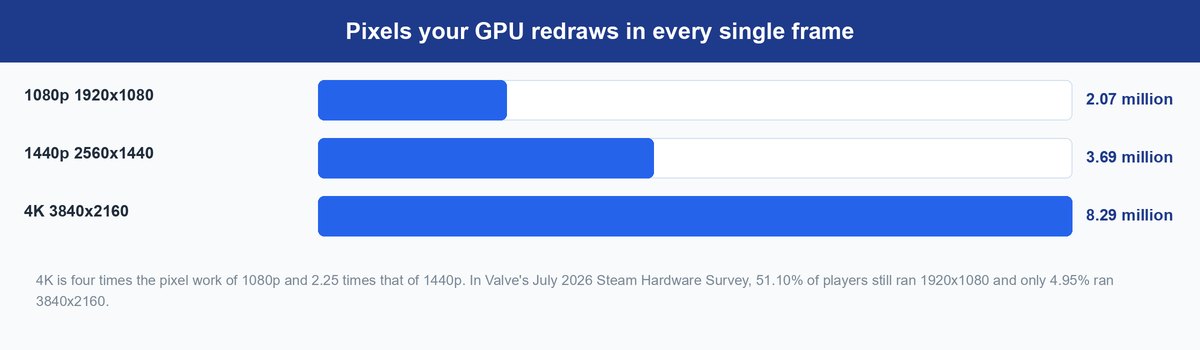
Gaming is the one place where the distance math flips, and where the cost of 4K is paid in frames instead of dollars.
Start with the workload. Every frame at 4K is 8.29 million pixels, four times the 2.07 million a 1080p frame needs. That is not a rounding error your graphics card can absorb; it is the difference between 120 frames per second and 45 in the same scene on the same hardware. Valve’s Steam Hardware Survey put 1920×1080 at 51.10% of players in July 2026, with only 4.95% running 3840×2160 — after a decade of 4K being on sale. PC gamers have voted, repeatedly, for frames.
But desks are not living rooms. Your face sits about two feet from a 27-inch monitor, and 1.5 diagonals on a 27-inch screen is only about 3.4 feet. You are deep inside the range where every extra pixel lands somewhere your retina can use it, which is why 4K looks transformative on a desk and invisible on a wall. Text edges, UI elements and distant detail in a game all sharpen visibly. Upscalers like DLSS and FSR muddy this further in a useful way: they render fewer pixels internally and reconstruct the rest, so a modern card can often show you a 4K-ish image for closer to 1440p money.
Where 1440p Fits Between 1080p and 4K
At 3.69 million pixels, 1440p asks for about 78% more work than 1080p and roughly 45% of what 4K demands. On a 27-inch monitor at desk distance that lands in a genuinely useful place: sharp enough that you stop noticing pixel edges, cheap enough that a mid-range card can hold a high refresh rate. It is the reason 1440p climbed to 21.46% of Steam users while 4K sat under 5%. If you game on a desk and cannot decide, 1440p is the answer far more often than either extreme — and if you want to see what the top end of the desk experience looks like, our Dell S3225QC 4K OLED review covers where the compromises land.
Is Upgrading From 1080p to 4K Worth It Right Now
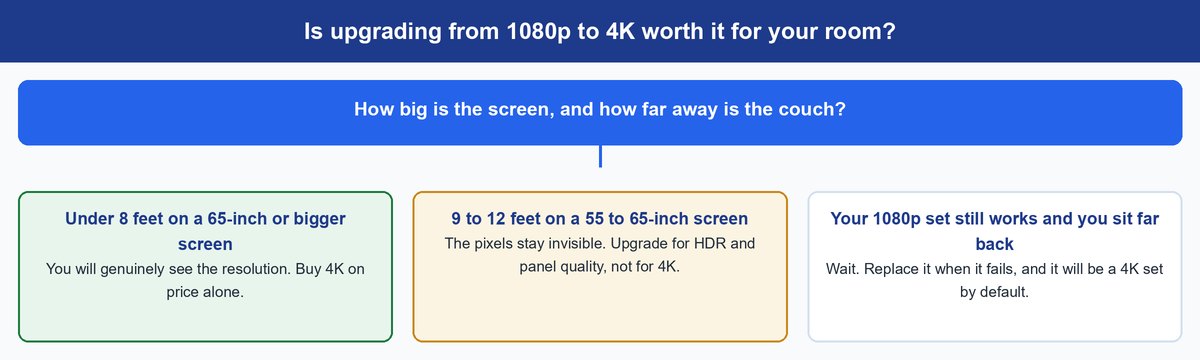
Take the two numbers from your own room and the answer usually writes itself.
If you sit inside 1.5 diagonals — a big screen, a small room, or a desk — the resolution alone justifies the upgrade, and you will notice it the first evening. If you sit outside that range, which covers most 55 and 65-inch living rooms, then upgrading for the pixels is spending money on something your eyes will never collect. That is not an argument for keeping a working 1080p TV forever, though. It is an argument for buying a modern 4K set when yours dies, for the HDR and the panel, and for putting the extra budget into screen size rather than into a higher-spec version of the same size.
Tip: if you have a fixed budget and a 9-foot couch, the biggest visible upgrade per dollar is almost always inches, then HDR performance, then everything else. Resolution is the last line on that list, not the first.
Frequently Asked Questions
Is there a big difference between 1080p and 4K?
It depends entirely on where you sit. Closer than about 1.5 screen diagonals, the difference is obvious and grows as you approach. Farther than that, there is no detail difference at all for 20/20 vision. What you may still notice is HDR and panel quality, which travel any distance and usually come bundled with the 4K set.
Which is better for gaming, 4K or 1080p?
For a monitor two feet from your face, 4K is a real visual upgrade. For frame rate, 1080p or 1440p is the smarter buy on most hardware, since 4K costs four times the pixel work per frame. Competitive players almost universally choose frames. Story-driven single-player games are where 4K pays off best.
Can you really tell the difference on a 55-inch TV?
Only if you sit closer than about 7 feet. Beyond that, a 55-inch 4K panel and a 55-inch 1080p panel resolve the same amount of detail to your eye. If your couch is 9 or 10 feet out, buy the 55-inch set for its contrast, brightness and features, and treat the resolution as a bonus you paid nothing extra for.
Does 4K make my old 1080p content look better?
Sometimes, but not because of resolution. A 4K TV upscales 1080p to fill the panel, and good processing can clean up edges and noise. It cannot invent detail that was never recorded. Most of the improvement people notice when they switch is the newer panel’s contrast and brightness doing the work.
Is 1440p worth it over 1080p?
On a desk, yes. At 2560×1440 you get 78% more pixels than 1080p for a fraction of 4K’s performance cost, which is why 1440p has taken more than a fifth of Steam users. On a living-room TV it is irrelevant, since TVs are not sold at that resolution and you sit too far away to benefit.
How close should I sit to a 65-inch 4K TV?
About 8 feet is where 4K detail begins to register, and roughly 4 feet is where you see all of it. Realistically, 6 to 8 feet is a comfortable range that captures most of the benefit without the screen swallowing your field of view. If your seating is fixed at 10 feet, consider a 75-inch screen instead.
What This Means for Your Next TV
The 4K vs 1080p debate has been argued as a question about televisions for a decade, and it was always a question about geometry. Screen size, seating distance and your own eyesight decide whether those extra pixels ever reach you, and in a typical living room with a typical screen, they do not. The stores will keep selling the pixel count because it is a number that fits on a shelf tag.
Buy the 4K set anyway. Not because you will see the resolution, but because the resolution is now the price of admission to good contrast, real HDR and a panel built this decade. Then spend whatever is left on a bigger screen, sit a little closer than you do now, and you will finally be watching the TV you actually paid for.