You plug in before bed, the screen says 100% by 1 a.m., and then the phone just sits there on the charger for another six hours. Somewhere in the back of your head a voice from 2009 whispers that you’re “overcharging” it, cooking the battery, maybe even risking a fire. So is it bad to charge your phone overnight? The honest, slightly annoying answer is: no, not the way you’re afraid of — and yes, a little, in a way almost nobody explains correctly.
Here’s the thesis I want you to walk away with. Your phone cannot overcharge. The fear that it keeps force-feeding electricity into a full battery until something pops is flat wrong on modern hardware. But the myth is doing something sneaky: by pointing at a danger that doesn’t exist, it hides a real, much smaller truth. Sitting pinned at 100% while giving off heat, night after night for a couple of years, does gently wear the battery down. That’s not a fire. It’s aging. And once you understand the difference, you stop worrying about the wrong thing and start doing the two or three things that actually help.
- No, your phone can’t overcharge — the charging chip cuts the current the instant it hits 100%, so there’s no “extra” electricity being forced in overnight.
- The real (and much smaller) cost is aging: a lithium battery held at 100% while it’s warm loses capacity faster than one kept cooler and lower.
- Heat is the true villain. A full battery baking at 40°C (104°F) can shed roughly 35% of its capacity in a single year — the plug isn’t the problem, the temperature is.
- Charging to about 80% instead of 100% meaningfully slows wear, which is exactly why Apple, Samsung, and Google all built overnight charge-limiting features.
- Turn those features on, keep the phone cool and out from under a pillow, and overnight charging is completely fine for the life you’ll actually own the phone.
The Short Answer Most People Get Wrong
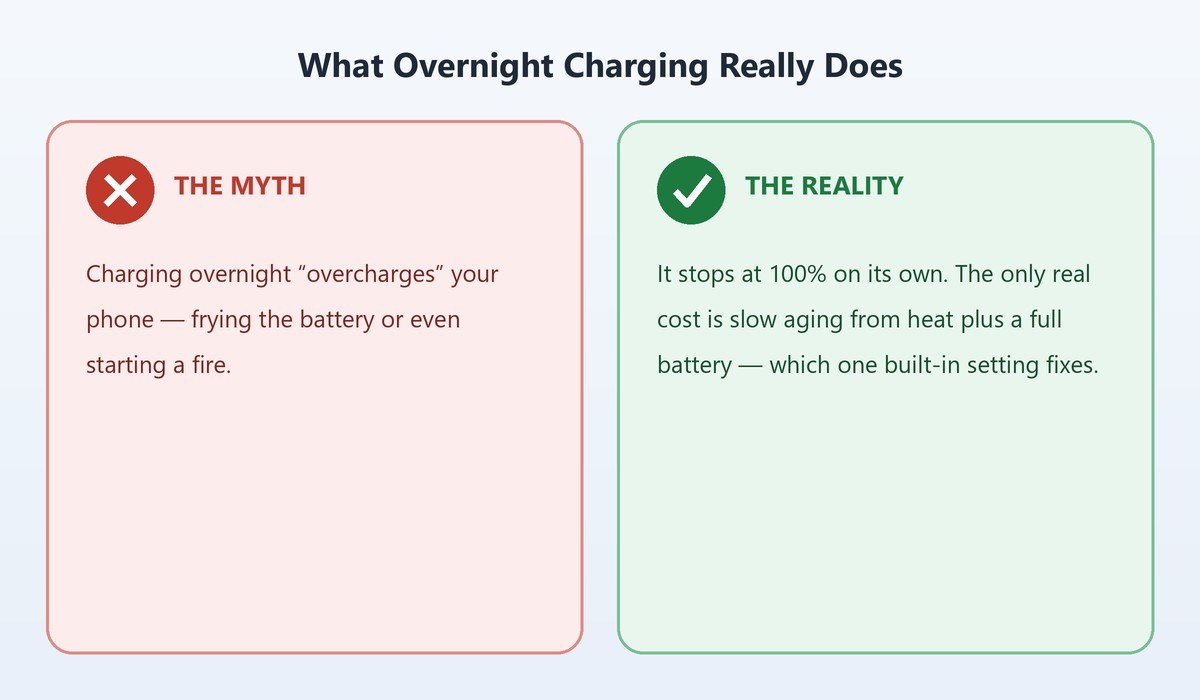
Let’s kill the scary version first. On any phone made in roughly the last decade, charging overnight will not overcharge it, will not “wear it out by morning,” and will not catch fire because it sat at 100% too long. The battery hits full, the phone stops pulling power, and it coasts. You could leave it plugged in for a week and it would not blow past 100%.
The part that’s true is quieter. Lithium-ion batteries don’t love living at a full charge, and they hate being warm while they do it. Every night your phone spends hours at 100% with a bit of charging heat still in it, you’re spending a tiny fraction of its long-term health. Not enough to notice next week. Maybe enough to notice as a slightly weaker battery two years from now — the same slow slide covered in our guide to what iPhone battery health percentage really means and when to replace it.
So the reassurance is real, but it’s not “do whatever you want forever.” It’s “relax about the fire, and spend thirty seconds turning on the setting that handles the aging for you.” The rest of this piece is the why, the science, and the exact toggles.
Why Your Phone Physically Cannot Overcharge Anymore
To overcharge a battery you’d have to keep shoving current into it after it’s full. Your phone is built specifically so that can’t happen, and it’s worth understanding the mechanism, because it’s the whole reason the myth is dead.
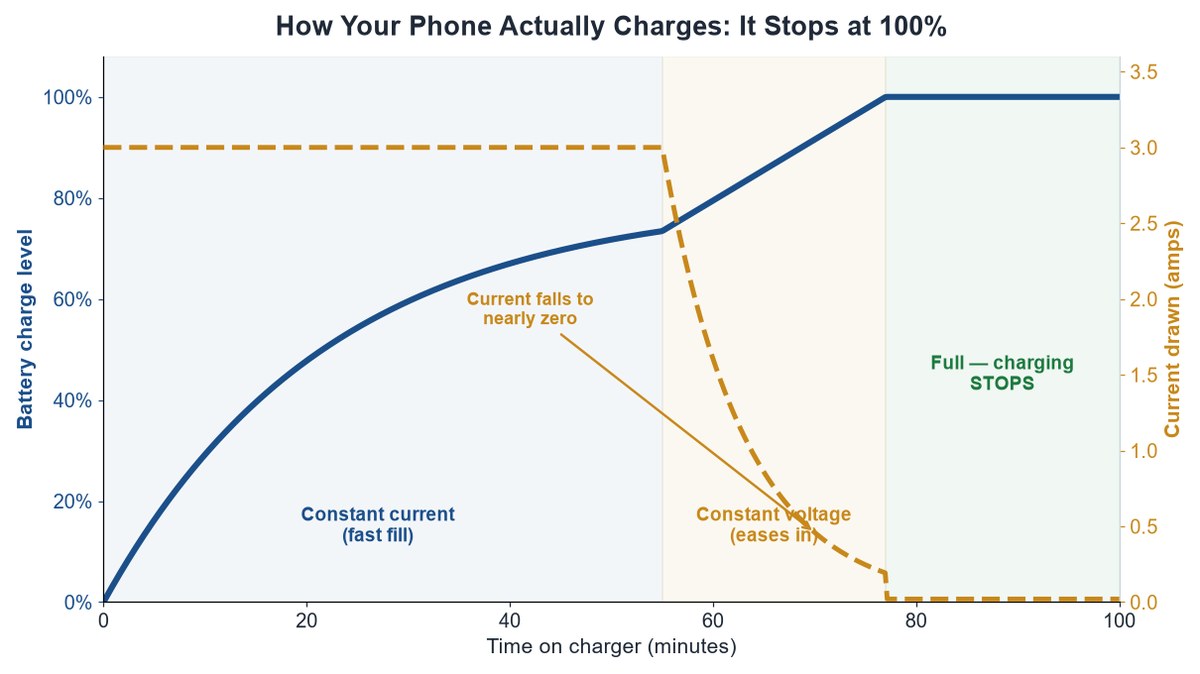
Every phone has a small piece of hardware called a charging IC (integrated circuit) — a manager chip sitting between the wall and the battery. It charges lithium-ion in two phases. First comes constant current: the phone pulls power hard and the battery fills quickly, which is why you rocket from 20% to 80% fast. Then, near the top, it switches to constant voltage: the current tapers off sharply, easing the last stretch in slowly to avoid stress. By the time you read “100%,” the current has fallen to almost nothing.
Here’s the key move: once it’s full, the charging chip stops. It doesn’t keep dripping power in. If the battery naturally sags a percent or two while it sits, the phone tops it back up in a quick sip and stops again. There’s no relentless force-feeding, so there’s nothing to overcharge.
Caveat: trickle-charging — slowly drip-feeding a full battery to “keep it topped off” — is a real thing that genuinely damages lithium-ion, which is why modern phones deliberately do not do it. Older NiMH and NiCd packs were topped up that way; lithium is different chemistry and would be harmed by it, so the chip cuts off instead of dribbling.
This is also why the old “unplug the second it’s full” advice is mostly obsolete. The manufacturers moved that job into the hardware. As battery-maker support docs from Anker and the phone makers all put it: the device stops drawing full power once it’s topped up. The plug being in the wall isn’t pumping anything.
The Real Culprit Is Heat and Sitting Pinned at 100%
If it can’t overcharge, why does anyone still say overnight charging is bad? Because they’re half-remembering something true and pinning it on the wrong cause. The damage isn’t from extra electricity. It’s from two conditions that overnight charging can quietly create: a high state of charge and heat.
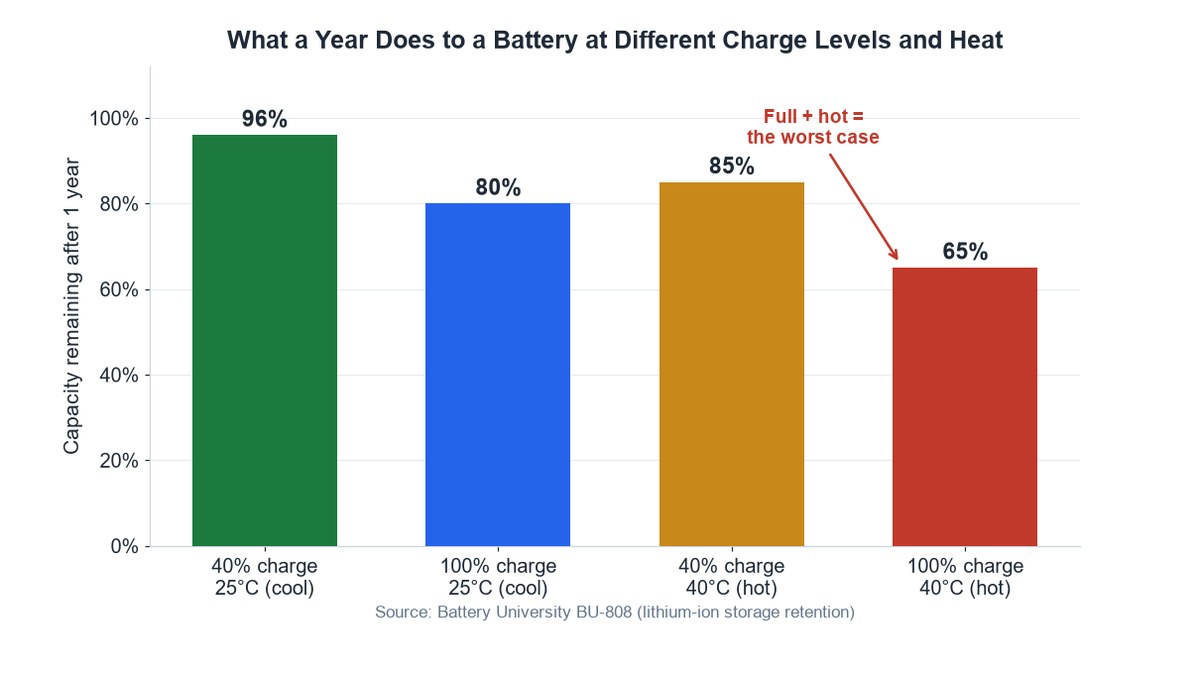
Lithium-ion chemistry ages fastest when the battery is both full and warm. At 100%, the cell voltage is at its peak, and high voltage speeds up the chemical side-reactions that permanently eat capacity. Add heat and those reactions accelerate hard. Battery University’s widely cited engineering reference, BU-808 on prolonging lithium-based batteries, spells out just how brutal the combination is.
Look at what a year of storage does to a lithium cell at different charge levels and temperatures. A battery kept at 40% charge and a cool 25°C (77°F) still has about 96% of its capacity a year later. Push it to a full 100% at that same cool temperature and it drops to around 80%. Now heat it up: a full battery held at 40°C (104°F) crashes to roughly 65% — a 35% loss in twelve months, from heat and fullness alone, without even using it.
The catch: the single worst thing you can do to a lithium battery is keep it fully charged and hot at the same time. That’s not overnight charging on a cool nightstand — that’s overnight charging under a pillow, in a hot car, or inside a thick case that traps charging heat. The state of charge sets the stress; heat multiplies it.
That’s the honest reframe. “Overnight charging is bad” should really be “keeping your phone hot while it’s full is bad.” Overnight is just when it most often happens, because that’s the longest stretch the phone spends sitting at 100%. If your phone tends to run warm on the charger, our breakdown of why your phone keeps overheating while charging walks through the fixes.
What the Science Actually Says About the 20 to 80 Rule
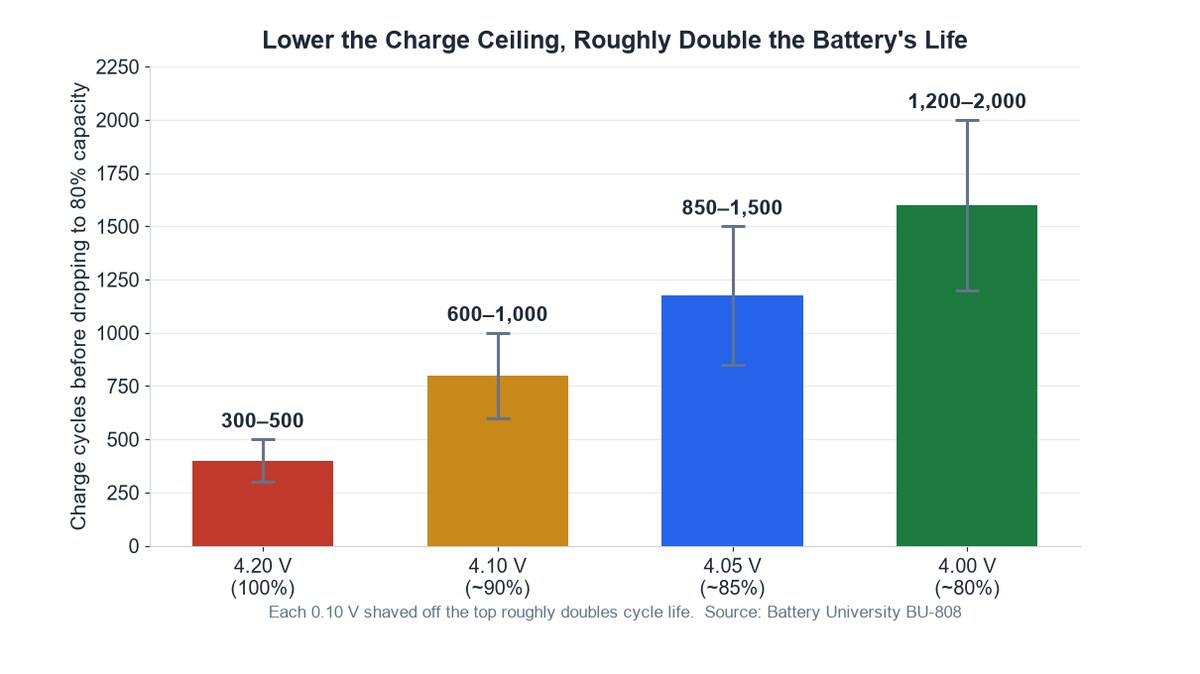
You’ve probably heard you should keep your phone between 20% and 80%. It’s real advice with real chemistry behind it, but it gets repeated like a superstition, so let’s put actual numbers on it.
The reason a lower ceiling helps comes down to charge voltage. A lithium cell charged all the way to 4.20 volts (that’s your 100%) is rated for only about 300 to 500 full cycles before it fades to 80% capacity. Back that peak off to 4.10V — think low-90s percent — and it jumps to 600 to 1,000 cycles. Drop to 4.05V and you’re looking at 850 to 1,500. Stop around 4.00V and it stretches to 1,200 to 2,000. The engineering rule of thumb: every 0.10V you shave off the top roughly doubles how many cycles the battery survives.
That’s what “80%” is really buying you. You’re not being fussy for no reason — you’re trading a sliver of screen time now for potentially double the usable lifespan. The 20% floor matters less for daily life; letting it dip is fine, just don’t habitually run it flat to 0% and leave it there.
Note: this is also why newer phones last longer on paper. Older iPhones (14 and earlier) were rated to hold 80% capacity after 500 cycles. Apple re-tested and now rates the iPhone 15 and later for about 1,000 cycles to that same 80% — better cells and smarter charging roughly doubled the official lifespan.
Now, the practical honesty: manually babysitting your phone between 20% and 80% all day is miserable, and you’ll fail at it. The good news is you don’t have to, because your phone will do the 80% part for you at exactly the moment it matters most — overnight. If you also want the last 20% to arrive faster on the mornings you’re in a hurry, see how to make your phone charge faster.
The Built-In Features That Already Solve This for You
This is the part the charger-brand blogs skip, because there’s nothing to sell you. Apple, Samsung, and Google already noticed that people charge overnight and built features that hold the battery at 80% for most of the night, then finish the top-up right before you wake. You get a full phone at your alarm and hours less time sitting at a stressful 100%. Turn the right one on and the entire “overnight charging” worry basically evaporates.
Apple Optimized Battery Charging on iPhone
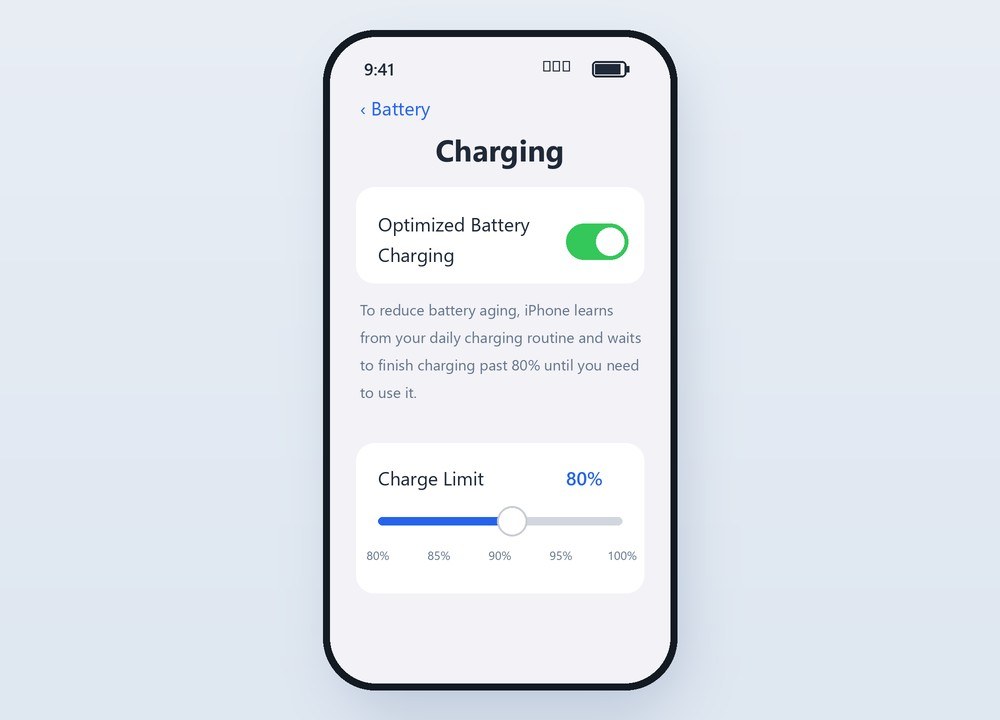
On iPhone, the feature is Optimized Battery Charging, and it’s been on by default since iOS 13. Your iPhone uses on-device machine learning to learn your daily routine. When it predicts a long stint on the charger — like overnight — it charges to 80%, pauses, and times the final climb to 100% to finish right around when you normally unplug.
Find it under Settings > Battery > Charging (older versions: Settings > Battery > Battery Health & Charging). On iPhone 15 and later you also get a hard Charge Limit slider — 80%, 85%, 90%, up to 100% — if you’d rather cap it manually and never see a full charge at all. Apple’s own explainer on Charge Limit and Optimized Battery Charging covers both.
Samsung Protect Battery on Galaxy
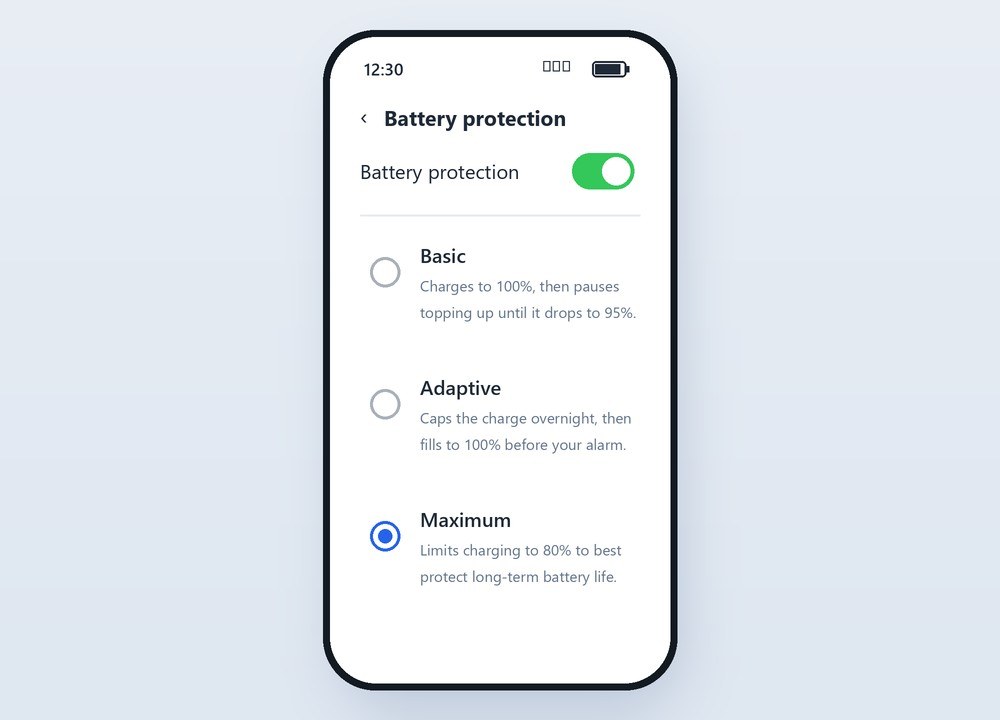
Samsung calls its version Battery protection (older builds labeled it “Protect battery”), and it’s genuinely the most flexible of the three. On One UI 6.1 and newer you get three modes. Basic charges to 100%, then holds there without topping off until you drop to 95%. Adaptive uses the strict cap while you sleep, then switches before your alarm. Maximum simply stops charging at 80% and stays there.
You’ll find it under Settings > Battery > Battery protection. Pick Maximum if battery longevity is your priority, or Adaptive if you want the overnight protection but a full battery by morning.
Tip: the exact caps differ by age. Newer Galaxy phones (One UI 6.1+) stop Maximum mode at 80%; older ones capped at 85%. Either way you’re parking the battery well below the stressful full-voltage zone, which is the whole point.
Google Pixel Adaptive Charging
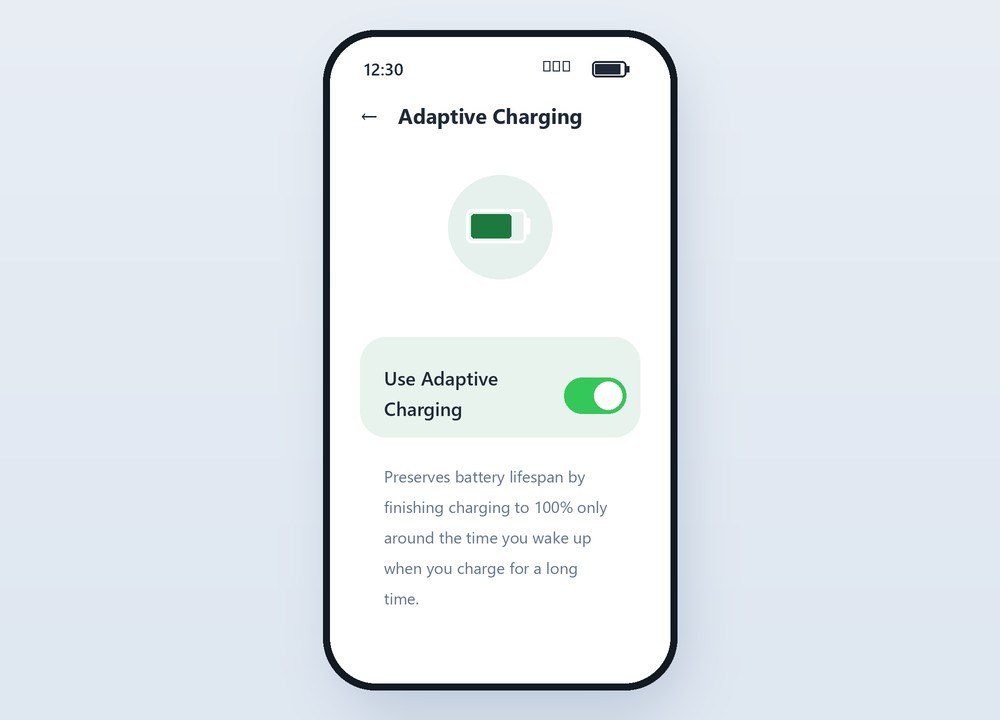
Pixel’s feature is Adaptive Charging. When it detects a long overnight charge — historically it looked for an alarm set for the morning; newer versions read your usage patterns — it charges to 80% at normal speed, then deliberately slows the last 20% so the phone reaches 100% about an hour before you get up.
Toggle it at Settings > Battery > Adaptive Charging. Google’s Pixel battery help page documents it. It’s less configurable than Samsung’s (no hard percentage cap), but it’s on-by-default and quietly does the right thing for the classic nightstand-charging case.
The Habits That Wear Your Battery Faster Than Overnight Charging
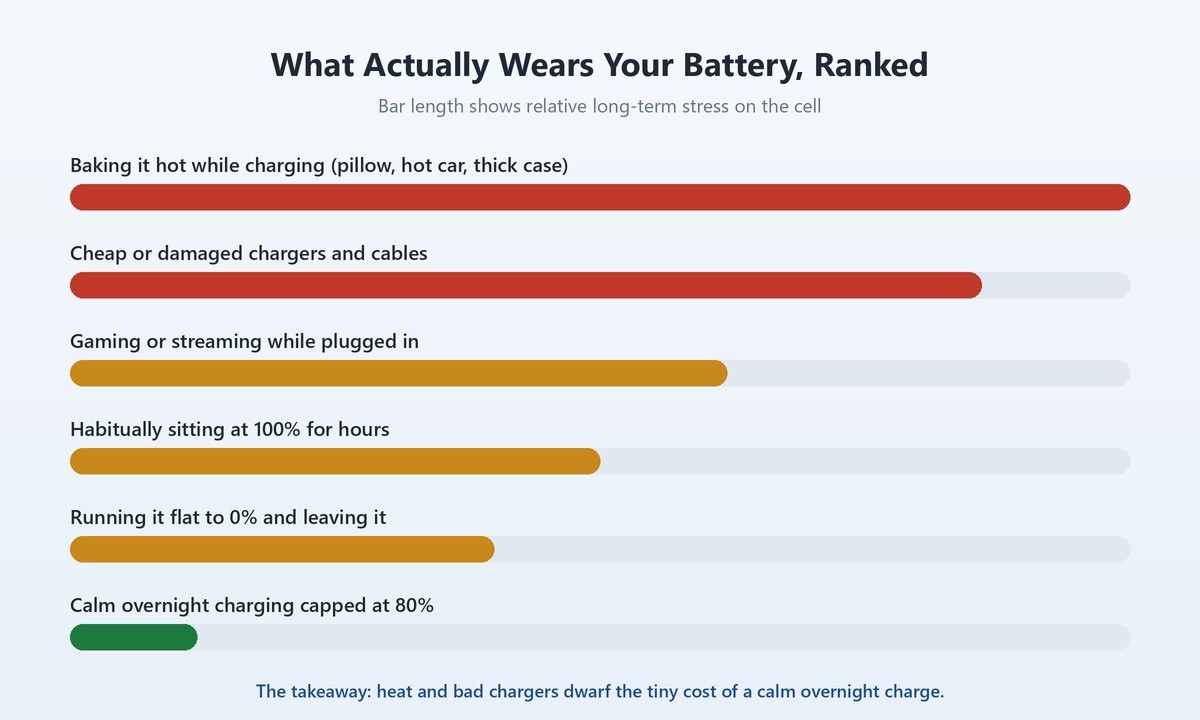
Here’s the reframe that actually saves your battery: overnight charging is nowhere near the top of the list of things hurting it. If you’re going to worry, worry about these instead — they do far more damage than a phone calmly sitting at 100% on a cool table.
Cooking Your Phone Under a Pillow or in a Hot Case
Heat is the number one battery killer, and we bury phones in it. Charging generates warmth; trapping that warmth under a pillow, blanket, or thick insulating case while it charges stacks the two worst conditions — full and hot — right on top of each other. That’s the 40°C-loses-35%-a-year scenario from earlier. Charge on a hard, open surface with airflow, and pop a heavy case off if the phone runs hot during a fast charge.
Trusting Cheap No-Name Chargers
A quality charger from a reputable brand isn’t about speed bragging rights — it’s about clean, regulated power and real safety cutoffs. The genuinely dangerous overnight-charging stories almost always trace back to a $3 gas-station brick with no protection circuitry, a frayed cable, or a counterfeit adapter, not to the phone sitting at 100%. Buy chargers that carry real certification and match your phone’s fast-charge standard.
Gaming or Streaming While It Charges
Running a demanding game or a long video call while the phone charges is a heat double-whammy: the processor is pumping out heat and the battery is taking a charge at the same time. The phone gets hot, and it’s doing it while topping toward full. An occasional session is fine, but making a habit of gaming plugged in does more measurable damage than any amount of calm overnight charging. If your battery already drains oddly fast, our guide to why your iPhone battery drains so fast covers the usual suspects.
When Charging Your Phone Overnight Is Genuinely Fine
So, all told — plug it in and sleep. Overnight charging is fine, and for most people it’s the only realistic way to start the day at 100%. You just want the conditions right. Charge on a cool, hard, open surface, not on a bed or under a pillow. Use a decent charger and cable. And spend the thirty seconds to switch on Optimized Battery Charging, Battery protection, or Adaptive Charging so the phone spends most of the night at 80% instead of pinned at full.
Do that and the wear becomes so slow it’s academic — your phone will almost certainly be replaced or handed down long before overnight charging is what limits it. The myth told you to fear a fire that can’t happen. The reality asks for one setting and a cool nightstand. That’s the whole trade.
Frequently Asked Questions
Is it bad to charge your phone overnight every night?
No. Charging every night won’t overcharge your phone or wear it out quickly, because it stops pulling power at 100%. The only real cost is slow aging from sitting at a full charge, and that’s exactly what the built-in 80% overnight features are designed to prevent. Turn one on and nightly charging is a non-issue.
Will leaving my phone charging overnight cause a fire?
Extremely unlikely with a normal phone and a legitimate charger. The battery stops charging when full, so there’s no overcharge to cause a fire. The rare incidents that do happen almost always involve a damaged battery, a counterfeit or unprotected charger, or the phone trapping heat under bedding — not simply being at 100%.
Should I turn my phone off while charging overnight?
You don’t need to. The charging chip manages everything whether the phone is on or off, and a phone idling on a nightstand draws almost nothing. Turning it off gains you nothing meaningful for battery health. Keeping it cool matters far more than powering it down.
Does charging to 100% every night ruin the battery?
“Ruin” is too strong, but consistently living at 100% does age it faster than staying lower. A cell held full loses capacity quicker than one kept around 80%, and heat makes that worse. It’s a gradual slide over years, not overnight damage — and capping the charge at 80% overnight slows it dramatically.
Is it better to charge my phone to 80% instead of 100%?
For long-term battery lifespan, yes. Charging to about 80% instead of 100% can roughly double the number of cycles the battery survives before noticeably fading, because it keeps the cell at a lower, less stressful voltage. Let your phone’s overnight feature handle the 80% cap so you still wake up to a full charge on the mornings you need it.
Do I need a special charger to charge overnight safely?
No special charger is required — you just need a legitimate, certified one that matches your phone’s charging standard. Avoid cheap unbranded bricks and damaged cables, which are the actual safety risk. A good charger plus your phone’s own protection features is all overnight charging needs.