Published 2026-07-08 · Last updated 2026-07-12
If you have ever Googled your own name and felt a jolt of unease at how much showed up, you have already met the data broker industry. Your home address, past addresses, phone numbers, relatives, approximate income, and even a rough map to your front door can sit on dozens of “people search” pages, free for anyone to browse and cheap for anyone to buy in bulk. Here is the part the removal-service ads will not tell you: when Consumer Reports actually tested this in 2024, do-it-yourself removals beat every single paid service in the study. A thorough data broker opt out is tedious, but it is free, it works better than anything you can buy, and in 2026 the tools finally tilted the field toward you.
This guide goes further than the usual “here is a table of links” treatment. You get a complete, verified walkthrough for every major people-search site — with screenshots of the actual forms we pulled this week — the honest time budget, the numbers on DIY versus paid, Google’s removal tool, California’s one-stop deletion platform, and what to do when a broker simply ignores you.
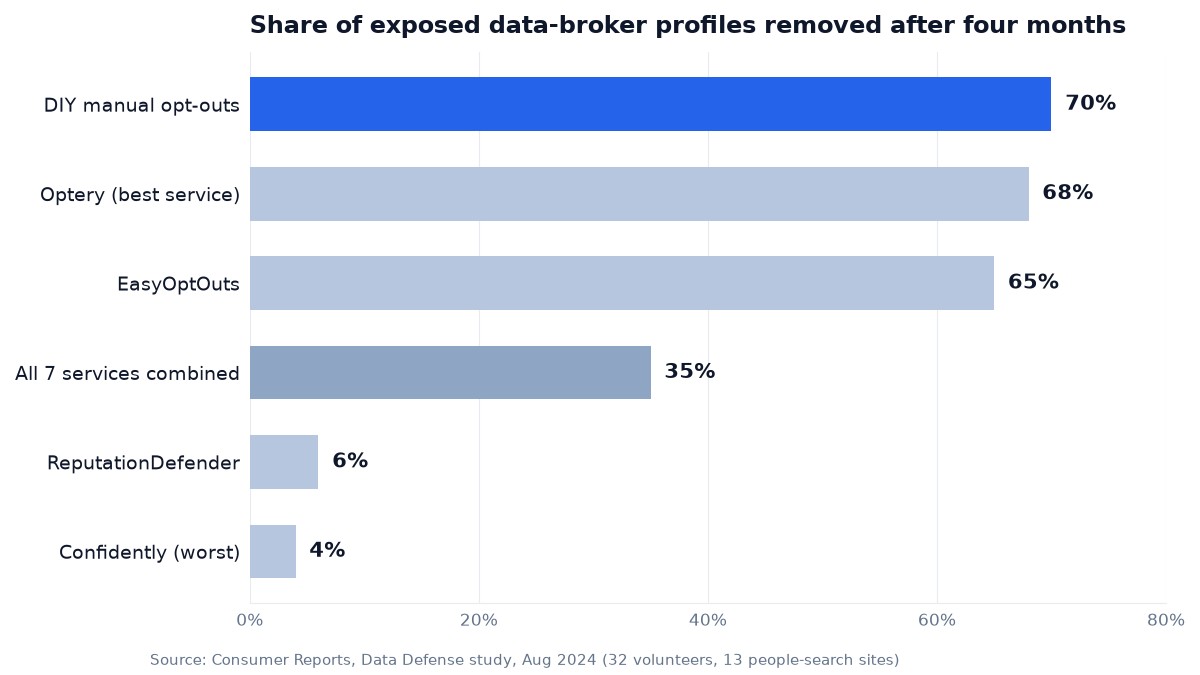
- Manual opt-outs removed 70% of exposed profiles in Consumer Reports’ four-month study; the seven paid services it tested managed 35% combined. You are the most effective removal service on the market.
- Hit the visible people-search sites first — Spokeo, Whitepages, BeenVerified, the PeopleConnect network, Radaris — then let one PeopleConnect suppression kill four sites in a single pass. Every walkthrough below was verified against the live forms.
- Budget two to three hours for the first full sweep and a 30-minute re-check each quarter. Brokers re-ingest fresh public records, so profiles you killed will try to come back — maintenance is the actual job.
- California’s free DROP platform now sends one deletion request to more than 600 registered brokers, and starting August 1, 2026, they must delete your data within 90 days. Vermont, Oregon, and Texas run public broker registries you can raid for opt-out links.
What Data Brokers Actually Are
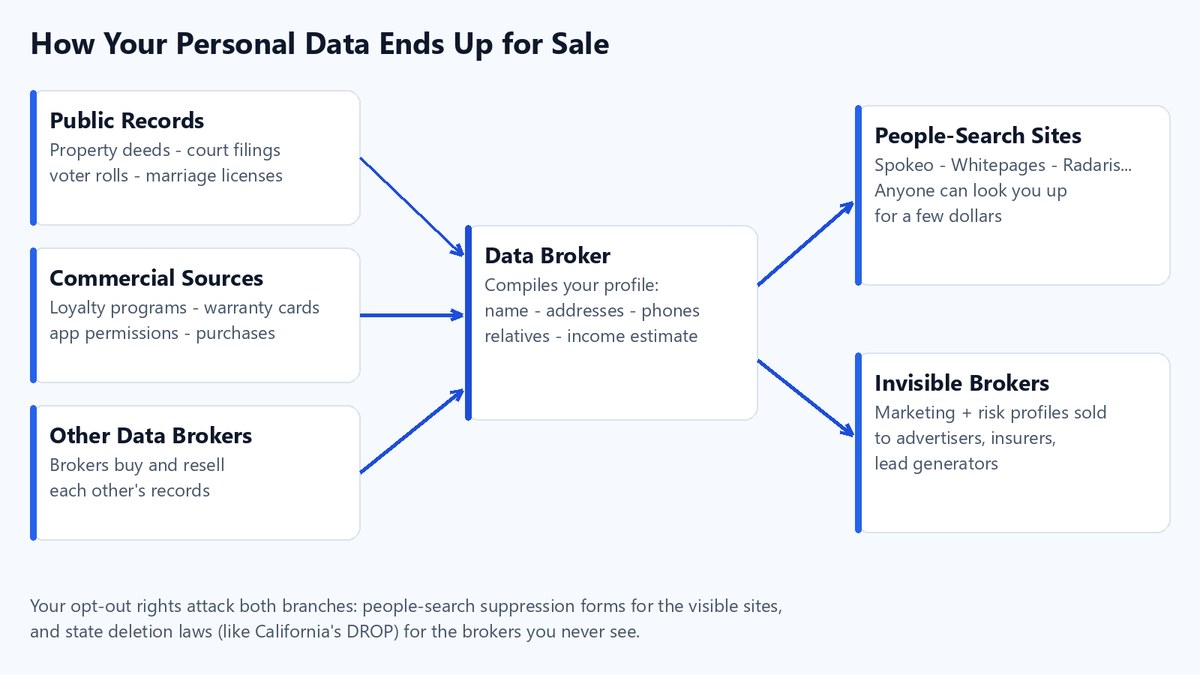
A data broker is a company that collects personal information about you, often without any direct relationship with you, and then sells or displays it. The information comes from public records (property deeds, court filings, voter rolls, marriage licenses), commercial sources (loyalty programs, warranty cards, app permissions), and other brokers who resell each other’s data. Two flavors matter for this guide.
The first is the people-search site you can see for yourself: Spokeo, Whitepages, BeenVerified, Intelius, Radaris, and dozens of clones. These publish a browsable profile of you and charge curious strangers a few dollars for the full report.
The second is the invisible broker you never interact with, the kind that compiles marketing and risk profiles sold to advertisers, insurers, and lead generators. You cannot search these the way you search Spokeo, but they are still required to honor deletion requests in several states. The scale is bigger than most people guess. California’s 2026 data broker registry listed 581 registered companies when we pulled the file in July 2026, and the nonprofit Privacy Rights Clearinghouse maintains a consolidated, searchable database of more than 750 registered data brokers with opt-out links, built by cross-referencing the state registries. It is the single best starting map for the invisible ones.
And do not let the “it’s just public records” framing lull you. A landmark study in Nature Communications found that 99.98% of Americans could be correctly re-identified in any dataset using just 15 demographic attributes — the exact kind of attributes brokers compile and sell. “Anonymized” marketing data is a polite fiction once enough fields pile up.
Why does any of this matter beyond annoyance? Exposed personal data is the raw fuel for stalking, doxxing, SIM-swap fraud, and targeted phishing. As the line between automated marketing and outright AI-driven scams and cybercrime keeps blurring, the less of your profile floating around for sale, the smaller your attack surface. Pairing that cleanup with phishing-resistant logins closes the loop — here is our honest look at whether passkeys are actually safe.
How to Remove Yourself From Data Brokers in Five Stages
The full process is repetitive but predictable. Think of it as five stages rather than one giant chore, and work through them over a few evenings rather than all at once.
-
Inventory your exposure. Open a private browser window and search your name in quotes along with your city and your phone number. Write down every people-search site that lists you. Then pull the Privacy Rights Clearinghouse broker list to capture the invisible brokers you would never find on your own. A simple spreadsheet with columns for site name, opt-out URL, date requested, and status will save you hours later — and that request date becomes legal ammunition if a broker stalls, as you will see in the edge-cases section.
-
Locate your specific listings. Many brokers host several profiles for one person, often split across old addresses or name variants. Click into each listing and copy the exact profile URL from your address bar, because most opt-out forms ask you to paste it. Do not assume one profile equals one person; you may need to remove three or four entries to fully disappear from a single site.
-
Submit the opt-out or suppression request. Each broker has its own form, usually labeled “opt out,” “suppression,” “do not sell,” or “exercise my privacy rights.” You will typically paste the profile URL, give an email address, and solve a CAPTCHA. The per-site walkthroughs below give you the exact door to knock on.
-
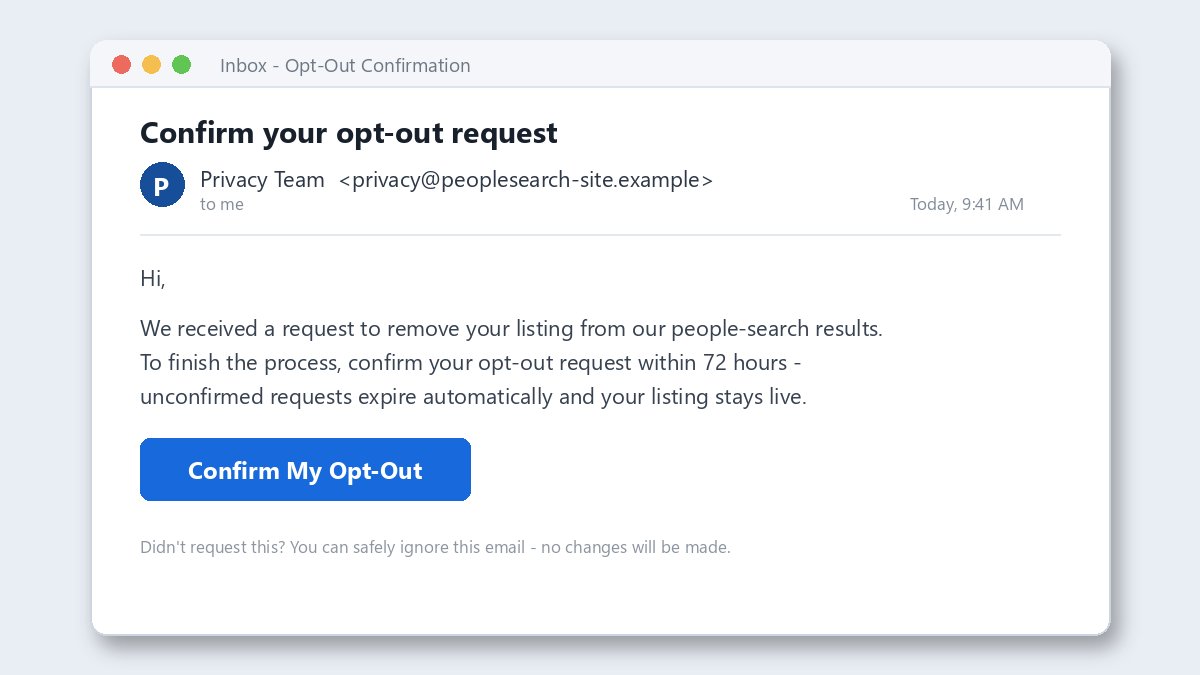
Complete the verification step. Most brokers send a confirmation email or text with a link or code that you must act on, and some requests silently expire if you sit on them. This is the step people skip most often, which is why their “removals” never take. Check spam folders and finish every confirmation the same day you start it.
-
Re-check and repeat on a schedule. This is the part nobody warns you about. Brokers continuously ingest fresh public records, so a profile you killed in January can quietly reappear by spring. Set a recurring calendar reminder every one to three months to re-scan your top sites and resubmit. A data broker opt out is a maintenance habit, not a one-time errand.
Tip: run the whole campaign from a free email alias service like Firefox Relay or SimpleLogin instead of your real inbox. Privacy researchers recommend this because contact details submitted to broker forms have a way of ending up in marketing databases — an alias lets you burn the address later without losing your real one.
How Much Time a Data Broker Opt Out Really Takes
Nobody publishes honest numbers on this, so here are ours, derived from the actual step counts in the walkthroughs below. Individual forms are faster than you fear; the drag comes from duplicate listings and verification emails.
| Task | Realistic time |
|---|---|
| Spokeo (per listing) | ~5 minutes |
| Whitepages (includes verification phone call) | ~10 minutes |
| BeenVerified | ~5 minutes |
| PeopleConnect suppression (kills 4 sites at once) | ~15 minutes |
| Radaris | ~5–10 minutes |
| TruePeopleSearch + FastPeopleSearch | ~5 minutes each |
| PeopleFinders | ~10 minutes |
| Acxiom | ~5 minutes |
| Google “Results about you” setup | ~10 minutes |
| California DROP request (residents only) | ~15 minutes |
Add the inevitable duplicate profiles, inbox round-trips, and a coffee, and the first full sweep lands at two to three hours, comfortably split across two evenings. After that, quarterly re-checks of your worst offenders run about 30 minutes. That is the entire annual cost of doing this yourself: roughly one workday’s worth of attention in year one.
Warning: some verification emails expire in as little as 72 hours, and an unverified request dies silently — the broker never tells you. Never start a batch of opt-outs on a Friday if you will not touch your inbox over the weekend.
The Major People-Search Sites and How to Opt Out
You do not need to opt out of all 750 brokers by hand. A relatively small group of high-traffic people-search sites accounts for most of what a casual searcher will find about you. Clear these first; they deliver the biggest privacy return for your time. Here is the quick-reference index, followed by a full walkthrough for each site. Every URL and process below was verified against the live form in July 2026 — these change often, and half the guides on page one of Google still point at dead links.
| Data broker | Opt-out entry point | Verification | Typical removal time |
|---|---|---|---|
| Spokeo | spokeo.com/optout | Email link | 24–48 hours |
| Whitepages | whitepages.com/suppression-requests | Automated phone call | 24–72 hours |
| BeenVerified | beenverified.com/app/optout/search | Email link | A few days |
| Intelius + 3 sister sites | suppression.peopleconnect.us | Email link | A few days |
| Radaris | radaris.com “Remove My Info” footer link | Email link | ~24 hours |
| TruePeopleSearch | truepeoplesearch.com/removal | Email link | 24–72 hours |
| FastPeopleSearch | fastpeoplesearch.com/removal | Email link | Up to 72 hours |
| PeopleFinders | peoplefinders.com/opt-out | Email link + form | Up to 72 hours |
| Acxiom | acxiom.com/optout | Email link | Weeks (invisible broker) |
Several of these companies are owned by the same parent and share databases, which means suppressing one may not suppress its siblings — the walkthroughs call out who owns what. And every one of them is subject to the re-listing problem, so this list is a starting lineup, not a finish line.
How to Opt Out of Spokeo Step by Step
Spokeo is the right warm-up: high traffic, clean process, and the same rhythm you will reuse everywhere else.
- Go to spokeo.com and search your full name, then add your city, phone number, or email to narrow the results to the right person.
- Open your listing and copy the full profile URL from the browser address bar. If you find more than one listing, copy each URL separately.
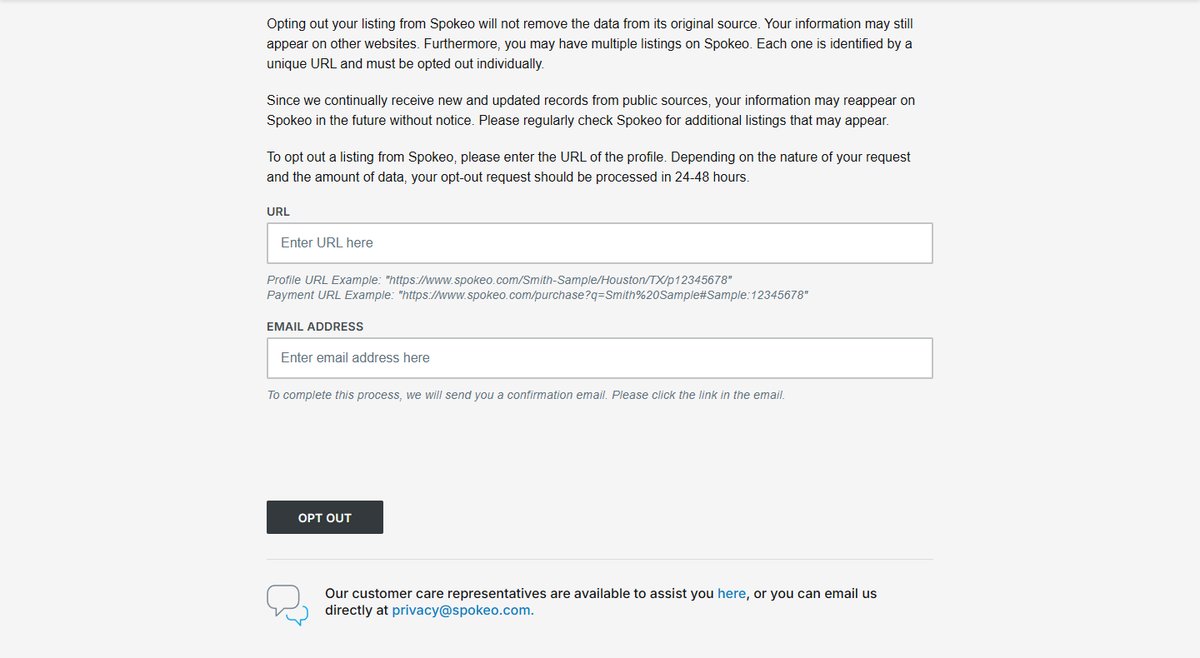
- Go to spokeo.com/optout and scroll down to the “Opt Out Your Listing from Spokeo” form — the top of the page is a marketing pitch; the actual form lives below it.
- Paste the profile URL, enter an email address you can access, and solve the reCAPTCHA.
- Open the confirmation email from Spokeo and click the verification link the same day.
- Spokeo says opt-outs process in 24–48 hours. Search yourself again after two days to confirm, and to catch duplicate profiles you missed.
What to watch for: Spokeo’s own form warns that every listing has a unique URL and must be opted out individually, and that your data can reappear as new public records arrive. If a paywall blocks you from reaching your own profile, Spokeo accepts opt-out help by email at privacy@spokeo.com.
How to Opt Out of Whitepages and Pass the Robocall Check
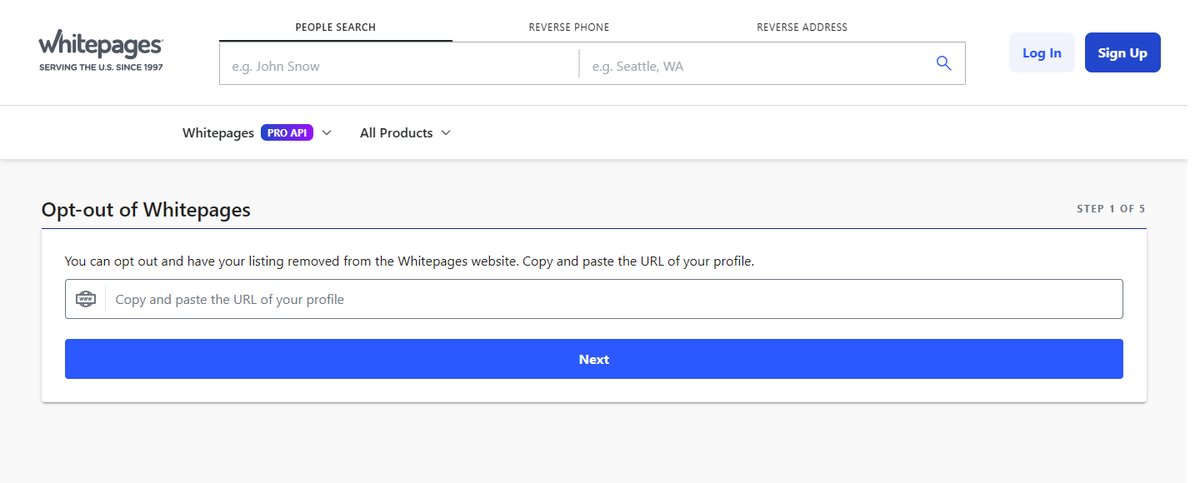
Whitepages is the oldest name in the game and the only major broker that verifies you by telephone, which trips people up.
- Search your name at whitepages.com and copy your profile’s URL from the address bar.
- Go to whitepages.com/suppression-requests — a five-step wizard, and step one asks for that profile URL.
- Confirm the listing is yours, then pick a removal reason from the dropdown (“I just want to keep my information private” works fine).
- Enter a phone number where an automated system can call you, then start the verification call. A code appears on your screen; the robocall asks you to key it in.
- Removals typically process within 24–72 hours.
What to watch for: spam-blocking apps love to eat the Whitepages verification call. If nothing rings within a few minutes, whitelist unknown numbers temporarily and retry. If the call never lands, email support@whitepages.com with your profile URL instead.
How to Opt Out of BeenVerified in One Search
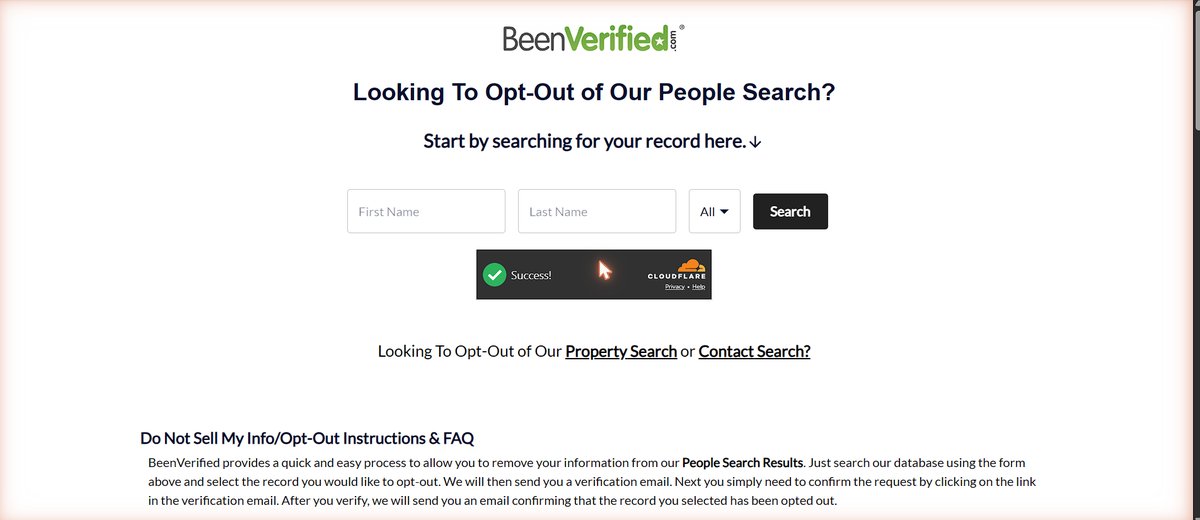
BeenVerified fronts a family of lookup brands (PeopleLooker and PeopleSmart ride the same rails), and its opt-out is one of the fastest here.
- Go to beenverified.com/app/optout/search and search your first name, last name, and state.
- Find the record that matches you — check the age and city list carefully, because similar names stack up — and select it to opt out.
- Enter your email address and submit; BeenVerified sends a verification email.
- Click the link in that email. You will get a second confirmation email once the record is actually suppressed.
- Repeat the search for maiden names or old cities; each record is a separate opt-out.
What to watch for: the same page offers separate opt-outs for BeenVerified’s property-search and contact-search databases — links sit right under the main search form. Most people only clear the people-search side and wonder why their address still surfaces.
How to Opt Out of Intelius and Three Sister Sites at Once
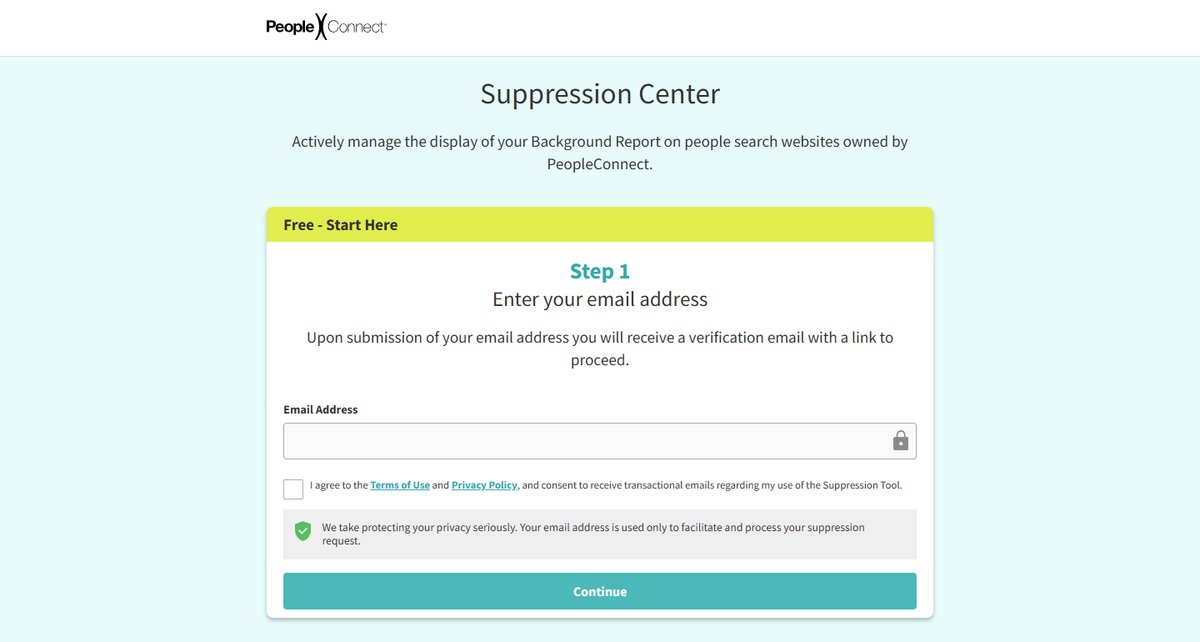
Intelius belongs to PeopleConnect, and this is the single highest-leverage form in this guide: one suppression covers Intelius.com, TruthFinder.com, InstantCheckmate.com, and USSearch.com in one pass.
- Go to the PeopleConnect Suppression Center and enter your email address, agree to the terms, and continue.
- Click the verification link that arrives by email — the tool will not show you anything until you do.
- Verify your identity with your name and date of birth, then review the background report the system matches to you.
- Choose to suppress the report. You can log back into the same tool later to manage or update the suppression.
- Expect the change to propagate across all four sites within a few days.
The catch: the Suppression Center hides your background report from name searches, but PeopleConnect says your details can still surface through phone, address, or email lookups on its sites, and Classmates.com is not covered at all. Suppression is display-blocking, not data deletion — pair it with a state-law deletion request if you qualify.
How to Opt Out of Radaris Without Creating an Account
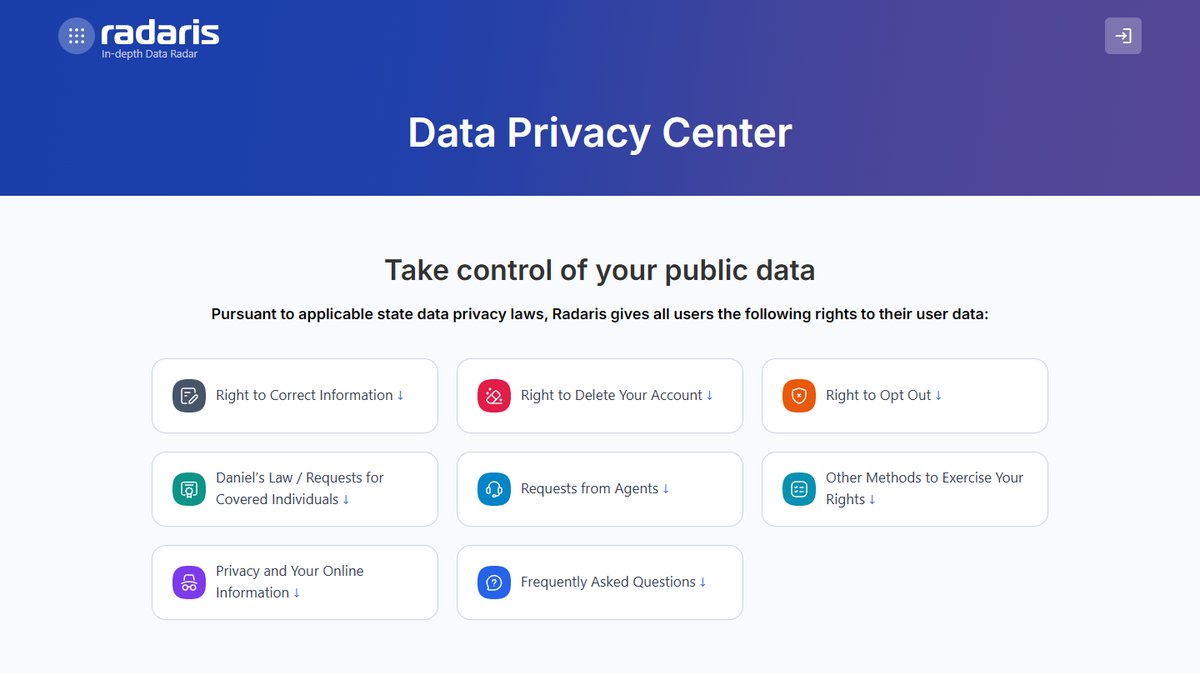
Radaris has a reputation for being stubborn, but its current process is simpler than its old one, and no account is required.
- Search your name on radaris.com and copy your profile URL.
- Use the “Remove My Info” link in the site footer — it routes to the opt-out flow at radaris.com/control-privacy — or start from the Radaris Data Privacy Center, which documents every removal path.
- Submit the request with your email; Radaris sends a verification email and confirms once processed.
- Radaris says removals reflect in search results in about 24 hours after its servers refresh. Clear your browser cache before re-checking.
What to watch for: the online flow removes exactly one record. If Radaris split you into multiple profiles — different spellings, initials, old addresses — you must email customer-service@radaris.com or call (855) 723-2747 to clear the rest. An opt-out also counts as a profile-deletion request under Radaris’ policy, and residents of a dozen states get a written appeal path via removals@radaris.com if a request is denied.
How to Opt Out of TruePeopleSearch in Five Minutes
TruePeopleSearch is the site that made “free people search” mainstream, and its removal really is one of the easiest — the flow asks for an email, finds your record, and takes it down.
- Go to truepeoplesearch.com/removal.
- Enter your email address, tick the agreement box, pass the security check, and begin the removal.
- Search your name plus city and state, open the matching record’s details, and hit the remove-this-record option.
- Confirm via the email TruePeopleSearch sends you.
- Removal usually lands within 24–72 hours; repeat for every duplicate record.
What to watch for: TruePeopleSearch runs aggressive bot-blocking — if you hit a Cloudflare “you have been blocked” wall (our automated verification did), it is not you; just open the page in your normal browser, and retry later if needed. No identity documents are ever required, so treat any request for an ID upload as a red flag that you are on a phishing clone.
How to Opt Out of FastPeopleSearch by Email Link
FastPeopleSearch shares its removal design with TruePeopleSearch, and the whole thing is a two-minute email round-trip.
- Go to fastpeoplesearch.com/removal.
- Enter your email, agree to the terms, complete the CAPTCHA, and start the removal process.
- Open the verification email and click the removal link for your record.
- The site quotes up to 72 hours for the listing to disappear.
What to watch for: like its sibling, FastPeopleSearch sits behind heavy bot-protection, so removal must be done from a regular browser session. If the form misbehaves, the documented fallback is a removal request by phone at (866) 679-8725 — give only the details already published in your listing.
How to Opt Out of PeopleFinders With the Profile URL Trick
PeopleFinders is one of the oldest brokers in the business, and its opt-out needs one non-obvious move: capturing your profile URL from the report page.
- Search your name at peoplefinders.com, narrow by city and state, and open your listing until you reach the page with the report button — then copy that page’s URL from the address bar.
- Go to peoplefinders.com/opt-out, paste the profile URL, enter your email, and pass the CAPTCHA.
- Click the link in the verification email, complete the short removal form it opens, and submit.
- PeopleFinders quotes up to 72 hours; in practice most removals land faster.
What to watch for: PeopleFinders also runs sister sites on shared data (PublicRecordsNow and PeopleSearchNow among them), so plan on separate requests there. It also re-lists faster than most of the sites here — put it at the top of your quarterly re-check list.
How to Opt Out of Acxiom Even Though You Cannot See Your File
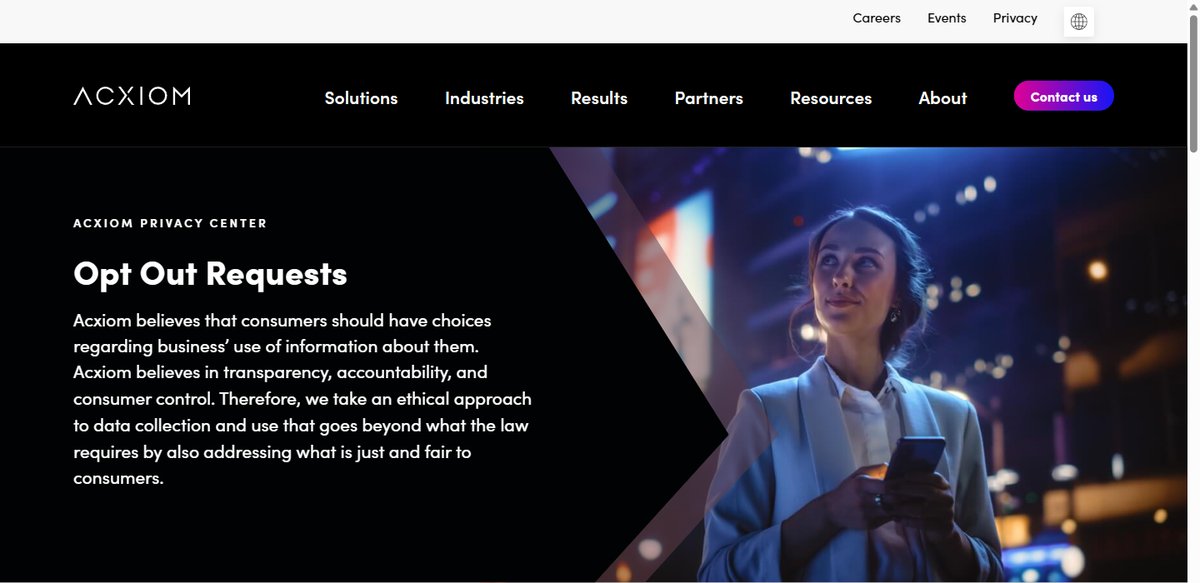
Acxiom is the classic invisible broker — a marketing-data giant whose profiles feed advertisers rather than a public search box. You will never “see” your listing disappear, which is exactly why it belongs on your list.
- Go to acxiom.com/optout and choose the US individual opt-out request.
- Submit the form with a valid email address — Acxiom requires you to respond to a confirmation email before the request is valid.
- No email? Acxiom takes opt-outs by phone at (877) 774-2094.
- Expect silence rather than a visible result; the payoff shows up over weeks as your marketing profile stops circulating.
What to watch for: Acxiom honors requests from authorized agents and from consumers in any state, not just the regulated ones, and runs separate opt-out channels for several countries — one of the few brokers with a real path for non-US residents.
What the Numbers Say About DIY Versus Paid Removal
At some point you will wonder whether to just pay a subscription service to handle all of this. Until 2024 the honest answer was a shrug. Then Consumer Reports ran the experiment, and the shrug turned into a verdict.
In its study Data Defense — an evaluation of people-search removal services, CR tracked 32 volunteers across 13 people-search sites for four months, pitting seven paid services against plain manual opt-outs. The results were brutal for the industry: the services combined removed just 117 of 332 exposed profile instances — 35% — after four months. Manual opt-outs worked 70% of the time, with most removals landing inside the first week. The best services, Optery (68%) and EasyOptOuts (65%), at least came close to DIY; the worst, ReputationDefender (6%) and Confidently (4%), barely moved the needle while charging real money. And for every single participant, some exposed profile still survived at the four-month mark — no service, and no human, got to 100%.
That is the context for the choice below. It is not “lazy versus diligent”; it is a genuine trade of money for maintenance.
Why the DIY Route Wins on Cost and Effectiveness
- It is completely free, and per the CR data it out-removes every paid service tested.
- The most important sites take only minutes each once you learn the rhythm — you just watched all nine walkthroughs.
- You see exactly what is out there and which removals actually stick, rather than trusting a dashboard.
- You are not handing yet another company your personal details to manage on your behalf.
- For California residents, DROP plus Google’s tool now covers a huge share of the work at no cost.
When a Paid Removal Service Earns Its Fee
- It automates the re-listing problem, continuously re-scanning and resubmitting so profiles do not creep back.
- It reaches a far longer tail of obscure brokers than most people would ever find or bother with manually.
- It is genuinely valuable if you face elevated risk — stalking or harassment victims, public-facing professionals — or if you know you will not maintain a quarterly routine. A 65% removal rate you do not have to think about beats a 70% removal rate you never get around to.
- If you do pay, the CR data says pick by results, not brand size: the cheapest service in the study (EasyOptOuts) was the second-best performer.
Whatever you choose, read the cancellation terms, check what the service does with the data you hand it, and treat any “100% removal” promise as marketing — the study just showed you nobody clears the board. A reasonable hybrid: do the high-value manual opt-outs and DROP yourself, then let a cheap service chase the long tail.
Using Google to Remove Personal Info From Search
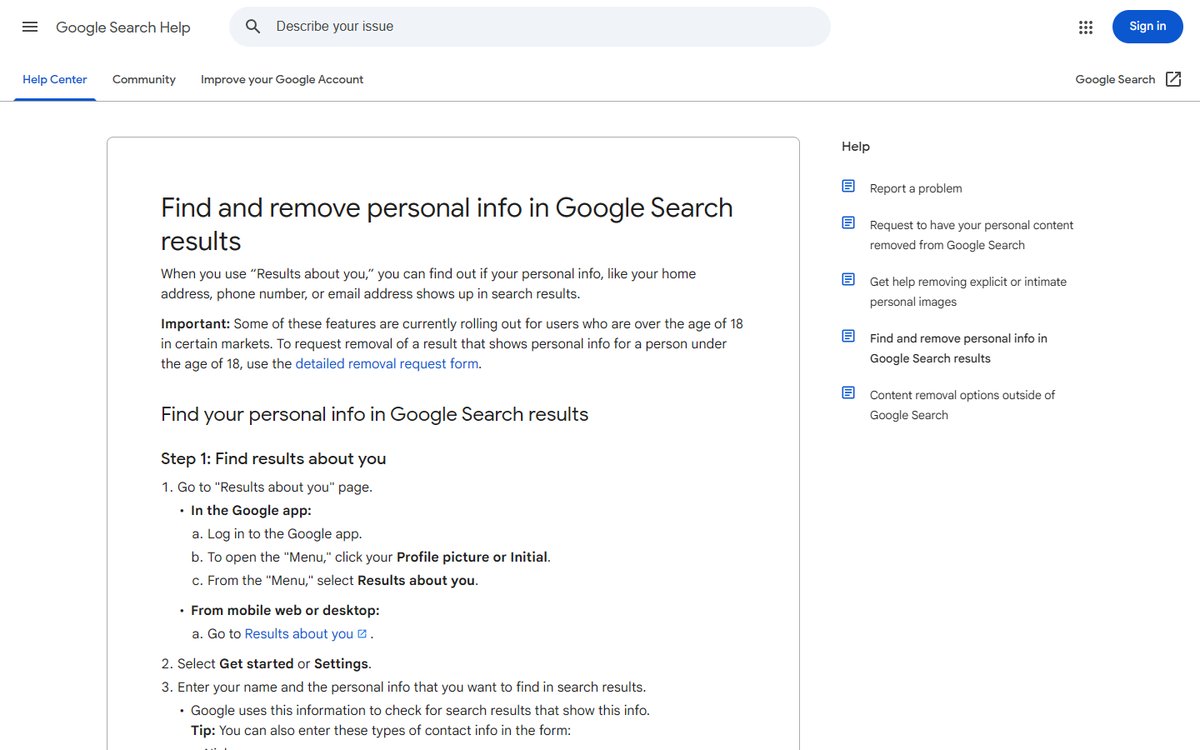
Removing a broker listing at the source is ideal, but it can take days, and meanwhile your information may still surface in Google. Google’s free Results about you tool tackles the search-results side of the problem and is one of the fastest wins available.
The tool, reachable from your Google account menu or at the Results about you dashboard, lets you tell Google which contact details to watch for — your name, phone numbers, home address, and email. Google then monitors Search for pages exposing that information and notifies you when it finds matches. From the dashboard you review each flagged page and request removal, which Google can fulfill through query-based removal, meaning the page stops appearing for searches that include your name.
In February 2026, Google expanded the tool to monitor government-issued ID numbers — driver’s license, passport, and Social Security numbers — starting in the US. The full criteria and current request steps are documented in Google’s “Results about you” support page. Two things to keep in mind: removing a result from Google does not delete the underlying page, so you still need the broker opt-out to remove the source, and Google will sometimes decline removal when a page is judged to have public-interest value. Use this tool as a fast complement to the manual opt-outs, not a replacement for them.
How California’s DROP Tool Changes the Game
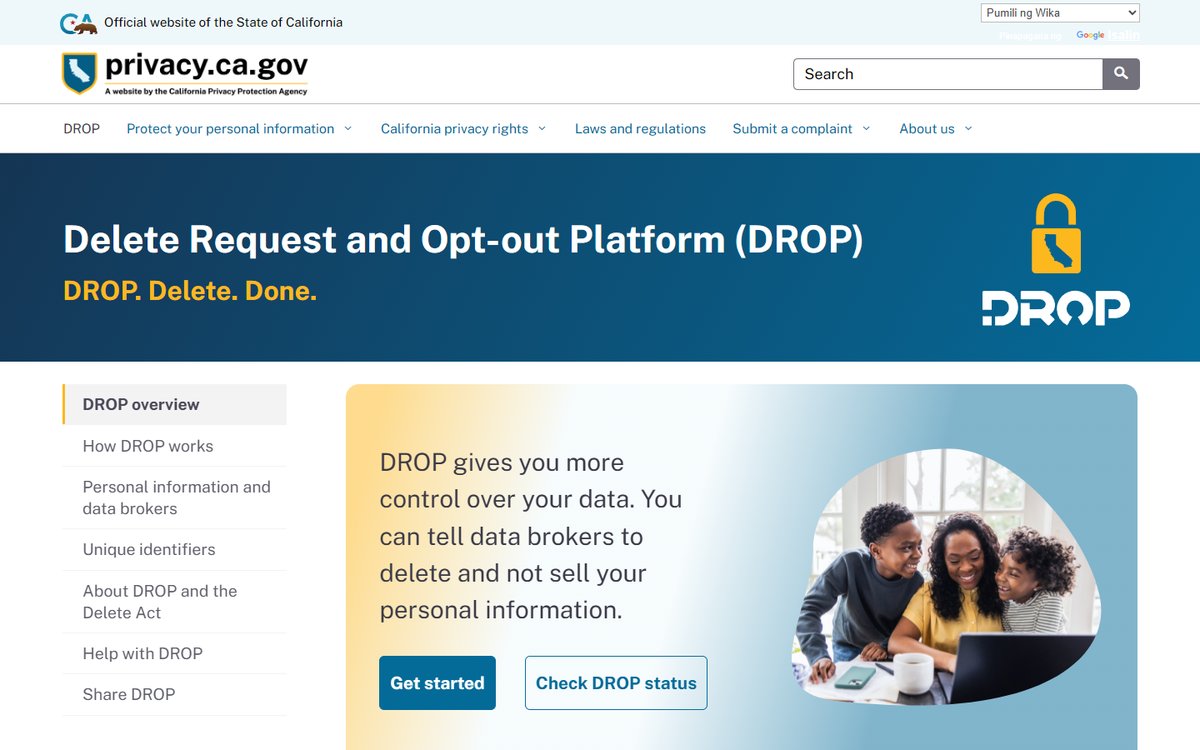
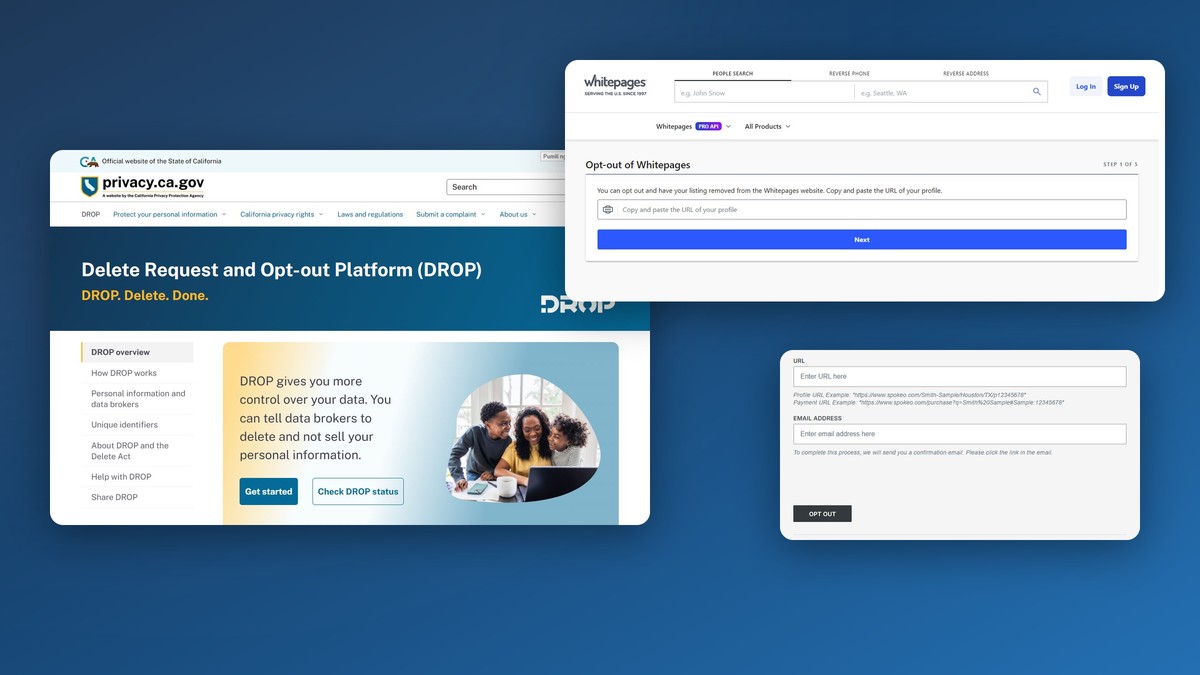
For the first time, there is a genuine one-stop deletion option, and it is run by a government agency rather than a vendor. California’s Delete Request and Opt-out Platform (DROP), built under the state’s Delete Act and operated by the California Privacy Protection Agency, lets a single request reach every data broker registered in the state.
DROP launched on January 1, 2026, and it is free. Here is how it works for an individual:
- Confirm you qualify. You must be a California resident, and you verify residency through the California Identity Gateway, the state’s secure identity system — either by entering your information directly or via a Login.gov account. You can also submit requests on behalf of a child or an elderly relative you are responsible for.
- Create a profile with basic details such as your name, address, and email. You control how much you provide, and the platform states the information is used only to process your request and is never sold or shared.
- Submit once. The state’s portal says that single request now reaches more than 600 registered data brokers, which beats filling out 600 separate forms by an enormous margin.
- Track and update. You can log back in to check the status of your deletion and update your information over time.
The enforcement timeline matters. Starting August 1, 2026, registered brokers must honor these requests and delete your data within 90 days, and going forward they must check DROP for new requests at least every 45 days, delete the associated personal data including inferences drawn about you, and report the status. You can read the official details and submit a request at the state’s DROP portal.
The catch: DROP only binds brokers that actually register with California, and some have dodged registration entirely — which is why the state stood up an enforcement strike force, with Delete Act penalties of $200 per day for failing to register. Until a dodger is caught, your DROP request never reaches it, so even Californians should still hit the visible people-search sites and Google directly.
State Data Broker Registries Worth Bookmarking
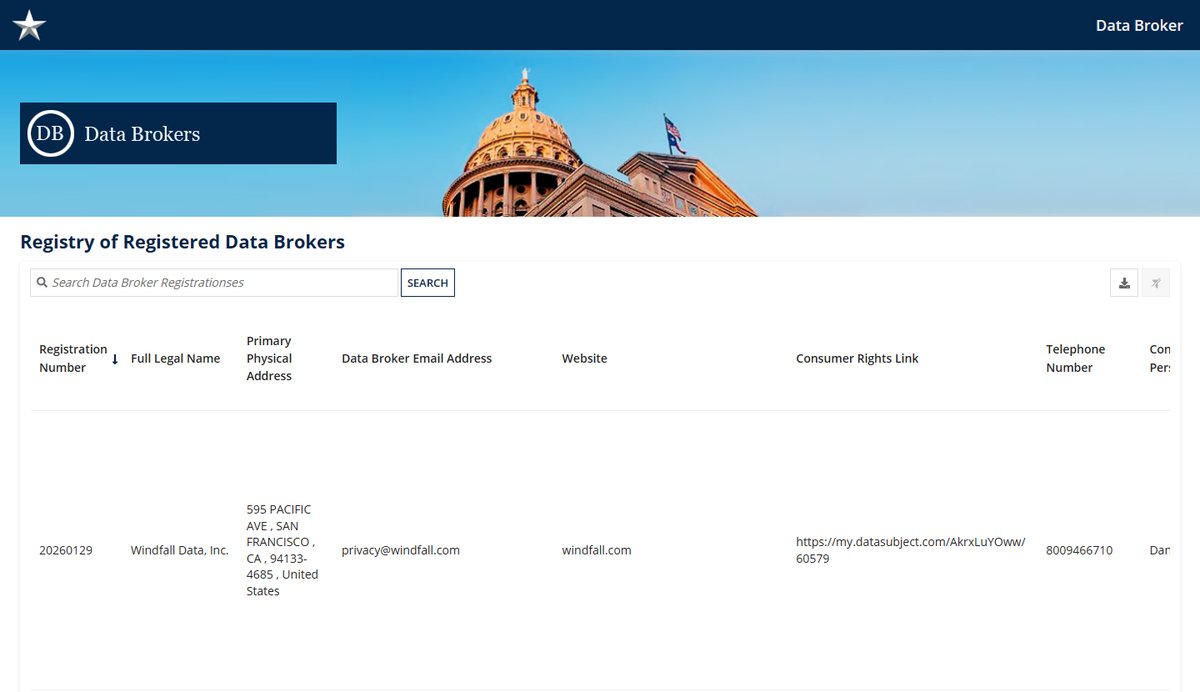
California gets the headlines, but four states now run public data broker registries, and they are quietly the best free reconnaissance tool in this whole fight: official lists of who is brokering data, with contact details and privacy-rights links you can raid for opt-outs. All four links below were load-tested for this guide.
- California — the CPPA Data Broker Registry lists 581 companies for 2026 (we counted the download), each with the URL where you exercise your privacy rights. Registrants must now disclose whether they sell data to law enforcement, foreign actors, or AI developers — read a few entries and you will never think “harmless marketing lists” again.
- Vermont — the original registry state; search it at the Secretary of State’s Data Broker Search.
- Oregon — brokers must register with the Division of Financial Regulation; start at Oregon’s Data Broker Registry page, which links the consumer search tool.
- Texas — the Secretary of State runs a searchable Registry of Registered Data Brokers, including each broker’s consumer-rights link and phone number.
If you live elsewhere, these registries still work for you: a broker registered in California or Texas holds data on people everywhere, and the opt-out links in the registry entries do not check your zip code.
When Brokers Ignore You and Other Edge Cases
The walkthroughs cover the happy path. These are the situations that generate the angry Reddit threads — and what actually works in each one.
Old Addresses and Name Variants Spawn Duplicate Profiles
Brokers build profiles from record fragments, so “J. Smith in Austin” and “Jane Smith in Dallas” may live as separate listings even though both are you. When you inventory a site, search every city you have lived in, your maiden or former names, and common misspellings, and opt out each profile separately — Radaris and Spokeo both explicitly require per-record removals. Miss a variant and a background check still finds you; this is the single most common reason people believe an opt-out “didn’t work.”
What to Do When a Broker Ignores Your Request
Silence is not the end of the road; it is where the legal leverage starts. If you are in California (or another comprehensive-privacy-law state), send a formal deletion request by email citing your state law — businesses generally must respond within 45 days, extendable once. Keep your dated spreadsheet as evidence. Still nothing? Escalate: Californians can file a complaint with the California Attorney General, and anyone can report the broker to the FTC. Several state laws also grant a written appeal right when a request is denied — Radaris, for example, documents an appeal channel for residents of twelve states. Brokers gamble that you will not follow through; a dated paper trail makes you the wrong bet.
Keep in mind: the CCPA’s 45-day response clock starts on the day the business receives your request, which is why every request should go out with a date you recorded. A complaint that says “requested deletion March 3, no response by April 20” gets regulator attention; “I asked a while ago” does not.
If You Live Outside the United States
The big people-search sites are a US phenomenon — most only index US records — so your exposure is usually smaller but your self-serve options are too, since forms often assume US addresses. Three moves that work: EU and UK residents can invoke GDPR Article 17 erasure by emailing the broker’s privacy contact (the state registries above list them); use Acxiom’s dedicated international opt-out channels, which cover several European countries explicitly; and lean on Google’s Results about you plus your national data-protection authority for domestic brokers. If a US site lists you anyway, its regular opt-out form still works — nothing stops a non-US resident from submitting it.
Brokers With No Self-Serve Opt-Out Path
A few holdouts make you work for it. MyLife is the notorious example: its old self-serve CCPA page now returns a 404 (we checked), leaving phone and email as the documented removal paths — and the FTC sued MyLife in 2020 over its background-report practices, so keep expectations calibrated. For any broker like this: email its privacy address with your name, the listing URL, and an explicit deletion request under your state’s law; follow up once after two weeks; then escalate to your state AG or the FTC with your paper trail. The California registry’s per-broker privacy-rights links are the fastest way to find the correct contact — that is exactly what the registries exist for.
Building a Privacy Routine That Lasts
The goal is not a single heroic cleanup; it is keeping your exposure low over time. Pair a one-time deep clean with a few lasting habits: opt out of the top people-search sites and submit a DROP request if you are eligible, turn on Google’s Results about you monitoring, then schedule a quarterly re-scan of your worst offenders. Reduce new leakage at the source too, by tightening app permissions, declining “share my info” prompts, and using email aliases and a P.O. box where practical. Done consistently, this shrinks your data footprint to the point where the occasional re-listing is a minor cleanup rather than a fresh exposure — and the numbers say your two evenings of work already beat anything you could have paid for.
Frequently Asked Questions
How long does a data broker opt out take to work?
Most people-search removals process within a few days of completing the email or phone verification — Spokeo quotes 24–48 hours and Radaris about 24, while Whitepages, TruePeopleSearch, FastPeopleSearch, and PeopleFinders all land within about 72. The verification step is essential; unconfirmed requests usually never take effect. California’s DROP follows a longer legal timeline, with brokers required to delete your data within 90 days once enforcement begins on August 1, 2026.
Why does my information keep coming back after I remove it?
Data brokers continuously pull fresh records from public sources and from each other, so a profile you suppressed can reappear weeks or months later. This re-listing problem is normal — it is why Consumer Reports found some exposed data for every participant even after four months of removals. The fix is a recurring schedule: re-check your top sites every one to three months and resubmit, or use an automated service that does the re-scanning for you.
Can I remove my personal info from Google entirely?
Not entirely, but you can remove a great deal. Google’s free Results about you tool monitors for and requests removal of pages exposing your contact details, and since February 2026 it also covers government-ID numbers like your driver’s license, passport, and Social Security number. Removing a result from Search does not delete the underlying page, so you still need to opt out at the broker for a full removal.
Do I have to opt out of every data broker one by one?
Outside California, largely yes, though the leverage points cut the work dramatically: one PeopleConnect suppression covers four sites, and prioritizing the nine walkthroughs in this guide clears most of what strangers actually see. California residents can use the free DROP platform to send a single deletion request to more than 600 registered brokers at once.
Is the California DROP tool available to people outside California?
No. DROP requires you to verify California residency through the state’s identity gateway, and it only reaches brokers registered with California. Residents of other states should bookmark their own registries — Vermont, Oregon, and Texas all maintain public ones — and the centralized-deletion model is spreading as more states copy the Delete Act.
Are paid data removal services worth the money?
Sometimes, but go in with the numbers: in Consumer Reports’ four-month test the seven services combined removed 35% of exposed profiles while manual opt-outs hit 70%. Their real value is automating the re-listing problem and reaching obscure brokers you would never chase. If you pay, results beat brand names — the bargain-priced EasyOptOuts outperformed services costing ten times as much in the same study.
What is the difference between an opt-out and a suppression request?
In practice they overlap. An opt-out generally tells a broker to stop selling or displaying your information, while a suppression request asks it to hide your existing profile — PeopleConnect’s tool, for example, suppresses your background report from name searches without deleting the underlying data. What matters is completing whichever form the broker provides, finishing the verification, and pairing suppression with a state-law deletion request when you qualify.
What happens if a broker ignores or rejects my opt-out request?
Escalate on a paper trail. Under the CCPA and similar state laws, businesses must respond to a verified deletion request within 45 days, extendable once with notice. If the deadline passes, file a complaint with your state attorney general — California’s runs an online complaint form — and report the broker to the FTC. Several state laws also give you a formal appeal right after a denial, and brokers must tell you where to send it.
How many data brokers actually have my information?
More than you think, and nobody can give you an exact count — that opacity is the business model. California’s 2026 registry alone lists 581 registered brokers, Privacy Rights Clearinghouse tracks more than 750 across state registries, and researchers have shown 15 data points are enough to re-identify 99.98% of Americans. Realistically, expect your profile on one to two dozen people-search sites and in the databases of hundreds of invisible marketing brokers — which is why the top-sites-first strategy beats trying to boil the ocean.