
Every article about Proxmox vs Docker ends the same way: “they’re not competitors, use both.” That’s true. But it skips the real question: where does each one actually go on your homelab?
Think of Proxmox as the landlord. It takes one computer and splits it into several smaller computers. Think of Docker as the moving crew. It packs each app into a box. That box runs the same way no matter where you put it.
Proxmox installs straight onto your computer’s hardware. There’s no other operating system underneath it. That’s called running on “bare metal.” Docker installs on top of an operating system that’s already running.
The short answer for your homelab: run Docker inside a Proxmox VM. A VM, short for “virtual machine,” is a fake computer built inside a real one. The rest of this article covers three times that answer is wrong. It also covers a November 2025 update that quietly redrew the line between these two tools. That’s the first time it moved in ten years.
- Proxmox builds virtual computers. Docker packages apps to run on a computer. One installs on the hardware. The other installs on top of an operating system. Use them together — don’t pick one.
- The setup that survives every online argument: run Docker inside its own Proxmox VM. Proxmox’s own wiki still calls this “a recommended practice.”
- Proxmox’s November 2025 update, called PVE 9.1, taught its LXC containers to read OCI images. Those are the same container files Docker Hub hands out. This works well for whole small systems today. The single-app version is still an early “technology preview” — don’t build your homelab on it yet.
- Don’t install Docker directly on the Proxmox machine itself. Proxmox’s own support forum, including Proxmox staff, warns this can overload the machine.
- These two tools used to be one and the same. Docker itself ran on LXC until March 2014. The 2025 update brings them back together, from opposite directions.
Why Proxmox and Docker Were Never Actually Competing
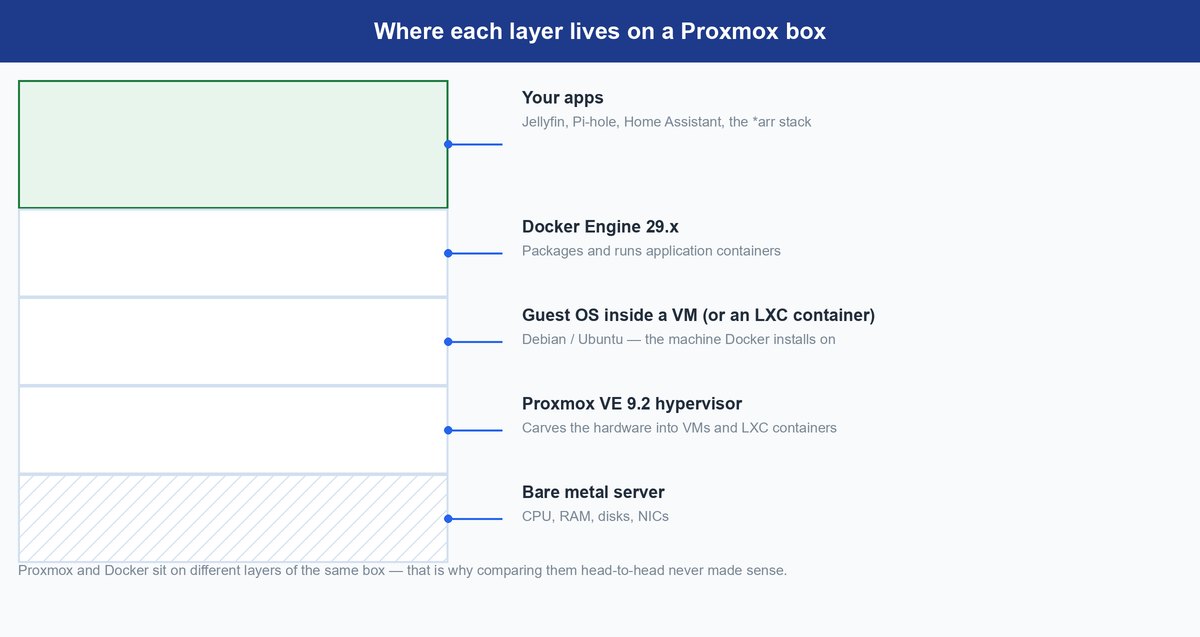
Proxmox VE is short for Proxmox Virtual Environment. Most people just say “Proxmox.” It’s what’s called a hypervisor. A hypervisor is software that installs directly on a computer’s hardware. Proxmox splits your hardware into virtual machines and LXC containers. More on LXC in a moment.
The current version is Proxmox VE 9.2, released May 21, 2026. Here’s what’s running underneath it.
| Part | Version |
|---|---|
| Debian (base operating system) | 13.5 |
| QEMU (runs each virtual machine) | 11.0 |
| LXC (Proxmox’s own container system) | 7.0 |
Docker Engine works differently. It’s a program you install on top of an operating system that’s already running. The current version is 29.7.2, released August 5, 2026.
Proxmox builds the computers. Docker runs apps on a computer that already exists.
Both tools use the word “container.” That’s where most of the confusion starts, because they mean two different things by it.
Proxmox’s LXC containers are system containers. Think of one as a whole small Linux computer. It’s squeezed down to use less power and memory than a full VM. But it still boots up and behaves like one. The Proxmox wiki explains the goal plainly: “Our primary goal has traditionally been to offer an environment that provides the benefits of using a VM, but without the additional overhead.”
Docker containers are application containers. Each one holds a single app, plus everything that app needs to run. Nothing else.
If “container” is still a fuzzy word for you, our containers explainer covers the basics. If you’re comparing Proxmox to a different hypervisor instead of to Docker, that’s a fairer fight. See our Hyper-V vs Proxmox breakdown.
This was never really a competition. But in November 2025, that started to change.
How Proxmox VE 9.1 Started Absorbing Docker’s Job
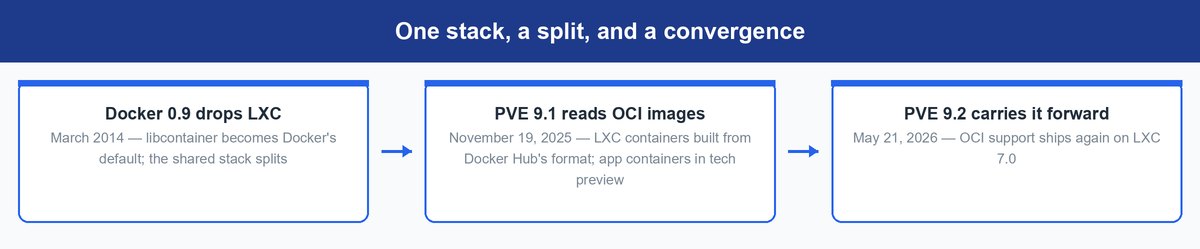
Proxmox VE 9.1, released November 19, 2025, gave Proxmox a new trick. It can now build LXC containers straight from OCI images. An OCI image is the standard packaging format for containers — the Open Container Initiative format. It’s exactly what Docker Hub hands out when you download a container.
Here’s how Proxmox describes it, straight from its own release notes: “This allows to create full system containers from suitable OCI images. Initial support for creating application containers from suitable OCI images is also available (technology preview).” When you pull one of these images in, Proxmox explains, “the image is automatically converted to the LXC stack that Proxmox VE uses.”
Proxmox can now open and use Docker’s packaging format, without Docker installed anywhere. For ten years the split was clean: Proxmox handled machines, Docker handled apps. This update is Proxmox reaching across that line for the first time. Proxmox VE 9.2 carried the feature forward this past May.
Still a preview: Proxmox calls the single-app version “application containers.” It’s still labeled a technology preview, in both PVE 9.1 and PVE 9.2. A technology preview is an early feature — Proxmox lets you try it, but doesn’t yet promise it works reliably. Treat it as something to test on a spare machine, not something to build your homelab around this month.
For context: Docker itself used to run on LXC as its default engine. That changed with Docker version 0.9 in March 2014, which replaced LXC with Docker’s own tool, called libcontainer. These two technologies used to share the same foundation.
Docker walked away from LXC to build its own path. Eleven years later, LXC — through Proxmox — learned to read Docker’s format again, meeting from the opposite direction. That’s why “they’re not competitors” gets a little less true with every new release.
The Four Places You Can Put a Container on Proxmox
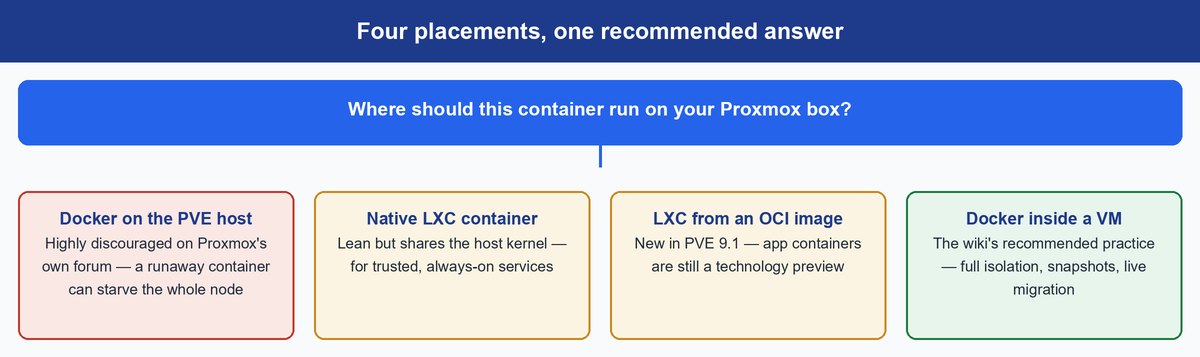
Proxmox and Docker work together instead of competing. So the real question is: where should your app actually go? Given a Proxmox machine and something you want to run, there are four places to put it. One of these four didn’t exist eighteen months ago.
Docker Straight on the Proxmox Host Can Break the Whole Machine
You can do this. Nothing stops you. But it’s strongly discouraged, for a real reason.
Proxmox VE is itself built on Linux. It depends on some deep, shared parts of Linux, called cgroups and namespaces. These keep track of every VM and container you run. Cgroups and namespaces are Linux’s internal bookkeeping systems. They control how much memory and processing power each thing on the computer gets, and they keep everything separated. Docker uses those exact same controls for its own containers. That’s two different programs trying to manage the same shared controls at once.
Anything running in Docker also shares the host’s resources directly. It has far less of a safety wall than something inside a VM. That includes container images you download from the internet.
Warning: Proxmox’s own support forum, staff included, describes a real failure mode. One out-of-control Docker container can use up all the host machine’s file handles and resources. The whole machine can freeze. That takes down every VM and container running on it, not just the misbehaving one.
Proxmox’s Own LXC Containers Fit Trusted Always-On Services
Proxmox’s own container type, LXC, is the lightest-weight option. Small always-on services fit here well. Think Pi-hole (a network ad-blocker), a reverse proxy, a DNS server, or a monitoring tool. Each can live in a small “unprivileged” LXC container. They barely use any resources.
The trade-off is isolation — that just means how separated a container is from everything else on the machine. LXC containers share the host computer’s kernel — the core part of the operating system that talks directly to the hardware. They share it with every other LXC container, and with Proxmox itself. That’s exactly why they’re lighter and faster than VMs: they don’t carry around a whole separate operating system of their own.
Stick with the “unprivileged” default setting. The Proxmox wiki warns that the LXC team itself “considers this kind of container as unsafe” when it’s set up as “privileged” instead — that means it has much deeper access to the host machine. Use LXC for small services you already trust, where you want something lean and fast.
OCI Images Running Directly as LXC Are the New Experiment
This is the new option from the November 2025 update. Point Proxmox at an OCI image (Docker’s standard packaging format, explained above). Proxmox converts it into its own LXC container. Whole-system containers work reliably today. Single-app containers are still the preview described above.
This is the option worth watching, because it skips the Docker VM step entirely. But “preview” means preview: expect rough edges where Docker’s own tools would normally smooth things over for you. Don’t move anything onto it that you’d genuinely miss if it broke.
Docker Inside a Dedicated VM Remains the Default Play
The boring answer is still the right one. Create one VM. Most homelab owners use a minimal Debian or Ubuntu install. Put Docker Engine inside it, and run everything there.
Here’s what that setup buys you.
- A hard wall between anything untrusted you download and Proxmox itself.
- Clean snapshots and backups of your whole Docker setup. A snapshot is a saved copy of the VM you can roll back to.
- “Live migration”: moving a running VM to a different physical machine with no downtime. Handy if you ever run more than one Proxmox server.
Official guidance: even in the same release that added OCI support, the Proxmox wiki still says that “for use cases demanding maximum isolation and the ability to live-migrate, nesting containers inside a Proxmox QEMU VM remains a recommended practice.” In plain terms: Proxmox built the shortcut, and told you to keep taking the long way anyway. That tells you how unfinished the preview still is.
Matching Real Homelab Workloads to the Right Placement
This gets easier once you stop thinking about which tool to use. Start thinking about what you’re actually trying to run instead. Most homelabs end up needing the same handful of things.
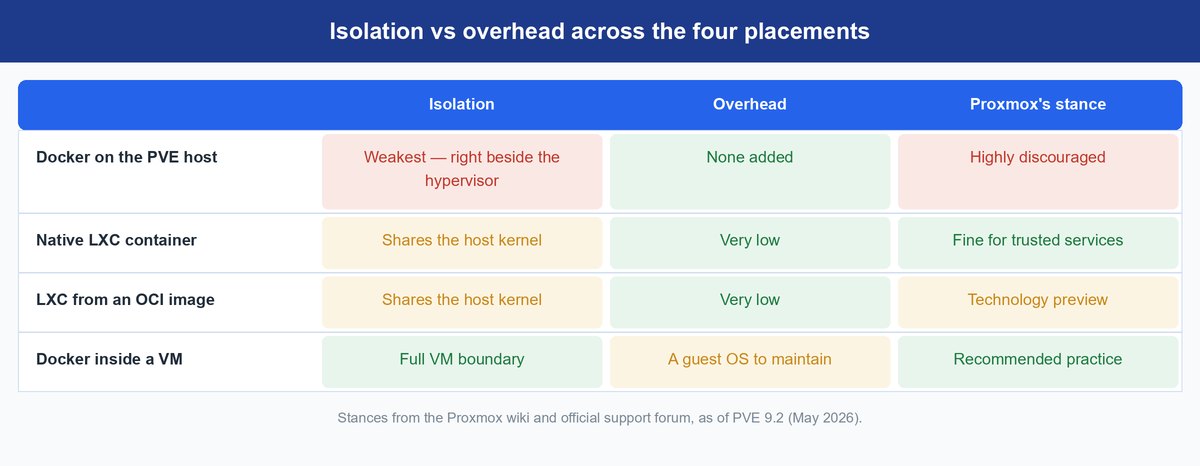
Before picking a spot for your app, here’s how the four placements compare side by side.
| Placement | Separation from the host | Resource cost | Proxmox’s stance |
|---|---|---|---|
| Docker directly on the Proxmox host | None — shares Proxmox’s own core controls | Lowest for the app, but risky for the whole machine | Discouraged — Proxmox staff warn it can overload the machine |
| Proxmox’s own LXC container | Shares the host’s kernel, locked down by default | Very low — a thin, small container | Supported default for trusted, always-on services |
| OCI image turned into LXC (Nov. 2025 update) | Same shared-kernel setup as native LXC | Low — skips the Docker VM step | Early technology preview for single-app containers |
| Docker inside its own VM | Full separation — a real hardware wall | Highest — a whole separate computer just to run Docker | “Recommended practice,” in Proxmox’s own words |
Home Assistant Runs Best in Its Own VM
This is the most-searched question in this whole debate. It also has the clearest answer. Run Home Assistant OS in its own separate VM. Don’t put it inside the same VM as your Docker apps. Don’t run it as a container either.
Home Assistant OS expects to run the whole machine itself. It manages its own updates and add-ons, the way Proxmox manages a VM. A dedicated VM lets you plug USB devices, like Zigbee and Z-Wave smart-home radios, straight through to it cleanly. It also lets you save a full snapshot before every update. Your smart home is the one service where “the whole house notices when it’s down.” Give it a boundary nothing else can cross.
Docker Compose Stacks Belong Inside the Docker VM
Maybe your whole setup already lives in one docker-compose.yml file — your media server, download tools, and dashboards, all together. Proxmox doesn’t change any of that. The compose file runs exactly the same way inside the Docker VM. From the inside, that VM just looks and acts like a normal Ubuntu computer.
Here’s the honest pitch for Proxmox, if you’re already all-in on Docker: everything you have keeps working. You also gain snapshots, backups, and room to run other things beside it. The same logic applies to orchestrators. These are tools like Docker Swarm or Kubernetes, which manage containers spread across several machines at once. In a homelab, your Swarm or Kubernetes machines are simply VMs that Proxmox hands out. It works the same way serverless platforms sit on containers underneath.
Proxmox vs Docker Desktop Compares Two Different Things
People really do search this, so here’s a straight answer. Docker Desktop is an app for developers. It runs on your Mac or Windows laptop, and quietly runs Docker inside a hidden VM in the background. Proxmox is a full operating system. You install it on a dedicated server, in place of Windows.
These two don’t compete. They don’t overlap. They don’t even belong on the same machine in a normal setup. You might think you’re choosing between them. Really, you’re choosing between “write code on my laptop” and “build a home server.” Those aren’t two answers to the same question.
What Happens if OCI Containers Graduate From Preview
Here’s a look ahead. Say single-app OCI containers grow up and leave technology-preview status. The “one big Docker VM” habit starts to look like extra work then: a whole separate small computer, kept running, just to translate between Proxmox and your apps. Two releases in a row have carried this feature, so Proxmox likely plans to keep pushing it. Proxmox managing app containers directly, with its own backups and permissions, would genuinely be better for a single-machine homelab.
But that’s a direction, not a promise with a date attached. Proxmox moves carefully — its own wiki still recommends the VM in the very same release notes that introduce this new feature. Preview features here stay in preview until they’re rock-solid. Most homelabs will run Docker-in-a-VM for years yet. Nothing available today changes what you should actually build this month.
Build the VM now. Keep one test LXC-from-OCI container running on the side. That way, you’ll already know how it works once the line finishes moving.
Frequently Asked Questions
Is Proxmox free to use?
Yes. The software is free and open source. Proxmox also sells optional paid support plans, from €120 per CPU socket a year (Community) up to €1,100 (Premium). Skip a plan and you use the “no-subscription” update channel instead. Proxmox’s wiki says this isn’t recommended for business servers — but for a homelab, it’s what nearly everyone uses.
Can I install Docker directly on the Proxmox host?
Technically, yes — nothing stops you. But Proxmox’s own support forum, including Proxmox staff, strongly advises against it. Docker and Proxmox both try to control the same core Linux systems. One misbehaving Docker container can drag down the entire machine. Put Docker inside a VM instead.
Should I use Proxmox or just Docker for a home server?
Starting fresh on a dedicated machine? Install Proxmox first, then run Docker inside a VM. You lose nothing, and you gain snapshots, backups, and room for more later. Maybe your “server” is just a spare computer running one Docker Compose setup, though. If so, plain Ubuntu with Docker works fine until you outgrow it.
Does Proxmox replace Docker now that it supports OCI images?
Not yet. The current Proxmox update can build whole-system containers from OCI images today. But single-app containers are still a technology preview. Running Docker inside a VM is still the recommended setup, according to Proxmox’s own wiki.
Can Proxmox run Docker Hub images without Docker installed?
Yes, as of the November 2025 update. Point Proxmox at a compatible OCI image. It converts that image into its own LXC container. This works cleanly for whole-system-style images. Single-app images are still preview territory. Treat them as an experiment, not something to rely on.
What about Proxmox vs Docker Swarm or Kubernetes?
It’s the same mix-up as Proxmox vs Docker, just one level higher. Docker Swarm and Kubernetes manage containers spread across several machines. Proxmox creates the machines themselves. In a homelab, your Swarm or Kubernetes machines are simply VMs that Proxmox is running. That’s why rebuilding a broken one takes five minutes with a saved snapshot, not an evening.
The Answer Is Still a VM, at Least for Now
The Proxmox vs Docker debate was really settled before it began. Hypervisors and app containers stack together — they don’t compete. What actually changed is the seam between them: since November 2025, Proxmox can read Docker’s own packaging format.
For what you should actually build right now, the careful, proven answer still wins, straight from Proxmox’s own wiki. Docker lives in its own dedicated VM. Small trusted services live in locked-down LXC containers. Home Assistant gets its own separate VM. Nothing touches the Proxmox host directly.
Still, keep an eye on that technology preview. The last time these two tools swapped technology this way was back in March 2014. It changed what “containers” meant for everyone. The line between them is moving again — this time toward the hypervisor.