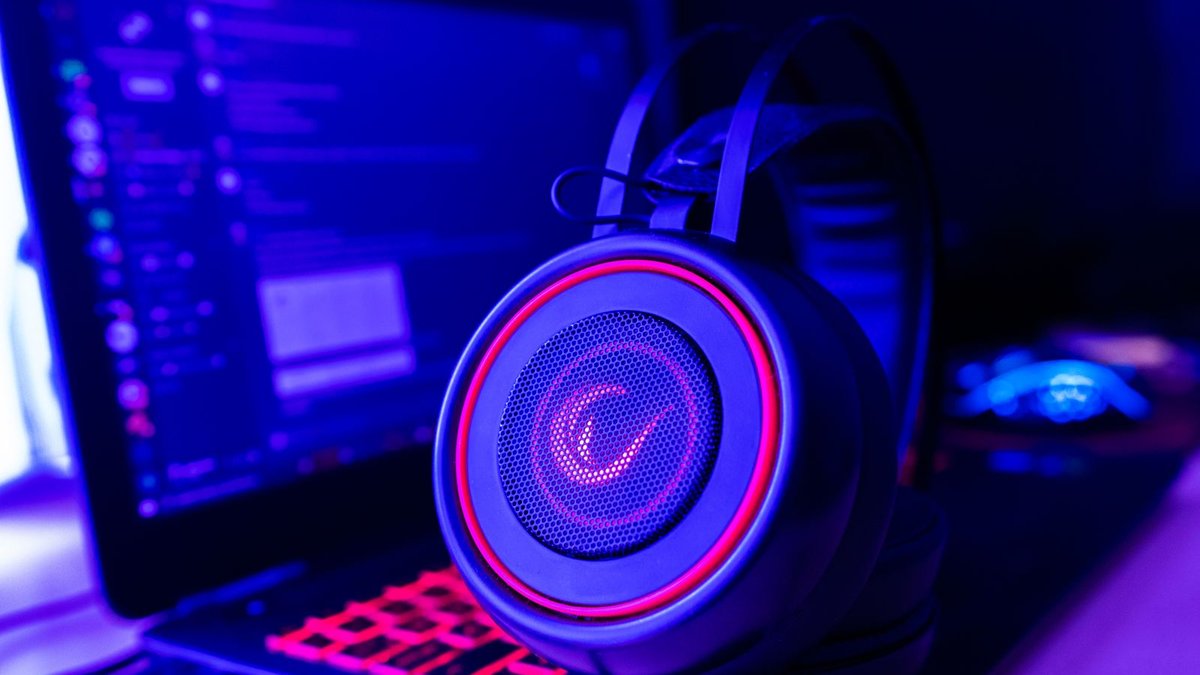
Fourteen years ago someone asked a Tom’s Hardware forum which gaming headset to buy, and the best answer he got told him not to buy one at all. That thread is closed now, but the question inside it never got a proper new answer, and the question is this: should you buy a gaming headset at all, or just get good headphones and clip a mic to them? The 2012 crowd said skip the headset. They were right then. They are half right now, and the half that changed is the half you are about to spend money on. The best gaming headset for you is no longer the one that sounds best. It is the one whose microphone your friends can stand and whose weight your head forgets.
Disclosure: TechDaily is an Amazon affiliate and earns a commission on purchases made through links on this page. It costs you nothing extra, and it does not change which headsets made this list.
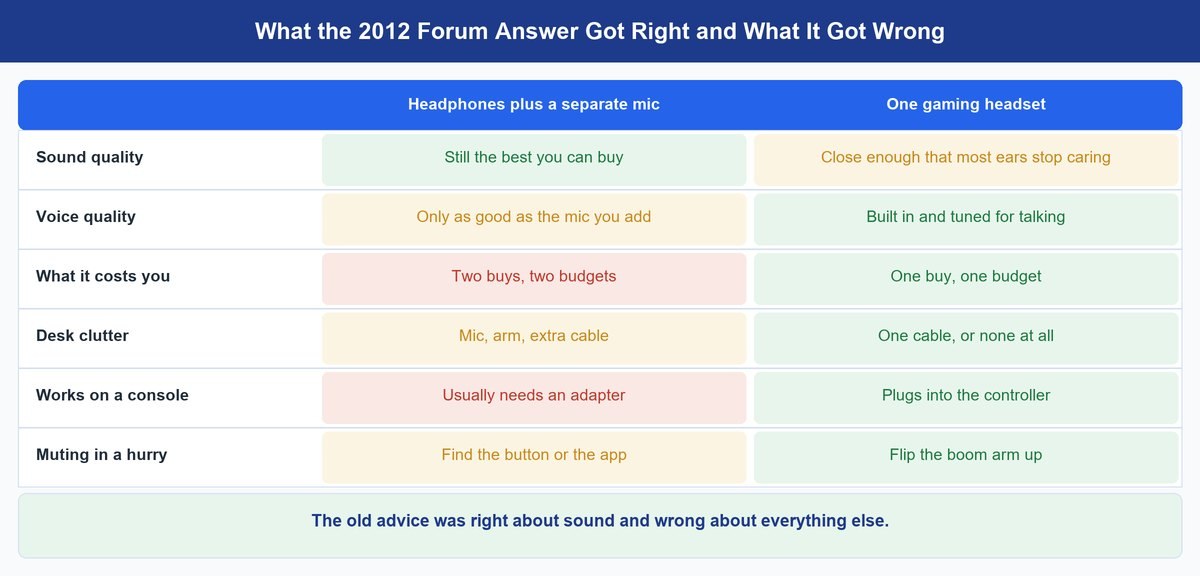
- That 2012 forum answer was right about one thing only. If pure sound is all you want, headphones plus a standalone mic still beat a headset, and always will.
- For everyone else the gap closed. A wired headset in the cheap tier now plays game audio well enough that most players stop noticing.
- The mic is the real reason to buy a headset. It is the one part your squad hears every night and the one part nobody checks before buying.
- The HyperX Cloud III is the pick for most people, because it does the boring things right and sits near the bottom of the price scale.
- The Razer BlackShark V2 X is the one to grab if you want to spend as little as possible and still be heard clearly.
- The Turtle Beach Stealth 600 Gen 3 is the cheapest way to cut the cable without the battery becoming your new problem.
- Comfort is what decides whether you still wear it in month three. Weight and clamp beat every driver spec on the box.
What is actually pushing you to buy one?
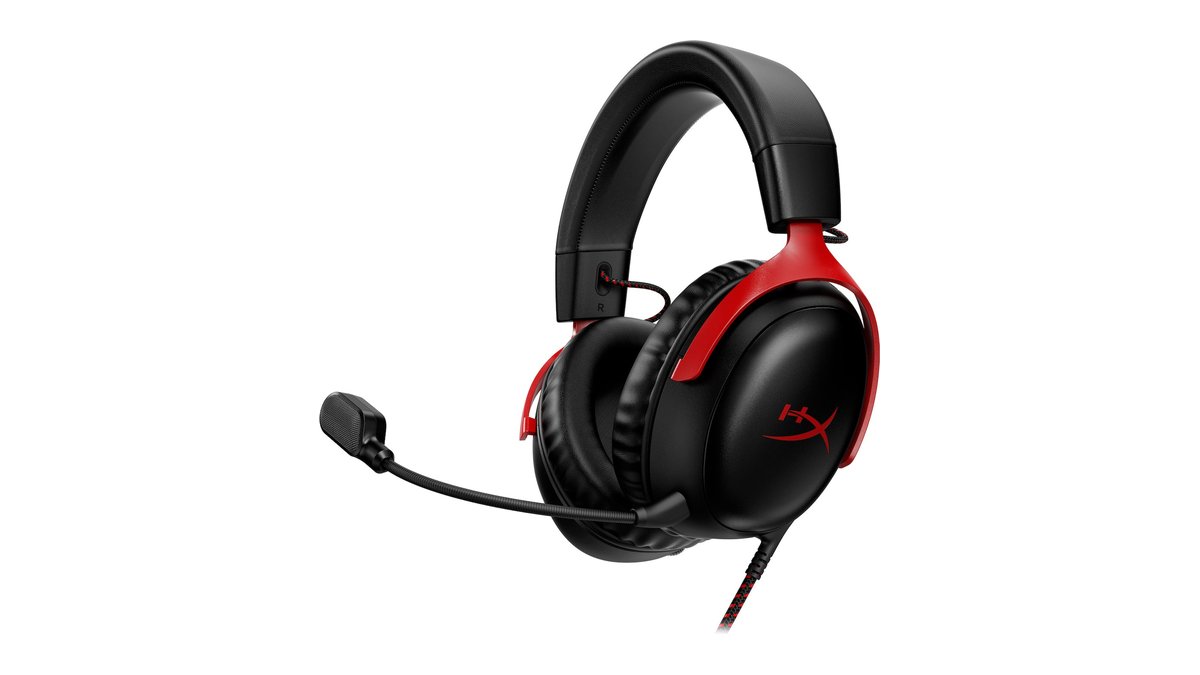
★ Your pick: HyperX Cloud III
Its detachable mic is the cleanest voice you can get at this money without adding a desk mic.
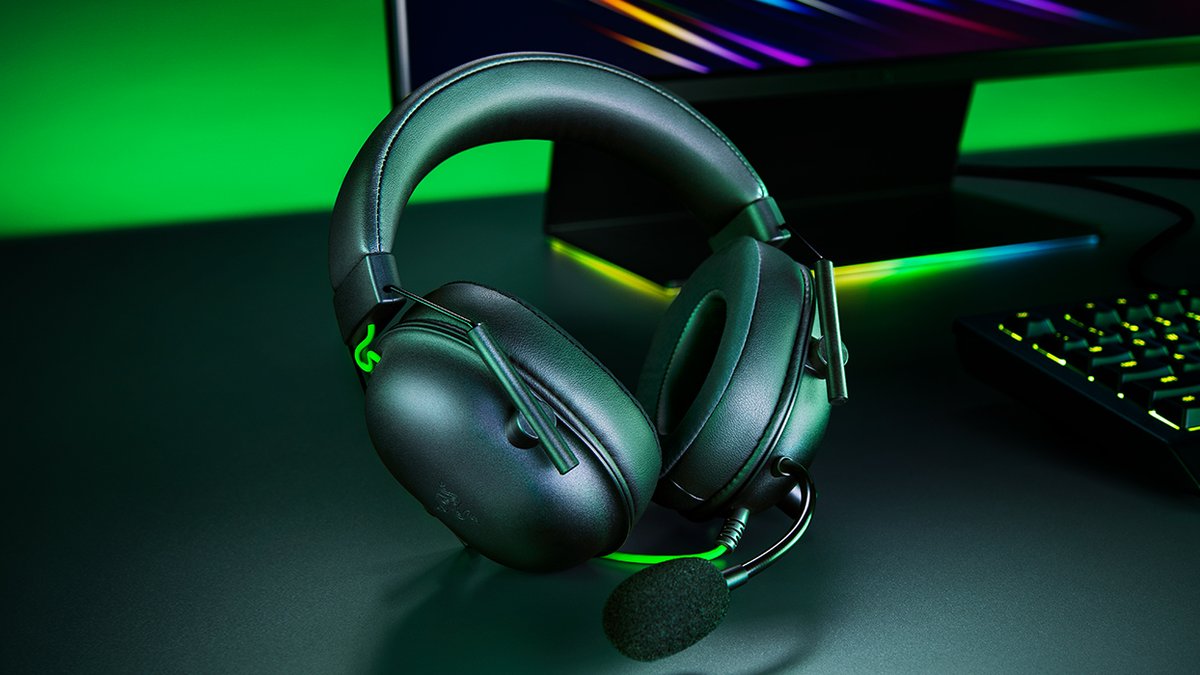
★ Your pick: Razer BlackShark V2 X
Plugs into anything with a headphone jack and still gets your voice across cleanly.
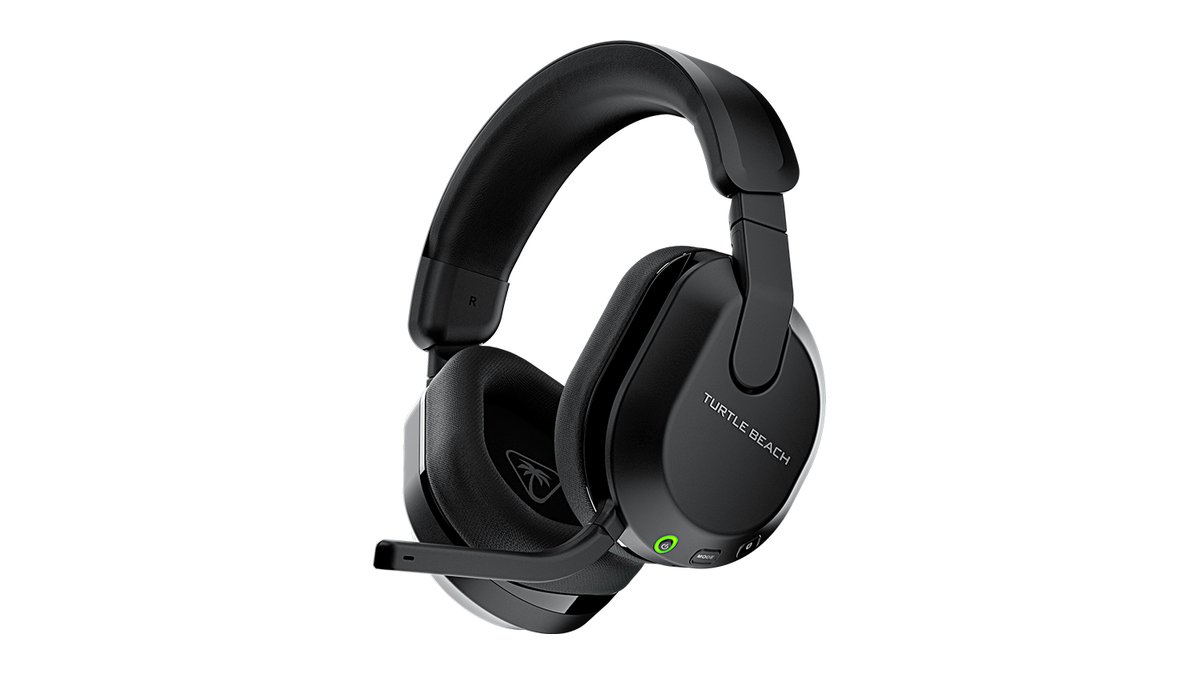
★ Your pick: Turtle Beach Stealth 600 Gen 3
Wireless with a battery measured in days, so cutting the cord does not add a nightly charging chore.
★ Your pick: Turtle Beach Stealth 600 Gen 3
Sold in console specific versions, so you are not fighting an adapter to get chat working.
★ Your pick: HyperX Cloud III
Light frame and deep memory foam pads, which is the combination that survives a long session.
👑 Our Top Pick — Best Overall Value
HyperX Cloud III
The safe answer. Good mic, comfortable for hours, and priced like an accessory rather than a purchase.
Opens on our Top Pick. Tap an option to see the best match for you.
Should You Buy a Gaming Headset or Just Get Headphones?
Go and read it. A user asks which gaming headset to buy. A reply tells him to stay away from gaming headsets entirely if he wants the best sound, and to get proper headphones with a clip-on mic instead. The thread is from early 2012 and it is closed to new replies.
Nobody wrote the follow-up, because the reviews published since answer a different question. They answer “which model is best”. The thread answers “is this whole product category a mistake”, and a lot of people typing this search are quietly asking exactly that. They have a pair of headphones already. They want to know if the headset is a downgrade with a boom arm glued on.
Here is the honest 2026 answer, and it splits in two.
The 2012 complaint was about sound, and it was fair. Back then a headset put a small, cheaply tuned driver in a plastic cup and charged you extra for a logo. A pair of studio headphones at the same money genuinely sounded better. That gap has narrowed a lot. Companies got tired of losing arguments on forums and started fitting decent drivers to cheap headsets. You can still hear the difference against real audiophile headphones. You have to be listening for it, and you have to care.
The part the 2012 answer never had to think about is the part that now decides the purchase. Voice chat went from a nice extra to the whole point. Party chat on consoles, Discord for everything else, ranked games where a callout half a second late loses the round. A clip-on mic dangling near your collar was fine when the stakes were a Team Fortress server. It is not fine when six people are relying on you to say where the enemy went.
Heads up: every current controller you are likely to own has a 3.5 mm jack on the bottom, including the PS5 DualSense, the Xbox Series controller and the Switch 2 Pro Controller. That single fact is why a cheap wired headset is still a serious answer in 2026. It is also why a fancy USB desk mic is useless for console chat.
So the split is clean. If you sit at a PC, never speak to anyone, and want the best sound your money can buy, take the 2012 advice. Buy good headphones, put the money into them, and add a mic later if you ever need one. If you talk while you play on any device, the headset stops being a compromise and starts being the sensible tool, because the microphone in it is built for one job and mounted in the one place that job works.
The Best Gaming Headsets Worth Buying Right Now
Three picks, three different reasons to buy. All three are current models as of September 2026, and I have said plainly who should skip each one. I have not tested these in a lab, so every number below is the manufacturer’s own claim or a published reviewer’s, and it is labelled as such.
Watch out: the names are one letter apart, so check which BlackShark you are buying. The newer V3 X is a wireless headset with a battery to charge and costs roughly twice as much. The pick here is the V2 X: the wired 3.5 mm model, no battery, one plug that works on every controller.
1. HyperX Cloud III — Best Overall for Most People
≈ $55–$70Wired, three plugsDetachable mic53 mm angled drivers0.7 lb
This is the one I would put on a desk without asking any follow up questions. HyperX has been iterating the Cloud since the original became the default recommendation on every forum, and the third version is the least exciting and most sensible of the bunch. Nothing on it is trying to impress you.
The mic is why it wins. HyperX fits a 10 mm condenser microphone on a stiff, bendable arm that stays exactly where you leave it. That matters more than any spec on the box, because a mic that droops is a mic that sounds different every night. It pulls out completely when you want to use the headset on a train without a stick of plastic sticking off your face.
Comfort is the other half. HyperX quotes the weight at just under 0.7 pounds, and it wears lighter than that because the pads are deep memory foam and the clamp is gentle. This is the headset people forget they are wearing at hour four, which is the only comfort test that means anything. The drivers are 53 mm and set at a slight angle so they fire toward your ear canal rather than straight at the side of your head, and the practical result is that things sound like they are in front of you instead of pressed against you.
The catch is that it is wired, and it stays wired. HyperX does sell a wireless Cloud III, but it costs a good deal more, and if a cable across your desk drives you mad the third pick below cuts the cord for less. It also runs three different plugs in the box, and the extra USB adapters are easy to lose in a drawer. Skip this one if you play mostly on a console from a couch far away from the screen, because a wire is a wire.
Features
- 53 mm angled drivers, per HyperX’s own spec sheet
- 10 mm detachable condenser mic with noise cancelling
- 3.5 mm, USB-A and USB-C connections in the box
- Memory foam pads under leatherette
- Frequency range quoted at 10 Hz to 21 kHz
- Aluminium frame with a fabric wrapped cable
Pros
- The cleanest microphone you will get at this money without buying a desk mic.
- Genuinely comfortable past the four hour mark.
- Plugs into a PC, a console controller or a laptop with no software involved.
- Aluminium frame and a fabric-wrapped cable hold up to years of desk use better than the plastic hinges cheaper headsets rely on.
Cons
- Wired only; the wireless Cloud III is a separate, pricier model.
- Three separate connectors to keep track of.
- Sound is very good rather than remarkable, and audio hobbyists will notice.
2. Razer BlackShark V2 X — Best Cheap Wired Pick
≈ $40–$60Wired 3.5 mm240 gCardioid mic50 mm drivers
This is the answer when the budget is genuinely tight and you still refuse to sound like you are calling from a car park. Digital Foundry at Eurogamer still called it the best wired 3.5 mm headset for the money in a February 2026 update, which is an unusual thing to survive six years of newer releases.
The reason it survives is the shape of it. Razer lists the weight at 240 grams, which is light enough that you notice the absence rather than the presence. The cups are oval instead of round, so ears sit inside them rather than under them, and the padding is thick memory foam. It does the two things a cheap headset usually fails at, and skips almost everything else.
Its microphone is a cardioid, meaning it listens forward and largely ignores what is happening behind it. In a room with a fan, a mechanical keyboard and a housemate, that directional pickup does more good than any amount of software cleanup. It is fixed rather than detachable, which is the honest trade for the price.
Where it stops is worth being blunt about. The plastic is plastic, and the headband adjustment is the part that will eventually complain. The 7.1 surround mode only exists on Windows through Razer’s own software, so on a console you get plain stereo. And you should walk past this if you already own something decent and are only shopping because you want an upgrade, because at this money it is a sideways step, not a better one.
Features
- 50 mm drivers Razer calls TriForce
- Cardioid microphone that listens forward, not sideways
- Single 3.5 mm plug, so it works on any controller
- 240 g listed weight
- Memory foam cushions in oval cups
- Virtual 7.1 surround on Windows through Razer’s software
Pros
- Very hard to beat for the money — a light frame, oval cups and a directional mic doing the two jobs that matter most.
- The directional mic handles a noisy room better than it has any right to.
- Light enough to forget, with no battery to charge, ever.
- One plug covers PC, PlayStation, Xbox and Switch.
Cons
- Build is clearly built to a price, and the headband is the weak point.
- The mic does not detach, so it is always in shot on a video call.
- Surround mode is Windows only and does nothing on a console.
3. Turtle Beach Stealth 600 Gen 3 — Best Wireless for Long Battery Life
≈ $90–$110Wireless 2.4 GHz80 h claimedBluetooth 5.2Flip-to-mute
Going wireless normally means paying a lot and then charging something every night. This is the pick that avoids both. Turtle Beach rates the battery at up to 80 hours, and even if your real number lands well under that, the practical effect is that you charge it about as often as you change a smoke alarm battery.
It runs a 2.4 GHz dongle for the low delay connection to your console or PC, and it also has Bluetooth 5.2 for your phone. You switch between the two with a button on the earcup rather than hearing both at once, so it is one headset for the console and the phone, not a mixer for both. The mic flips up to mute, which is the only mute control that never leaves you guessing.
Buy the right version. Turtle Beach sells this in separate Xbox and PlayStation flavours, and that is not a colour choice. Xbox uses its own wireless standard, so only the Xbox model carries the hardware to talk to it. The Xbox version also works on PlayStation and PC; the PlayStation version does not work on an Xbox. If there is any Xbox in the house, buy the Xbox version.
The compromises are real. It is plastic and it feels it, especially next to the price. The 50 mm drivers are tuned with a strong bass lift out of the box, which is exciting for an hour and tiring after three, and fixing it means opening the Turtle Beach app rather than a proper hardware control. Walk past it if you sit two feet from your PC anyway, because you would be paying roughly double the wired picks for a convenience you do not need.
Features
- Battery rated by Turtle Beach at up to 80 hours
- 2.4 GHz wireless plus Bluetooth 5.2, switched with a button
- 50 mm drivers Turtle Beach calls Nanoclear
- Flip-to-mute microphone with noise reduction
- Separate Xbox and PlayStation versions
- Works with PC, Steam Deck and current consoles
Pros
- Battery life you genuinely stop thinking about.
- Pairs to your phone over Bluetooth too, so one headset covers the console and the phone.
- Flip-to-mute is the fastest and least confusing mute there is.
- Cheapest wireless option here that does not feel like a compromise on the basics.
Cons
- The plastic build does not match the price on the tag.
- Heavy bass by default, and fixing it means an app.
- You must buy the version that matches your console.
What More Money Gets You in a Gaming Headset
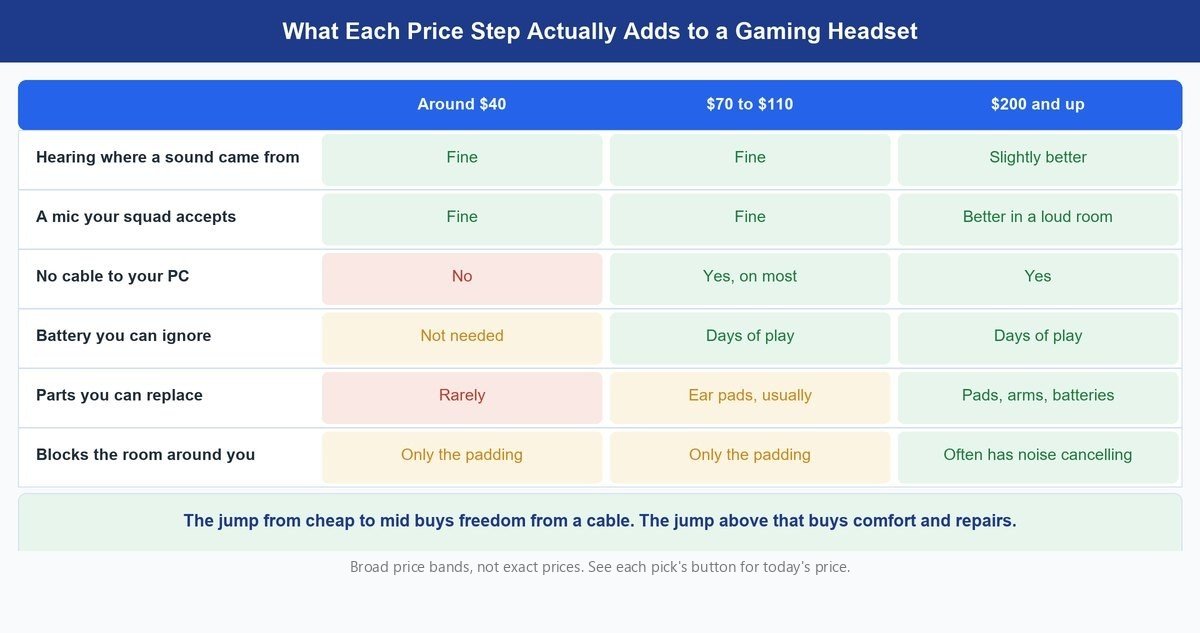
Category prices run from roughly twenty five dollars to well over two hundred, and the way that money is spent is not intuitive.
The first jump, from the very cheapest tier to something around forty dollars, is the only one that buys you basic competence. Below that you are buying a mic that clips, a headband that cracks and pads that flatten in a season. That step is worth taking every time.
The next jump, into the range where the wireless picks live, buys you exactly one thing: the cable goes away. That is a real quality of life change if your desk is a mess or you play from a sofa. It is worth nothing at all if you sit close to your PC. Look at the middle column of the comparison above and notice how little else changes.
Above roughly two hundred dollars you are into a different argument. That money goes on noise cancelling, on replaceable ear pads and batteries, on metal instead of plastic, and on a mic that survives a room full of people. Reviewers who test at that level bear this out. RTINGS currently puts the Audeze Maxwell 2 at the top of its gaming headset rankings on sound, and PC Gamer’s August 2026 pick for best overall is Razer’s BlackShark V3. Both are excellent. Neither will win you a match that the cheap pick would have lost.
So the money question is not “how good does it get”. It is “where does it stop mattering to me”, and for most people that point arrives lower down the scale than the marketing suggests.
What Actually Makes a Headset Mic Sound Good or Bad
You will never hear your own headset mic while you play. Everyone you talk to will hear it for hours. That is a strange gap and it explains why so many people buy on driver size and then spend two years being asked to repeat themselves.
Three things separate a mic people tolerate from one they complain about, and none of them are the numbers printed on the box.
Where the Mic Sits Relative to Your Mouth
A boom arm parks the capsule a couple of inches from the corner of your mouth. A clip-on mic on your shirt sits a foot away, pointing at your chin, catching your keyboard on the way. Distance is the single biggest factor in how clean a voice sounds, and this is the whole reason a mediocre headset mic beats a decent clip-on. Put it beside your mouth, not in front of it, or every hard consonant arrives as a thump.
Whether It Listens in One Direction
A cardioid or uni-directional mic hears what is in front of it and quietly ignores the rest. All three picks here use one. It is why a cheap headset can sound usable in a room with a fan and a loud keyboard, while a phone-style omnidirectional mic in the same room sounds like a group call you were not invited to.
What the Software Does to It Afterwards
Noise reduction is not free. It works by deciding what is noise and deleting it, and it sometimes decides the quiet end of your voice is noise too. That is why some headsets make people sound like they are cutting in and out. If your voice sounds chopped, the fix is usually in the app rather than in the hardware, and turning the processing down is worth trying before you return anything.
Pro tip: before the return window shuts, record yourself. Windows Voice Recorder or the voice memo app on your phone, thirty seconds, normal speaking volume, with your keyboard and fan running exactly as they usually do. Then listen on speakers, not the headset. That single recording tells you more than every review you will read, and it takes a minute.
What Makes a Headset Comfortable for Long Sessions
Nobody returns a headset because the drivers were 40 mm instead of 50 mm. They quietly stop using it because their ears ache after two hours and it lives on a hook now. Comfort is the spec that actually determines whether you got value, and it barely appears in reviews because it is hard to measure and different for every head.
Three things drive it. Weight is the obvious one, and anything under about 300 grams tends to disappear on your head. Clamp force is the sneaky one, because a firm grip feels secure in the shop and feels like a headache at hour three. Pad depth is the one people never check, and it decides whether your ear touches the driver. If it does, that contact point will be sore long before the session ends.
Glasses change all of it. Arms press the frame into the side of your head, and a stiff pad turns that into a hot spot fast. Soft, deep memory foam pads are the fix, which is why the Cloud III suits people who wear glasses better than most.
The good news is that this is the one thing you can fix after buying. Replacement pads exist for almost every popular model, they cost a fraction of a new headset, and swapping thin cloth for deep foam can rescue something you were about to give up on.
Important: if you play with the volume high for hours at a time, no headset design protects your hearing. A closed headset that blocks outside noise well actually helps, because you stop turning it up to drown out the room. If you catch yourself pushing past halfway on the dial to hear footsteps, the honest fix is a quieter room, not a louder headset.
Which Headsets Work on Which Consoles
This is where most bad purchases happen. A headset can sound perfect and still refuse to carry your voice into party chat, because game audio and chat audio travel separately on consoles.
| Your setup | Wired 3.5 mm | 2.4 GHz dongle | Bluetooth |
|---|---|---|---|
| PC or laptop | Works, audio and mic | Works, audio and mic | Works, but mic quality drops |
| PlayStation 5 | Works via the controller | Works with the PlayStation version | Not supported for audio |
| Xbox Series X or S | Works via the controller | Needs the Xbox specific model | Not supported |
| Nintendo Switch 2 | Works via the headphone jack | Works with most dongles | Supported for audio |
| Phone or tablet | Needs a USB-C adapter on most | No | Works |
Two rules come out of that table. On Xbox, buy the model that says Xbox on the box, because the wireless standard is not shared with anything else. And on any platform, avoid using plain Bluetooth for voice chat if you can help it, because the moment the mic opens, Bluetooth drops the audio quality to something that sounds like a phone call from 2008. A wired plug into the controller sidesteps every one of these problems for the price of a cable, which is also why our guide to wired versus wireless gear for gaming keeps landing on the same conclusion.
If you are still weighing the whole form factor rather than a specific model, the trade offs between cups and buds are laid out in our earbuds and headphones comparison. And if your controller is the thing dropping out rather than the headset, start with fixing the controller connection before you blame the audio.
Frequently Asked Questions
Do I need a gaming headset, or will normal headphones do?
Normal headphones do fine for game audio, and good ones sound better than almost any headset. The gap is voice. If you never talk while you play, keep your headphones and save the money. If you talk every session, a headset gives you a mic in the right place with no second device to buy, set up or knock off your desk.
Is a wired gaming headset better than a wireless one?
For sound and voice quality at the same price, wired wins, because none of your money went on radios and a battery. Wireless wins on comfort of use, and modern 2.4 GHz connections have delay low enough that you will not feel it in a game. Bluetooth is the exception and is worth avoiding for competitive play.
How much should I spend on a gaming headset?
The sweet spot for most people sits between roughly forty and a hundred dollars. Below that you start losing basic build quality and mic clarity. Above it you are mostly buying wireless, replaceable parts and noise cancelling, which are conveniences rather than performance. Spend more only if you can name the specific thing you want.
Does virtual 7.1 surround sound actually help you hear footsteps?
Sometimes, and less than the box implies. It is software making stereo sound wider, not real extra speakers. Some players find it helps them place sounds; others find it smears everything. It is worth switching on and off in your usual game and trusting your own ears. It is never a reason to pick one headset over another.
Will one headset work on my PC and my console?
A wired 3.5 mm headset works on essentially everything with a headphone jack, which includes every current controller. Wireless is fussier. A 2.4 GHz dongle generally covers PC and PlayStation, while Xbox needs a model built for its own wireless standard. If you switch between platforms often, a wired headset is the simple answer.
Why do people say my mic sounds bad even with a good headset?
Usually position rather than hardware. The boom needs to sit beside the corner of your mouth, roughly two fingers away, not directly in front of it. After that, check whether noise reduction in the app is set aggressively, since heavy processing is what makes voices cut in and out. Record yourself and listen back before you replace anything.
The Bottom Line Before You Spend
That 2012 thread still matters because it asked the right question and nobody kept the answer current. So here is the current one. Buy a gaming headset for the microphone and for the fact that it is one device instead of two. Do not buy one expecting it to beat proper headphones on sound, because it will not, and being disappointed by that is what started the argument in the first place.
For most people the Cloud III ends the search. It is comfortable, the mic is clean, and it costs less than a couple of new releases. Take the BlackShark V2 X if the budget is truly tight, and the Stealth 600 Gen 3 if the cable is the thing driving you up the wall. Then go and record thirty seconds of yourself talking, because that is the only part of this purchase you cannot judge from the outside.