The best tablet for kids depends on one thing more than any spec: how old your kid is. For ages 3 to 5, get the Amazon Kids Tablet 8 in its squishy bumper. For ages 6 to 8, step up to the Amazon Kids Tablet 11, or the Samsung Galaxy Tab A11+ Kids Edition if your family lives in Google’s world. From about 9 up, buy the iPad (A16) and lock it down with Screen Time. It’s the one that still makes sense in middle school.
Here’s why this year is different. For a decade, the easy answer was “just buy a Fire Kids tablet.” Amazon’s kid tablets ran their own closed app store, and they came with a 2-year worry-free guarantee: break it, and Amazon replaced it. On October 8, 2026, Amazon announced a brand-new kids line. The new tablets run Android with the full Google Play store, behind a parent’s approval. And Amazon’s announcement lists a 1-year limited warranty, with no mention of the old no-questions replacement. So the old default needs a second look.
One quick note. TechDaily didn’t hands-on test these tablets. Specs and features come from each maker. Some links are affiliate links, so we may earn a small commission if you buy. That never changes a pick, and it costs you nothing extra.
- Age picks the tablet. Little kids need a tough, simple tablet. Kids 9 and up need one that runs real school apps and games.
- Amazon’s new Kids Tablet 8 is our pick for ages 3 to 5. It comes in a thick bumper with a handle and a year of kid content.
- The new Amazon kids tablets now get Google Play, but only the apps you approve. That’s more choice, and more setup work for you.
- The old 2-year “we’ll replace it” deal isn’t in Amazon’s launch details. Budget for a drop, or keep the case on at all times.
- For ages 9 and up, the iPad (A16) is the safest long-term buy. Apple’s Screen Time gives you the tightest app and time controls here.
How old is the kid getting this tablet?
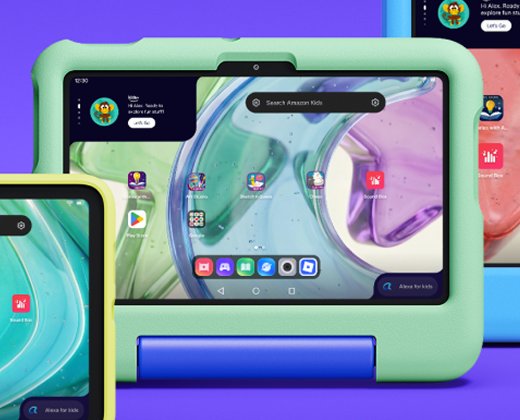
★ Your pick: Amazon Kids Tablet 8
Small, light, wrapped in a soft bumper, with a year of kid-safe content in the box.
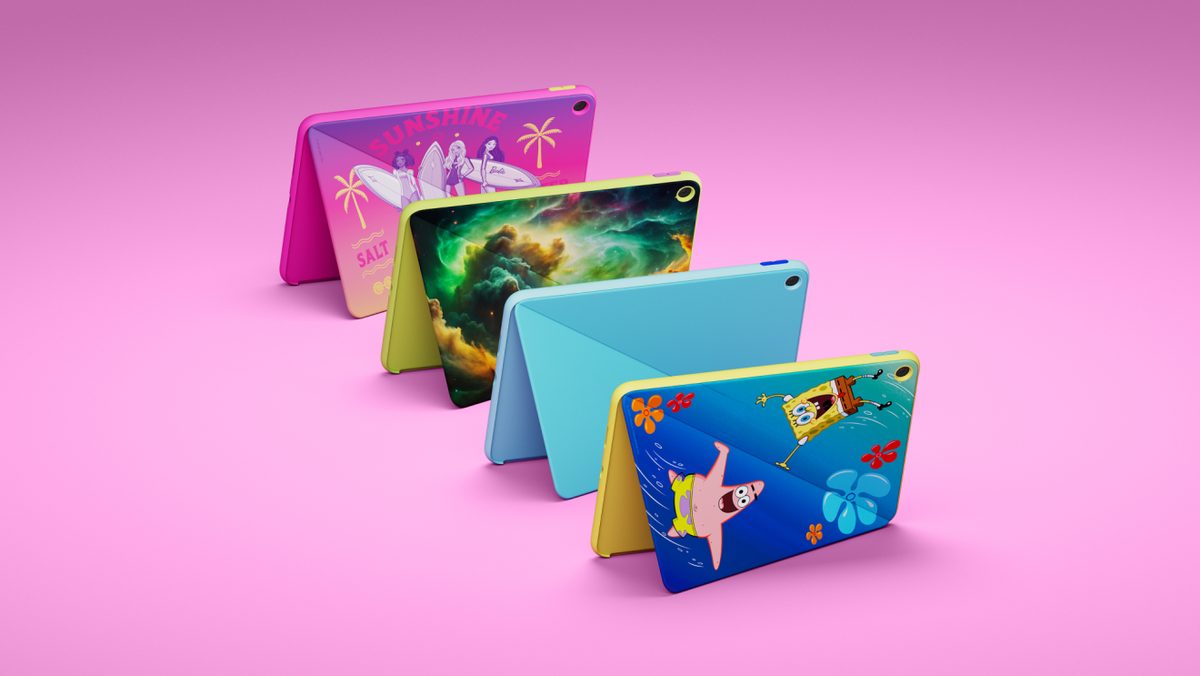
★ Your pick: Amazon Kids Tablet 11
A sharp 11-inch screen, stylus support and Amazon’s parent app.
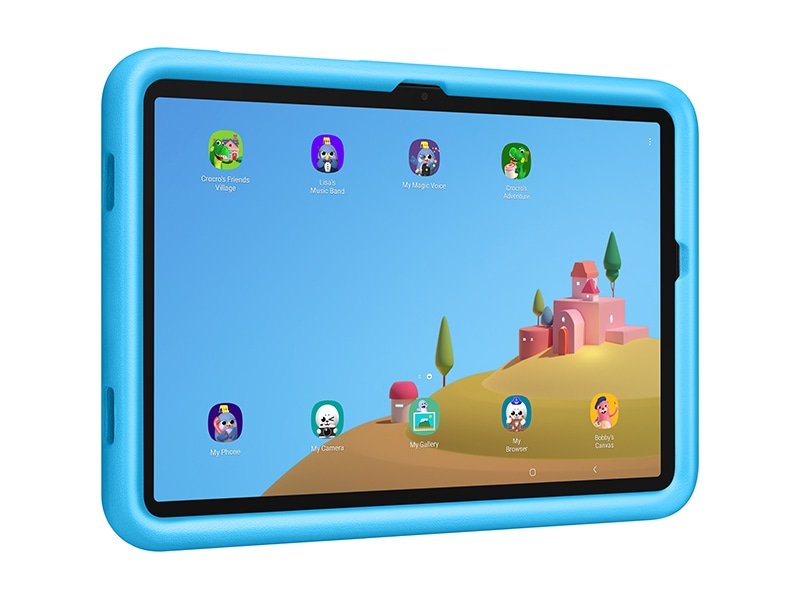
★ Your pick: Galaxy Tab A11+ Kids Edition
Google Play, a kids cover and pen, and seven years of Android updates.
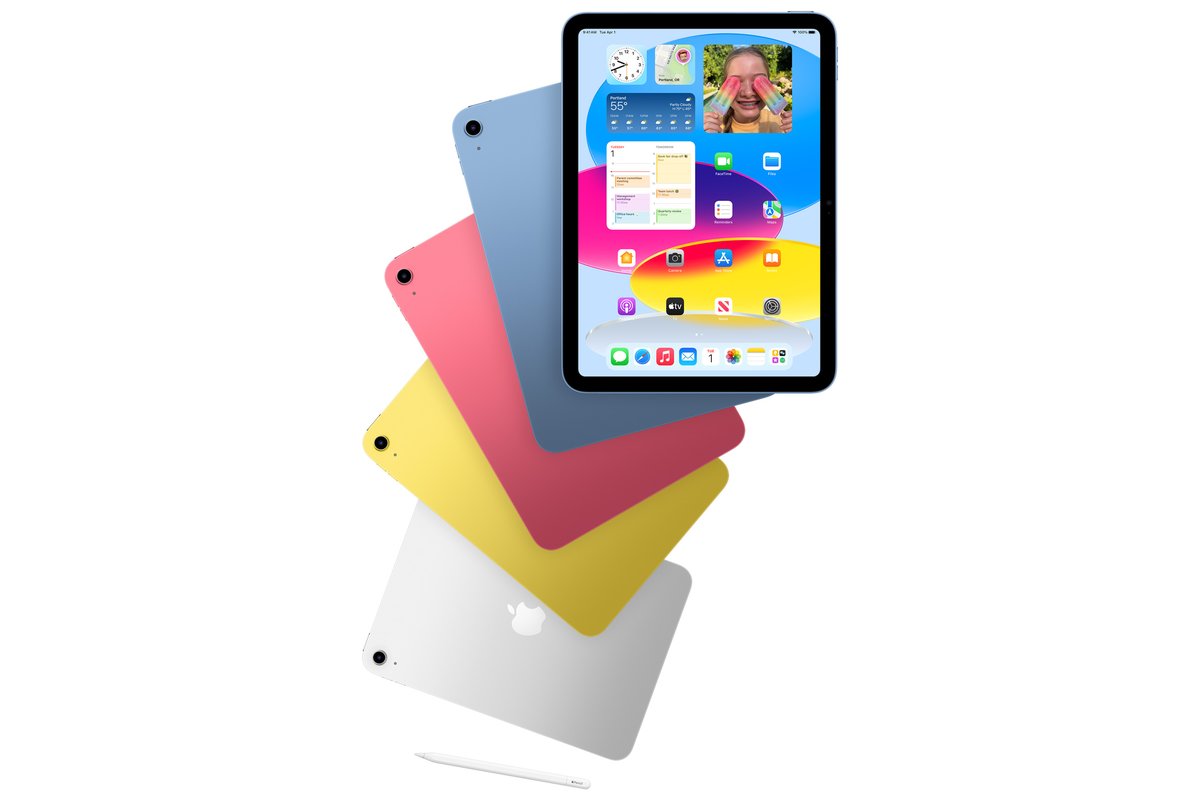
★ Your pick: iPad (A16)
Runs the school apps and games older kids ask for, and lasts for years.
👑 Our Top Pick — Best Overall Value
iPad (A16)
The tablet a kid won’t outgrow, with the big school apps and Apple’s Screen Time controls.
Opens on our Top Pick. Tap an option to see the best match for you.
Pick the Tablet by Your Kid’s Age First
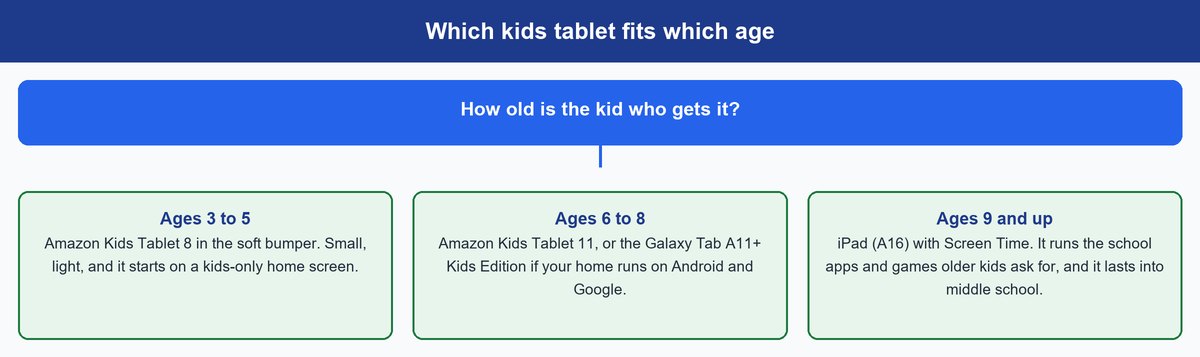
A 4-year-old needs a tablet that survives being dropped and keeps them in a fenced yard of apps. A 10-year-old needs homework apps, the games their friends play, and controls you can tighten or loosen as they grow.
Ages 3 to 5 Need Toughness and a Closed Garden
At this age, the tablet will hit the floor. Often. So a thick foam bumper with a handle matters more than screen sharpness. You also want the tablet to start on a kids-only home screen, so a tap can’t wander into a web browser or an app store. Amazon’s Kids Tablet 8 does both, and its 8.7-inch size fits small hands.
The American Academy of Pediatrics also suggests watching with young kids when you can and picking high-quality content made for children. A kids tablet with a curated library makes that easier, because you’re not sorting through all of YouTube.
Ages 6 to 8 Want More Apps and a Bigger Screen
Early readers start using school apps, drawing, and games with friends. They’ll ask for a bigger screen, and they’ll ask for apps that aren’t in a kids-only library. This is where an 11-inch screen and Google Play behind a parent’s approval make sense. You still hold the keys, but the tablet can grow with them.
Ages 9 and Up Need a Real Tablet With Real Controls
Older kids use the tablet for homework, video calls, and games like Roblox and Minecraft. A kids-branded tablet starts to feel babyish, and they’ll push to get around it. A real tablet with strong built-in controls wins here. That’s the iPad, and you’ll get years out of it.
Keep in mind: the AAP’s free Family Media Plan tool lets you set screen-free times and places, like meals and bedrooms. A rule tied to a place is easier to enforce than a timer. Find it on the AAP’s HealthyChildren site.
The Four Best Tablets for Kids Right Now
These four cover every age and both big app stores. Each one is the maker’s current model as of October 2026.
1. Apple iPad (A16) — Best Tablet for Kids 9 and Up
$420–$450 range11-inch screenUp to 10 hoursTouch ID128 GB
This is the tablet we’d hand to a 9-year-old and expect to still be using at 13. It’s Apple’s basic iPad, the current model with the A16 chip. It’s not a kids tablet, and that’s the point. It runs the full App Store, so school apps, Roblox, Minecraft, and drawing apps all just work.
The screen is an 11-inch Liquid Retina display, sharp enough for reading and video. It weighs 1.05 pounds, a little light for its size. Apple rates the battery at up to 10 hours of web or video. That’s less than the Amazon and Samsung picks, but it covers a school day or a long flight. Touch ID sits in the top button, so your kid can unlock it, but you set the passcode. It works with the USB-C Apple Pencil for drawing and notes.
The real win is control. Apple’s Screen Time lets you set daily time allowances, schedule downtime, approve every app with Ask to Buy, and choose who your kid can message. It’s built into the iPad, not an add-on app. Compared with the Amazon picks, it costs more and has no case in the box. Budget for a sturdy case on day one. Skip it for a preschooler, who doesn’t need the power and will break the glass long before they outgrow it.
Pros
- Runs the big school apps and popular kids games from the App Store.
- Screen Time gives you time, app, content and contact controls.
- 11-inch screen is sharp and bright for reading and video.
- Works with the USB-C Apple Pencil for drawing and notes.
- Easy to sell or hand down later.
Cons
- Costs the most of our four picks.
- No case in the box, so you need to buy one.
- Up to 10 hours of battery, the shortest here.
- Too much tablet for kids under about 8.
2. Amazon Kids Tablet 8 — Best Tablet for Ages 3 to 5
$220–$240 range8.7-inch screenAbout 14 hoursSoft bumper1-year Kids+
For a preschooler, this is the one. It’s the smaller of Amazon’s two all-new kids tablets, announced October 8, 2026, with Amazon saying it ships October 14. The ages 3+ edition comes wrapped in a thick soft bumper with a handle that folds out into a stand. Little hands can carry it, and it can sit on a tray table for a movie.
The screen is 8.7 inches, a good size for a small lap. Amazon rates it at about 14 hours of video, and it has 64 GB of storage, so you can download shows and games before a trip. Inside, it runs Android. Each box includes a year of Amazon Kids+, a library of ad-free books, shows, games, and apps picked for kids.
It’s far cheaper than the iPad, and the bumper makes it the toughest pick here. Unlike the iPad, it starts on a kids-only home screen. It also gets Google Play now, but every download needs your approval in the Parent Dashboard app. Two catches. Amazon’s launch details list a 1-year limited warranty, not the old 2-year replacement promise. And when the free year of Kids+ ends, it renews at a monthly fee unless you cancel. Skip it for kids 8 and up. They’ll find the smaller screen and kids home screen limiting.
Pros
- Thick bumper with a handle and stand, made for drops.
- About 14 hours of video for road trips.
- A year of Kids+ content included in the box.
- Google Play access, but only for apps you approve.
- Parent Dashboard works from your own phone.
Cons
- 1-year limited warranty, shorter than older Fire Kids deals.
- Kids+ renews at a monthly fee after year one.
- 8.7-inch screen feels small for older kids.
- Too new for long-term owner reports yet.
3. Amazon Kids Tablet 11 — Best Big Screen for Ages 6 to 8
$320–$340 range11-inch 2.5K screen8 GB memoryStylus supportUp to 13 hours
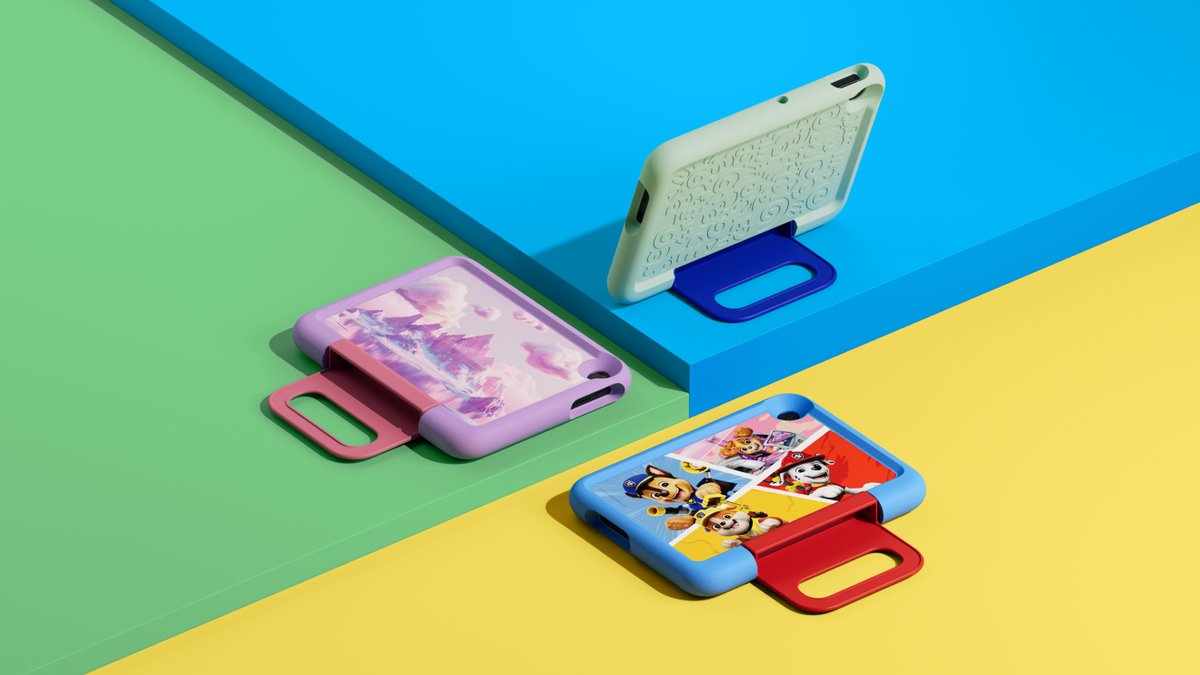
This is the bigger sibling, and it’s the one for early grade-schoolers. It has the same Amazon kids software, but a much nicer tablet underneath. Amazon sells it in two editions. The ages 6+ edition we link, shown here from the back, trades the chunky bumper for a slim hard case with a built-in kickstand. It fits in a backpack and looks less babyish to a second grader.
The 11-inch screen is 2.5K, which is sharper than the Kids Tablet 8 and close to the iPad. It has 8 GB of memory, so games and drawing apps run smoothly. It also works with a stylus, which is handy for drawing and homework. Battery life is up to 13 hours of video, and it has 64 GB of storage.
It costs much more than the Kids Tablet 8, so only step up if your kid will use the big screen and the stylus. Next to the Galaxy Tab A11+ Kids Edition, it’s close on screen size and price. Pick Amazon if you want the Kids+ library and Amazon’s Parent Dashboard. Pick Samsung if your family already uses Google accounts and wants years of Android updates. Next to the iPad, it’s cheaper and comes with a case, but older kids may outgrow the Amazon kids home screen.
Pros
- Sharp 11-inch 2.5K screen.
- 8 GB of memory for smooth games and apps.
- Stylus support for drawing and school work.
- Slim hard case with stand in the ages 6+ box.
- Same Parent Dashboard and Google Play approvals as the 8.
Cons
- Costs a lot more than the Kids Tablet 8.
- 1-year limited warranty.
- Kids+ renews at a monthly fee after year one.
- Slim case protects less than the bumper version.
4. Samsung Galaxy Tab A11+ Kids Edition — Best Android Tablet for Kids
$330–$350 range11-inch 90Hz screenUp to 15 hoursKids cover and pen7 years of updates
If your family runs on Android phones and Google accounts, this is the kids tablet to get. It’s Samsung’s regular Galaxy Tab A11+ bundled with a shock-absorbing kids cover, a chunky stylus Samsung calls the Crayo-Pen, a pen tether, and stickers. It comes loaded with Samsung Kids, a kids mode with its own parental controls.
The 11-inch screen refreshes at up to 90Hz, so scrolling and games feel smooth. Samsung rates the battery at up to 15 hours of video, the longest of our four picks. It has 128 GB of storage, double the Amazon tablets, plus a microSD slot for up to 2 TB more. The big one for parents is updates. Samsung promises seven Android upgrades and seven years of security updates, counted from early 2026. That’s a long life for a tablet in this price range.
It’s the closest rival to the Amazon Kids Tablet 11, with the same screen size and a similar price. Samsung gives you more storage, longer battery life, and no kids subscription to keep paying. Amazon gives you a curated content library and a simpler kids home screen. One setup note: you set a PIN to lock Samsung Kids, and you’ll want Google Family Link on your phone for remote control. Skip it if you want the simplest setup. Amazon’s kids software is easier to get going.
Pros
- Up to 15 hours of video, the best battery here.
- 128 GB of storage plus microSD up to 2 TB.
- Kids cover, Crayo-Pen, tether and stickers in the box.
- Seven years of Android and security updates.
- No kids content subscription needed.
Cons
- Samsung Kids takes more setup than Amazon’s software.
- 1-year limited manufacturer warranty.
- The bundle costs more than the plain Tab A11+ plus a case.
- 6 GB of memory, less than the Kids Tablet 11’s 8 GB.
Fire Tablet vs iPad for Kids and What Really Changed
Parents still search “Fire tablet vs iPad,” so let’s settle it with this year’s facts. For years, the split was simple. Amazon’s Fire Kids tablets were cheap and tough, but they ran Fire OS with only the Amazon Appstore. The iPad cost more but ran everything. Many parents bought the Fire for a young child, then hit a wall when the kid wanted an app the Amazon Appstore didn’t carry.
Amazon’s new kids tablets close most of that gap. They run Android with Google Play, behind your approval. So the old “you can’t get that app” problem mostly goes away. What’s left is a choice between two kinds of control and two kinds of durability.
| What matters | Amazon Kids Tablets | Galaxy Tab A11+ Kids | iPad (A16) |
|---|---|---|---|
| App store | Google Play, parent-approved | Google Play | Apple App Store |
| Parent tools | Amazon Parent Dashboard | Samsung Kids and Family Link | Screen Time |
| Case in the box | Yes, bumper or slim case | Yes, kids cover | No |
| Kids content plan | 1 year of Kids+ included | None needed | None needed |
| Warranty | 1-year limited | 1-year limited | 1-year limited |
Look at the last row. Every tablet here now has the same basic warranty, so the case does the real protecting. That’s why we lean toward the Amazon bumper for little kids and a rugged case for any iPad.
Before you wrap it: the free year of Kids+ renews on its own at a monthly fee. Over a year, that adds up to about a hundred dollars if you keep it. Put a reminder on your calendar for eleven months out, then decide if your kid still uses it.
Set Up Parental Controls Before You Wrap It
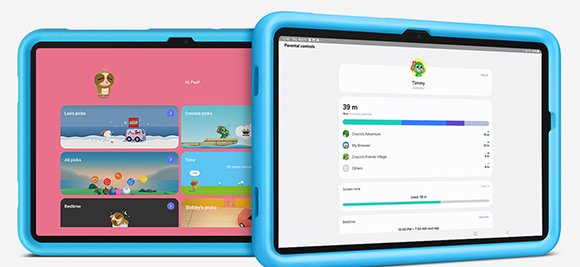
The best time to set up controls is before your kid ever touches the tablet. Unbox it the night before, update it, and turn on the controls. A tablet that’s already locked down on the first morning saves a fight later.
On an iPad, Use Screen Time
Go to Settings, then Family, tap your child’s name, then Screen Time. Apple’s guide to using Screen Time to manage your child’s iPad walks through each option. You can set Time Allowances and Screen Time Schedules for bedtime. Turn on Ask to Buy, so every app download comes to your phone for approval. Use Content & Privacy Restrictions to block mature apps and websites, and Communication Safety, which blurs nude photos and warns your kid before they open one.
Don’t skip this: write your Screen Time passcode down somewhere your kid can’t see. Kids watch you type it. If you ever lose it, here’s how to reset a forgotten Screen Time passcode without wiping the iPad.
On an Amazon Kids Tablet, Use Parent Dashboard
Amazon’s Parent Dashboard is on the tablet and in a free app for your iPhone or Android phone. Per Amazon’s launch announcement, you can set screen time limits, pause the tablet from your phone, and control web browsing. A “Learn First” option makes your kid hit reading or learning goals before games unlock. Every Google Play download needs your approval, and one tablet holds up to four child profiles.
On a Samsung Galaxy Tab, Use Samsung Kids and Family Link
Open Samsung Kids and set a PIN first. Without that PIN, your kid can leave kids mode. Inside, you can set daily screen time, pick allowed apps, and see usage reports. Add Google Family Link on your own phone to approve Play Store downloads and lock the tablet remotely.
Tip: whatever tablet you pick, set up parental controls inside the apps too. Roblox, YouTube and Netflix each have their own kid settings. The tablet’s controls decide which apps open. The app’s own settings decide who your kid can chat with inside it.
Frequently Asked Questions
What is the best value tablet for kids?
For ages 3 to 5, the Amazon Kids Tablet 8 is the best value. It costs the least of our picks, and it includes a tough bumper and a year of kid content. For older kids, the iPad (A16) gives the most years of use for the money.
What age is appropriate for a tablet for a child?
There’s no single right age. The AAP suggests limiting screens for babies and toddlers and watching together with young kids. Most families start with a kids tablet around 3 to 5, with tight limits. Move to a full tablet like the iPad around 9.
What is the latest tablet for kids?
Amazon’s all-new Kids Tablet 8 and Kids Tablet 11 are the latest. Amazon announced them on October 8, 2026, and says they ship October 14. They run Android with parent-approved Google Play access.
Is a Fire tablet or iPad better for kids?
For kids under about 8, Amazon’s kids tablets are better. They’re cheaper, come in a protective case, and start on a kids-only home screen. For kids 9 and up, the iPad is better. It runs the big school apps and has stronger built-in controls.
Can kids play Roblox on a kids tablet?
Yes, on all four of our picks. The iPad gets it from the App Store. The Amazon and Samsung tablets get it from Google Play, once you approve it. Set up Roblox’s own parental controls too, since they control chat.
What’s the best tablet for kids to watch movies in the car?
The Galaxy Tab A11+ Kids Edition, with up to 15 hours of video and 128 GB of storage for downloads. The Amazon Kids Tablet 8 is a close second, with about 14 hours and a handle that props it up on a seatback tray.
The Bottom Line on Choosing a Tablet for Your Kid
Start with your kid’s age, not the spec sheet. Under 6, buy the Amazon Kids Tablet 8 and keep the bumper on. From 6 to 8, the Kids Tablet 11 or the Galaxy Tab A11+ Kids Edition gives them room to grow. From 9 up, buy the iPad (A16) and set up Screen Time before it’s wrapped. And since every pick now carries the same 1-year basic warranty, the case is your real insurance. If your kid also reads a lot, our guide to the best tablet for reading covers screens that are easier on the eyes.