Here is the thing nobody selling you a router wants to say out loud: most people shopping for the best wifi router 2026 do not need the fastest one on the shelf. The marketing boxes scream 19 Gbps and 30 Gbps like your living room is a data center, but the honest question is smaller and sharper. What does your internet plan actually deliver, how many devices are fighting for airtime at 8 p.m., and is your house one floor or three? Answer those and the “best” router stops being a spec-sheet trophy and becomes a match to your real life.
This is a buyer’s guide, not a physics lecture. If you want to understand what WiFi 7 changes under the hood, we already broke that down in Wi-Fi 7: The Next Big Shift in Speed, Security, and Connectivity, and I will not re-explain the standard here. What I will do is tell you which real, named routers to buy in 2026, who each one is genuinely for, and where the hype quietly falls apart.
- Most homes in 2026 are still better served by a strong WiFi 6E or entry WiFi 7 router than by a flagship — WiFi 7 was just 1.8% of global Wi-Fi samples in Q1 2026, so you are early, not late.
- Buy WiFi 7 now only if you have multi-gig internet (2 Gbps+), a wired 2.5G/10G backbone, or a phone/laptop that already speaks WiFi 7 — otherwise you are paying for headroom you cannot use yet.
- For most people the value pick is the TP-Link Archer BE550 Pro (BE9700): real tri-band WiFi 7 with 2.5G ports without the flagship tax.
- Big or multi-floor home? Mesh beats a single tower every time — the TP-Link Deco BE63 covers up to 7,600 sq ft as a 3-pack and keeps a strong 6 GHz backhaul.
- The Netgear Nighthawk RS700S earns its price only if you have a 10 Gbps port to feed it and a gaming/streaming load that actually saturates a single fast client.
- Ignore the top BE number on the box. Your bottleneck is almost always your ISP plan and your oldest device, not the router’s theoretical ceiling.
Who Actually Needs WiFi 7 Versus WiFi 6E in 2026
Let’s kill the FOMO first, because it is costing people real money they did not need to spend. WiFi 7 has been buyable since 2023, yet in Q1 2026 it made up only 1.8% of global Wi-Fi samples and 6.8% in North America, where WiFi 6 still ran the show at 57.5% of connections, per Ookla data reported by Telecoms Tech News. Translation: the entire planet’s device fleet is still catching up to the routers already on shelves. Buying the newest standard does not make your three-year-old phone negotiate a faster link — it can’t.
Keep in mind: A router can only hand out a WiFi generation your client device also supports. A WiFi 7 router talking to a WiFi 6 laptop connects at WiFi 6 speeds. The upgrade pays off when a meaningful share of your devices — not just one flagship phone — can actually use it.
So who is the WiFi 7 upgrade genuinely for in 2026? Three groups, and if you are not in one of them, save your money and buy a great 6E box.
You Have Multi-Gig Internet Coming Into the House
If your ISP delivers 2 Gbps, 5 Gbps, or a symmetrical fiber plan, a WiFi 6 router with a single 1G WAN port is now the bottleneck — you are literally throwing away paid-for bandwidth at the front door. This is the clearest case for WiFi 7 (or at minimum a router with a 2.5G/10G WAN), because the multi-gig ports are the point, arguably more than the airtime gains.
You Are Wiring the House With 2.5G or 10G Ethernet
The quiet truth of fast home networking in 2026 is that the biggest wins are still wired. If you are running Ethernet to a gaming rig, a NAS, or a wired backhaul between mesh nodes, WiFi 7 routers are where the affordable 2.5G and 10G ports live now. You are buying the router for its port array as much as its radios.
Your Devices Already Speak WiFi 7
Flagship phones and laptops from 2024 onward increasingly ship WiFi 7 radios with 320 MHz channels and Multi-Link Operation. If half your household runs recent hardware, the standard’s real-world latency and congestion gains start showing up. If your fleet is older, you are buying for a future that hasn’t arrived in your home yet.
The catch: WiFi 7’s headline 320 MHz channels live almost entirely in the 6 GHz band, and 6 GHz does not travel through walls the way 2.4 GHz does. In an older home with plaster or brick, that top-tier speed evaporates a room or two away. Range, not raw speed, is what quietly ruins the flagship-router fantasy.
How We Ranked the Best WiFi Router 2026 Picks
I did not rank these by the biggest number on the box, because that number is theatre. Every pick below is judged on the three things that decide whether a router is good for you: does it match a realistic internet plan, does it cover your actual square footage, and does the price reflect ports and features you will use rather than a spec you will never touch. Prices reflect 2026 street pricing, which has softened noticeably — ModemGuides tracked both the Archer BE550 Pro (BE9700) and the much cheaper BE3600 falling sharply as WiFi 7 volume scaled up.
The fine print: TechDaily earns a commission on some links in this article. It never changes what we recommend.
The Best WiFi Routers to Buy in 2026 by Use Case

The single most useful way to shop is to stop asking “what is the best router” and start asking “what is the best router for my situation.” Here are the picks that win each real-world job, with the specs that actually matter.

1. TP-Link Archer BE550 Pro (BE9700) — Best Overall Value
1× 10G WAN/LANValue pickTri-band WiFi 7Single-floor homes
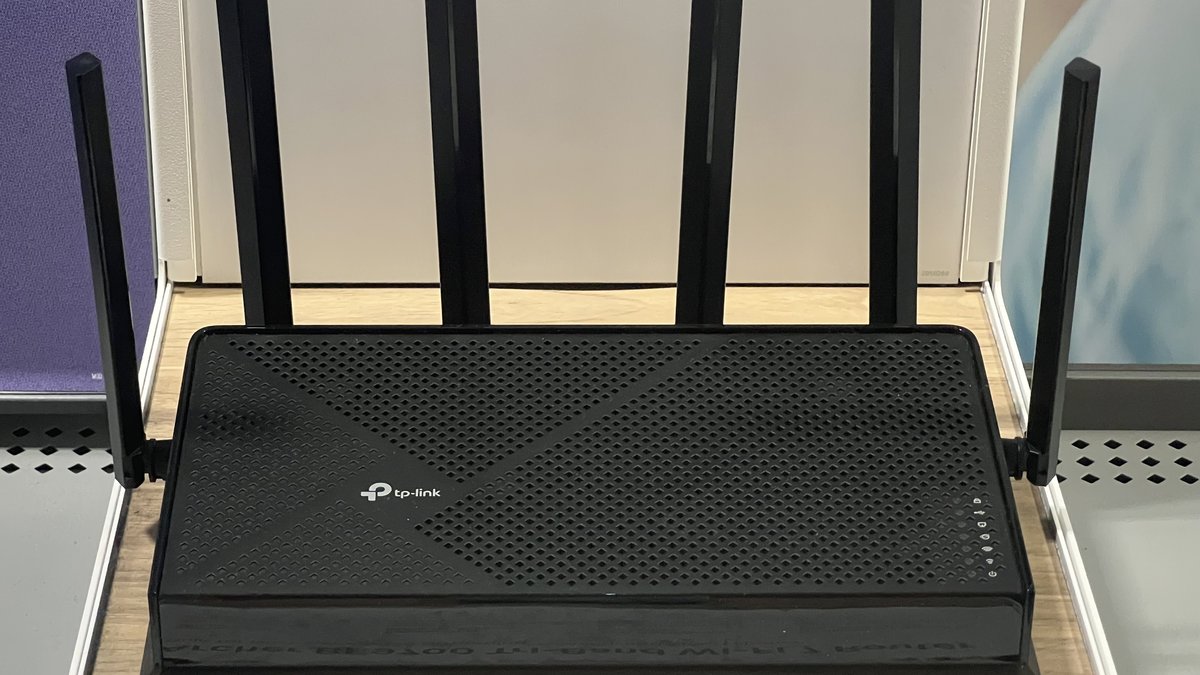
This is the router I point most people to in 2026, and it is not close. The Archer BE550 Pro — the retail listing name TP-Link sells its BE9700-class router under — is tri-band Wi-Fi 7 (2.4 / 5 / 6 GHz) with one flexible 10G WAN/LAN port, one 2.5G WAN/LAN port, and three dedicated 2.5G LAN ports. It is the cheapest way into a real 10G socket plus a full 6 GHz Wi-Fi 7 radio. For a single-floor home or an apartment, this is the sweet spot where “future-proof” and “not overpaying” actually overlap.
The trick with this box is to match the 10G port to your setup, not to the biggest number on a spec sheet. Use it for 10G internet and every wired client runs on the remaining 2.5G ports; reserve it for a NAS or switch and your internet enters through 2.5G. On a 1 Gbps plan the real benefit is the cleaner 6 GHz band for nearby Wi-Fi 7 devices.
Caveat: Beyond the FCC’s blanket ban covered below, TP-Link specifically is under an active US government investigation — the Commerce Department has proposed banning its routers outright, with backing from the Departments of Homeland Security, Defense, and Justice, per Malwarebytes’ reporting. Your BE550 Pro stays legal to own and use either way, but if you want zero regulatory risk, the exempt Netgear Nighthawk RS700S below is the ban-proof buy.
See the full TP-Link Archer BE550 Pro review here — the port trade-off, BE550 comparison, Wi-Fi 7 client requirements, and HomeShield limits.
Pros
- Real tri-band WiFi 7 with a proper 6 GHz band at a mid-range price
- One flexible 10G WAN/LAN port plus four 2.5G connections for a NAS or gaming PC
- Saturates any consumer plan short of premium multi-gig fiber
Cons
- Single tower, so it can’t cover a big or multi-floor home on its own
- One 10G port cannot serve 10G WAN and 10G LAN at the same time

2. TP-Link Deco BE63 — Best Mesh for Whole-Home Coverage
Premium (3-pack)Tri-band WiFi 7Up to 7,600 sq ftStrong 6 GHz backhaul
A single tower router, no matter how fast, cannot beat physics — one radio in one corner of a 2,500 sq ft house leaves dead zones. If your home is large or has multiple floors, mesh is not a luxury, it is the correct architecture. The TP-Link Deco BE63 (Deco 7 Pro, BE10000) is tri-band WiFi 7 with a combined ~10 Gbps ceiling, four 2.5G ports per unit, and as a 3-pack it covers up to 7,600 sq ft and 200+ devices. Crucially it keeps a strong 6 GHz band, which matters because in a good mesh that band does the heavy lifting for the wireless backhaul between nodes.
One move most mesh owners never make pays off more than any spec on the box: if you can run a single Ethernet cable between nodes, do it. Wired backhaul frees the 6 GHz band for your devices instead of spending it on node-to-node traffic, and on the Deco’s four 2.5G ports per unit that backhaul is genuinely fast.
Caveat: The TP-Link investigation cloud hangs over the Deco line too, and a mesh system leans on firmware and cloud services harder than any single tower — if updates stop after January 1, 2029, mesh degrades ugliest. The exempt Netgear Nighthawk RS700S is the ban-proof alternative, with the honest trade that one tower cannot match a 3-pack’s whole-home coverage.
Pros
- Even, whole-home coverage up to 7,600 sq ft with a 3-pack, 200+ devices
- Strong 6 GHz band for a fast wireless (or wired) backhaul between nodes
- Four 2.5G ports per unit, so wired backhaul and multi-gig devices both fit
Cons
- Overkill and overpriced for a small apartment that one tower would cover
- Peak single-point speed trails a dedicated high-end tower like the Nighthawk

3. Netgear Nighthawk RS700S — Best for Gaming and 4K Streaming
FlagshipBE19000 tri-band WiFi 710 Gig WAN/LAN~3,500 sq ft
If you have a 10 Gbps-capable internet plan and a single demanding client — a gaming PC, a 4K/8K streaming setup, a heavy home server — the Netgear Nighthawk RS700S is built for exactly that fight. It is BE19000 tri-band WiFi 7 rated up to 19 Gbps, covers around 3,500 sq ft, and its headline feature is a 10 Gig WAN/LAN port backed by a 2.6 GHz quad-core processor. That speed claim is not marketing spray, either: in CNET’s lab testing the RS700S recorded 1,586Mbps on the 5GHz band and 2,668Mbps on 6GHz — the highest CNET has measured from any router on both bands — earning a 9.7/10 score and CNET’s Lab Award for fastest router. That 10G port is the whole reason to buy it; feed it a multi-gig connection and point it at a wired gaming rig, and it flies.
Here is the honest read on the price: street pricing sits at flagship level, and if you do NOT have a 10 Gbps internet feed and a device that can actually pull multi-gig throughput, you are paying flagship money for a port you will never light up. This is a specialist’s router for one fast, hungry client — not a default pick, and not a fix for dead zones across a big house.
Pros
- A genuine 10 Gig WAN/LAN port — rare at this tier and the reason to buy it
- BE19000 tri-band WiFi 7 with a 2.6 GHz quad-core CPU for heavy single-client loads
- Purpose-built for a wired gaming rig or a 4K/8K streaming setup
Cons
- Flagship pricing you waste without a 10 Gbps feed to match
- One tower covering ~3,500 sq ft — it does not solve whole-home dead zones

4. TP-Link Archer BE3600 — Best Budget WiFi 7 Entry
BudgetDual-band WiFi 7 (no 6 GHz)2.5G WAN + 2.5G LANCheapest way onto WiFi 7
Want on the WiFi 7 ladder without the flagship tax? The Archer BE3600 dropped hard in 2026, which makes it one of the cheapest ways to own a WiFi 7 router at all. The honest trade-off: it is dual-band (2.4 / 5 GHz) with no 6 GHz radio, so you lose the marquee WiFi 7 feature — the wide 320 MHz channels that live up in 6 GHz. What you keep is WiFi 7’s efficiency and Multi-Link improvements on the bands you have, plus a 2.5G WAN and 2.5G LAN port at a price WiFi 6 routers used to command.
Be clear-eyed about what this actually is: a dual-band WiFi 7 router without 6 GHz is really a smarter WiFi 6E-class experience wearing a WiFi 7 badge. It is a legitimately good value for a small home or a first upgrade, but do not expect the eye-popping 6 GHz speeds — those require a tri-band box like the Archer BE550 Pro or Deco BE63.
Pros
- The cheapest genuine on-ramp to WiFi 7 of anything here
- Still gets 2.5G WAN + 2.5G LAN — multi-gig wired ports at a budget price
- WiFi 7 efficiency and Multi-Link gains on the 2.4 / 5 GHz bands
Cons
- No 6 GHz radio, so you miss the marquee 320 MHz WiFi 7 speeds
- Effectively a WiFi 6E-class experience, not a true flagship WiFi 7 leap
What the FCC Router Ban Means for These Picks
In late March 2026, the ground moved under this entire list. On March 23, 2026, the FCC added foreign-made consumer routers to its Covered List, implementing a federal interagency national-security determination made three days earlier — and the practical effect is blunt: new foreign-made router models can no longer get the FCC authorization they need to go on sale in the US. Since virtually every consumer router is designed, developed, or assembled overseas, the order sweeps in nearly the whole market — TP-Link, Asus, Linksys, and the rest of the shelf included.
Two carve-outs decide how you should shop this list. First, as CNET reported, Netgear and eero are so far the only consumer router brands holding a Conditional Approval exemption, so they keep launching new models while everyone else is frozen. Second, routers the FCC approved before the ban — every TP-Link pick on this page — stay fully legal to buy and use. The sting is quieter: non-exempt routers risk losing the ability to receive software and firmware updates after January 1, 2029, a deadline the FCC has already pushed back once. A router that cannot be patched is not dead, but in security terms it starts aging the day the updates stop.
| Pick | Price Tier | Fastest Port | FCC Ban Status |
|---|---|---|---|
| TP-Link Archer BE550 Pro (BE9700) | Value | 2.5G | Banned brand — this approved model stays legal, but updates are at risk after Jan 1, 2029 |
| TP-Link Deco BE63 | Premium (3-pack) | 2.5G | Banned brand — same Jan 1, 2029 update risk, and mesh leans hardest on firmware |
| Netgear Nighthawk RS700S | Flagship | 10G | Exempt (Conditional Approval) — new models and updates keep flowing |
| TP-Link Archer BE3600 | Budget | 2.5G | Banned brand — cheap enough that a 2029 update cliff barely dents the value |
So here is the buy-or-hold read, pick by pick:
- Archer BE550 Pro (BE9700) — buy, but reframe the math. It is an approved model, legal and still updating. Treat it as a three-year value play rather than a seven-year investment; at its price, that math still works comfortably.
- Deco BE63 — hold unless you need mesh today. A three-pack mesh is a much bigger bet on post-2029 firmware than a single value-priced tower. If you do buy it, wire the backhaul and plan for the software to stand still late-decade.
- Nighthawk RS700S — buy with the most confidence on this page. The exemption quietly strengthened its case: it is no longer just the speed king, it is the regulatory safe harbor.
- Archer BE3600 — buy cheap, treat it as a stopgap. At budget money you would likely replace it before 2029 anyway, so the update cliff barely changes the math.
Netgear Nighthawk Versus TP-Link Deco Is the Wrong Fight
People frame the router decision as Netgear Nighthawk vs TP-Link Deco, as if it is a heavyweight bout with one winner. It is not, because they are answering different questions, and choosing between them by brand loyalty is how you buy the wrong box. The Nighthawk RS700S is a single high-performance tower — one powerful radio and a 10G port aimed at concentrating maximum throughput in one area for one demanding client. The Deco BE63 is a mesh system — multiple modest nodes trading peak single-point speed for even, whole-home coverage.
Tip: Ask one question to settle it — is your problem speed in one spot or coverage everywhere? If your gaming corner is fast but the back bedroom is a dead zone, mesh (Deco) fixes your actual problem. If coverage is fine but one wired rig needs every last megabit, the tower (Nighthawk) is your tool. Buying the Nighthawk to fix dead zones, or a mesh to feed a 10G gaming PC, is the classic mismatch.
The deeper point: the “best” of these two is entirely a function of your floor plan and your internet plan. A 900 sq ft apartment with fiber does not need mesh, and a 3,000 sq ft two-story home does not get saved by one very fast tower in the office. Diagnose the problem before you shop the brand.
WiFi 6 Versus WiFi 7 Is Mostly a Question About Your Ports
The wifi 6 vs wifi 7 comparison gets sold as a speed story, but in 2026 it is mostly a ports and future-proofing story for regular homes. Yes, WiFi 7 adds 320 MHz channels, 4K-QAM, and Multi-Link Operation — the real technical gains are covered in our Wi-Fi 7 deep dive. But the practical reason to jump in 2026 is that WiFi 7 routers are where affordable multi-gig ports and current-gen hardware now live. A solid WiFi 6E router is still an excellent buy for most homes; a WiFi 7 router mainly buys you longer relevance and better wired connectivity.
Before you pay the WiFi 7 premium, audit the other side of the connection — a router upgrade only pays off when your devices can meet it halfway. Here is where the gear people actually own stands:
| Your Device | Does It Actually Speak WiFi 7? |
|---|---|
| iPhone 16 / 17 generations | Yes — but Apple caps them at 160MHz channels, so an iPhone never touches WiFi 7’s headline 320MHz speeds |
| Samsung Galaxy S24 Ultra and newer flagships | Yes — full WiFi 7 with 320MHz channel support |
| Google Pixel 8 Pro and newer | Yes |
| Windows laptops with Intel BE200 (Core Ultra era, 2024 on) | Yes — full 320MHz WiFi 7 |
| MacBooks, including recent M-series | No — still WiFi 6E as of early 2026; Apple has kept WiFi 7 for iPhones so far |
| PlayStation 5 | No — WiFi 6 |
| Xbox Series X / S | No — WiFi 5, believe it or not |
| Smart home gear (plugs, bulbs, cameras) | No — overwhelmingly 2.4GHz WiFi 4/6, and it will stay that way |
Read that table honestly and the pattern jumps out: unless your home is full of recent Android flagships or BE200-equipped laptops, the fastest radio in a WiFi 7 router spends most of its life idling — even a brand-new iPhone only drinks half of what a 320MHz channel can pour.
If you are replacing a dying WiFi 5 or early WiFi 6 router today, buy WiFi 7 — the price gap has nearly closed and you get years more runway. But do not scrap a healthy WiFi 6E router just to chase the badge; the real-world gain for a typical device fleet in 2026 is modest, and adoption data says the ecosystem is still catching up to you.
Frequently Asked Questions
Do I really need WiFi 7 in 2026 or is WiFi 6E still fine?
For most homes, a good WiFi 6E router is still completely fine in 2026 — WiFi 7 was only about 1.8% of global connections in Q1 2026. Buy WiFi 7 if you have multi-gig internet, are wiring 2.5G/10G Ethernet, or your devices already support it. Otherwise 6E gives you 6 GHz benefits at a lower price.
What is the best WiFi router 2026 for most people?
For a typical single-floor home or apartment, the TP-Link Archer BE550 Pro (BE9700) is the value sweet spot — real tri-band WiFi 7 with 2.5G ports. For large or multi-floor homes, step up to a mesh system like the TP-Link Deco BE63 instead of a single tower.
Is a mesh system better than a single powerful router?
It depends on your problem. A mesh like the Deco BE63 solves coverage — dead zones across a big or multi-floor home. A single powerful tower like the Nighthawk RS700S solves peak speed in one spot for a demanding wired client. Match the tool to whether your issue is range or raw throughput.
Why is my WiFi 7 router not hitting its advertised speed?
Almost always because something else is the bottleneck: your internet plan, your client device’s older WiFi radio, or distance from the 6 GHz band. WiFi 7’s top speeds live in 6 GHz, which does not pass through walls well, and a router can only connect at the WiFi generation your device supports.
Is the Netgear Nighthawk RS700S worth its higher price?
Only if you have a 10 Gbps-capable internet feed and a device that can pull multi-gig speeds — its 10G port is the whole reason to buy it. Without that, you are paying flagship money for a port you will never use, and the Archer BE9700 or Deco BE63 is a smarter spend.
What does the BE number on a WiFi 7 router actually mean?
It is the combined theoretical maximum across all bands added together — BE19000 means ~19 Gbps total, not per device. No single device ever sees that number; it is marketing math. Judge a router by its port speeds, band count, and coverage instead of chasing the biggest BE figure.