You’re about to hand your old phone to a buyer, a family member, or a recycling kiosk, and one nagging question stops you cold: does a factory reset delete everything, or is some stranger going to scroll through your photos next week? Here’s the honest answer that most listicles bury: on any modern, encrypted phone, a factory reset is genuinely a secure wipe — but “everything” is doing a lot of heavy lifting in that question. The reset nukes what’s stored on the device. It does not touch your cloud, it does not always release the digital handcuffs that lock the phone to your account, and it flat-out ignores anything on a memory card. That gap between “the phone is wiped” and “your data is safe” is exactly where people get burned.
- On a modern encrypted phone, a factory reset works by destroying the encryption key — so your leftover data becomes mathematically unreadable noise, not something a thief can just “undelete.”
- The “factory reset doesn’t really delete anything” scare is a leftover from pre-2015 unencrypted phones and old spinning-disk PCs; it does not describe the iPhone or Android in your pocket today.
- A reset does NOT sign you out of iCloud or Google, does NOT remove Activation Lock or Factory Reset Protection, and does NOT wipe a microSD card — those all survive and can brick the phone for a buyer or leave data behind.
- iPhones crypto-erase instantly and reliably; older or budget Androids are the only devices where a reset might leave recoverable data, and only if encryption was never on.
- Windows is the odd one out: a PC reset is only a true crypto-erase if BitLocker was already on, and Microsoft itself admits the Clean data option does not meet government erasure standards.
- Before you sell, the order matters: back up, sign out of every account, pull the SIM and SD card, then reset — and confirm it boots to the setup screen.
What a Factory Reset Actually Does Under the Hood
Most people picture a factory reset as a tiny robot arm scrubbing every bit of storage clean, one by one. That’s not what happens, and understanding the real mechanism is the whole ballgame here.
Every iPhone since 2014 and effectively every mainstream Android since 2015 encrypts your data by default. The moment a photo or text hits the storage chip, it’s already scrambled with a hardware-bound AES key you never see. When you tap “Erase All Content and Settings,” the phone doesn’t laboriously overwrite 128 gigabytes of files — it throws away that one encryption key. This is called crypto-erase, or cryptographic erasure, and it’s the reason a reset finishes in seconds instead of hours. Kill the key, and the billions of encrypted bits still sitting on the chip turn into useless static. There is no “undelete” for data you can’t decrypt.
This isn’t a marketing shortcut, either. The U.S. National Institute of Standards and Technology (NIST) treats cryptographic erase as a legitimate way to sanitize storage in Special Publication 800-88, the government’s own guideline for retiring drives. NIST rewrote that guideline in September 2025, and the current revision still defines cryptographic erase as sanitizing the keys that protect the data so that getting the readable version back becomes infeasible. When the standard federal agencies use to decommission drives counts killing the key as real erasure, you can stop worrying that a corner store phone-flipper is going to resurrect your bank app.
What a Factory Reset Deletes and the Things It Quietly Leaves Behind
So the on-device wipe is solid. The trouble is that people assume a factory reset resets your entire digital life, and it absolutely does not. It’s a local operation with a very specific blast radius. Here’s what slips right past it — and each of these has bitten real sellers.
Your Cloud Accounts and Their Backups
Wiping the handset does nothing to the copies living on Apple’s or Google’s servers. Your photos, contacts, and messages are still sitting in iCloud or Google One, fully intact, tied to an account you’re still logged into. That’s usually a good thing — it’s how your stuff reappears on your next phone. But if you’re offloading a device because you’re worried about privacy, remember the reset only cleared the local mirror. The master copy in the cloud is untouched and stays exactly where it was.
Activation Lock and Factory Reset Protection
This is the one that turns a resale into a nightmare. Both Apple’s Activation Lock and Android’s Factory Reset Protection (FRP) are anti-theft features that survive a factory reset on purpose. If you wipe the phone without first signing out of your account, the device boots back up and demands your Apple ID or Google password before anyone can set it up. You’ve handed the buyer an expensive paperweight, and you’re now fielding angry messages to remote-unlock it.
microSD Cards and External Storage
A factory reset wipes the phone’s internal storage. It does not, in the standard configuration, wipe a microSD card, and on most Androids that card was never encrypted in the first place. Photos, downloads, and app data written to removable storage sit there in plain, recoverable form after the reset finishes.
Your SIM, eSIM, and Carrier Details
The physical SIM card is its own little storage chip — on many phones it still holds contacts and can carry SMS data, and it identifies your line to the carrier. A factory reset doesn’t eject it. If your phone uses an eSIM instead of a physical SIM, the digital profile can linger after a reset too, which is why carriers ask you to delete or transfer the eSIM before you pass the device on.
Logged-In Apps and Security Tokens
Here’s a subtle one. The reset clears app data locally, but the sessions and secrets those apps represent live elsewhere. Your two-factor authenticator seeds, if not backed up, are simply gone (locking you out of your own accounts). Meanwhile streaming, banking, and social apps may still count that device as “trusted” on the server side until you actively deauthorize it. A wipe is not the same as logging out everywhere.
What Survives a Factory Reset and What Actually Gets Wiped
Screenshot this before you list anything for sale. The pattern to notice is that almost nothing in the “stays on the device” column is a file. It is a lock, a card, or a line, and every one of them is a separate manual step that the reset button will happily let you skip.
| What it is | Synced cloud copy | Stays on the device | Recoverable by forensics |
|---|---|---|---|
| Photos, contacts, notes and calendars | Yes, still sitting in iCloud or your Google Account | No | No, the key that decrypted them is gone |
| Texts and chat history | Only if Messages in iCloud or a Google backup was switched on | No | No |
| Apps and their local data | Your purchase history stays with the account | No | No |
| Files on a microSD card | No | Yes, the reset never touches the card | Yes, cards are usually stored unencrypted |
| eSIM profile and carrier line | Your carrier’s records are unaffected | Often yes, unless you delete or transfer it | Not the risk here, a live line is |
| Activation Lock or Factory Reset Protection | The lock itself lives on Apple’s or Google’s servers | Yes, staying put is the whole point of it | Not applicable |
| Saved passwords and passkeys | Yes, in iCloud Keychain or Google Password Manager | No | No |
| Two-factor authenticator seeds | Only if you turned on that app’s cloud backup | No | No, and losing them can lock you out |
| Windows files after Remove everything with Clean data off | OneDrive copies survive untouched | No | Possible on a drive that was never encrypted |
| Windows files on a BitLocker-encrypted drive | OneDrive copies survive untouched | No | No, the same crypto-erase logic applies |
Read the last two rows together and you have the whole Windows problem in miniature. The same command, on the same version of Windows, is either a proper wipe or a speed bump depending on one thing you probably never checked, which is whether BitLocker was on.
Can Someone Recover Your Data After a Factory Reset?
Now for the question that launched a thousand panicky Reddit threads. The short version: on an encrypted device, no — and that’s not optimism, it’s cryptography. Recovering crypto-erased data means recovering the deleted key, and the key is gone from the secure hardware that held it. Forensic recovery tools can pull “deleted” files off storage all day long, but every one of those files is still encrypted with a key that no longer exists.
So where did the myth come from? It’s real history, just outdated. Back in 2014, security firm Avast bought 20 used Android phones off eBay and recovered more than 40,000 photos, along with emails and texts, from devices their previous owners believed were wiped. A year later, University of Cambridge researchers Laurent Simon and Ross Anderson showed that the factory reset on older Android versions (roughly 2.3 through 4.3) failed to fully sanitize storage on an estimated 500 million devices. Those findings were legitimate and alarming — but they describe phones from the pre-encryption era, where “reset” meant deleting file pointers rather than destroying a key. That’s the origin of the fear, and it’s precisely the flaw that default encryption closed.
For anyone genuinely curious about how investigators pull data off devices in the lab, our deep dive on mobile device forensics walks through the tools and their very real limits against modern encryption.
What the NIST Media Sanitization Standard Actually Says
If you want the grown-up version of this argument, it lives in NIST Special Publication 800-88r2, and it is worth knowing that this document changed recently. The 2014 edition everybody quotes was formally withdrawn on 26 September 2025 and replaced in its entirety by revision 2. Plenty of the advice still circulating on this topic is quoting a retired document.
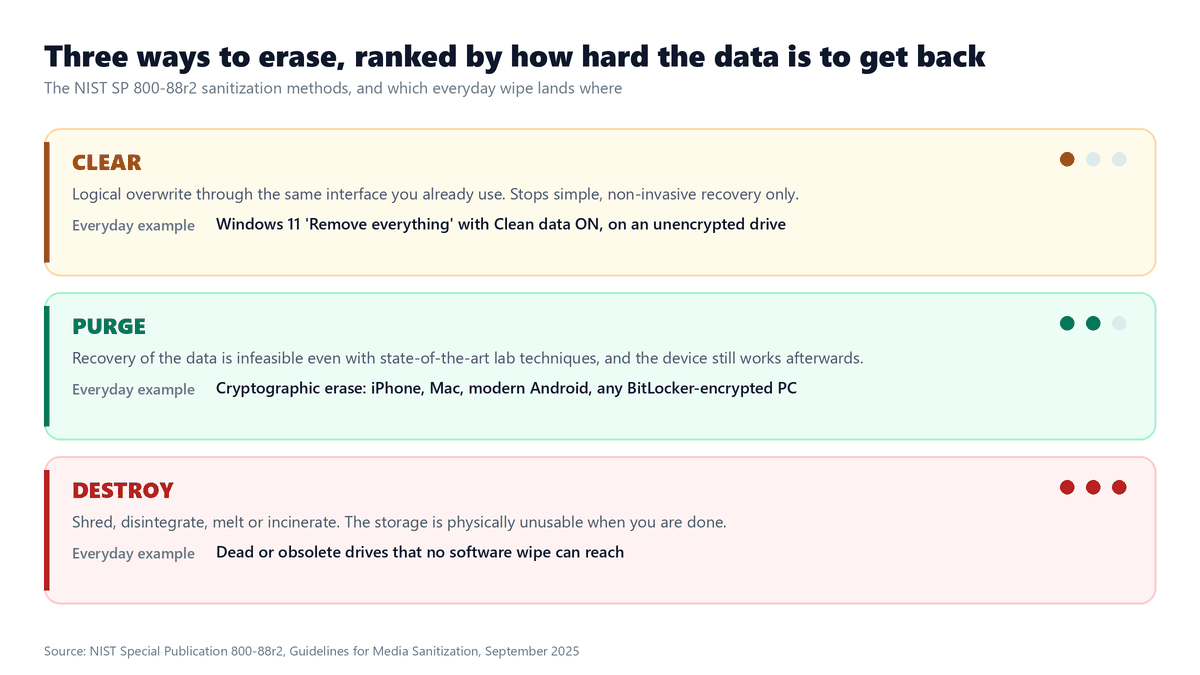
The standard sorts erasure into three methods, and the labels matter more than they sound. Clear means a logical overwrite through the same interface you already use, and it only defends against simple, non-invasive recovery. Purge means recovery of the data is infeasible even with state-of-the-art laboratory techniques, while the device still works afterwards. Destroy means shredding or melting the thing. Cryptographic erase is classed as a purge technique, which is exactly why a phone wipe that finishes in thirty seconds outranks an hour of overwriting.
NIST attaches one honest condition to that: cryptographic erase is only as good as the cryptography underneath it, including how the keys were generated and whether the encryption implementation is sound. That is the technical spelling of the point above. A 2012 handset with encryption switched off is not doing purge-grade anything, no matter what the menu calls it.
There is a second detail in the standard that quietly demolishes a popular assumption. NIST notes that on flash-based storage, spare cells and wear levelling make it infeasible for a user to sanitize all previous data by overwriting, because the drive decides where writes land and the old blocks are not where you think they are. Every SSD in every modern laptop works this way. Overwriting is the weaker method and it is the one people trust most.
iPhone vs Android and Whether They Wipe the Same Way
They land in the same place, but they don’t get there identically, and the differences matter if you own both.
On iPhone, hardware encryption has been standard since the iPhone 3GS in 2009, and since the Secure Enclave arrived with the iPhone 5S in 2013 those encryption keys have lived in dedicated, tamper-resistant hardware. “Erase All Content and Settings” tells the Secure Enclave to obliterate the key stored in dedicated “effaceable storage,” which is why an iPhone wipe is both instant and, frankly, bulletproof. Apple documents this behavior openly in its Platform Security guide. There is essentially no consumer scenario where a properly erased modern iPhone gives up its data.
Android gets to the same crypto-erase outcome, but the road is bumpier because Android is not one device — it’s thousands. Google made full-device encryption the default in Android 6 (2015) and moved to more granular file-based encryption in Android 10. On a Pixel, Samsung, or any recent mainstream handset, a factory reset crypto-erases exactly like an iPhone. The asterisk is the long tail: ancient budget handsets, obscure off-brand tablets, or devices where someone disabled encryption are the only places the old “recoverable after reset” problem can still theoretically live. For 99% of phones sold in the last several years, the answer is the same on both platforms — the data is gone.
How to Factory Reset a Phone, PC, or Mac Without Leaving Data Behind
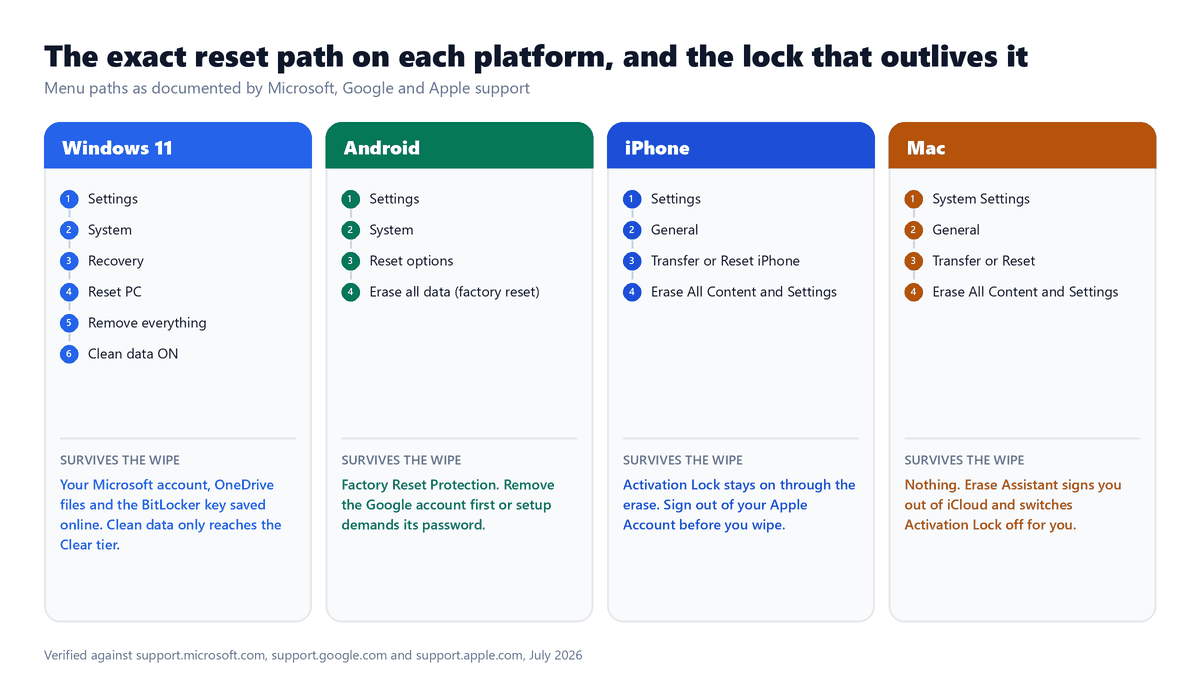
Here is the part the generic advice always skips. The four platforms barely differ in what they erase. They differ enormously in who is responsible for releasing the account lock, and in whether the wipe is a real crypto-erase or just an overwrite wearing the same button. Get those two things right per device and you are done.
What Windows 11 Reset This PC Really Removes and What It Leaves
Microsoft puts the whole thing behind Settings, then System, then Recovery, where you pick Reset PC under Recovery options. From there you choose:
- Keep my files, which Microsoft also calls Refresh. Windows is reinstalled and your apps and settings are wiped, but your documents and photos stay. This is a repair tool, not a handover tool.
- Remove everything, the actual Reset. Personal files, apps and settings all go. This is the one you want before the PC leaves your house.
- Cloud download or Local reinstall. Cloud download pulls a fresh, fully updated copy of Windows. Local reinstall rebuilds from files already on the machine, which is faster on a slow connection but may not be current.
- Clean data, the toggle that only appears under Remove everything. Microsoft says to use it if you are donating, recycling or selling the PC, because it cleans the drive as well as removing the files.
And now the sentence Microsoft buries in a note under that table, which you should read twice: the data erasure functionality “does not meet government and industry data erasure standards.” That is the vendor telling you, in its own documentation, that Clean data is a consumer convenience rather than a certified wipe. Line it up with the NIST tiers above and it sits at Clear, not Purge.
So what actually makes a Windows handover safe? BitLocker. If the drive was encrypted before you reset it, Remove everything becomes the same crypto-erase your phone performs, because the protected key goes with it. If the drive was never encrypted, Clean data is an overwrite pass on an SSD that quietly reassigns blocks behind your back. Find your BitLocker recovery key before you start either way, because Microsoft warns you will need it if the reset drops you into the Windows Recovery Environment. And remember that resetting the PC does nothing to your Microsoft account, your OneDrive contents, or the recovery key already escrowed online.
How an Android Factory Reset Interacts With Factory Reset Protection
On a Pixel, Google’s own path is Settings, then System, then Reset options, then Erase all data (factory reset). Enter your PIN when asked, confirm Erase all data, and let it restart. Google says to charge to at least 70 percent first and stay on Wi-Fi, because the reset can take up to an hour and you need a connection to sign back in afterwards. Samsung, Xiaomi and the rest move that menu around, and Google explicitly tells you to check the manufacturer’s support site rather than assume.
The bit that ruins resales is Factory Reset Protection. It switches itself on the moment your phone has both a Google account and a screen lock, and Google is unusually blunt about the consequence. After a reset, setup demands the screen lock or the Google Account password that was on the device, and if you cannot produce it, you will not be able to use the phone at all. Not partially. At all.
There is exactly one clean way out and it takes thirty seconds before the wipe, which is to remove your Google account from the device. Do that and FRP has nothing to enforce. Two footnotes worth knowing: Google says to wait 24 hours after changing your Google Account password before you factory reset, and on Android 14 and older you can also disable device protection through OEM unlocking in Developer options, which is a route thieves know about too.
How the iPhone Erase All Content and Settings Wipe Handles Activation Lock
Apple’s pre-sale sequence is more than one tap, and the order is the whole game:
- Back up, then unpair any Apple Watch that is paired to the phone.
- Open Settings, tap your name, scroll down and tap Sign Out. On iOS 26 and later you are offered a choice between Erase this iPhone and Sign Out But Don’t Erase.
- If you are moving to Android, deregister iMessage, or texts from iPhone users will vanish into a phone you no longer own.
- Go to Settings, then General, then Transfer or Reset iPhone, and tap Erase All Content and Settings.
- Enter your passcode, confirm the erase, then remove the handset from your list of trusted devices.
Why the sign-out has to come first is spelled out in Apple’s platform security documentation. Activation Lock turns itself on automatically the moment you sign in to your Apple Account and enable Find My, and it is designed to remain enabled even after the device is erased. It is enforced at the activation server, right after the Wi-Fi screen in Setup Assistant, so no amount of local wiping touches it.
One newer wrinkle matters if you are selling a phone for parts or buying a repaired one. Apple has extended Activation Lock down to individual iPhone components, so during a repair, a part pulled from an iPhone that was still locked or in Lost Mode gets its calibration restricted. The lock now follows the hardware, not just the handset.
How the macOS Erase Assistant Wipes a Mac in One Pass
The Mac is the one platform that closes the loop for you. Erase Assistant lives at System Settings, then General, then Transfer or Reset, then Erase All Content and Settings, and it needs a Mac with Apple silicon, or an Intel Mac with the T2 security chip, running macOS Monterey 12 or later. Back up with Time Machine before you touch it, because there is no undo.
What Apple documents it doing is genuinely broader than the iPhone flow. It signs you out of Apple services including iCloud. It turns off Find My and Activation Lock, so the Mac stops being associated with you. It erases your content, settings and installed apps, every volume rather than just the one you booted from, and every user account rather than only yours. It also clears the fingerprints stored for Touch ID.
That last bit is why the Mac is the safest handover of the four. On Windows, Android and iPhone, releasing the account lock is a separate thing you have to remember. On a supported Mac it is baked into the erase. The exception is an older Intel Mac without a T2 chip, which never gets Erase Assistant. On those machines you are back to signing out of iCloud and turning off Find My by hand before you erase, and the old resale trap returns with them.
Should You Factory Reset Your Phone Before Selling It? A Security-First Checklist
Yes — but a bare reset isn’t the finish line, it’s step five. Do these in order and you close every gap we’ve covered: the local wipe, the account handcuffs, and the physical media a reset ignores.
Step 1 — Back Up Everything You Want to Keep
Before you erase, make a full backup to iCloud, Google, or a computer, and confirm it actually completed. Crypto-erase is permanent — there’s no “oops” recovery afterward. If you’re moving to a new device, this is also the moment to transfer your data cleanly so nothing important rides off with the old phone.
Step 2 — Sign Out of Every Account and Kill the Activation Lock
This is the step that saves you from bricking the phone for the next owner. On iPhone, turn off Find My iPhone and sign out of your Apple ID. On Android, remove your Google account so Factory Reset Protection doesn’t lock the buyer out. Do this before the reset, not after.
Step 3 — Remove the SIM and the microSD Card
Physically eject the SIM (or delete the eSIM profile through your carrier) and pull any memory card. Remember, the reset never touches these, and the card is very likely unencrypted. Two seconds with a paperclip closes a real data leak.
Step 4 — Deauthorize Your Sensitive Apps
Log out of banking, streaming, and social accounts, and move your two-factor authenticator seeds to your new device first. This unlinks the phone from services that still trust it server-side and prevents you from locking yourself out of your own 2FA.
Step 5 — Run the Factory Reset and Verify It
Now erase the device. When it reboots, it should land straight on the language/”Hello” setup screen with no request for your old account credentials.
While you’re locking down your privacy, it’s also worth removing yourself from data broker sites, because the phone was never the only place your personal information lived.
The Bottom Line on Factory Resets and Your Data
Strip away the scare-tactic headlines and the answer is refreshingly clear. On the phone you actually own today, a factory reset does delete everything that matters locally, and it does so with cryptography strong enough to satisfy federal sanitization standards. The reset isn’t the weak link. You are — or rather, the accounts, locks, and memory cards you forget to handle are. Treat the reset as the last step in a short checklist rather than a magic “make my data disappear” button, and you can sell, gift, or recycle any device with total confidence.
Frequently Asked Questions
Does a factory reset delete everything on my phone permanently?
On any modern encrypted phone, yes — the on-device data is permanently and irreversibly gone, because the reset destroys the encryption key that made your files readable. What it does not delete is anything stored outside the phone: your iCloud or Google cloud backups, and any files on a microSD card. Those survive the reset completely.
Can data be recovered after a factory reset?
Not from an encrypted device, which is every mainstream phone made in roughly the last decade. Recovery would require the deleted encryption key, and that key is wiped from secure hardware. Data recovery is only realistic on very old, unencrypted phones or storage where encryption was manually turned off — the exact scenario behind those “recovered 40,000 photos” news stories from 2014.
Does a factory reset remove the Google account or Apple ID?
No, and this trips people up constantly. A factory reset does not sign you out of your Google or Apple account, and it does not remove Factory Reset Protection or Activation Lock. If you don’t manually sign out before wiping, the phone will demand your old password on setup and be unusable for the buyer. Always remove the account first.
Should I factory reset my phone before selling it?
Yes, but do it as the final step after backing up, signing out of all accounts, removing the SIM and SD card, and deauthorizing sensitive apps. A reset alone leaves your cloud accounts logged in and can lock the device to you via anti-theft features. The full checklist — not just the reset — is what makes a resale safe.
Does resetting a Windows 11 PC delete everything the way a phone reset does?
Not automatically. Choosing Remove everything wipes your files, apps and settings, and the Clean data toggle adds an overwrite pass, but Microsoft’s own documentation says that erasure does not meet government and industry data erasure standards. A PC reset only matches a phone wipe when BitLocker was already encrypting the drive, because then the reset discards the key instead of scrubbing blocks. Check your encryption status before you sell the machine.
Does a factory reset delete everything on an SD card too?
Usually no. A standard factory reset wipes only the phone’s internal storage and ignores a removable microSD card, which on most Androids isn’t even encrypted. The only exception is Android’s “adoptable storage” mode, where the card is treated as encrypted internal storage. Unless you deliberately set that up, physically remove the card before parting with the phone.