Type why is my phone so slow into a search bar and stop before you try a single tip: “slow” is not one problem. It is four. A phone that slowed overnight, one that faded over three years, one that only crawls online, and one that has felt like this since day one are four different patients. The fix that cures one does nothing for the others. Sort out which one you are holding — it takes two minutes — and you will know whether you need a free setting, a cheap battery, or an honest goodbye. A new phone is the last answer, not the first.
- “Slow” is four different problems — sudden, gradual, internet-only, and always-been-slow. Match the fix to the pattern or you will waste your weekend.
- A phone that slowed down suddenly usually just took an update. Give it a day or two and one restart before you touch anything else.
- A phone that faded over the years is usually running on a tired battery — iOS deliberately slows the phone to protect it, and Settings shows you where.
- Full bars do not mean fast internet. If your phone is only slow online, the network is the suspect — the phone is innocent.
- Cleaner and booster apps speed up nothing. The only purchase worth weighing is a battery service versus a new phone, and a three-question test settles it.
Figure Out Which Kind of Slow You Are Dealing With
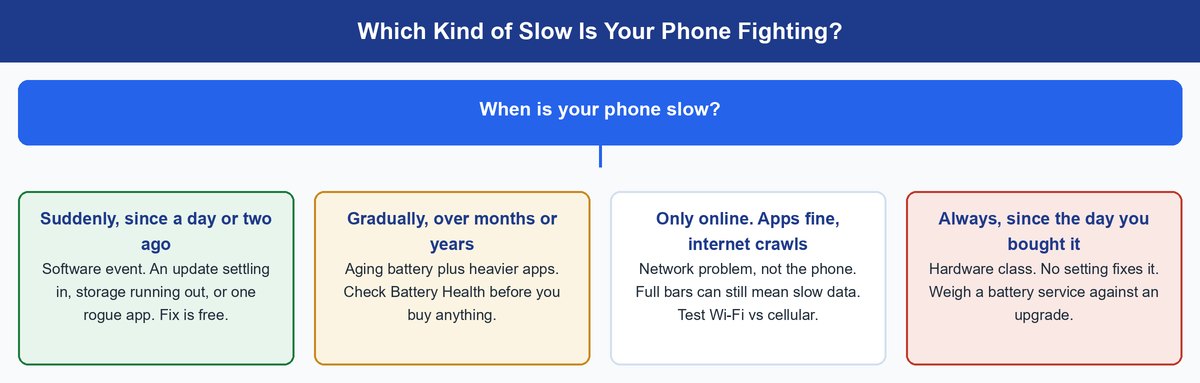
Before you clear a single cache — and our iPhone cache guide covers when that actually helps — answer one question: when is your phone slow? The answer sorts you into one of four branches below.
- Slow since yesterday or last week? Something changed — almost always software. Start with the sudden-slowdown section.
- Slow compared to two years ago? That is aging, and most of it lives in the battery. Head to the gradual section.
- Slow only when feeds, sites, and videos load? Your phone is fine. Your connection is not. Jump to the internet section.
- Slow since the day you unboxed it? No setting rescues a phone that shipped underpowered. Go straight to the hardware verdict.
Why Your Phone Is Slow All of a Sudden
A phone that was fine last week and crawls today is almost never dying. Sudden slowdowns are software events, and the top three causes are all fixable for free.
The Last Update Is Still Settling In
After a big iOS or Android update, your phone spends a day or two doing homework in the background — re-indexing photos, rebuilding search data, re-optimizing apps. Everything feels heavy while that runs. The fix is patience: keep it charged, restart once, and give it 48 hours. Still crawling after two days? Move down this list.
Your Storage Ran Out of Working Room
When storage is nearly full, your phone loses the working room it needs for updates, caches, and app data — which is why both Apple and Android vendors recommend keeping some space free. On an iPhone, Settings > General > iPhone Storage shows exactly what is eating your space and offers one-tap cleanup recommendations.
Fix: Offload Unused Apps, one of those built-in recommendations, removes an app you rarely open but keeps all its documents and data. You get the space back, and the app reinstalls with everything intact the next time you tap it.
One App Is Misbehaving in the Background
Sometimes the phone is fine and a single app is not. An app that took a bad update can quietly chew CPU and battery in the background all day. Open your battery usage list and look for an app near the top that you barely opened — that is your suspect. Force-close it, update it, or reinstall it. In rarer cases, an app installed from outside the official stores can run junk you never asked for — worth a look if you sideload, but it belongs low on the suspect list, not at the top where security vendors put it.
Why Your Phone Got Slower Year After Year
Gradual fade has two engines running at once: battery chemistry and software weight. Neither means your phone is broken — but one of them you can actually fix.
Your Battery Aged and the Phone Is Protecting Itself
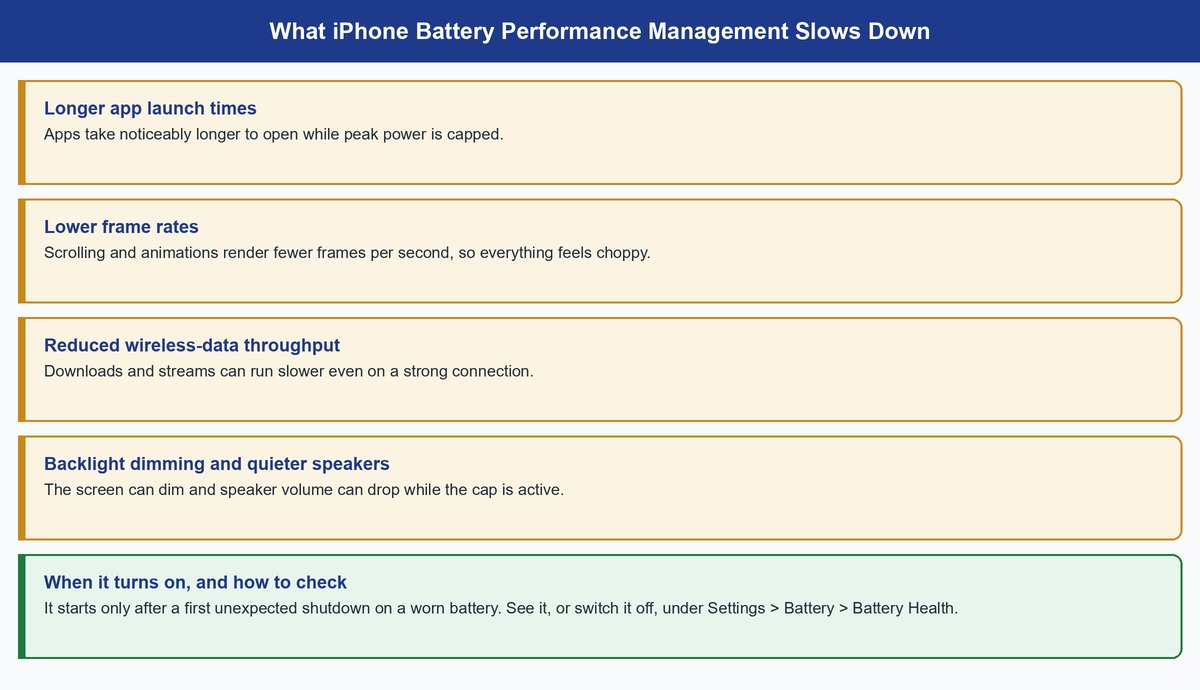
Every battery wears down with charge cycles, and a worn battery struggles to deliver quick bursts of power. Apple’s answer is performance management: after a degraded battery causes its first unexpected shutdown, iOS starts dynamically capping peak performance so it does not happen again. Apple’s own documentation lists the effects — longer app launches, lower frame rates, slower wireless data, backlight dimming, and quieter speakers. That is a slow phone by design. After a 2017 controversy over exactly this behavior, Apple apologized, documented it, and gave users the switch: Settings > Battery > Battery Health shows whether it is active and lets you turn it off if you accept the shutdown risk.
Worth knowing: iPhone 11 and later run a newer version of this system that manages performance more precisely, so the slowdown is designed to be far less noticeable than on older models.
And if you suspect your charging habits wore the battery out — probably not. We broke down what overnight charging actually does to a modern battery.
Apps Grew Heavier While Your Chip Stayed the Same
The second engine is simpler: apps are built for this year’s phones. Every year, apps and operating systems assume a little more memory and processing power. Your chip never got worse — the workload got bigger. It is also why restarting helps less each year: a restart clears memory, but it cannot shrink the apps. There is no setting for this one. It just starts the clock on the hardware decision below.
Why Your Phone Is Only Slow on the Internet
If apps open instantly but feeds stall, videos buffer, and pages hang, stop blaming the phone. This branch is a network problem wearing a phone costume.
Full Bars Measure Signal, Not Speed
The bars on your screen show how strongly you are connected to the tower — not how much data that tower has left to give you. A tower serving a stadium crowd or the 5 p.m. commute can show full bars while your data crawls, because thousands of phones are splitting the same capacity. Full bars with slow internet is not a contradiction. It is rush hour.
Handy shortcut: Run the same speed test twice — once on Wi-Fi, then again with Wi-Fi switched off. If cellular is fast and Wi-Fi crawls, your router is the problem, not your phone. If both crawl everywhere you go, the phone earns a spot on the suspect list.
Your Wi-Fi Router Might Be the Real Bottleneck
At home, the usual culprit is the router: too far away, too old, or drowning in neighbors on the same wireless channel. Walls and distance quietly cut your speed long before the connection actually drops. If your phone also falls off the network entirely, we covered why Wi-Fi keeps disconnecting and the router-side fixes that stick.
When the Phone Itself Really Is the Problem
Here is the honest part: sometimes no tip fixes it, because the phone is done. The trick is knowing that before you spend money in either direction.
A Three-Question Test Before You Spend Anything
- Does your phone still get OS updates? If the maker has stopped updating it, apps keep outgrowing it and security patches stop coming. The clearest end-of-road signal there is.
- What does Battery Health say? If iOS reports the battery needs service, or performance management keeps switching itself on, a battery replacement is the cheapest speed upgrade you can buy.
- Was it a budget phone three or more years ago? Entry-level chips age fastest because they started with the least headroom — a flagship from four years ago often outruns a budget phone from two.
Before you buy: A battery service costs a fraction of a new phone and lifts the very caps a worn battery triggers — check Apple’s current battery service pricing before you write the device off. And if the test says the phone really is done, read our wait-or-buy breakdown first — timing an upgrade badly is its own kind of expensive.
Skip the Cleaner and Booster Apps
Whatever branch you landed in, skip the cleaner, booster, and “RAM optimizer” apps. iOS and Android already manage memory automatically, the useful cleanup tools are built into Settings for free, and many of these apps add ads and background processes of their own — the exact thing making phones slow. An app cannot un-age a battery or widen an internet connection.
Frequently Asked Questions
Why is my phone so slow even though I have storage?
Because free space is only one of four levers. A worn battery triggering performance management, a misbehaving background app, or a congested network all slow a phone with plenty of storage. Start with Settings > Battery > Battery Health, then scan your battery usage list for a surprise.
Why is my phone so slow and laggy after an update?
Big updates trigger a day or two of background re-indexing, and the phone feels heavy until it finishes. Keep it charged, restart once, and wait 48 hours. If the lag survives the settling period, check storage next — updates need working room too.
Do phone cleaner apps actually make your phone faster?
No. They duplicate cleanup tools your phone already includes, and many add ads and background activity that make things worse. If a phone needs daily boosting to stay usable, it has one of the four real problems above.
Why is my phone slow even with full bars?
Bars measure signal strength — how well you can hear the tower — not how much capacity the tower has free. A congested tower shows full bars while thousands of phones split the same bandwidth. Test at another time or place; if speed returns, it was never your phone.
Is slow charging caused by the same things as a slow phone?
Usually not — slow charging is its own problem with its own suspects, starting with the cable, the adapter, and a lint-packed port. We covered how to make your phone charge faster and how to clean a phone charging port safely.
Will restarting my phone actually make it faster?
Yes, briefly — a restart clears working memory and kills stuck background processes, which is why it is the first move for sudden slowdowns. But if you need one every day, the restart is a symptom pointing at one of the four branches above, not a fix.
Match the Fix to Your Kind of Slow
You cannot treat four diseases with one prescription. A suddenly slow phone wants patience, storage room, or one app uninstalled — all free. A gradually slow phone wants a battery check first, because a worn battery is the one fix money buys cheaply. An internet-only slowdown is a network problem the phone cannot solve. And a phone that failed the three-question test deserves a clear-eyed goodbye, not another weekend of tips. Figure out which one you are holding. Everything else is guesswork.