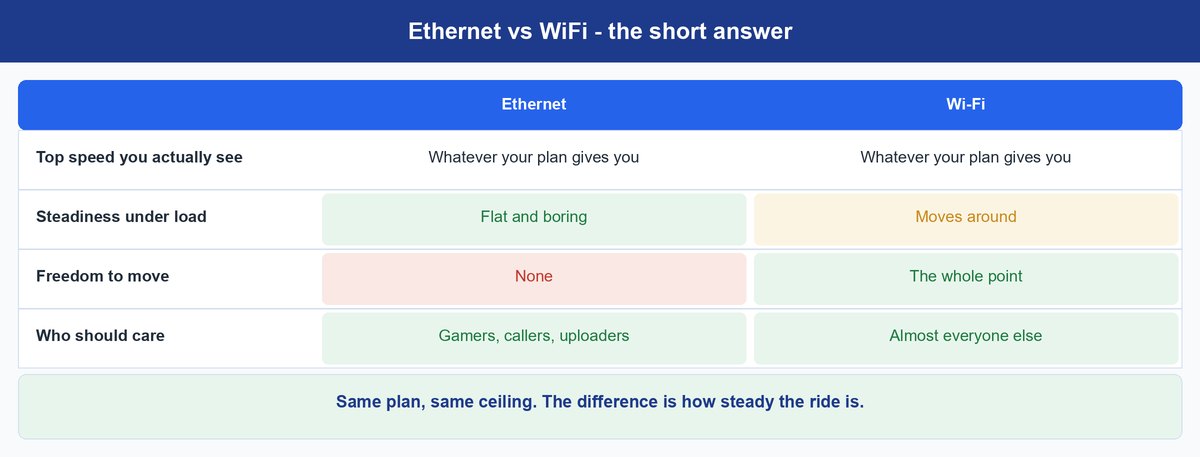
You ran a cable to the desk, opened a speed test, and watched it land on almost the same number your laptop got from across the room. That is the moment most people write off the whole ethernet vs wifi debate as marketing noise, and based on that one test they are right.
The test lied to you. It measures how much data you can pull in ten seconds under good conditions. It says nothing about the instant you click to shoot, or second 47 of a client call. That is where a cable earns its money.
- Your plan caps both links, so if you pay for 300 Mbps, plugging in still gets you 300 Mbps
- The wired win is consistency, not peak speed — a wired ping barely moves while Wi-Fi’s wanders all day
- Wi-Fi devices take turns on the same air, and that turn-taking is where the delay is born
- Competitive gaming, cloud gaming, calls and big uploads feel it; 4K streaming and smart-home gear do not
- If no cable is possible, MoCA over TV coax is the best fallback and powerline is the gamble
- A five-minute ping test settles it, and the number that matters is the worst reading, not the average
The fine print: TechDaily earns an affiliate commission when you buy through the links on this page, at no extra cost to you. It never changes which fix we recommend or the order they appear in.
What are you actually trying to fix?
★ Your pick: Cat 6 ethernet cable
Spikes come from shared airtime. A cable gives your PC a private lane.
★ Your pick: Anker USB-C to Ethernet Adapter
Thin laptops dropped the port, not the ability. This puts a gigabit port back.
★ Your pick: goCoax MoCA 2.5 Adapter
Turns the TV coax in your walls into a wired backbone.
★ Your pick: TP-Link AV2000 Powerline Kit
Sends data over your mains wiring. Results depend on your house, so buy where returns are easy.
★ Your pick: TP-Link Archer BE550
Stuck wireless? Wi-Fi 7 at both ends is the version that targets latency.
👑 Our Top Pick — Best Overall Value
Cat 6 ethernet cable
The cheapest fix in home networking, and it never needs a firmware update.
Opens on our Top Pick. Tap an option to see the best match for you.
Why Plugging In Often Changes Nothing at All
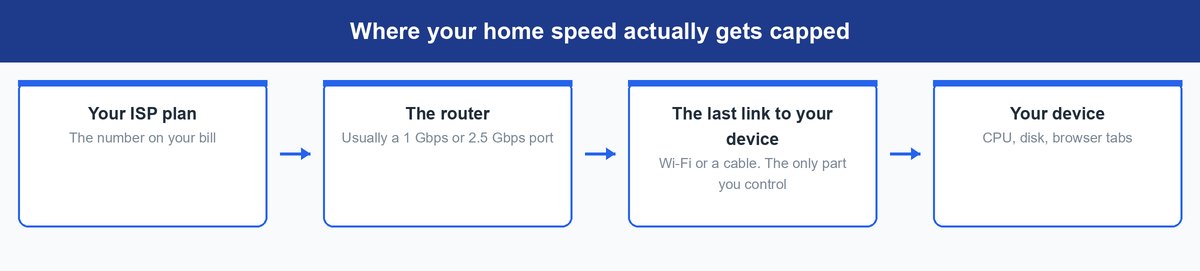
Here is what nobody selling internet leads with. In a typical US home the slowest link is the plan itself, not the last few meters to your device. Routers ship with gigabit or multi-gig ports, and a decent Wi-Fi 6 connection at close range already moves more than most subscriptions deliver. When the tap is the limit, the width of the last pipe stops mattering. That is why your speed test did not budge.
Picture a four-lane road feeding one toll booth. A fifth lane pushes no more cars through per hour. What it changes is whether you sit in a queue that stops and starts without warning, a completely different complaint from “this is slow”.
What a Wired Link Actually Gives You
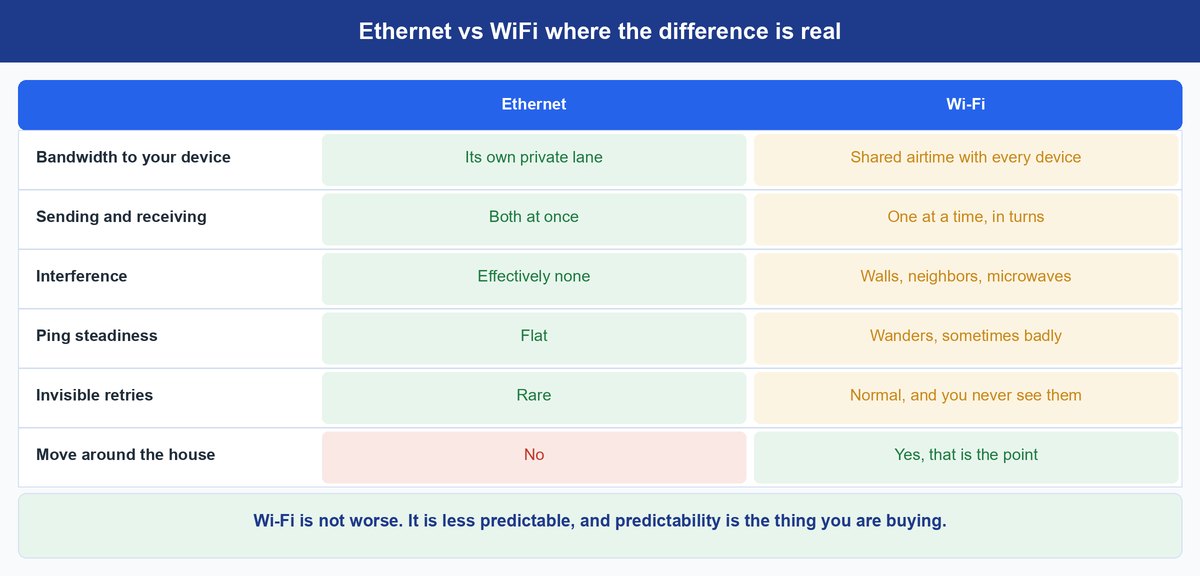
Strip away the marketing and it comes down to one thing. Ethernet gives your device a private connection to the switch inside your router. Wi-Fi gives it a share of a public space.
A wired port is full duplex, meaning it talks and listens at once without either side interrupting. Wi-Fi is half duplex. Only one radio in range can transmit on a channel at any moment, so everything takes turns. That single difference is the root of nearly every complaint people have about wireless, and no firmware update removes it.
The wired side is standardized by the IEEE 802.3 working group. The twisted-pair Ethernet those standards define is built around a 100-meter run. Unless your house is enormous, length is not a limit you will hit.
One difference rarely decides anything at home but is worth naming. Wired traffic only reaches someone who physically plugs in, while wireless traffic travels through the air. Modern Wi-Fi encrypts what you send, so this alone is not a reason to run a cable, and most comparisons overstate it.
Keep in mind: length has almost nothing to do with lag. A signal crosses 100 meters of copper in well under a millionth of a second. When a long run misbehaves, blame damage, poor shielding beside a power line, or a counterfeit with aluminum conductors instead of copper — never the distance.
Why Your Wi-Fi Speed Wanders and Ethernet Does Not
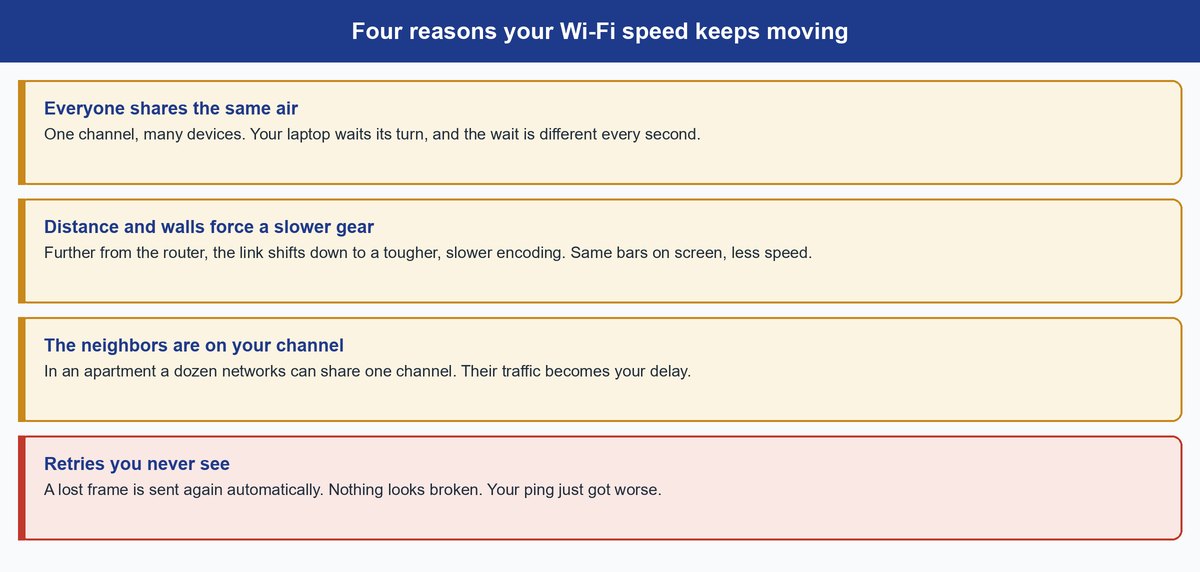
Ask a network engineer what makes wireless hard and you will not hear about bandwidth. You will hear about variance. Bandwidth is how much you can move; variance is how much that answer changes second to second. Network people call that variance jitter. Variance is what you experience as “the internet is being weird”. Four things create it, and they stack.
Every Device Is Waiting for the Same Air
Before your laptop transmits, it listens. If the channel is busy it waits a random slice of time, then listens again. Multiply that by your phone, the TV, two speakers and a doorbell and the waiting never stops, and it is never the same length twice. That is why your response time refuses to sit still. A wired port does none of it, because nobody else is on the wire.
Distance Quietly Shifts You Into a Slower Gear
Wi-Fi radios pick their encoding from signal quality. Strong signal, dense fast encoding. Weaker signal, a slower tougher one that survives noise. Your device does this silently, which is why full bars in a far room can still feel sluggish. Bars measure signal strength, not the encoding you landed on.
Your Neighbors Are Sharing Your Channel
In an apartment block a dozen networks can land on one channel, and their traffic eats airtime you needed. This is why two identical routers behave completely differently in a row house and a detached one, and why a channel change sometimes fixes what looked like a hardware fault. If yours drops out entirely instead of slowing, that is a different problem, covered in our guide on why your WiFi keeps dropping.
The Retries You Never See
When a wireless frame gets corrupted, the radio quietly sends it again. Your browser never finds out and nothing on screen says “retry”. You just get a longer round trip on that packet, which is exactly what a lag spike is. Wired links drop frames too, but on a clean cable it is rare.
How to Measure the Gap in Your Own Home
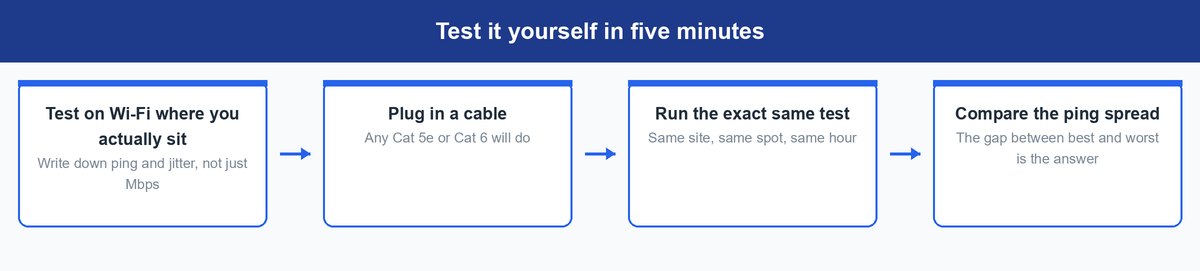
Every argument above collapses into something you can verify yourself. Nobody can tell you what your house does. Your house can.
Test in the spot you actually use, not beside the router. Run a speed test on Wi-Fi and write down download, upload and ping. Then plug in a cable, switch Wi-Fi off on that device so it cannot cheat, and run the identical test on the same site at the same time of day. Then open a terminal, run a long ping to something outside your house, and compare the best and worst readings on each link.
Tip: on Windows run ping -n 100 8.8.8.8, and on macOS or Linux run ping -c 100 8.8.8.8. Ignore the average, the number everyone quotes and the least useful one here. Read the maximum and the packet-loss line. A wired run usually returns a maximum close to its minimum. If your wireless maximum is several times its own minimum, you have just measured why your calls stutter.
Run the wireless test twice, at a quiet hour and when the house is busy. A large difference means congestion, which no router upgrade fully removes because your neighbors are part of the equation.
Who Really Needs the Cable and Who Does Not
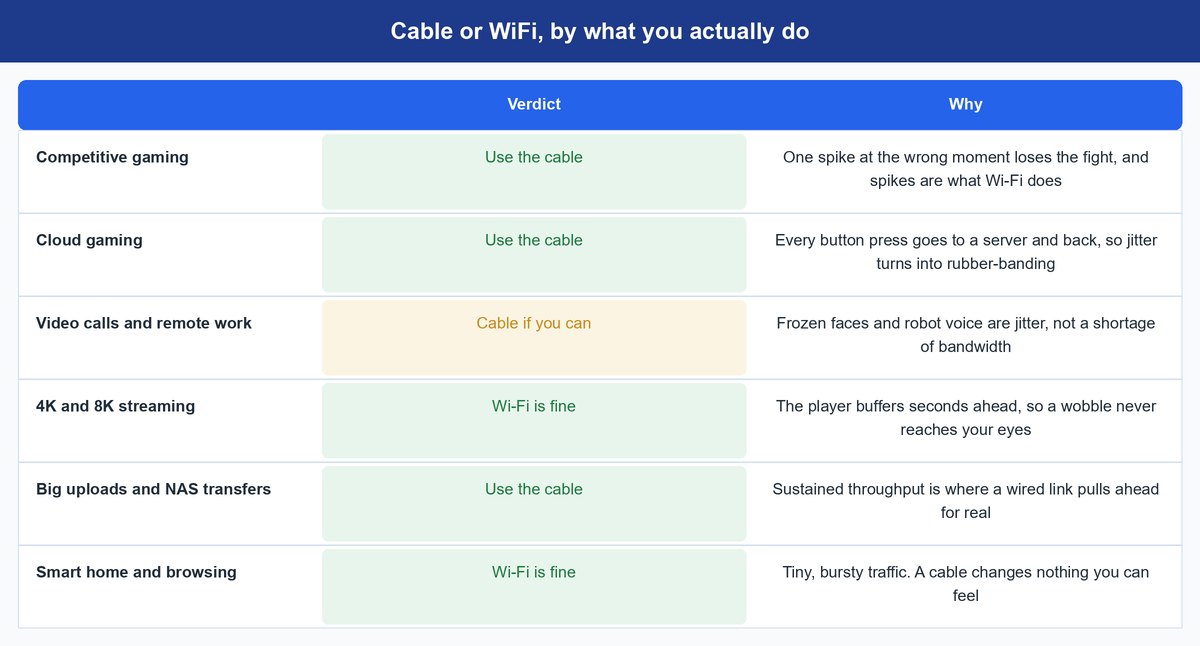
“Ethernet is more stable” is true for everybody and useful to almost nobody. What matters is whether the thing you are doing can hide a delay or has to react to it.
Competitive Gaming Punishes the Single Late Packet
Shooters and fighting games run on your inputs arriving in a rhythm. Average latency barely matters once you are near the server. The outlier kills you, the one packet that arrives late because someone else’s stream grabbed the airtime. If you cable exactly one device, make it the gaming rig.
Cloud Gaming Is Even Less Forgiving
On GeForce Now, Xbox Cloud Gaming or Luna nothing renders locally. Every input travels to a data center and comes back as video, so no local frame papers over a hiccup. Jitter becomes rubber-banding. This is where people notice a cable fastest.
Video Calls and Remote Work Sit in the Middle
The frozen face and the robot voice are jitter, not a bandwidth shortage. A call needs a small steady trickle far more than a wide pipe. If your job runs on calls, cabling the work machine is the cheapest upgrade you can make. One call a month? Skip it.
Streaming 4K Is Fine on Wi-Fi and Always Was
Netflix, Disney+ and YouTube buffer seconds ahead of what you are watching, and that buffer exists to absorb wobble. A wireless link can stumble repeatedly during an episode and you will never see it. Cabling a TV for streaming alone solves a problem you never had.
Big Uploads and Home Server Transfers Want the Cable
Moving a 60 GB project to a NAS is where sustained throughput genuinely beats wireless. A wired link holds its rate for the whole transfer, while wireless sags as other devices wake up.
Where Wi-Fi 7 Genuinely Narrows the Gap
Wi-Fi 7 is the first generation to attack consistency rather than headline speed. Its Multi-Link Operation feature lets a compatible device use more than one band at once instead of picking one and hoping. The Wi-Fi Alliance describes multi-link operation as supporting “more efficient load balancing of traffic among links, resulting in increased throughput and enhanced reliability”, and says the generation enables “high throughput, lower latency, and greater reliability”.
Read that wording carefully, because it is entirely qualitative. The body that certifies Wi-Fi 7 publishes no millisecond figure for the improvement at all.
Caveat: if a blog quotes an exact millisecond figure for Wi-Fi 7 latency, check whether it names a lab and a method. The standards body publishes neither, and a number with no method behind it is decoration. Multi-link operation also needs Wi-Fi 7 at both ends, so a Wi-Fi 7 router talking to a Wi-Fi 6 phone gets none of it.
So Wi-Fi 7 narrows the gap without closing it. Airtime is still shared and your neighbors’ gear is still in the room. Whether the upgrade earns its price is a separate question we took apart in our WiFi 6 vs WiFi 7 breakdown.
What to Do When You Cannot Run a Cable
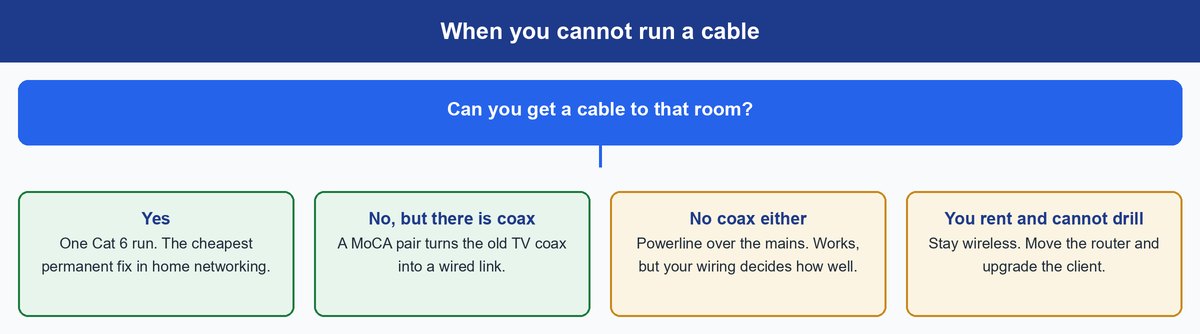
Every guide that ends at “just run ethernet” assumes you own the walls. Plenty of readers do not. Here are the real options, best first.
Run the Cable if You Possibly Can
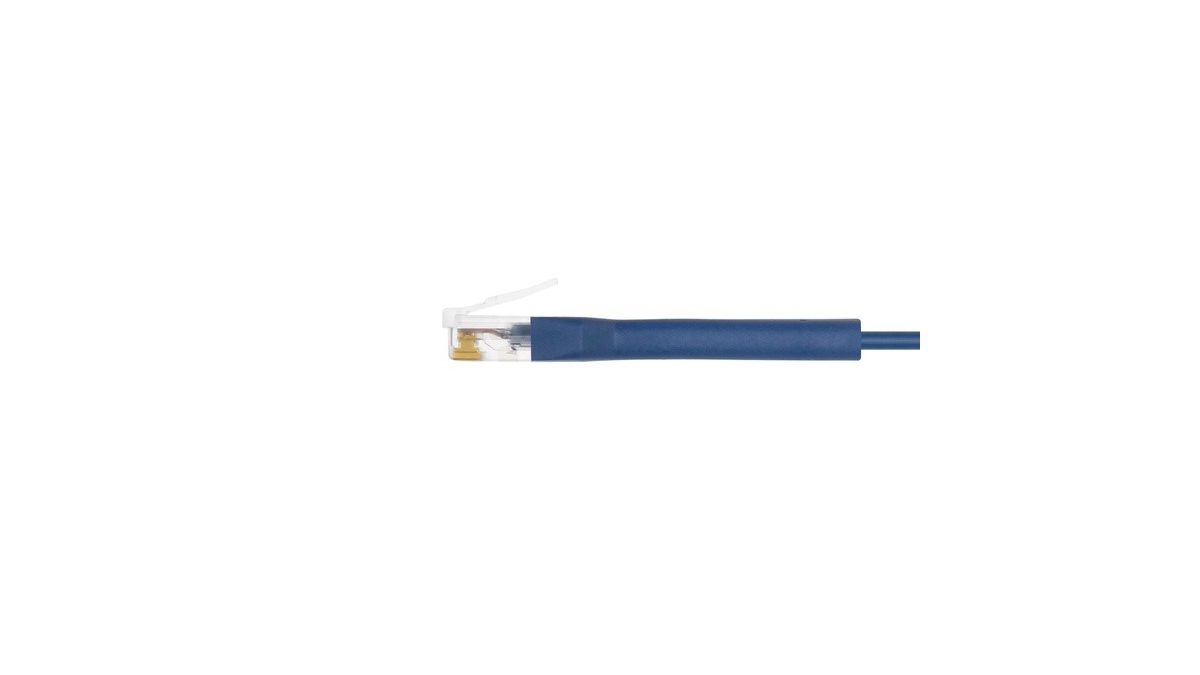
Look for the boring routes first, along a baseboard, through the hole where the coax already enters, or under a door with a flat cable. A Cat 6 ethernet cable costs less than lunch and needs no power or configuration. Cat 5e carries a gigabit fine, so use one you already own. Cat 6 only matters if you plan to pass a gigabit later.
MoCA Turns Old TV Coax Into a Wired Link
If your home has coaxial TV outlets, MoCA adapters send network traffic over that coax. Buy a pair, one by the router and one in the far room, and you get a genuinely wired link with wired-like steadiness. The MoCA Alliance rates MoCA 2.5 at 2.5 Gbps of MAC throughput, far more than most plans need. A goCoax MoCA 2.5 adapter is the strongest fallback here.
The catch: the two coax outlets must actually connect to each other through a splitter that passes MoCA frequencies. If your internet arrives over that same coax, add a point-of-entry filter at the street side so your signal does not leak into the neighborhood.
Powerline Is the Last Resort That Sometimes Works
Powerline kits push data over your mains wiring. When the house cooperates they are excellent. When it does not, because of old wiring, separate circuits, or a fridge throwing noise onto the line, they are inconsistent and no setting fixes it. Treat the box rating as a lab ceiling, not a promise. Buy a TP-Link AV2000 powerline kit where returns are painless and test it in week one.
A USB-C Adapter Fixes Laptops With No Port
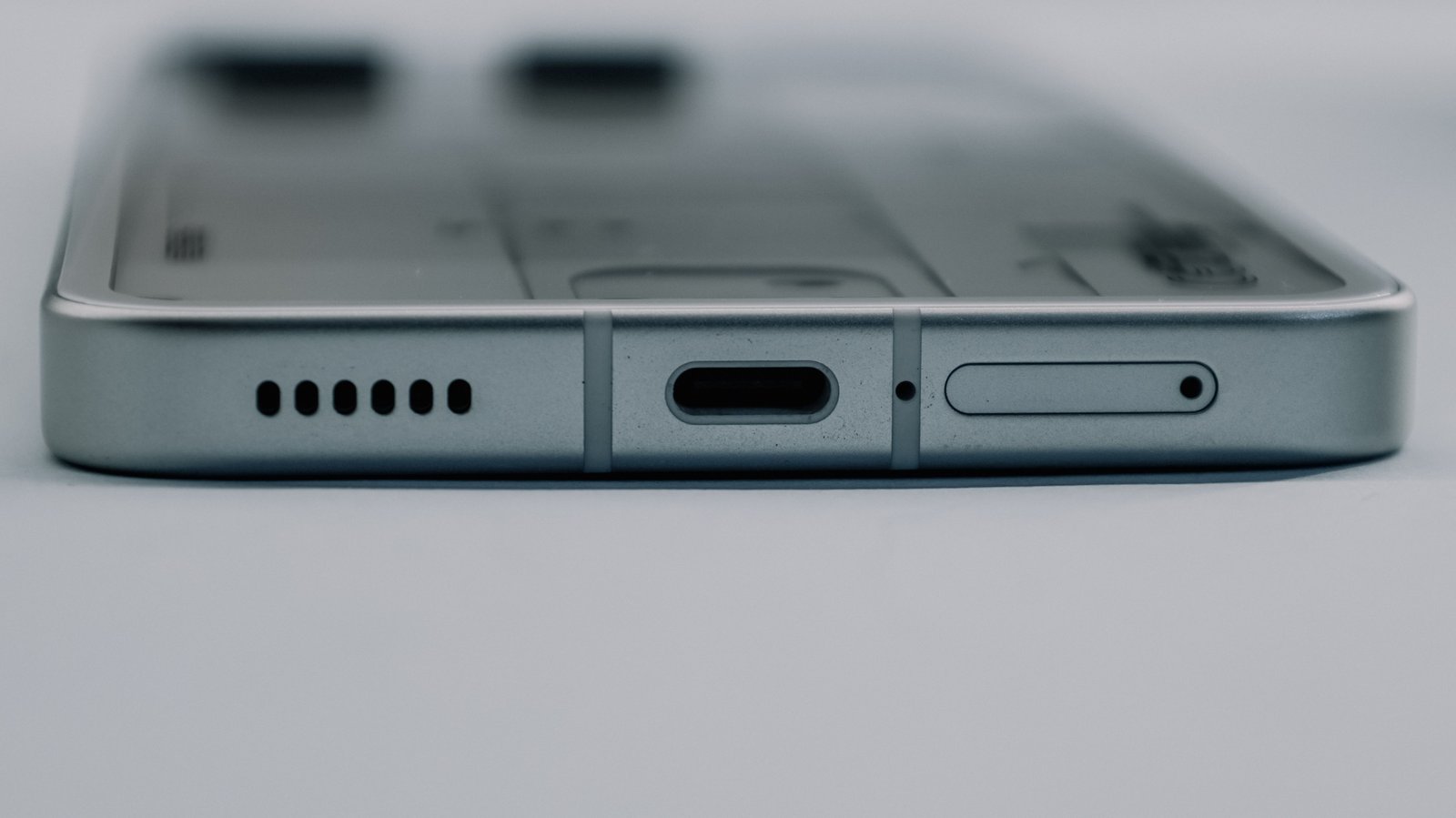
Thin laptops dropped the jack for thickness, not capability. An Anker USB-C to Ethernet adapter restores a gigabit port and works the moment you plug it in.
If You Rent, Spend on the Radio Instead
If nothing here is possible because you rent, spend on the radio instead. Get the router out of the cupboard, high and central, and a Wi-Fi 7 router such as the TP-Link Archer BE550 at least gives newer devices multi-link operation.
Frequently Asked Questions
Does ethernet actually make my internet faster?
Usually not, and anyone promising otherwise is selling something. Your plan sets the ceiling and both links normally reach it. What changes is steadiness, the same average speed on a far more regular rhythm. The exception is a genuinely weak signal where you sit, when the wire really is faster because wireless was the bottleneck.
How much ping will I really save by plugging in?
Nobody can honestly give you a universal number, and any article that does is guessing. It depends on how congested your air is, how far you sit from the router, and how many devices are awake. Run the ping test above and compare best against worst, because that gap is what you feel.
Does a longer ethernet cable slow you down?
Not within a house. Copper Ethernet cabling is designed around runs of up to 100 meters, or 328 feet, and a signal crosses that in a tiny fraction of a millisecond. A long cable that misbehaves is damaged, poorly shielded or counterfeit.
Is Cat 6 worth it over Cat 5e for a home?
Only if you are planning past a gigabit. Cat 5e handles gigabit speeds over a normal household run, so existing Cat 5e is not holding you back. The price gap is small enough that Cat 6 makes sense for new cable, as future-proofing rather than a fix for today.
Does Wi-Fi 7 make ethernet pointless?
No, and its own certifying body is careful with the wording. Wi-Fi 7 attacks consistency with multi-link operation, which the Wi-Fi Alliance credits with better load balancing and reliability rather than any latency figure. Both your router and your device must be Wi-Fi 7 for it to apply, and shared airtime does not go away.
Can I use both ethernet and WiFi at the same time?
You can, but there is little reason to. Your operating system picks one route and normally prefers the wired one, so the radio just sits there. Switch Wi-Fi off on machines that live on a cable, which also stops a device drifting silently back to wireless when a plug works loose.
The Bottom Line on Ethernet vs WiFi
Treat this as a speed contest and you will run one test, see the same number twice, and decide the whole thing is a myth. Treat it as a consistency contest and it resolves fast, because consistency is measurable in five minutes.
If you play competitively, game in the cloud, live on calls or move large files, run the cable, or use MoCA if the walls say no. It is a small permanent fix to a problem otherwise blamed on your provider forever. If you mostly stream and browse, stay wireless with a clear conscience and spend on router placement instead. The best network is not the fastest on paper. It is the one that behaves the same way every single time.