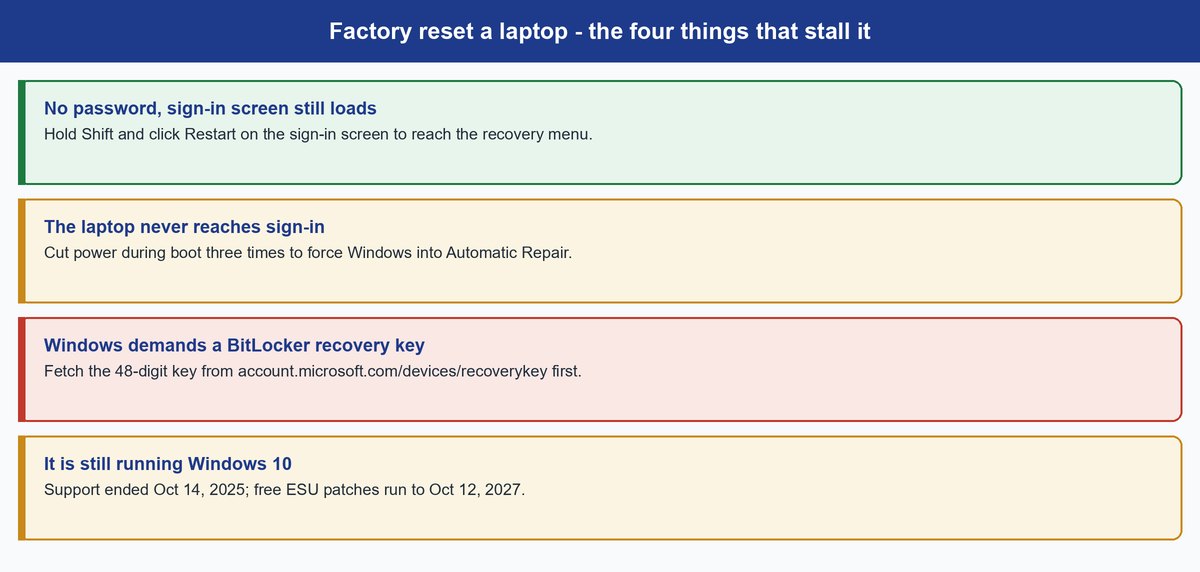
Before you wipe anything, check which version of Windows is on that machine. If it says Windows 10, you are about to spend an hour restoring a laptop to an operating system Microsoft stopped supporting on October 14, 2025. The reprieve is that Microsoft quietly extended the free consumer Extended Security Updates program in June 2026 — enrolled machines now get security patches through October 12, 2027, not the single year originally promised. So a Windows 10 reset is no longer a two-month clock. It is a fourteen-month one, and only if that machine is actually enrolled.
Now the part you came for. If you can sign in, you can factory reset a laptop in about four clicks. But most people searching for this cannot sign in. The password is gone, the sign-in screen refuses them, the thing will not boot, or Windows is suddenly demanding a 48-digit recovery key nobody has ever seen. Those are four different doors, and picking the wrong one wastes an afternoon. This is a Windows guide — the lockout paths below are Windows recovery, not macOS or ChromeOS.
- Resetting a Windows 10 laptop gives you back an operating system Microsoft stopped supporting on October 14, 2025. Free consumer ESU was quietly extended in June 2026 and now covers enrolled devices through October 12, 2027 — check you are enrolled before you count on it.
- If you can sign in, the path is Settings, then System, then Recovery, then Reset PC. That’s it.
- Locked out? Hold Shift and click Restart on the sign-in screen. You land in the recovery menu without ever typing a password.
- Pull your BitLocker recovery key from account.microsoft.com/devices/recoverykey before you start. It is the classic mid-reset ambush on modern Windows 11 laptops.
- “Remove everything” is not a forensic wipe. Microsoft says its clean-data option “does not meet government and industry data erasure standards.”
The Four-Click Reset If You Can Still Sign In
Here is the whole happy path, unpadded. Open Settings, go to System, then Recovery, then click Reset PC. Windows asks two questions. First, Keep my files or Remove everything — keeping your files still strips out every installed app and every setting, so it is a deep clean, not a light one. Second, Cloud download or Local reinstall. Cloud download pulls a fresh copy of Windows over the internet; Local reinstall rebuilds from files already on the drive, which is faster but useless if those files are what broke.
Then you wait. Microsoft says the screen may go black for “upwards of 15 minutes” during the process. End to end, plan on 20 to 60 minutes depending on the drive and which option you picked.
Heads up: A black screen is not a frozen laptop. Cutting the power mid-reset is how a routine wipe turns into a machine that needs recovery media to boot at all. Plug into mains power and walk away.
Why a Windows 10 Reset Needs a Second Thought Right Now
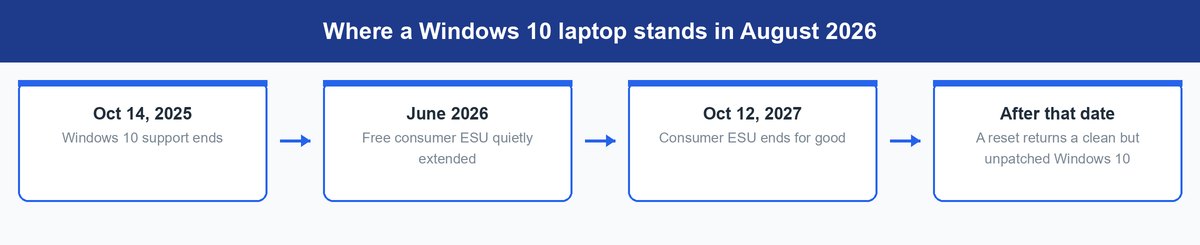
A reset does not upgrade anything. It hands you the same Windows version you already had, minus your files. On a Windows 10 laptop that means you spend an hour to arrive at a clean install of an operating system Microsoft stopped supporting in October 2025, kept alive only by the free consumer ESU program that now runs to October 12, 2027.
That changes the calculation. If you are resetting because the laptop feels slow and cluttered and the machine can run Windows 11, upgrading gives you the same fresh start on a platform that still gets patched. If you are handing the laptop to someone else, wipe it anyway — just be honest about what they are inheriting. And if the hardware genuinely cannot make the jump, reset it and plan to use it as a lower-risk device once the patches stop.
Keep in mind: Windows 11 needs TPM 2.0, Secure Boot and a CPU on Microsoft’s supported list — Settings, System, About shows your specs, and Microsoft’s PC Health Check gives a straight yes or no. A lot of 2017-era laptops clear the TPM bar and still fail on the CPU list, which is exactly why so many are still running Windows 10.
How to Factory Reset a Laptop You Cannot Log Into
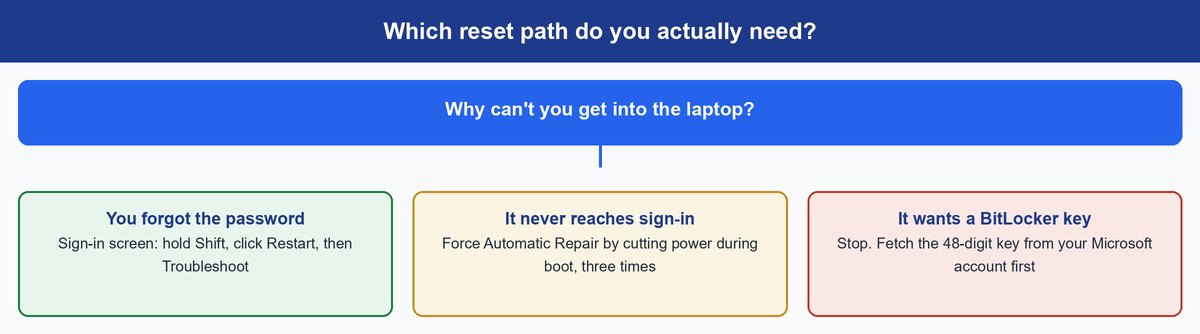
This is the branch that actually needs a human. The right move depends entirely on why you are locked out, so start by naming your situation.
You Forgot the Password but the Sign-In Screen Loads
You do not need the password to reset. On the sign-in screen, click the power icon in the corner, hold down Shift, and click Restart. Windows boots into the recovery environment instead of the desktop. From there go to Troubleshoot, then Reset this PC, then Remove everything.
The account gets wiped along with everything else, so the password stops mattering the moment the reset finishes. You set the laptop up as a new machine, exactly like it came out of the box.
The Laptop Never Reaches the Sign-In Screen
If Shift plus Restart is not available because you never get that far, force Windows into recovery the blunt way. Power the laptop on, and as soon as you see the manufacturer logo, hold the power button until it shuts off. Do that three times in a row. On the next boot Windows gives up on starting normally and opens Automatic Repair, and from there you can reach the same Troubleshoot menu.
It feels wrong to deliberately abuse the power button. It is not a hack — it is the standard route into recovery on a laptop that will not boot.
Windows Is Asking for a BitLocker Recovery Key
This is where resets die. Modern Windows 11 laptops encrypt the drive by default, so the recovery environment stops and demands a 48-digit BitLocker recovery key most people have never seen, let alone written down. If the laptop is signed in to a Microsoft account, that key is almost certainly stored there.
Important: Get the key at account.microsoft.com/devices/recoverykey on your phone or another computer before you start the reset — not after you are already staring at the blue key-entry screen with a laptop you can no longer use for anything else.
The Laptop Belongs to a Work or School Account
If an employer or school issued the device, it may be managed — a reset can be blocked outright, or it can finish and then re-enroll itself into the same management profile on first boot. Ask IT before you spend an hour on it. On a laptop you do not own, that is the only right move anyway.
What to Wipe Before You Sell or Hand Over the Laptop
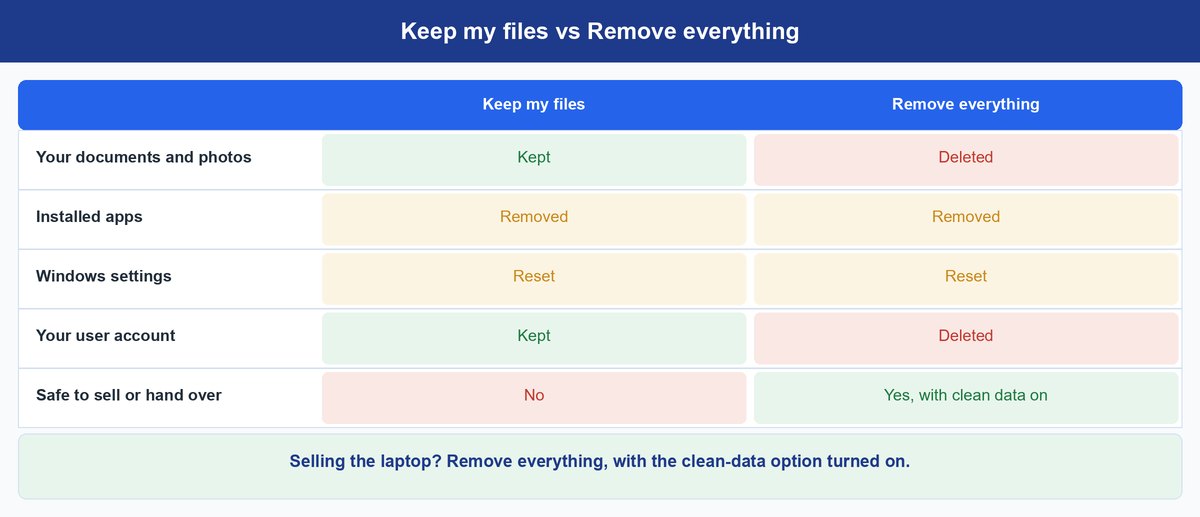
Every OEM guide walks you through the reset and stops there. The five minutes before the reset are what actually protect you, and almost nobody covers them.
Sign Out of the Accounts That Follow the Hardware
Sign out of your Microsoft account and remove the device from your account’s device list. Deauthorize the machine in anything that counts installs against a licence — iTunes and Adobe apps are the usual suspects — because those slots do not free themselves when a drive is erased. If the laptop sits in a find-my-device service, remove it there too. Do all of it while you can still log in.
Choose Remove Everything, Not Keep My Files
For a laptop leaving your hands, “Keep my files” is the wrong answer and it is chosen by accident constantly. Pick Remove everything, and turn on the clean-data option when Windows offers it. It takes longer. It is also the difference between a wiped laptop and a laptop with your documents sitting one undelete tool away.
Know What Clean Data Does and Does Not Promise
Microsoft says the clean-data option “is targeted at consumers and does not meet government and industry data erasure standards.” That is Microsoft’s own wording, and it is the honest ceiling on what a built-in reset gives you. For a household laptop going to a family member or a resale site, it is proportionate. For a machine that held tax records, client files, or anything you would not email to a stranger, it is not, and we have broken down exactly what a reset does and does not erase separately.
The catch: Anyone buying a wiped laptop is trusting a stranger’s definition of “wiped.” That cuts both ways — it is also worth knowing when you are on the buying side of a refurbished machine.
Frequently Asked Questions
How long does a factory reset take on a laptop?
Commonly 20 to 60 minutes, depending on drive speed, how much data is on it, and whether you chose Cloud download or Local reinstall. Microsoft says the screen may go black for “upwards of 15 minutes” partway through, which is normal. The clean-data option adds to that.
Can I factory reset a laptop without the password?
Yes. From the sign-in screen, hold Shift and click Restart, then choose Troubleshoot, Reset this PC, Remove everything. You never enter the password, because the account is deleted along with everything else. The one thing that can stop you is drive encryption asking for a BitLocker recovery key.
What if my laptop asks for a BitLocker recovery key I don’t have?
Check account.microsoft.com/devices/recoverykey, signed in with the Microsoft account that was on the laptop. If work or school issued the device, IT holds the key. If nobody has it, treat the encrypted data as gone — you can still wipe the machine and install Windows fresh from a USB drive, but the files are not coming back.
Does a factory reset remove Windows itself?
No. It reinstalls the same edition and version of Windows you already had and returns it to a clean state. Moving from Windows 10 to Windows 11 is a separate upgrade, not something the reset does.
Should I reset my Windows 10 laptop or upgrade it first?
If the machine can run Windows 11, upgrading gets you the same clean slate on a platform still in full support, so do that instead. Windows 10 support ended on October 14, 2025; free consumer ESU now patches enrolled devices through October 12, 2027, after Microsoft extended it in June 2026. If the hardware cannot make the jump, reset it, make sure it is enrolled in ESU, and plan to retire it before that date.
Is Remove everything enough before I sell a laptop?
For most private sales, yes — with the clean-data option on and your accounts signed out first. Microsoft says the option “does not meet government and industry data erasure standards,” so if the drive held genuinely sensitive material, a reset is not the tool for that job.
The Bottom Line Before You Hit Reset
Resetting a laptop is easy. Everything around it is where people lose an afternoon — the BitLocker key nobody retrieved, the licence slots nobody freed, the power cable nobody plugged in. Sort those first and the reset itself is a coffee break.
And if the laptop in front of you is still on Windows 10, ask the harder question before you start. Microsoft’s June 2026 extension bought that machine until October 12, 2027 — real breathing room, but a deadline all the same. A reset resets the software; it does not reset the clock.