Drop your phone on a charging pad, walk away, come back to a full battery. It feels almost magical—until that nagging question creeps in: am I quietly killing my battery every time I do this? The fear is everywhere in tech forums, and the short answers people give (“yes, it cooks your battery” or “no, it’s totally fine”) are both wrong in their own way.
So is wireless charging bad for your battery? The honest answer is it depends, and the thing that actually matters is not the magic—it’s the heat. Modern phones already stop charging the instant they hit 100%, so the old “overcharging” panic is largely obsolete. What genuinely ages a lithium-ion battery is cumulative thermal stress, and wireless charging can generate more of it than a cable if you set it up carelessly. Get the setup right—especially with the newer Qi2 and Qi2.2 hardware arriving through 2026—and the difference shrinks to something most people will never notice.
This guide unpacks the real science, separates myth from measurable effect, and gives you a practical playbook so you can keep charging wirelessly without the guilt.
- Overcharging is a myth on modern phones. The battery management system (BMS) cuts the charge at 100%, so leaving it on a pad does not “force” extra energy in.
- Heat is the real degradation driver. Lithium-ion cells age faster the warmer they run, and wireless charging is less efficient than a cable, so more energy is lost as heat near the battery.
- The energy penalty has actually been measured. iFixit’s bench test clocked Apple’s own MagSafe puck burning 24.4% more energy than a cable for the same full charge, and a misaligned budget pad burning 104.2% more. That surplus becomes heat, right behind your battery.
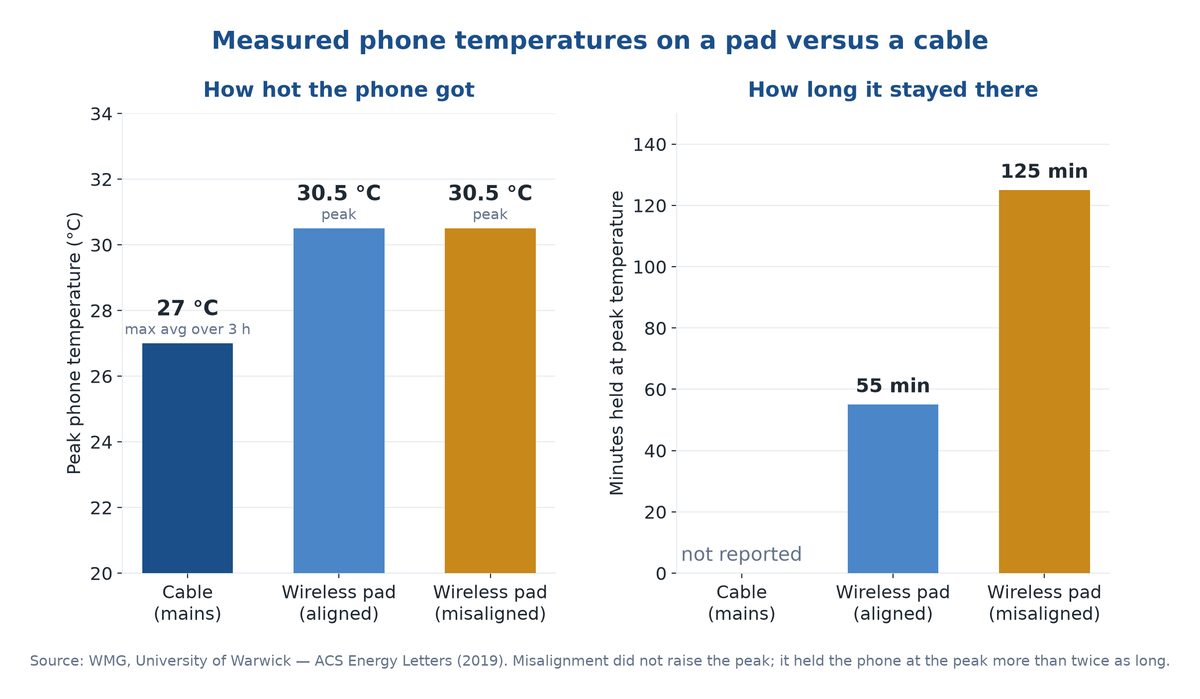
- The real temperature gap is about 3.5 degrees. University of Warwick researchers logged a cabled phone averaging no more than 27°C across three hours, against 30.5°C on a pad. Misalignment didn’t raise the peak — it held the phone there for 125 minutes instead of 55.
- Do the arithmetic and it is under a point of extra capacity loss per year. Roughly 0.3 to 0.7 percentage points on a well-aligned pad, climbing to about 1.5 to 3 points if you stack a misaligned pad, a thick case and a warm room. We show the working below.
- Efficiency is roughly 80% wireless versus near-90%+ wired—treat these as approximate ranges, not lab-exact constants, because case thickness, alignment, and wattage all move the number.
- Overnight charging is largely a non-issue thanks to trickle/standby behavior and “optimized charging” features that hold the battery at 80% until just before you wake up.
- Qi2 and Qi2.2 are designed to cut the heat penalty with magnetic alignment and tighter thermal management—an important 2026 update we cover below.
How Lithium-Ion Batteries Actually Wear Out
To answer whether wireless charging hurts your battery, you first have to know what “hurts” a battery in the first place. Two forces do almost all the damage, and “overcharging” is not really one of them.
Charge Cycles Are the Clock
A lithium-ion battery has a finite number of full charge cycles in it—one cycle being 100% of capacity used, whether that’s one full 0-to-100 charge or two half charges. Every cycle nudges capacity down a fraction. After a few hundred cycles, you’ll notice the phone doesn’t last as long as it did new. This is normal chemistry and happens no matter how you charge.
Heat Is the Accelerator
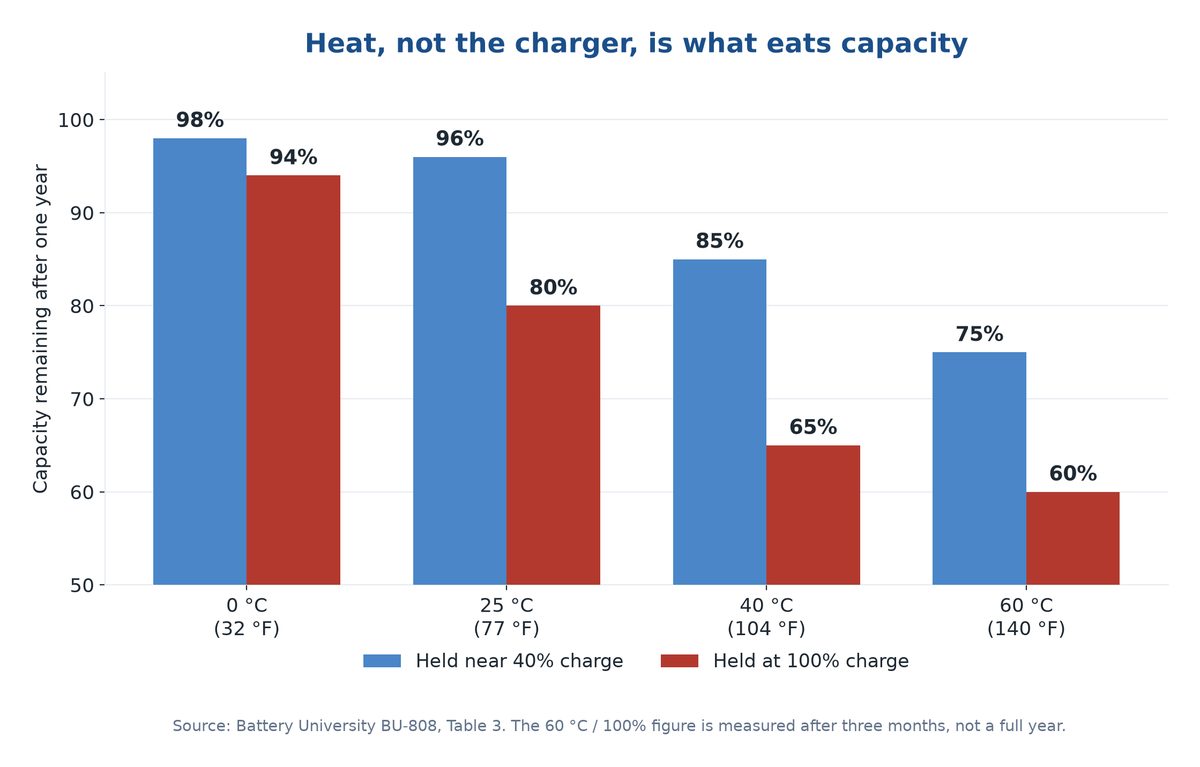
Here’s the part most people miss: temperature, not the charger, decides what those cycles cost you. Battery University’s BU-808 data puts hard numbers on it. A lithium-ion cell kept at 25°C (77°F) and held at full charge still has about 80% of its capacity a year later. Run that same full cell at 40°C (104°F) and it falls to 65%. Keep it near 40% charge instead of full at that same 40°C and it holds 85%. Same chemistry, same twelve months. The only things that changed were heat and how full you kept it.
Important: The classic Arrhenius rule of thumb says lithium-ion aging roughly doubles for every 10°C (18°F) the cell runs above about 30°C. Battery University’s own table is gentler than that — its numbers work out closer to 1.45× per 10°C. We run the math at both ends later in this piece, because an honest range beats a confident single number.
Sitting Full and Hot Is the Worst Combo
Battery University also notes that dwelling at a full state of charge while hot is more stressful than actually cycling the battery. High voltage (a full cell) plus high temperature is the punishing combination. This is exactly why a phone pinned at 100% and warm on a pad all day is theoretically worse than one that charges, cools, and rests.
Why “Overcharging” Is the Wrong Worry
The old fear was that leaving a phone plugged in “overcharges” the battery and bloats or kills it. On any phone made in the last decade, this can’t happen the way people imagine. The onboard BMS stops the charge the moment the cell reaches its safe maximum. It does not keep cramming current into a full battery. So the real question was never “will it overcharge?”—it’s “will it run hot while sitting full?” That reframes the entire wireless-charging debate around thermal management instead of voltage.
Does Wireless Charging Overheat Your Phone
This is the heart of the matter, because if wireless charging ran as cool as a cable, there would be almost nothing to discuss. It doesn’t—but the gap is smaller and more controllable than alarmists suggest.
Why Induction Runs Hotter and Less Efficient
Wireless charging works by induction: a coil in the pad creates a magnetic field, and a coil in your phone converts that field back into electricity. Every conversion step loses a little energy, and lost energy becomes heat. A cable, by contrast, moves electrons more or less directly into the charging circuit with far fewer losses.
The commonly cited figures put wireless efficiency somewhere around 80% versus roughly 90% or higher for a good wired connection—but treat those as approximate ranges rather than fixed constants. Real-world efficiency swings with coil alignment, case thickness, ambient temperature, and charging wattage. The key point is directional and well established: more of the energy is wasted as heat, and crucially, that heat is generated right next to the battery rather than out in a wall adapter.
Misalignment on a flat pad is the single biggest cause of excess heat and slow charging, which is exactly why a magnetic Qi2 charger helps. It snaps the coils into place automatically and removes the variable that bites most people on cheap non-magnetic pads.
Where the Heat Actually Comes From
Two heat sources stack up during wireless charging. First, the induction losses described above. Second, misalignment: if the phone’s coil isn’t sitting squarely over the pad’s coil, the system works harder and runs hotter to push the same power through. A phone that’s slightly off-center on a cheap pad is a classic recipe for a warm back panel and slow, inefficient charging.
Wattage Changes Everything
At low power—say the old 5W Qi standard—the heat difference between wireless and wired is small enough to be irrelevant for battery health. The story changes as wattage climbs. Today’s fast wireless standards push well past 10W, with magnetic systems reaching 15W and the newest Qi2.2 hardware hitting 25W. Higher power means more total energy moving, more loss, and more heat to dissipate. This is why a budget 50W wireless pad can leave a phone noticeably warm while a modest 5-10W pad barely registers.
If your phone gets uncomfortably hot during any kind of charging, that’s worth investigating on its own—our guide to why phones overheat while charging walks through the common causes and fixes.
What the Lab Bench Actually Measured
Almost every page competing for this question hand-waves at “wireless makes more heat” and moves on. Two teams actually put instruments on it, so let’s use their numbers instead of vibes.
How Much Hotter a Charging Pad Really Runs
Researchers at WMG, University of Warwick charged phones three ways — cable, aligned wireless pad, deliberately misaligned wireless pad — while thermal-imaging them throughout. Their results, published in ACS Energy Letters in 2019, are the most useful numbers anyone has on this question.
On the cable, the maximum average temperature within three hours of charging never exceeded 27°C. On the aligned pad it peaked at 30.5°C, then eased off through the back half of the charge. The misaligned pad hit exactly the same 30.5°C peak — and that is the bit everyone gets wrong. Misalignment doesn’t make your phone hotter. It makes your phone hot for far longer: the aligned setup sat at peak for 55 minutes, the misaligned one for 125.
Time at temperature is what ages a cell. A pad that briefly touches 30.5°C is nothing. A pad that parks your phone there for over two hours a night, for three years, is a different conversation.
The catch: The misaligned pad pulled 11W from the wall to do the job the aligned pad did on 9.5W, and its own base ran at 35.3°C instead of 33°C. You pay for sloppy placement twice — once on the power bill, once in hours your battery spends warm.
How Much Energy a Pad Actually Wastes
The efficiency side has been metered too. In April 2024 iFixit put watt meters at the wall and between charger and phone, sampling every five minutes through full charge cycles and standby. Filling a 12.7Wh phone battery over a cable took 18.25Wh. Apple’s MagSafe puck needed 23.33Wh for the same job — a 24.4% increase. A misaligned Amazon Basics 15W pad needed 33.93Wh, or 104.2% more. Tesla’s in-car platform was worst of the lot at 113.7% more energy per day.
Look at who came out best there. Apple’s magnetically aligned puck was the efficient one and the cheap flat pad was the disaster. That is the entire case for magnetic standards in a single data point: the variable that matters is alignment, not the badge on the box.
What the Standards Body Will and Will Not Tell You
Here is something worth knowing before you trust anyone’s efficiency claim. The Wireless Power Consortium, the body that actually owns the Qi standard, states that Qi2 devices use magnetic attachment to align charger and phone “for improved energy efficiency,” and that a Qi2 25W pad can take a phone from 0 to 50% in about 30 minutes.
What the WPC does not publish is a headline end-to-end efficiency percentage. Qi certification tests interoperability, power delivery and safety — not a watts-in-versus-watts-out score you can hold up against a cable. So when a charger brand quotes you a tidy “up to 80% efficient,” understand where that figure is not coming from. It is not in the standard. The only comparable efficiency numbers in public are independent bench tests like iFixit’s.
Is It Bad to Leave Your Phone on a Wireless Charger Overnight
This is the single most-asked version of the question, because overnight is when most of us charge. The reassuring news: on a modern phone, leaving it on the pad overnight is generally fine—with a couple of sensible caveats.
What Happens After It Hits 100%
Once your battery reaches full, the BMS stops the main charge. From there the phone enters a trickle or standby pattern, topping off only the small amount lost to natural self-discharge and to running background tasks. It is not relentlessly forcing energy into a full cell for eight hours. The pad mostly idles, with brief sips to hold the line at full.
Optimized Charging Changes the Math
Both major phone platforms now ship smart charging features designed precisely for the overnight scenario. Apple’s Optimized Battery Charging learns your daily routine and holds the battery at around 80% overnight, finishing the last 20% just before your usual wake-up time so the cell spends fewer hours sitting full. Android phones offer comparable “adaptive charging” features. The whole point is to minimize the time spent in that stressful full-and-warm state. Apple’s own documentation on Charge Limit and Optimized Battery Charging, last updated in December 2025, says the iPhone “will delay charging past 80 percent” once the feature is active. On iPhone 15 and later you can skip the guesswork entirely and set a hard charge limit anywhere from 80% to 100% in 5% steps. There is a catch about when that feature actually switches on, and we get to it below.
The Real Overnight Caveat Is Heat, Not Time
The genuine risk overnight isn’t the duration—it’s a thick, insulating setup that traps heat. A phone in a heavy case, face-down on a pad, on top of a soft duvet that blocks airflow, can stew at an elevated temperature for hours. That’s the combination Battery University warns about: full charge plus sustained heat. Charge on a hard, ventilated surface and the overnight concern mostly evaporates.
The simplest heat gauge you own is your own hand. If the phone is ever too hot to hold comfortably while charging, reposition it on the pad or take the case off. That touch check beats any battery app you could install.
A Reasonable Middle Path
If you want to be cautious without obsessing, enable optimized/adaptive charging, keep the pad somewhere cool and open, and don’t bury the phone under bedding. That’s enough to make overnight wireless charging a genuine non-issue for the vast majority of users.
Wireless Charging vs Wired Charging for Battery Health
So which is actually gentler on your battery over the long haul? Wired charging holds a modest, real efficiency and heat advantage—but the practical gap is smaller than the internet’s panic implies, and it narrows further with good wireless gear.
Here’s a side-by-side comparison of the factors that matter:
| Factor | Wireless Charging | Wired Charging |
|---|---|---|
| Energy efficiency | ~80% (approximate; varies with alignment, case, wattage) | ~90%+ (approximate; fewer conversion losses) |
| Heat near the battery | Higher—induction + alignment losses sit next to the cell | Lower—most loss happens in the wall adapter |
| Overcharge risk | None—BMS cuts at 100% | None—BMS cuts at 100% |
| Convenience | Very high—just set it down | Moderate—plug and unplug |
| Port wear | None—no connector cycling | Connector wears over years |
| Best-case battery impact | Negligible with low wattage, good alignment, ventilation | Negligible; slightly cooler baseline |
| Worst-case battery impact | Meaningful if high-wattage, misaligned, hot, in a thick case | Lower, but fast wired charging also adds heat |
Putting a Real Number on the Yearly Cost
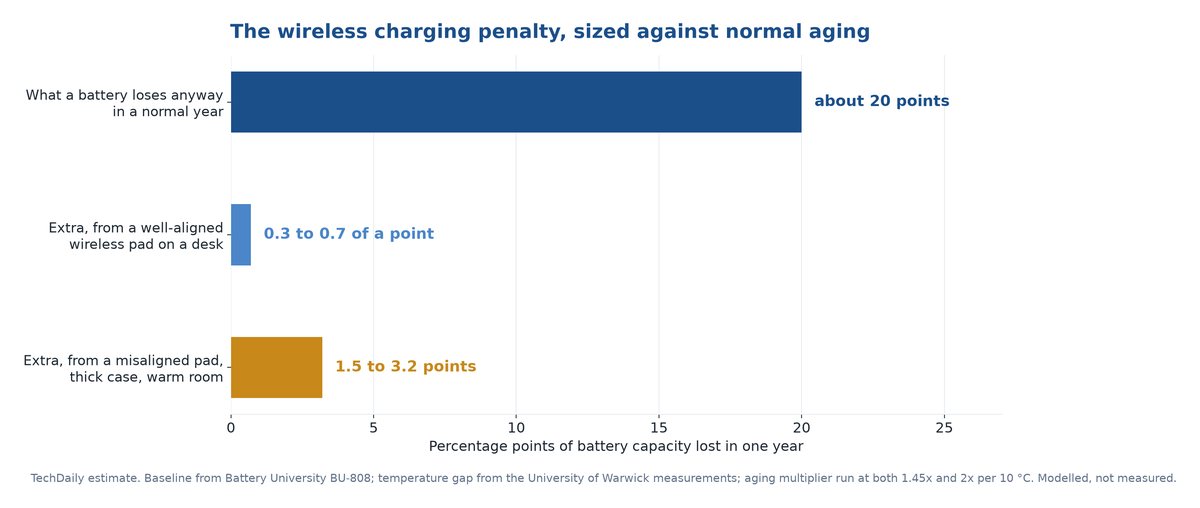
Nobody ranking for this question will give you a number, so here is ours with the working shown. This is a model built from published figures, not a measurement of your phone. Argue with the steps if you like — that is exactly why they are here.
- Start with the baseline. Battery University’s table says a cell at 25°C held at full charge keeps about 80% of capacity after a year. Call normal aging roughly 20 percentage points a year.
- Get the heat multiplier. That same table drops to 65% at 40°C, so 15°C of extra heat did about 1.75× the damage — roughly 1.45× per 10°C. The classic Arrhenius rule says 2× per 10°C. We carry both ends.
- Get the actual temperature gap. Warwick measured 3.5°C between a cable at 27°C and an aligned pad at 30.5°C. Applied to 3.5°C, those two multipliers mean the cell ages 14% to 27% faster — but only while it is charging.
- Weight it by time. You charge maybe three hours out of twenty-four, so only about 12% of the year runs warm. Blended across the whole year, that is a 1.7% to 3.4% increase in total aging.
- Multiply out. 20 points × 1.7-3.4% lands at 0.3 to 0.7 of a percentage point of extra capacity lost per year. Not one percent. A fraction of one percent.
Now run the same arithmetic on the bad setup. Warwick’s misaligned rig sat at 35.3°C rather than 27°C, and a thick case in a warm room stretches the hot window to something like five hours a day. That works out to 1.5 to 3 percentage points a year.
Here is what those numbers mean in your hand. Three years of well-aligned wireless charging costs you roughly 1 to 2 extra points of battery health versus never touching a pad — on a phone that will have shed dozens of points to ordinary aging by then. Three years on a misaligned pad in a hot room costs something like 5 to 9 points, and that one you might genuinely feel. Apple treats 80% health as the worn-battery threshold. A charging pad is not what pushes you across it. Careless habits with a charging pad might.
Keep in mind: These are modeled figures, not measurements of your specific phone, and the range is wide on purpose — a factor-of-two disagreement between the two aging rules is baked straight into it. We show the arithmetic so you can check it. Nobody selling you a charger will show you theirs.
The Honest Verdict
If your only goal is squeezing the absolute maximum lifespan out of the cell, a cable on a cool desk wins by a small margin, mainly because it runs cooler. But “wins by a small margin” is the important phrase. For most people, the convenience of wireless charging vastly outweighs a difference you may never actually observe before you replace the phone anyway. Battery degradation from charging method is a slow, marginal effect—not a cliff.
One more thing before you blame the pad: a metal ring holder, PopSocket or thick wallet case sandwiched between phone and charger blocks coil alignment and traps heat. Pull those off before charging, or the back panel runs noticeably hotter and slower than the spec sheet promised.
Don’t Forget the Port-Wear Trade-Off
Wired charging has its own quiet downside: every plug-in cycle mechanically wears the charging port and cable. Heavy daily users sometimes face a flaky port years down the line. Wireless charging eliminates that wear entirely, which is a real durability benefit for the device as a whole, even if it’s not strictly about the battery cell.
2026 Update Does Qi2.2 Fix the Heat Problem
This is where the conversation has genuinely moved on. Much of the “wireless is bad for batteries” lore was built on older, loosely-aligned Qi pads. The newer standards attack the heat problem directly, and 2026 is when this hardware becomes mainstream.
What Qi2 Brought to the Table
Qi2, built around a magnetic alignment system, was the first big step. The magnets snap your phone into near-perfect coil alignment every time, which directly reduces the misalignment losses that generate so much waste heat. Better alignment means more of the power actually reaches the battery instead of warming the back of the phone. We cover the standard in depth in our Qi2 wireless charging explainer, and how it stacks up in our Qi2 vs MagSafe comparison.
What Qi2.2 Adds in 2026
Qi2.2 is the spec number; Qi2 25W is the badge you will actually see on a box. The WPC announced it on 23 July 2025, describing it as “nearly 70% more power” than the original Qi2, which launched back in November 2023 at 15 watts. On paper, more power should mean more heat. In practice the higher wattage arrives bundled with tighter controls:
- Refined magnetic alignment keeps the coils locked in their optimal position, minimizing the misalignment heat that plagued older pads.
- Mandatory compliance testing before any pad may wear the Qi2 25W badge. The WPC says fourteen devices cleared certification in the limited July 2025 launch, with several hundred more queued behind them — the only enforceable safety and thermal floor in a category otherwise full of unbranded pads.
- Improved coil and circuit design reduces wasted energy at the source, so a given amount of charging produces less heat than equivalent older hardware.
So, Is the Heat Problem Solved
Not “solved,” but meaningfully reduced—and that’s the honest framing. Qi2.2 doesn’t repeal physics; induction still loses more energy than a cable, and 25W still moves a lot of power. What it does is make wireless charging far smarter about managing heat, so a properly aligned Qi2.2 setup should run cooler and waste less than the loose Qi pad that scared everyone a few years ago. If battery longevity worries you, upgrading from an old generic pad to certified Qi2/Qi2.2 hardware is the single most effective wireless-charging move you can make in 2026.
Worth knowing before you spend anything: hitting the full 25W takes a Qi2.2 charger and a Qi2.2-capable phone, plus a 30W+ USB-C PD wall adapter. Pairing one Qi2.2 device with older gear quietly caps you at 15W or less — half the combo alone unlocks nothing.
Two Charging Habits That Change the Answer
Everything above assumes a phone sitting on a pad on a desk. Two extremely common situations break that assumption, and neither one is covered by the pages currently ranking for this question.
If You Leave It on the Pad All Night
Overnight is the longest unbroken stretch your phone spends at full charge — seven to nine hours, every night, for years. It is the one window where “full and warm,” the exact combination that wrecks the numbers in the Battery University table, gets real time to work.
Which is why Optimized Battery Charging matters, and why one detail in Apple’s documentation deserves far more attention than it gets. The feature is not a switch that works the moment you flip it. Apple spells out the conditions: it needs at least 14 days to learn your habits before it will engage at all, and your iPhone has to log at least 9 charges of 5 hours or more in a given location first. If you just set up a new phone, moved house, or started charging on the other side of the bed, the 80% hold is dormant — the toggle can read “on” while the behavior is not running.
So the overnight fix was never unplugging at 2am. It is making sure the software hold is genuinely active, and putting the pad somewhere heat can escape.
Fix: On an iPhone 15 or later, stop trusting the algorithm and set a hard ceiling instead: Settings ▸ Battery ▸ Charging, then pick any limit from 80% to 100% in 5% steps. It works from day one, with no 14-day learning period and no location requirement.
If You Charge in a Hot Car or Dashboard Mount
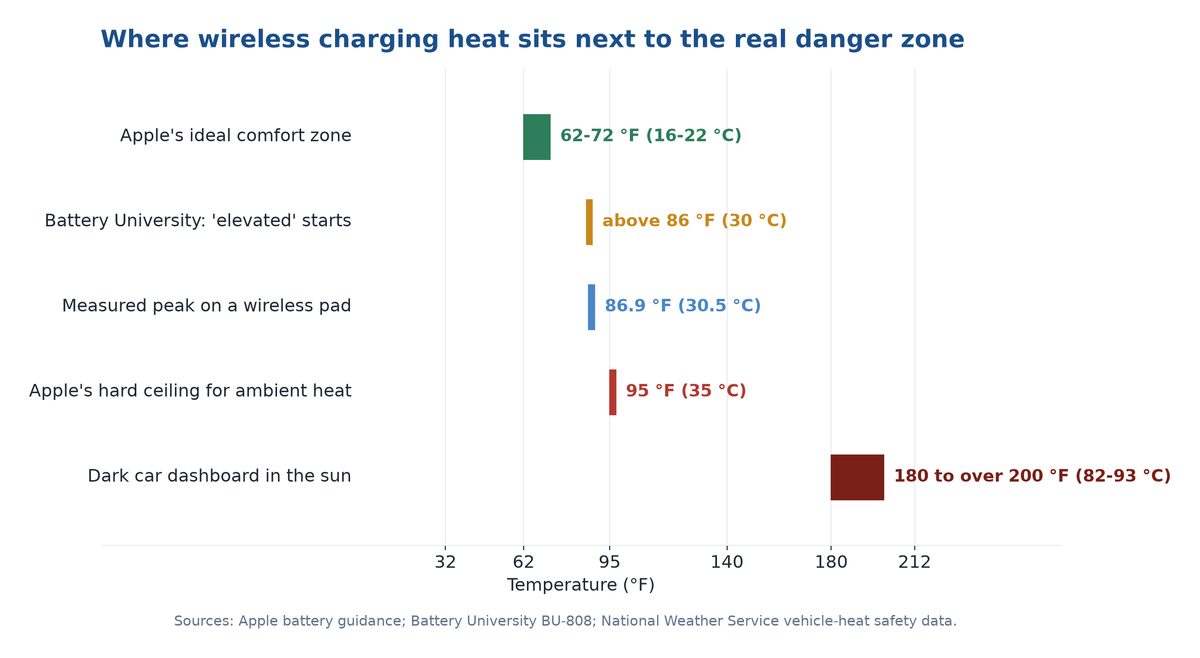
This is where wireless charging stops being a rounding error and starts being a genuinely bad idea. Apple is blunt about the limits: the ideal ambient range is 62-72°F (16-22°C), and exposure above 95°F (35°C) can, in Apple’s own words, permanently damage battery capacity. Not slow it down. Permanently damage it.
Now put that next to a parked car. The National Weather Service reports that a dark dashboard or seat can easily reach 180 to over 200°F, and that a vehicle interior can climb 20°F in ten minutes. Your phone’s hard ceiling is 95°F. A dashboard mount in July sun can be more than double that before you have added a single watt of charging.
Stack a suction-cup wireless mount on top of that and you are pumping induction heat into a cell already sitting far past its damage threshold, while the screen runs at full brightness and navigation hammers the modem. This is not a “fraction of a point per year” scenario. This is the 40°C column of that Battery University table — the one where a full battery falls to 65% capacity inside twelve months.
The practical version: use a vent mount rather than a dash mount so cabin air blows across the phone, run navigation on a cable when the drive is long and sunny, and never leave the phone sitting on a mount in a parked car.
Watch out: Apple’s software quietly stops cooperating here — its documentation notes that charging may be limited above 80% once recommended battery temperatures are exceeded. If your phone stalls in the high 80s on a hot drive, that is not a broken charger. That is thermal protection doing exactly its job.
Practical Tips to Protect Your Battery While Charging Wirelessly
You don’t need to abandon wireless charging—you need to manage heat. These habits do almost all the work.
Prioritize Ventilation and Cool Surfaces
Heat is the enemy, so give it somewhere to go. Place your charging pad on a hard, open surface like a desk or nightstand—never on a bed, couch cushion, or stack of papers that traps warmth. If your pad has a built-in fan or active cooling, even better for high-wattage charging.
Remove Thick or Metal-Backed Cases
A thick case acts as insulation and forces the coils to work harder across a bigger gap, both of which raise temperature. For routine charging, a slim case or no case helps the phone shed heat and align better. Metal accessories or magnetic mounts between the phone and pad can interfere badly—keep that gap clean.
Use Properly Aligned Qi2 Pads
Misalignment is a top cause of wasted heat. Magnetic Qi2/Qi2.2 pads solve this automatically by snapping into position. If you’re using a flat non-magnetic pad, take a second to center the phone over the coil rather than dropping it anywhere on the surface. Not sure whether your phone has the magnets built in, or which pad style fits your desk? Our rundown of which phones support Qi2 and how to pick a charger settles both in one read.
Avoid Charging in Hot Environments
Never leave your phone charging in a hot car, in direct sunlight, or next to a heat source. Ambient heat stacks on top of charging heat, pushing the cell into the high-stress zone Battery University describes. If the phone is already warm from gaming or a hot day, let it cool before you charge.
Enable Optimized or Adaptive Charging
Turn on your phone’s built-in smart charging feature so it limits time spent at a full charge, especially overnight. It’s free, automatic, and directly targets the full-and-warm stress combo.
Pro tip: Turn it on by name—iPhone (15 and later): Settings ▸ Battery ▸ Charging ▸ Optimized Battery Charging (iPhone 14 and earlier: Settings ▸ Battery ▸ Battery Health & Charging). Samsung (One UI 6.1+): Settings ▸ Battery ▸ Battery protection ▸ Maximum (caps at 80%) or Adaptive.
Don’t Sweat the Small Stuff
Finally, keep perspective. You will almost certainly upgrade or replace your phone before charging-method differences become the limiting factor on its battery. Reasonable habits beat anxiety. Charge the way that fits your life, manage the heat, and move on.
Frequently Asked Questions
Does wireless charging affect battery life?
Yes, but by a fraction of a percent a year. University of Warwick researchers measured a phone peaking at 30.5°C on a wireless pad against a maximum average of 27°C on a cable, and heat is what ages lithium-ion cells. Run that 3.5°C gap through published aging rates and a well-aligned pad costs you roughly 0.3 to 0.7 extra percentage points of capacity per year, against the roughly 20 points a battery loses anyway. A misaligned pad in a thick case in a warm room costs more like 1.5 to 3 points.
Does wireless charging overheat your phone?
It runs warmer than a cable because induction wastes more energy as heat, and misalignment makes it worse. But a well-aligned pad on a ventilated surface keeps temperatures reasonable. If your phone gets genuinely hot, suspect a thick case, a cheap misaligned pad, a hot environment, or very high wattage—not wireless charging as a concept.
Is it bad to leave your phone on a wireless charger overnight?
Generally no. Once full, the battery management system stops charging and only trickles to maintain the level, and optimized-charging features hold the battery at 80% until shortly before you wake. The real risk overnight is trapped heat, so keep the pad on a cool, open surface and avoid burying the phone under bedding.
Is Qi2 or Qi2.2 better for battery health than older wireless chargers?
Yes, generally. Qi2’s magnetic alignment and Qi2.2’s tighter thermal management and adaptive power scaling reduce the wasted energy and heat that aged batteries on older loose Qi pads. Upgrading from a generic pad to certified Qi2/Qi2.2 hardware is the most effective single step for cooler, gentler wireless charging in 2026.
Is wired charging better than wireless for battery health?
Slightly, mainly because it runs cooler and more efficiently, with most energy loss happening in the wall adapter rather than next to the battery. But the margin is small and shrinking with newer wireless standards. Wired charging also wears the physical port over years, which wireless avoids entirely.
Can wireless charging overcharge my battery?
No. Every modern phone has a battery management system that stops charging the moment the cell reaches 100%. It does not keep forcing energy into a full battery. The thing to manage isn’t overcharging—it’s how warm the phone gets while it sits at full charge.
How hot is too hot when charging?
As a rule of thumb, batteries are happiest at normal room temperature, and stress rises noticeably as they dwell above about 30°C (86°F). If your phone is too warm to hold comfortably while charging, that’s a signal to improve ventilation, remove the case, move it out of the heat, or check your charger.